
If your VIP King badge is close to expiring, the safest move is simple: top up early, then confirm whether you still need to complete a separate renewal inside Mico’s VIP Center. The biggest last-minute mistakes are waiting until the final hours, paying on the wrong account, or assuming that buying Mico Coins automatically keeps the badge active. For King Badge, there is no grace period after expiry, so a delay of even 30 to 45 minutes can matter if you leave everything too late.
The safest timing is earlier than most users think
For anyone searching How to Top Up Mico Coins Before Your VIP King Badge Expires, the practical answer is not right before the timer ends. It is to treat the visible expiry date as your outer limit, not your target.
The safest window is at least 24 hours before expiry. That gives you room for payment review, app lag, account checks, and the extra step of renewing the badge if the app requires it. Same-day top-up can still work, but it becomes a risk decision rather than a safe plan. The final one to three hours are where avoidable failures become expensive and stressful.
That matters because the VIP King Badge deactivates immediately on expiry. There is no grace period. By contrast, MICO Live Coins are non-expiring virtual currency, so buying them early is not wasteful. If you top up ahead of time, the balance stays available for gifts, VIP upgrades, and live-stream use.
There is also a timing detail many buyers miss: reported card delivery is often within five minutes off-peak, but during 7–11 PM UTC it can stretch to 30–45 minutes. If your badge is expiring tonight, that is not a small delay. It is enough to miss the renewal window.
If I were advising by urgency tier, I would frame it this way:
If expiry is tomorrow or later, top up now and finish the renewal calmly.
If expiry is today, use the fastest route you already understand and verify every account detail before paying.
If expiry is within a few hours, avoid experimental payment methods, avoid app-store uncertainty, and do not assume a successful charge means instant badge protection.
If you want a direct recharge path after checking your account details, you can review the Mico Coins top-up guide.
Does buying Mico Coins actually renew the VIP King badge?

This is the point that causes the most confusion. Buying coins and renewing the badge are not automatically the same thing.
What is confirmed is that King Badge renews via the VIP Center and that there is no automatic King Badge renewal. The badge is a subscription feature, and once it lapses, it deactivates immediately. The renewal flow described in the available facts is: go to VIP Center, select King Badge, and purchase the subscription package using diamonds.
That means a user can top up currency successfully and still lose the badge if they never complete the renewal step inside the app. From an editing and troubleshooting perspective, this is the most common misunderstanding in thin how-to content: it treats top up coins as if that alone preserves the entitlement. The facts do not support that.
There is one nuance worth handling carefully. App-store billing may show store-managed behavior, including charges through iTunes and auto-renew processing 24 hours before expiry unless canceled. But that should not be treated as proof that every VIP King flow renews itself from stored balance. The safer interpretation is this: check the exact prompt in your app and separate three things clearly before paying:
stored currency such as coins
the in-app VIP renewal flow
any store-managed subscription behavior shown on your device
If the app says King Badge must be renewed in VIP Center, trust that flow rather than assumptions.
A good buyer mindset here is: first fund the account, then verify the badge renewal path, then confirm the badge status changed. Do not stop at payment completed.
What should you verify before you pay?
Most failed or delayed top-ups are not mysterious technical events. They come from preventable mismatches. One fact in the database is especially useful: 90% of top-up failures come from wrong UID or region mismatch.
So before any urgent Mico Coins top up, slow down long enough to confirm the details that actually matter.
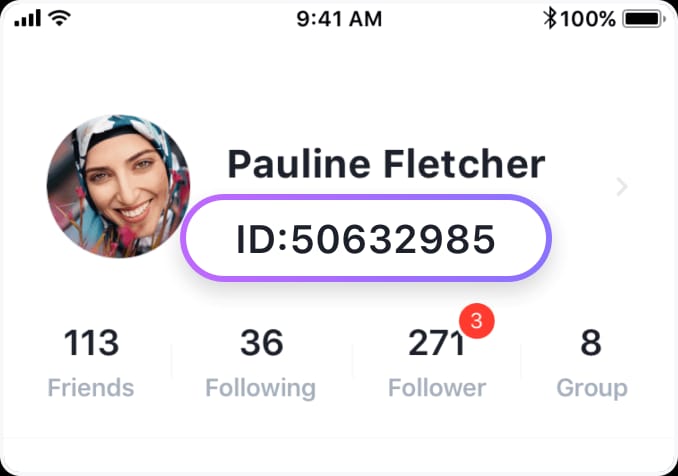
Your MICO Live ID (UID) is the key identifier for top-ups. It is described as an 8–12 digit numeric identifier shown under your profile. If you are using a web checkout route, entering the wrong UID can send value to the wrong account. That is much harder to fix than waiting a few extra minutes to double-check.
You should also confirm the login method tied to the target account. Users sometimes have more than one sign-in path and do not notice they are funding the wrong profile. Region matters too. If the payment region does not match the account region, the order can fail or be delayed for verification. A recent region change is especially risky because it may trigger 24–48 hours of review.
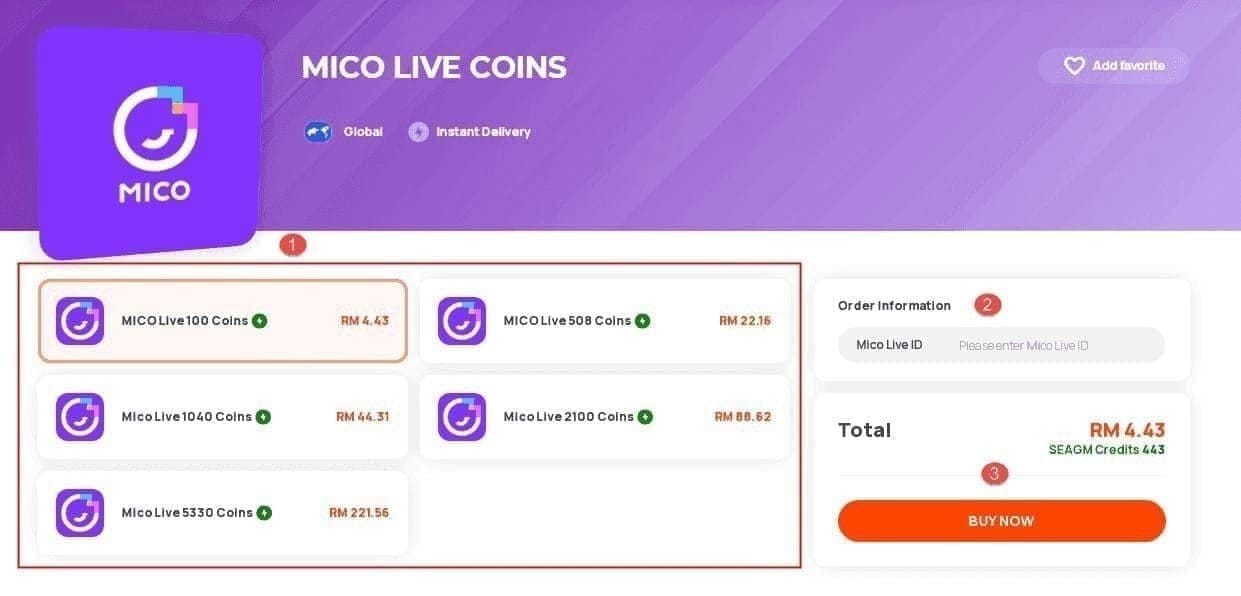
The other thing to verify is what you are actually buying. Are you buying coins to prepare for a manual VIP renewal? Are you entering a direct renewal flow inside VIP Center? Or are you seeing a store billing prompt? Those are not interchangeable.
A careful pre-payment check should cover:
the exact badge expiry date and time
the correct UID
the account login method
the account region and payment region
whether you need coins first or a direct membership purchase
whether your current balance is enough, with a small buffer rather than the exact minimum
That last point matters because buying the exact threshold can create a second rush if fees, pack structure, or in-app conversion leave you short. The facts confirm that entry VIP can require 1000 coins, while higher tiers can require 5000+. For King Badge specifically, the app’s VIP Center should be your source of truth on the amount needed at the moment you renew.
Which payment route is best when the deadline is close?
There is no single perfect route for every buyer. The right choice depends on how urgent the renewal is, whether your billing setup is already stable, and how much friction you can tolerate.
For urgent situations, the facts point in one direction: avoid app store for urgent purchases because pending review can delay completion. That does not mean app checkout is always bad. It means app-store billing is a poor choice when your badge may expire before a pending state clears.
If your Apple App Store or Google Play billing usually works smoothly and your expiry is not today, app checkout can still be reasonable. But if you are already in a deadline situation, store-side review is exactly the kind of uncertainty you do not want.
A direct web checkout, where available, is often easier to troubleshoot because you can track the order more clearly and keep the order ID ready. It is not automatically faster in every case, but it is often easier to support if something goes wrong. Browser issues can still interfere, though, so use a stable connection, disable VPN, and make sure the device has enough free storage. The facts recommend stable Wi‑Fi, VPN off, and about 500MB free storage to reduce payment problems.
Card payments are workable for many users, but they can hit 3-D Secure friction or bank fraud review. That is one reason same-day buyers get stuck: the card is valid, but the bank wants one more verification step, and the clock keeps moving.
For buyers who already know how to use it, USDT/USDC on Tron is described as the fastest urgent route, with delivery often under one minute and negligible fees. That makes it attractive for true deadline cases, but only for users already comfortable with that method. A last-minute renewal is not the time to learn a new payment flow from scratch.
For no-card buyers, local methods may help depending on region. The facts note that GCash is supported on some sites for users in the Philippines. There is also a reported success-rate advantage for gift cards in some cases, at 97% payment success versus 78–85% for direct top-up. Even so, if your badge expires very soon, the best route is usually the one with the fewest extra verification steps and the clearest delivery trail.
In practical terms, the decision memo looks like this:

If you still have time, use the route you already trust and can verify easily.
If expiry is today, prefer a direct route with visible order tracking over app-store uncertainty.
If you are in the final hours, do not gamble on a method that may trigger review, region checks, or unfamiliar authentication.
For route comparisons and account prep, the Mico app-store vs web checkout path is the useful next read.
Why do Mico top-ups get delayed near badge expiry?
When users say my payment is pending, they usually mean one of several different things. The card may have been charged, but the order is still under review. The app store may still be processing. The coins may have been delivered, but the app has not refreshed. Or the payment may be tied to the wrong account or region.
Near expiry, several delay sources become more dangerous because there is no grace period on the badge.
Card verification and 3-D Secure can slow a purchase that otherwise looks straightforward.
Bank fraud checks can hold a transaction even after the user confirms it.
Apple ID or Google Play pending states can delay store-side completion.
Peak-hour traffic can stretch delivery from minutes to nearly an hour.
Region mismatch can trigger a much longer verification delay of 24 to 48 hours.
Browser, network, or app-version issues can interrupt checkout or delay confirmation.
This is why I paid before expiry is not always enough. What matters is whether the coins or entitlement were actually available in time for the renewal step.
There is also a behavioral risk here. When buyers panic, they often retry the payment too quickly, switch devices, or submit multiple orders without checking whether the first one is still processing. That can make support harder later because the order trail becomes messy. A better approach is to wait through the normal delivery window first, then verify balance, then renew, then escalate with proof if needed.
If coins arrive late or VIP status does not update, what should you do?
Start with a quick diagnosis before opening support. The facts specifically recommend logging out and back in first for missing coins. That simple refresh can resolve display lag.
Then check the balance and go straight to VIP Center. If the coins are there, try the manual King Badge renewal immediately. If the balance updated but the badge did not, the likely issue is that the renewal step was not completed or the status has not refreshed yet.
If the payment succeeded but coins did not appear, or if the coins arrived after the badge expired, gather your proof before contacting support. The exact evidence to collect is clear and should not be skipped:
receipt
order ID
payment timestamp
UID or account ID
screenshots of payment result, balance, and badge status
the platform used, such as app store, card checkout, crypto, or local wallet
This is where prepared buyers usually get faster help. A support request with the receipt, order ID, timestamp, UID, and screenshots is much easier to process than a vague message saying only that the top-up failed.
You should also direct the issue to the right place. If the order is stuck in app-store billing, platform billing support may be relevant. If the payment completed and the issue is missing coins, wrong-account credit, or VIP status not updating inside Mico, the official Mico help path is the better escalation route. The official Mico app page, help center, and payment policy are the right places to verify current support instructions.
One warning is worth stating plainly: do not use a chargeback as a casual shortcut. The facts describe a zero-tolerance chargeback policy with potential permanent bans within 24–48 hours and a very low appeal success rate. If the issue is delay, mismatch, or non-updated status, support is the safer path.
If you need help preparing the evidence, the best next step is a guide like How to find your Mico account ID and order history or Mico coins not received after payment.
Final verdict for urgent buyers
The best answer to How to Top Up Mico Coins Before Your VIP King Badge Expires is to stop treating the final hours as normal buying time. Top up early because coins do not expire, but the badge does. Then verify whether you must manually renew in VIP Center, because buying coins alone does not guarantee the badge stays active.
If you still have a day or more, top up now and finish the renewal before peak-hour delays can matter. If expiry is today, avoid app-store uncertainty and use the fastest payment route you already understand, with exact UID and region checks first. If the badge has already lapsed, do not panic-buy twice. Confirm whether the coins landed, try the manual renewal once, and escalate with receipt, order ID, timestamp, UID, screenshots, and platform details.
For a careful next step, start with the Mico payment and account help hub or the Best Mico coin pack for VIP renewal.