
Yes—How to Top Up Hatsune Miku: Colorful Stage! Crystals with Touch 'n Go eWallet in Malaysia usually comes down to choosing the right checkout route. In Malaysia, TNG eWallet is commonly available through supported partner checkouts rather than something you should assume appears on every official payment page. The safest approach is simple: verify your Player ID, confirm Touch 'n Go eWallet is actually shown on the live checkout, complete the redirect properly, and keep the order ID and receipt in case crystals arrive late.
If you are still comparing routes, it also helps to read a broader Hatsune Miku: Colorful Stage! Crystals top up guide before paying.
Can you top up Hatsune Miku: Colorful Stage! Crystals with Touch 'n Go eWallet in Malaysia?
The short answer is yes, but not in a way that should be treated as universal.
For Malaysian buyers, Touch 'n Go eWallet is confirmed on partner routes used for mobile game credit top-ups. The facts here are stronger for partner checkouts than for the official Sega web store. The official web store at colorfulstage-store.sega.com does officially support crystal purchases by Player ID, which is important because it gives buyers a direct, app-store-free route. What is not clearly confirmed in the provided facts is that the official store always offers TNG eWallet specifically.
That distinction matters. Many buyers assume Malaysia payment method means every checkout will show the same local wallet options. In practice, payment visibility depends on the merchant, the payment partner, the device flow, and sometimes the browser session. So the right mindset is not TNG must be there, but TNG is possible if this checkout supports it.
For Hatsune Miku: Colorful Stage! Crystals in Malaysia, the most clearly supported TNG-friendly paths in the facts database are partner sellers such as GameCharge.net and SEAGM, both of which support Player ID-based top-up flows. GameCharge is specifically noted as accepting Touch 'n Go eWallet, GrabPay, and DuitNow for Hatsune Miku crystals in Malaysia. SEAGM is also noted as offering direct top-up with e-wallets including Malaysian options.
That makes TNG eWallet a realistic local payment method for Malaysian buyers—but mainly through these partner routes, not as a blanket assumption across all stores.
When TNG eWallet shows at checkout, what should you verify before paying?
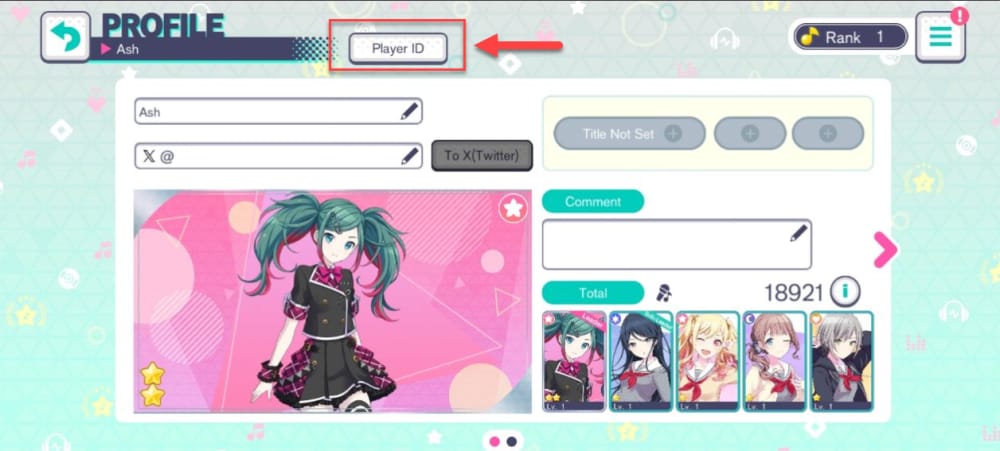
Most top-up mistakes happen before the payment is approved, not after. The wallet itself is usually not the real problem. The bigger risk is sending crystals to the wrong account, using the wrong route for your device, or closing the payment flow too early.
The first thing to verify is your Player ID. Official guidance says to confirm it in the game before topping up so crystals go to the correct account. Community guidance places it in the game profile settings through the top-right menu. That sounds minor, but it is the single most important pre-payment check. Third-party top-ups commonly deliver to any bound account via Player ID, which is convenient because you do not need an app-store link, but it also means one wrong digit can send the purchase elsewhere.
The second check is the product and amount. Official store pack pricing exists, but the exact MYR conversion you see can vary by route. What matters for checkout is that your wallet balance covers the final amount shown and that you are comfortable with the route you are using. If you are buying only to test whether the payment flow works, a smaller purchase can reduce risk. If you are buying for value, community experience says larger packs usually offer better value per crystal.
The third check is the payment page itself. Do not rely on a category page or a payment-method logo shown earlier in the funnel. Confirm that Touch 'n Go eWallet appears on the actual final checkout page before you commit time to the flow. If it is not there, switch routes rather than trying to force the same one.
A normal TNG eWallet purchase flow for a Player ID top-up looks like this in practice: you choose the crystal pack, enter the Player ID, select TNG eWallet, approve the payment in the wallet flow, and return to the merchant page. That last step is easy to underestimate. A successful wallet authorization does not always mean the merchant has marked the order as completed. If the redirect breaks or the session expires before the merchant receives confirmation, you can end up with a pending or disputed order.
For that reason, do not close the browser immediately after approving payment. Wait until the merchant page confirms the order, then save the order reference.
What if you are on iPhone or Android and TNG eWallet is not showing?
This is where many first-time buyers get confused, because there are really two different purchase systems in play: app-store billing and web or partner checkout.
If you buy through Google Play or the Apple App Store, you are using the billing rules of that store account. If you buy through the official web store or a Player ID partner, you are using a separate checkout flow that sends crystals based on your Player ID instead of your app-store profile. Those are not interchangeable systems, and they fail for different reasons.
For Android users in particular, region setup can be the hidden blocker. The facts database notes community reports that Google Play billing requires a matching region address for SEA users to purchase crystals. That is why some Malaysia buyers see app purchases fail even when they have enough funds and a working device. The same facts also note that Android users can bypass some of that friction by using the official web store with Player ID top-up instead of relying on Google Play billing.
On iPhone, the same general principle applies: if the app-store billing route is stable for your Apple ID, it can be the cleaner option for in-app purchases and especially for recurring products. But if you specifically want to pay with a local wallet and that wallet is not available through your app-store billing setup, a Player ID-based web or partner route may be more practical.
This is why Malaysian buyers should think in scenarios rather than in one universal method:
If you open a partner checkout and TNG eWallet is visible, that is usually the fastest no-card route.
If you are blocked by app-store region or billing issues, the official web store is worth trying because it uses Player ID rather than store billing.
If you already have a stable Apple ID billing or Google Play billing setup and you are buying something recurring like Colorful Pass, app-store billing is often the more reliable route.
That last point is important. Community guidance in the facts says TNG eWallet is best for quick no-credit-card top-ups via partners, while app-store billing is more reliable for subscriptions. So if your goal is a one-off crystal purchase in MYR, TNG can be ideal. If your goal is a recurring pass, the app-store route may be less troublesome over time.
If you want a broader comparison, this is also where a dedicated look at Hatsune Miku: Colorful Stage! Crystals on iPhone vs Android billing or a payment methods overview becomes useful.
Why did my TNG eWallet payment fail or stay pending?
When a TNG eWallet payment fails, the cause is usually ordinary rather than mysterious. The facts provided point to a few recurring issues: insufficient balance, poor internet, and missed OTP or authorization steps. In real use, browser redirects and expired sessions are often the practical friction points.
A failed payment that happens immediately usually points to one of the basics. The wallet may not have enough balance for the full amount, the connection may have dropped during authorization, or the OTP/approval step may not have been completed in time. In those cases, the first response should be boring and methodical: check the wallet balance, confirm whether the transaction actually completed, and retry only if there is no completed charge.
A pending payment is trickier because it often means the wallet side and the merchant side are temporarily out of sync. You may have approved the payment, but the redirect back to the merchant did not finish cleanly. That is why it is risky to immediately pay again. Duplicate attempts can create a bigger support problem than the original delay.
Before you retry anything, save the evidence that support teams usually need:
the order ID
the receipt or wallet transaction screenshot
the exact payment time
the amount in MYR
the Player ID used for the order
From reviewing digital top-up failures, the most common local-wallet issue is not the wallet itself but a mismatch between the checkout route, account region, and device or store billing setup. If app-store billing is the route that failed, and you already suspect a region mismatch, it is usually smarter to stop forcing that route and switch to the official web store or a Player ID partner checkout instead.
There is also a policy angle here: just because a payment method exists in Malaysia does not mean it is supported for every region-store combination. Unsupported cross-region assumptions are one of the fastest ways to waste time.
Payment succeeded but the crystals did not arrive—what now?
This is the moment where buyers panic, but it is often still recoverable without much drama.
First, do not assume the crystals are lost the second the wallet charge appears. The facts database notes that third-party top-ups are commonly delivered from instant to 15–60 minutes. It also notes that crystals from third-party routes commonly go to the in-game Gift Box, where they may need to be claimed manually.
So the right sequence is to slow down and check the obvious things in order. Restart the game. Open the Gift Box. Look at the merchant order history. If your game shows a purchase log in the Crystal Shop, check that too. Only after that should you treat it as a delayed-delivery issue.
Official guidance is clear on the support side: if crystals do not appear after payment, restart the game, check the Gift Box, and contact the provider with the order ID and receipt. That is the fastest first escalation because the seller can confirm whether the order was completed, pending, or blocked.
If the seller confirms completion but the crystals still do not show, then move to the publisher’s official support channels. The provided facts list sega.helpshift.com and support-pjsekai.sega.com as official support points for purchase issues. In delayed-delivery cases, support tends to move faster when the buyer sends one complete message instead of several partial ones. Include the order ID, payment time, MYR amount, receipt, and Player ID together.
One subtle point can also confuse buyers after a successful purchase: free Crystals are spent before Paid Crystals in gacha and shops. So if you are trying to confirm whether the purchase counted, do not rely only on a quick glance at your balance without understanding how the game uses free and paid currency.
If you need deeper troubleshooting, this is also the point where a focused guide on Hatsune Miku: Colorful Stage! Crystals not received after payment would be the natural next read.
Which payment route makes the most sense for Malaysia buyers?
There is no single best route for everyone. The better question is which route fits your situation with the least friction.
For a first-time buyer in Malaysia who wants to avoid credit cards, TNG eWallet through a supported Player ID partner is often the most practical option. It is local, familiar, and does not depend on app-store billing. It also works well when you want to pay in MYR and keep the process simple. The trade-off is that you must be careful with the Player ID and you must confirm that TNG is actually available on that checkout.
For a buyer who is running into Google Play region issues, the official web store is often the cleaner fallback. It officially supports Player ID purchases and avoids some app-store friction. The trade-off is that local wallet support on that official checkout is not clearly confirmed in the provided facts, so you should verify the payment options live rather than assuming TNG will appear.
For buyers who already have a stable Apple App Store or Google Play billing setup, especially those purchasing Colorful Pass or other recurring products, app-store billing is usually the more reliable route. The trade-off is that it can be less flexible for local-wallet users and more sensitive to region and billing-profile mismatches.
If TNG eWallet is unavailable or temporarily failing on a supported partner, DuitNow QR can be a sensible official local alternative where offered. GameCharge is specifically noted as supporting it for Malaysia. That makes it useful as a backup when the goal is still a local payment rail rather than app-store billing.
A practical way to think about it is this:
Choose TNG eWallet when you want a fast, no-card, MYR-friendly top-up and the checkout clearly supports it.
Choose the official web store when app-store region issues are blocking you and you want a Player ID-based official route.
Choose app-store billing when reliability for subscriptions matters more than local-wallet convenience.
Whatever route you choose, avoid suspiciously cheap unofficial offers. The facts explicitly warn that cheap unofficial sellers can lead to undelivered crystals or account risk. Saving a little on the front end is rarely worth a support mess later.
Bottom line for Malaysia buyers
For most one-time crystal purchases in Malaysia, Touch 'n Go eWallet is a strong option when used through a supported Player ID checkout. It is especially useful for buyers who want to avoid cards and pay through a familiar local wallet. Just do not assume it will appear everywhere. Verify the payment method on the actual checkout page, confirm your Player ID inside the game first, and keep the order ID and receipt until the crystals are safely in your account.
If TNG is not showing or app-store billing is fighting your region setup, switch routes instead of forcing the same one. The safest purchase is usually not the cheapest-looking one—it is the one with clear payment support, clear order tracking, and the fewest chances to send crystals to the wrong place.
For next steps, a Hatsune Miku: Colorful Stage! payment methods overview can help if you are still deciding between wallet, web store, and app billing.