
To top up Blue Protocol: Star Resonance with GCash safely, first confirm that your checkout route actually supports GCash through a web-based local payment gateway, then verify your exact UID and server before you pay. That’s the real risk point. In the Philippines, GCash isn’t officially listed on the game’s own payment pages, so most buyers use third-party PHP checkout sites. And a deducted wallet payment does not always mean your Rose Gems, Rose Orbs, Monthly Card, or Void Pass has been credited yet.
If you want a cleaner local-wallet route, compare the current Blue Protocol: Star Resonance GCash top up flow first, then check your account details before confirming payment.
Can you top up Blue Protocol: Star Resonance with GCash in the Philippines?
Yes — but usually not directly in-game or on the official payment site. Officially, the game’s site and payment page don’t list GCash, and no in-app or app-store GCash route is clearly supported. For PH buyers, GCash top-ups are commonly done through third-party web checkout sites that accept Philippine peso payments.
That distinction matters. A lot of users search Blue Protocol Star Resonance GCash and assume the game itself has a native wallet button. It doesn’t appear to. Community reports consistently point to web checkout instead, where you:
Pick a pack such as Rose Gems, Monthly Card, or Void Pass
Enter your UID or Character ID
Pay in PHP with GCash
Wait for delivery to the account
For local buyers, that’s normal wording: PHP total, wallet approval, receipt, then credit delivery. Just don’t confuse GCash accepted somewhere with official direct GCash support.
Quick diagnosis
From reviewing top-up support cases, I would check the account details first, not the wallet. Wrong UID and wrong server cause more damage than a failed OTP.
What I would check first
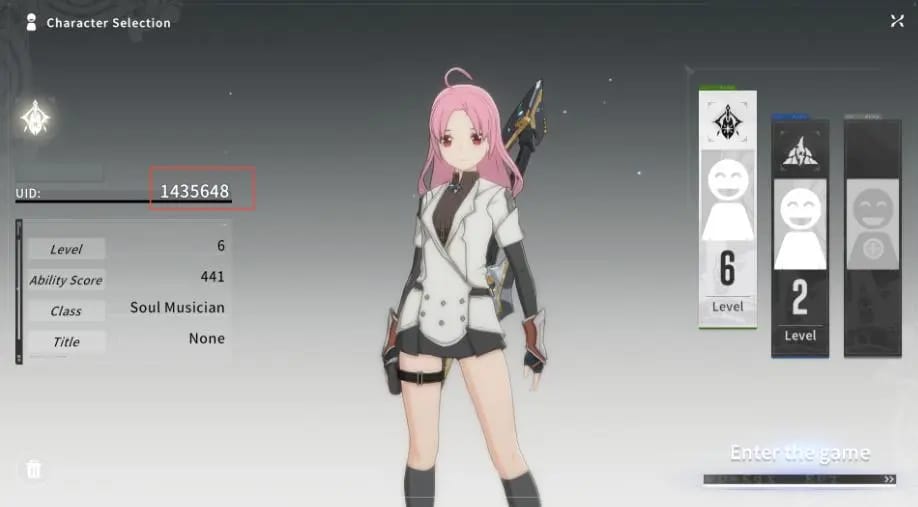
Check the UID, server, and login identity before touching GCash. That’s the shortest path to avoiding a bad purchase.
Users commonly report that the correct UID is visible on the in-game character selection screen. Match that with the right server. Community reports also note that many PH top-up routes support the Global A+Japan version, not SEA. If your account is on an unsupported region, the payment can go through while the credit fails or lands nowhere useful.
Three checks matter most:
UID / Character ID: copy it carefully; don’t type from memory
Server / region: use the Global server UID if the site requires it
Login method match: make sure you’re topping up the account you actually play on
Honestly, this is where first-time buyers get burned. On mobile, it’s easy to switch between the game, browser, and GCash app too quickly and lose track of which account details you copied.
If you’re buying for a friend, gift top-up is usually done by entering their UID, not by logging into their account. I would avoid account sharing entirely.
How do you pay with GCash safely step by step?
You pay safely by treating it like a wallet checkout, not a casual game purchase. Slow down for 30 seconds and verify everything.
1) Before checkout
Make sure you have:
A fully verified GCash account if limits apply
Enough balance for the full PHP amount
A stable connection
The correct UID and server ready
Time to finish the wallet approval without switching around too much
A successful bank or wallet charge can still stall if the browser session breaks during authorization. That handoff is the fragile part.
2) At the merchant page
Choose the item you want:
Rose Gems
Rose Orbs
Monthly Card
Void Pass
Community and single-source pricing examples show Monthly Card around the PHP equivalent of $5 and Void Pass Advanced around $10, though local totals vary by site and promo. Some PH sites also support Maya, GrabPay, QR Ph, online banking, and sometimes ShopeePay, but if your goal is safety, stick to the wallet you can verify cleanly.
3) During GCash authorization
Expect a normal local-wallet flow:
PHP order summary
Merchant/order details
Redirect to GCash approval
OTP or in-app confirmation
Return to merchant success page
Don’t tap Pay twice. Don’t refresh. And don’t jump out of the browser unless the wallet app requires it. In my experience reviewing wallet checkout issues, duplicate confusion often starts when users think the first tap didn’t work and retry before the first authorization finishes.
4) After payment
Check for:
Payment success in GCash history
Merchant order confirmation or order history
Delivery within 5 to 60 minutes
If you want a PHP wallet route with clearer local wording, this is the kind of flow to look for in a Blue Protocol: Star Resonance recharge with GCash Philippines checkout: item selected, UID entered, PHP total shown, wallet approved, order tracked.
Why did my GCash payment go through but the credits did not arrive?
Because wallet deduction, payment clearance, and game credit delivery are three different stages. A lot of guides blur them together. They shouldn’t.
Here’s the practical read:
GCash deducted means the wallet side processed something
Merchant order completed means the seller accepted the payment
Credits delivered means the game entitlement reached your UID
If your payment is deducted but no Rose Gems or pass appears, wait up to 60 minutes first. Then check wallet history and the merchant’s order history if available. Some sites keep order records after login, which helps.
Common causes:
Pending verification after payment
Browser interruption during return from GCash
Wrong UID or wrong server
Temporary delivery delay
And yes, delayed delivery is frustrating when the money already left your account. But don’t repurchase immediately unless the first order clearly failed. That’s how duplicate orders happen.
What should you prepare before contacting support?
Prepare the proof first. It speeds everything up.
Official support guidance for missing credits is clear: gather your GCash receipt, UID, order ID, timestamp, amount, and screenshot, then email support. The official support email listed for this issue is support@sfduelmobile.zendesk.com. Official guidance also says payment proof matters for missing credits after GCash or Maya.
Use this evidence set:
If you bought through a web top-up route, contact the seller’s support first when the order is still pending after 60 minutes. If the order shows completed but the in-game credit is still missing, escalate with the official support email and include the same evidence.
If the issue came from an in-game purchase path, official Epic Games support is also named for missing in-game purchase items. But for GCash specifically, the web route is usually the relevant one because that’s where PH buyers actually pay.
Is web checkout safer than in-app billing for GCash?
For GCash, yes — web checkout is usually the clearer route. That’s because no direct in-app or app-store GCash path is clearly supported here, while PH buyers commonly use web checkout with local wallets.
I personally prefer the route with visible order tracking, PHP totals, and a clear order ID. It’s not always the cheapest-looking option, but it’s easier to prove what happened if something breaks. Cheap, vague offers are the ones I would avoid.
Safety boundaries worth keeping:
Use trusted, encrypted checkout routes
Avoid suspicious too cheap offers, even if the discount looks tempting
Don’t share your account
Top up directly to your own UID or a friend’s UID
Pause if the merchant name or order summary looks unclear
Prevention checklist for your next top-up
Use this before every repeat purchase:
Confirm Global/server compatibility
Copy the UID from the character selection screen
Check the PHP total before approval
Make sure your GCash account is verified if needed
Keep enough balance for the full charge
Finish OTP/app approval in one go
Save the receipt and order ID
Wait up to 60 minutes before escalating
For Monthly Card renewals, users commonly repurchase the Monthly Card to the same UID through the same third-party route. That’s usually the least confusing repeat flow.
Best next move
If you need Blue Protocol: Star Resonance top-up in the Philippines with no credit card, use a web checkout route that clearly supports GCash in PHP, then verify UID and server before paying. That’s the real safety step. If payment is deducted and nothing arrives, wait up to 60 minutes, collect the receipt, order ID, UID, amount, and timestamp, then escalate with complete proof. Clear records beat fast guesses every time.