
Before topping up Chamet Diamonds, verify the exact in-app user ID/UID on the recipient account and ignore display names, nicknames, or old screenshots. That one habit prevents most avoidable mistakes. In community guidance, wrong-account and invalid-ID problems usually come from copied digits gone wrong, checking the wrong logged-in account, shared-device mix-ups, or paying first and realizing later that no usable proof was saved. If you need a quick buying reference, Chamet top up user ID check is the right mindset to keep from the start.
Before you pay: the account detail that actually matters
For a Chamet diamonds top up, the key identifier is the numeric UID, sometimes described as a user ID or account ID. Community guidance consistently treats that UID as the field that matters for recharge, while a profile name or nickname is not valid for this purpose.
That distinction sounds small until a payment goes through and the diamonds land somewhere else. A display name can look familiar, especially if you are buying for yourself and recognize the profile photo. But recharge systems are built around the account identifier, not the visible nickname. If you submit the wrong number, the order can still be processed against the wrong recipient account.
Community reports repeatedly point to this as the main failure point. Depending on the source, around 40% to 41% of recharge failures are linked to incorrect user ID entry, and another version-specific figure says 63% of failed top-ups come from the wrong UID. Those numbers are not official Chamet statements, so they should be treated as directional rather than definitive. Still, they match the pattern buyers see in practice: the expensive mistake is usually not the payment method, but the account detail entered before payment.
A good rule is simple: if the field asks for an account identifier, use the numeric UID exactly as shown in the app, not what you remember, not what appears in chat, and not a cropped image from weeks ago.
How do I find the correct Chamet User ID before diamonds top up?
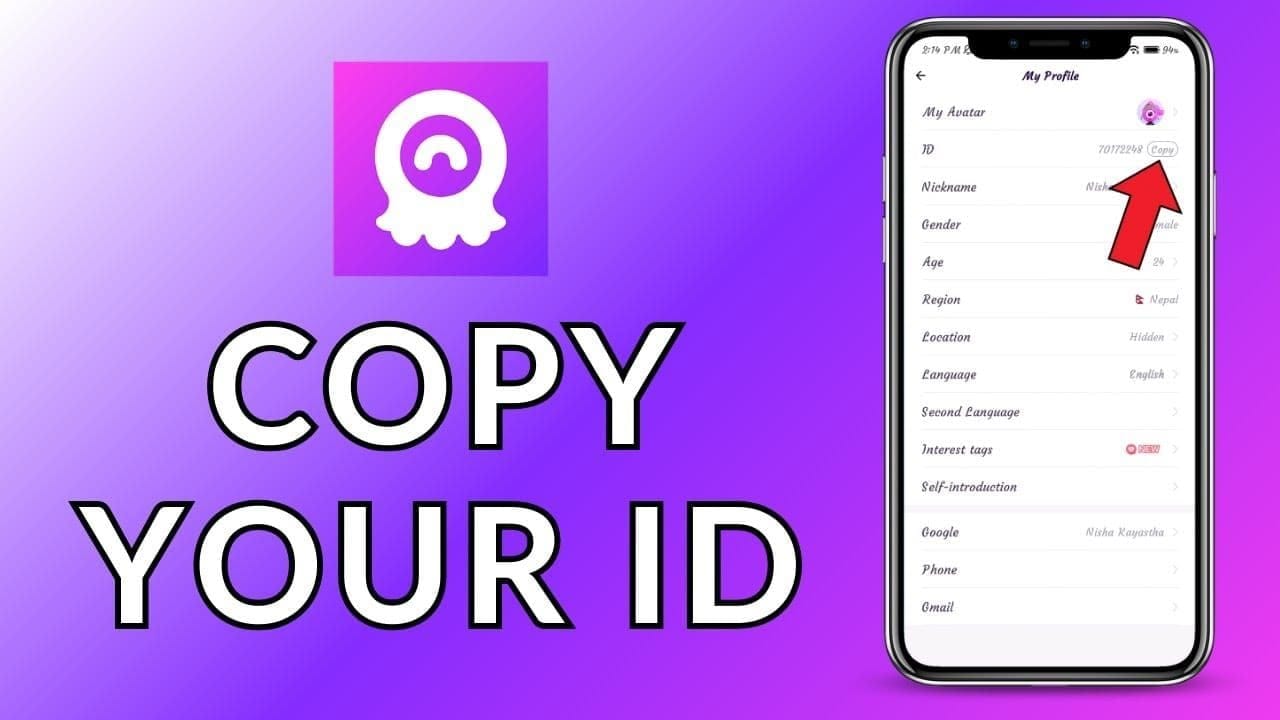
The UID is commonly described by the community as an 8-12 digit numeric identifier shown below the profile avatar. A common path is:
tap the profile icon at the bottom right
open My Profile
copy the numeric UID
Another community-observed path says Me > Wallet can also show the UID used for recharge.
If the app shows a profile name clearly but the number is less obvious, slow down and look for the numeric line tied to the account itself. The visible name is for recognition; the UID is for payment accuracy. That difference matters even more when two accounts have similar names or when a buyer is topping up for another person.
There are also a few edge cases worth understanding before you assume the account changed:
If the user changed phone, email, or phone-number login, one source says the UID stays the same if the account was properly rebound.
A guest account may not have a valid UID for top-ups.
One source says the UID is permanent after account creation, which is useful context when a buyer worries that a new device means a new recharge ID.
So if someone tells you, I switched phones, use my new nickname, that is not enough. The safer move is to ask for the current in-app UID again and compare it directly.
Why does Chamet say invalid user ID during top up?
An invalid user ID error often looks like a payment problem, but many cases start earlier, at verification. The most common causes are surprisingly ordinary.
The first is plain typing error. A single missing digit, an extra digit, or a formatting issue from manual entry can break the order. Community guidance strongly favors copy-paste because it reduces spaces and typos that can send diamonds to the wrong account.
The second is using the wrong account context. On shared devices, buyers may open Chamet, see a familiar profile image, and assume they are in the right account. Then they copy the wrong UID. One source specifically warns that shared devices cause UID mix-ups and recommends logging out other accounts first. If multiple people use one phone, this is not a minor detail; it is one of the easiest ways to create a wrong-recipient order.
The third is relying on old screenshots. Community guidance warns that old account images are a common source of mistakes, especially after reinstalling the app, changing phones, or switching login methods. Even when the UID itself is permanent, an old screenshot can still mislead the buyer if it came from the wrong account, was cropped, or no longer reflects the current balance and profile context.
There are also account-state and environment issues. A guest account may not support valid top-up identification. One source also notes that VPN use during payment can trigger invalid UID errors. And while the UID itself does not include a server or region field, community guidance says platform differences and occasional country-setting mismatches can still confuse checkout.
That last point is important because buyers often think region mismatch means the UID is region-locked. The available information does not support that. What it does suggest is more limited: the UID is global in format, but Android/iOS differences, local payment rules, or unusual app country settings can still interfere with the order flow.
Does account region matter when buying Chamet diamonds?
Yes, but mostly around checkout behavior rather than the UID format itself.
Community guidance says there is no server or region field inside the UID, so this is not the kind of game recharge where you must choose a server code that is embedded in the account number. Still, region and platform can matter around the payment route. One source describes region-setting mismatch as rare, but still worth checking if the UID looks correct and the order fails anyway.
A practical example is local wallet support. One source says GCash, OVO, GrabPay, and DANA top-ups require verified local wallets in the Philippines or Indonesia, while the same UID verification rules still apply. Another community note mentions GCash, credit card, and Google Pay for Philippine top-ups. In other words, the payment method may be local, but the account check is still the same: the right UID must be entered.
If you are paying by credit card, debit card, Apple Pay, or Google Pay, the safest habit is to treat the payment confirmation and the account verification as two separate checkpoints. A successful charge does not automatically prove the right account was submitted.
Before paying, it is worth checking:
whether you are on the intended Android or iOS device context
whether the app’s country or language setting looks normal
whether a local wallet must be verified for that route
whether a VPN is active
These are not the first things to blame, but they are sensible checks when the UID appears correct and the order still refuses to process.
What should you save before and after checkout?
The buyers who get faster help are usually the ones who can show exactly what they submitted and exactly what they paid. Community guidance is consistent on the minimum proof set: UID screenshot, order ID, timestamp, and payment receipt.
Before payment, the most useful capture is a live screenshot showing the UID, profile name, and current diamond balance. That gives support a clean before state and helps you confirm you were looking at the right account at the time of purchase.
After payment, save the receipt before closing the page or wallet confirmation screen. Then check the balance again in Profile > Diamonds and capture that result too. If the order is pending or throws an error, save that message as well.
For support, the strongest package usually includes:
the submitted UID
the profile name visible at the time
the diamond balance before payment
the purchased amount or pack
the order ID or transaction ID
the payment method
the exact date and time
the payment receipt
the post-payment balance or missing-balance screen
This is also where a clear receipt trail matters more than a bargain. If you later need help with a missing order, a timestamp and transaction reference can be more useful than a vague payment confirmation from memory. If you need broader guidance, this is also the point where a Chamet payment and recharge help center or a Chamet receipt and order ID guide would be the natural next read.
One privacy note matters too: save your proof privately, but do not post your UID, receipt, or transaction details publicly. That creates unnecessary account-risk exposure.
Payment succeeded, but the diamonds did not arrive. What now?
Start by separating a delivery delay from a wrong-account submission.
A delay case usually has a clean payment receipt, a UID that matches the intended account, and no sign that the order was sent elsewhere. Community guidance says the first response should be practical: check the in-app history, restart the app, and review the balance again. One version-specific source says 60% of missing-diamond cases are fixed by app restart, and another says 90% resolve within 30 minutes after restart or cache clear. Those figures are not official, so they should be treated cautiously, but the troubleshooting sequence itself is reasonable.
A wrong-account case looks different. The payment succeeded, but the submitted UID was wrong, so the diamonds were credited to another account. Community guidance is blunt here: recovery is possible only with transaction proof, and success is rare. That is why pre-payment verification matters more than post-payment argument.
If diamonds do not appear, work through the case in this order:
First, confirm the exact UID you submitted. If it matches your target account, check the balance again, restart the app, and if needed clear cache. If the order still does not appear, gather your proof and contact support with the UID, order ID or transaction ID, timestamp, and receipt.
One listed support route in the available facts is chamet.feedback@gmail.com, with screenshots, UID, and transaction details. Because official recharge guidance appears limited, the quality of your evidence often determines how quickly the case can even be understood.
It is also sensible to verify that you are using the official Chamet app listing identified as com.hkfuliao.chamet on Google Play and the Apple App Store. That does not solve a wrong UID, but it helps rule out confusion about the app environment.
A safer verification flow for self top-up and gifting
The best pre-payment routine is short enough to repeat every time.
For a self top-up, open Chamet, go to the profile area, and copy the live numeric UID from the account currently logged in. Do not type it from memory. Confirm the visible profile context matches your account, then save a screenshot with the UID, profile name, and current diamond balance. Only after that should you move to checkout.
For gifting, add one more layer of caution. Ask the recipient for a live screenshot or a current profile share that clearly shows the UID. Then compare the digits twice before paying. This matters because gifting combines several common failure points at once: old screenshots in chat, similar nicknames, and the temptation to trust a familiar profile image instead of the actual account number.
If you are topping up multiple accounts, keep the orders separate. One source specifically recommends separate orders per UID to reduce mix-ups. That is especially important on shared devices or when buying for family or friends.
Finally, be careful with suspiciously cheap offers. Community guidance repeatedly warns that unusually low prices increase exposure to wrong-UID scams, fake recipient details, and broader account-risk problems. The issue is not just value; it is traceability. A slightly more straightforward checkout with a clear receipt, timestamp, and order trail is usually safer than a deal that leaves you with no usable proof.
If you still are not fully sure, stop before paying and recheck the account details. A one-minute pause is cheaper than trying to reverse a completed top-up sent to the wrong UID. For related troubleshooting, a Chamet invalid user ID error fixes page or Chamet diamonds not received after payment guide would be the logical next step.
In short, How to Verify Chamet User ID Before Diamonds Top Up comes down to one discipline: use the live in-app numeric UID, verify the logged-in account, and save proof before and after payment. That is the clearest way to avoid wrong-account credits, invalid-ID errors, and weak support claims later.