
If your Zenless Zone Zero Top Up Failed: How to Fix Payment Errors (ret 107) issue appears at checkout, stop retrying right away. The safest fix is to first check whether the order is actually failed, still pending, or only authorized, then verify your UID, server, region, platform, and payment method before trying again.
In practice, ret 107 is commonly linked to network and checkout verification problems, not just low balance. Users widely report VPNs, DNS issues, IPv6, region mismatch, issuer fraud checks, and wrong account details as the real triggers. If money was deducted, don’t repurchase first—check in-game delivery and the payment state.
Why does Zenless Zone Zero top up fail with ret 107?
ret 107 usually points to a transaction failure during payment verification, but there is no public official definition of the code. Community reports consistently connect it to VPN use, unstable connections, DNS problems, IPv6, disabled Epic Online Services overlay, and region mismatch.
From reviewing failed recharge cases across digital goods checkouts, I would check the network layer first because it’s the fastest thing to rule out and one of the most common causes. Official help guidance also confirms the core fixes: disable VPN, use a stable connection or hotspot, make sure your payment region matches your physical location, and check your mobile date/time settings.
A few causes sit in different layers:
One thing many guides miss: the same card can work everywhere else and still fail here. Digital goods often trigger stricter fraud filters, especially if you retry too fast, use a VPN, or pay in a region/currency that doesn’t match your account setup.
If the official route keeps failing after the checks below, some users switch to an alternative checkout path such as Zenless Zone Zero payment error ret 107, mainly because it gives clearer order details for troubleshooting.
Why was my Zenless Zone Zero payment declined even though my card or wallet works?
Because a working card doesn’t guarantee this specific transaction passed issuer, region, and account verification. In Zenless Zone Zero top-up failures, the decline is often about risk checks, not available funds.
The most common payment-side reasons are:
Issuer anti-fraud blocks on digital goods
3D Secure verification not completed on the bank side
Billing address mismatch with Apple Pay or Google Pay settings
Prepaid/gift card rejection, which users commonly report more often than major cards
Rapid repeat attempts, which can trigger more fraud flags
Personally, I would avoid prepaid cards here unless you already know they work with your issuer. Community reports are pretty consistent: major credit/debit cards and PayPal-style wallet balances are usually more reliable than prepaid or gift-based methods.
Account and region mismatches are a separate class of failure:
Your UID/server entered in top-up doesn’t match the in-game account
Your HoYoverse login doesn’t match the account you intend to recharge
Your payment country/store region doesn’t match your physical location
Your selected server doesn’t match your actual in-game region
And yes, this matters more than many users expect. A region-locked account can keep failing until the server and billing region line up correctly. Community reports also note that changing region isn’t always simple without account consequences, so matching the existing account server is usually the safer move.
How can I fix Zenless Zone Zero top up failed ret 107 step by step?

Follow a strict sequence. Don’t change five things at once, and don’t spam retries.
Check the payment state first
Failed: immediate decline, usually no charge.
Pending: still processing; wait 15–30 minutes.
Authorized: temporary hold; not final settlement.
Reversed: bank returns the held funds.
Completed: payment cleared and items should arrive.
This distinction matters. Honestly, this is where people create duplicate charges: they see a bank notification and assume the order succeeded, when it may only be an authorization hold.
Disable VPN and fix the connection
Turn off any VPN or proxy.
Switch to a stable Wi‑Fi or mobile hotspot.
On Windows, flush DNS with
ipconfig /flushdns.Prefer IPv4 if IPv6 is causing issues.
Restart the network and the game.
Update the platform and launcher
Update the launcher before retrying.
On Epic, enable Epic Online Services Overlay in launcher options if it’s disabled.
If store pages won’t load, clear browser/store cache; some users also report reinstalling helps.
Verify account details exactly
Confirm your UID
Confirm the server/region
Confirm the HoYoverse account/login
Confirm you’re topping up the intended platform/account
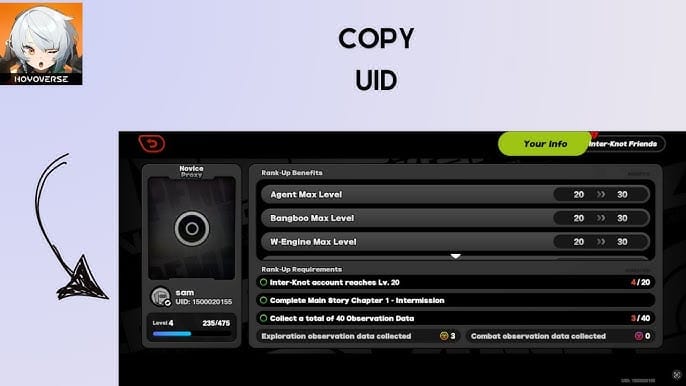
Double-check this before every retry. A single wrong digit or wrong server selection is enough to fail the order or send value to the wrong place.
Check billing and payment settings
Make sure your payment country matches your physical location
Complete any 3D Secure prompt from your bank
If using Apple Pay or Google Pay, verify the billing address and payment method setup
If your bank tends to block game purchases, ask them to whitelist HoYoverse
Prefer major cards over prepaid cards
Retry once, after 15–30 minutes
Retry only after the earlier state is clearly failed or reversed
Change one variable at a time: network, then payment method, then platform path
Don’t do back-to-back attempts
For a cleaner fallback path after repeated official checkout failures, some users use Zenless Zone Zero top up failed fix because the UID/server entry is straightforward and the order record is easier to keep for support.
What should I do if my Zenless Zone Zero payment went through but the top up did not arrive?
First, assume it may be delayed or stuck in verification—not lost. Official guidance is clear: don’t repurchase first.
Do this in order:
Wait 15–30 minutes if the order is pending.
Restart the game.
Log out and back in.
Check in-game mail.
Check the Monochrome top-up menu and any manual claim area.
Review your payment app or bank history to see whether the charge is pending, authorized, or settled.
A successful bank charge does not always mean the order has cleared verification. Google Pay, for example, may show successful while the transaction is still pending. Apple/iOS and store-side gateway issues have also had official incident notices in the past.
If the funds were deducted and nothing arrived after those checks, prepare support evidence before contacting anyone:
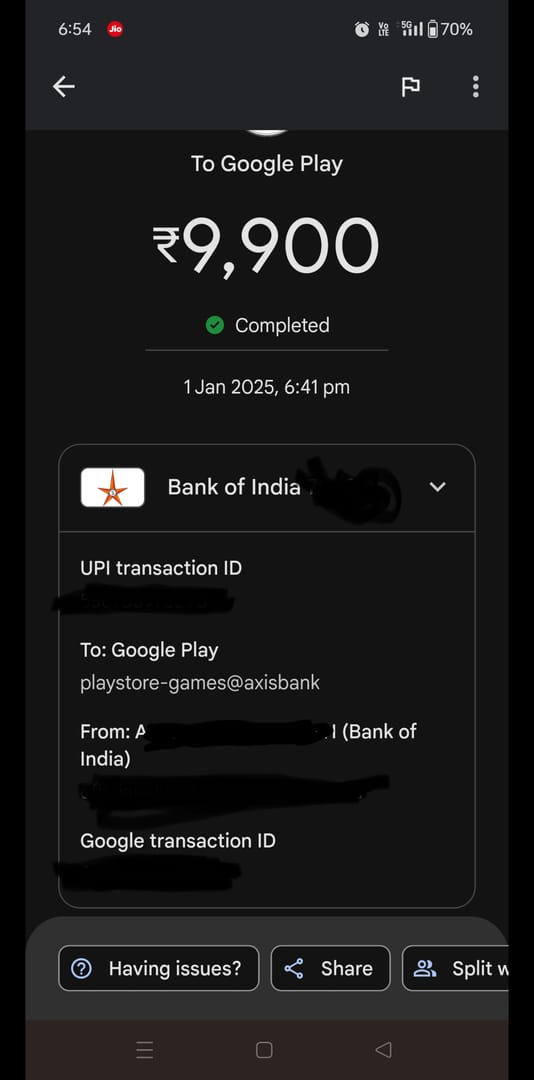
For official help, use the HoYoverse Help Center purchase-failure guidance or contact zzzcs_en@hoyoverse.com. In my experience reviewing payment cases, tickets move faster when the timestamp, UID, and receipt are all in the first message.
What does ret 107 mean in Zenless Zone Zero top up?
It most likely means the transaction failed during checkout verification. There’s no confirmed public official definition, so the safest wording is that users commonly associate it with network, region, or payment validation problems.
Why was my Zenless Zone Zero payment declined even though I have funds?
Because available funds are only one check. Banks can still block the payment for anti-fraud reasons, 3D Secure can fail, or the account/server/region details may not match.
What should I do if Zenless Zone Zero charged me but I did not receive the top up?
Wait 15–30 minutes, then restart the game, log out/in, and check in-game mail and the top-up menu. If nothing arrives, don’t buy again—collect the order ID, receipt, UID, platform, region, and screenshots, then contact support.
Can account region mismatch cause Zenless Zone Zero payment failure?
Yes. Official guidance and user reports both support this. If your payment country, store region, selected server, or account region don’t line up, checkout can fail even when the card itself is valid.
Should I retry a Zenless Zone Zero payment immediately after ret 107?
No. Wait first and confirm whether the charge is failed, pending, or only authorized. Rapid retries are a common way to trigger duplicate holds or extra fraud checks.
How do I contact official support for a Zenless Zone Zero payment error?
Use the HoYoverse Help Center for purchase-failure steps, then email zzzcs_en@hoyoverse.com if needed. Include your order ID, exact payment time, UID, platform, region, receipt, and error screenshots in the first message.
How long should I wait if my Zenless Zone Zero order is still pending?
Wait 15–30 minutes before taking further action. If it stays pending or the funds remain deducted without delivery after the standard checks, contact support and your payment provider if necessary.
Zenless Zone Zero ret 107 is usually fixable once you separate network issues, payment verification, and account-region mismatches. Check the order state first, verify UID/server and billing region, then retry once on a stable connection with no VPN. If money was deducted, don’t buy again until you’ve checked in-game delivery and gathered support evidence.