
If your Ragnarok M: Classic Top-Up Payment Failed or Zeny Not Added issue just happened, the safest move is not to pay again right away. First separate four possibilities: the payment truly failed, the payment is still pending, the order completed but delivery is delayed, or the Zeny went to the wrong UID or server. That distinction matters because a bank deduction does not always mean a captured payment, and a completed checkout does not always mean the currency reached the correct character.
Quick diagnosis: what kind of problem do you actually have?
Most players lose time at the very first step by treating every missing-Zeny case as the same problem. It is not. In practice, you need to identify whether the issue sits on the payment side, the order side, or the game-delivery side.
A useful fast path is this:
If the card, wallet, or app store says declined and no order exists, you are dealing with a failed payment.
If your bank or app store shows activity but the order is still processing, you are likely in authorization, review, or gateway-delay territory.
If the order looks completed but Zeny is missing, check in-game balance, mail, and account details before assuming the payment vanished.
If the UID, server, or character details were wrong, the purchase may have been delivered somewhere else.
That is the core triage for Ragnarok M: Classic payment failed, Ragnarok M: Classic order stuck processing, and Ragnarok M: Classic Zeny not added cases.
The three checks that solve the most cases are still the simplest ones:
Verify the payment status: declined, pending, completed, or under review.
Check whether Zeny or related delivery appeared in-game or through mail.
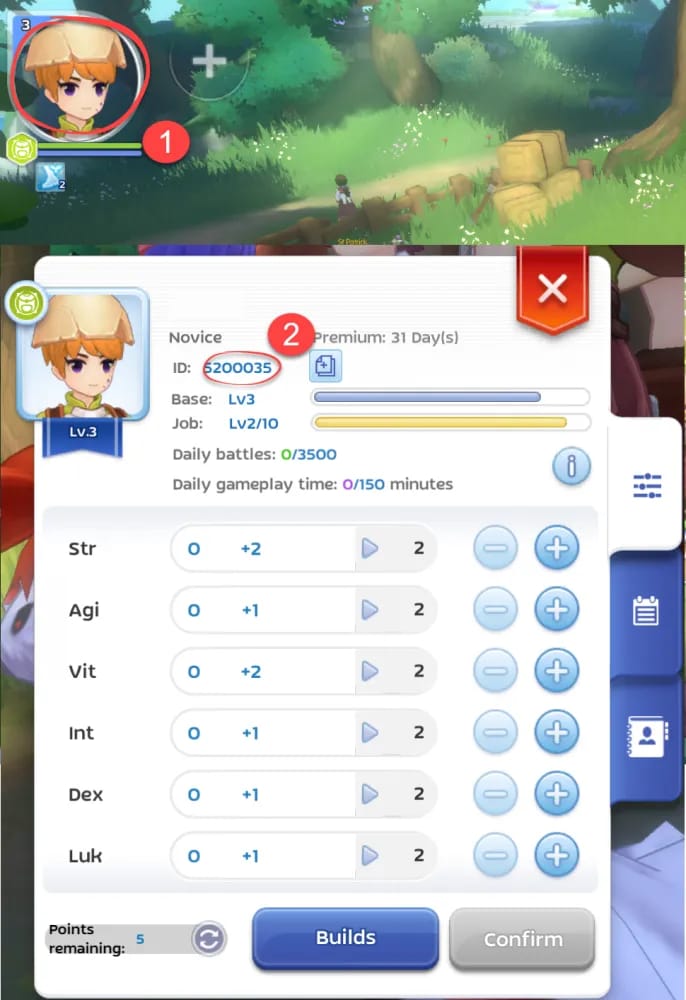
Confirm the UID, server, and character name used at checkout.
If you want a broader overview of common purchase flows, the Ragnarok M: Classic top-up guide is the right companion page before you escalate.
Why did my Ragnarok M: Classic payment fail but my bank shows a charge?
This is one of the most common and most misunderstood situations. A visible deduction is not always a final charge. With cards in particular, what looks like a completed payment may only be an authorization hold.
Community reports around digital top-ups consistently describe the same pattern: a player retries because the first attempt looked stuck, then sees two charges, only to learn later that one or both were temporary holds. In failed retry cases, those holds may release in 1–3 days if the payment was never captured.
That is why the wording in your banking app matters. Pending or authorized is not the same as posted or completed. If the merchant side has no completed order ID, the bank may simply be reserving funds while the transaction expires or is rejected.
The likely causes are fairly predictable, and the order matters:
Payment authorization failure comes first. The issuer may block the transaction, the card may be declined, or the billing route may fail before an order is created.
3-D Secure or OTP interruption is another frequent cause. If the payment flow switches apps, times out, or the verification step is not completed cleanly, the transaction can stall between authorization and capture.
App-store pending states are also common. On Android, Ragnarok M: Classic uses Google Play billing for com.gravityus.romzeny.aos, and official guidance points players to the Google payment center to check order status and request restore if payment succeeded but delivery did not. On iOS, direct recharge uses Apple billing, and official notes indicate that recharge failures can happen because of Apple server issues, in which case waiting for Apple’s side to resolve is sometimes the correct move.
There is also an awkward edge case on iOS: Apple may still show a pending in-app purchase while the game has already credited the Zeny. That is why pending on the billing side is not always the same thing as not delivered on the game side. If Zeny is missing after an iOS payment, the available restore path is App Settings > Upgrade/Restore.
Finally, anti-fraud review can delay orders, especially unusual or higher-value ones. When that happens, retrying too quickly often makes the situation worse by creating duplicate authorizations.
What should you check if Zeny was not added after payment?
Once payment appears to have gone through, the next question is whether the problem is delivery delay or delivery mismatch. Those are not the same thing, and support will usually treat them differently.
Start inside the game. Check your current Zeny balance first. Then check in-game mail, because some delivery paths and voucher-style redemptions may arrive there with a delay. Community reports around voucher redemption note that mail delivery can lag, and broader top-up reports suggest contacting support if delivery is still missing after about 10 minutes in cases that should be near-instant.
Then compare the account details used at purchase:
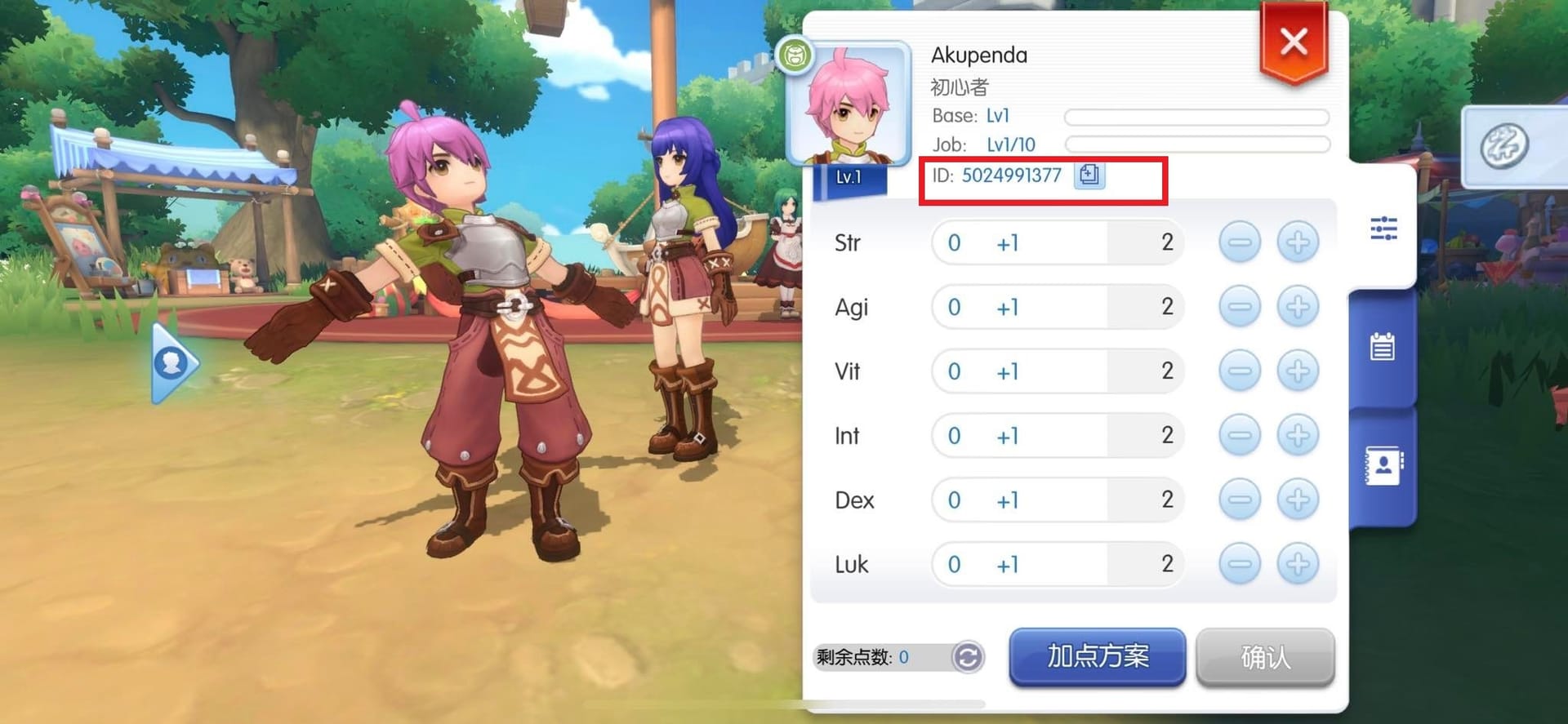
UID
server
character name
order ID
transaction reference
payment timestamp
This is where many missing top-up cases turn out not to be missing at all. In account-credit investigations, wrong UID and wrong server mistakes are more common than buyers expect, especially when IDs are typed manually or copied from old notes. Community guidance is blunt here: wrong UID top-ups and wrong server/account deliveries are often irreversible. That does not mean you should not contact support; it means you should do so quickly and with realistic expectations.
The platform also matters. For Google Play, official guidance is to log into the Google payment center with the purchase account, check the order status, and request restore if the order completed but the Zeny did not appear. On iOS, use the in-app restore path. If you changed phones, restoring purchase history through the app store is also a relevant check before assuming the purchase disappeared.
For third-party top-ups, dispute handling usually depends on whether you can provide a clean proof bundle: UID, character name, server, and payment proof. If you need a more focused walkthrough, the Ragnarok M: Classic payment and delivery help center hub is the most relevant next stop.
How long should you wait before contacting support?
The honest answer is: long enough to avoid a duplicate charge, but not so long that evidence gets messy.
Some payment routes are expected to be fast but not always instant. Officially, Touch 'n Go eWallet top-ups can remain pending for up to 10 minutes because of bank or gateway delays. A separate bank transfer note also says to wait for system processing and contact support if there is still no credit after 10 minutes. Community reports around delayed delivery use a similar threshold: check mail and current balance, then escalate if the top-up still has not appeared after that short delay window.
That does not mean every method shares the same timing. Cards and app-store billing are usually quick when they work cleanly, but they are also the methods most likely to create confusion between authorization, pending review, and actual capture. Regional wallets can show successful payment on the wallet side while the game side still lags. In those cases, proof becomes more important than repeated attempts.
Before you refresh, close the app, or try again, capture everything support will ask for anyway:
order ID
transaction reference or transaction ID
payment timestamp
receipt
UID
server
character name
screenshots of the error, pending state, or missing delivery
current Zeny balance
in-game mail screen
This is one of those areas where a little discipline saves hours. The fastest support escalations usually come from one complete message with all evidence attached, not from a long back-and-forth where screenshots arrive one by one.
Official in-game support access is commonly described as:
Login screen > Poring icon > Customer Support > Submit Feedback
Some payment issues may also be routed to a Payment and Billing department depending on the flow used.
Can a wrong-account top-up be fixed, and when does a refund make sense?
This is the hardest part of the topic because the answer is often not what players want to hear.
If the transaction failed before capture, expired, or never created a valid completed order, a refund or automatic release is much more plausible. With cards, that may look like a temporary hold disappearing later rather than a manual refund. With app-store billing, the timing and handling depend on the store’s own process. With bank transfer and wallet methods, the outcome depends on whether the payment settled and whether a matching order exists.
But if the order completed and the Zeny was delivered to the wrong UID or server, community evidence suggests reversals are often not available. The same goes for many completed top-up orders in general: once the purchase is treated as delivered, refund options become limited, and app-store requests may also be rejected.
So the practical policy interpretation looks like this:
A failed payment may resolve as a released hold, a rejected order, or a refund path depending on the payment method.
A pending review may simply need time and proof.
An expired or undelivered order is the strongest case for support intervention.
A wrong-recipient top-up is the weakest case for reversal, even if you report it quickly.
That is why your support request should be short, factual, and complete. Include the exact account details, the order details, the payment method, and the evidence package in one message. If your case involves a wrong account or server, it is also worth reviewing a dedicated Ragnarok M: Classic wrong account top-up fix style guide before you assume the outcome.
Which payment routes create the most troubleshooting friction?
Not every payment method fails in the same way, and understanding the pattern helps you decide whether to wait, restore, or escalate.
Credit and debit cards are the most likely to create confusion around holds, issuer declines, and duplicate retries. They are convenient, but they also produce the classic money looks deducted but the order failed scenario.
Google Play is usually straightforward when the purchase account is correct, but a pending or declined Google Play purchase is not the same as a completed top-up. The official route is to check the Google payment center and use restore if appropriate.
Apple billing and Apple Pay-linked card flows can be affected by Apple server issues, and iOS players should remember the restore option inside the app. The unusual case where Apple still shows pending while the game has already credited Zeny is another reason not to judge only by the billing screen.
Bank transfer tends to be less ambiguous once settled, but it can involve a short processing delay. If there is still no credit after the expected processing window, support should be contacted with proof.
Regional wallets can be fast, but they also generate some of the most frustrating mismatch cases: wallet says success, game says nothing yet. Official notes mention up to 10 minutes of delay for Touch 'n Go eWallet, while community reports mention cases such as GCash success with missing Zeny, where support may ask for transaction OTP and receipt.
High-value orders deserve extra caution regardless of method. Community advice is sensible here: double-check UID and server, and use a route where support is reachable if something stalls.
One small community-reported workaround is also worth mentioning carefully: some users say recharge issues improved after setting the phone language to English. That is not official policy, but it is a low-risk test if a localized checkout flow seems broken.
Before you try again
The safest repeat-checkout habit is simple: do not retry until you know what happened to the first attempt.
A good prevention routine looks like this in practice. Confirm whether the first payment is pending, posted, or already released. Check whether an order ID exists. Recheck UID, server, and character name. Verify Zeny and in-game mail. If the first order is unresolved, submit support with the full proof set before placing another order.
That approach reduces the risk of Ragnarok M: Classic duplicate charge, Ragnarok M: Classic payment pending, and Ragnarok M: Classic top up not received problems piling on top of each other.
For future purchases, the habits that matter most are not complicated:
copy the UID instead of typing it from memory
confirm the server every time, especially on alternate characters
keep the receipt and order ID until the Zeny appears
be more cautious with high-value orders
prefer a checkout path where order history and support access are clear
If you are using VGTopup, keep the order ID, UID, server, and receipt together before you contact support. That single step usually makes verification faster than trying to reconstruct the purchase later.
The bottom line is that Ragnarok M: Classic Top-Up Payment Failed or Zeny Not Added is usually solvable once you identify where the failure actually happened. Treat it as a diagnosis problem, not a panic problem: payment status first, order status second, delivery status third. That sequence prevents unnecessary retries and gives support the exact evidence they need if the issue does need manual help.