
If your Mico Coins Recharge payment went through but the coins were not added, the fastest fix is to verify the exact account/UID, confirm whether the charge is completed or still pending, and submit support proof that matches the payment channel. In many cases the issue isn't a lost payment at all. It's a wrong UID, a different login binding, a region mismatch, or a normal sync delay. From reviewing digital top-up complaints, I would check account identity first, not the bank charge.
Why are my Mico coins not added after payment?
Usually because the coins were sent to the wrong UID, the account region didn't match the package, or the payment is still clearing.
Community reports point to two big causes: wrong UID or region mismatch account for about 90% of failed Mico top-ups. And a successful bank charge doesn't always mean the order has fully cleared verification. That's the part many users miss.
A quick reality check:
Users commonly report that about 60% of "missing coins" cases are just a stale balance display fixed by logout/login. And off-peak, first deliveries often land in 5 minutes, with 98% credited within minutes in normal cases. So yes, delays happen — but not every delay means failure.
If you're comparing next steps or checking a fresh purchase path, this page on Mico Coins Recharge coins not added after payment is relevant only after you've confirmed the UID and payment status.
Did the coins go to the right Mico account and UID?
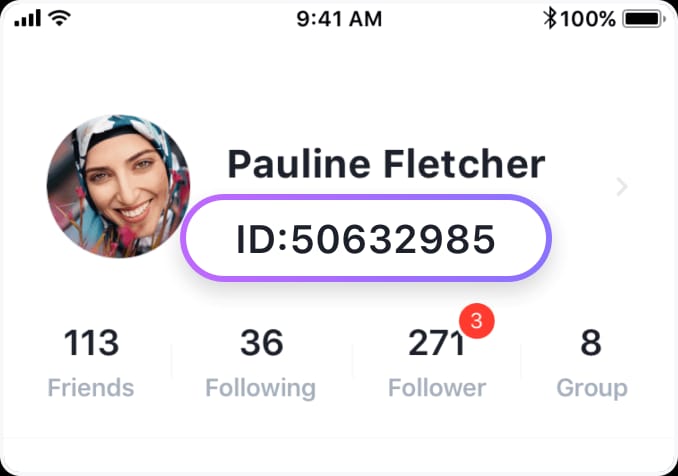
Yes, this is the first thing to verify, because Mico top-ups are UID-based and don't require your password or full login details.
How do I check the correct Mico UID before contacting support?
Open MICO, tap Profile at the bottom right, and copy the numeric UID shown under your nickname.
Use this exact sequence:
Open the MICO app
Tap Profile
Copy the numeric UID under your nickname
Check the region in profile/settings
Compare that UID and region with the order receipt
Personally, I would paste the UID instead of typing it. Community advice is consistent on this because one digit off can send coins to a stranger's account, and once credited, those coins are generally non-refundable.
What if I logged in with the wrong method?
That happens a lot after changing phones. You may think you're on "the same account" while actually using a different binding — phone on one device, email or social sign-in on another.
Common signs:
Your profile photo or nickname looks different
Purchase history is empty
VIP status, badge, or balance doesn't match what you expected
The UID is different from your old screenshots
Mini case note: this is one of the most frustrating versions of the problem. The payment is real, the coins were delivered, but they landed on another Mico account you also control — or worse, one you don't.
How long should Mico coins take to appear after a successful payment?
Usually minutes, but the safe waiting window depends on the payment method.
Here's the practical timing I would use before escalating:
Peak hours can add up to 30 minutes of server delay. And first-time recharges may take longer because of verification. Community reports also say region mismatch can trigger a 24-48 hour hold, especially after switching between Global and MENA.
One more detail many pages skip: MICO has Global and MENA regions with incompatible coin packages. Community reports also note different rates, such as MENA historically offering 143 coins per USD versus 110 on Global, though the preferential MENA rate expired on Feb 28, 2026 and later package rates were reportedly cut 10-15% in a 2026 update. That matters because buying the wrong regional package can block or delay fulfillment.
Which payment route did you use, and why does it matter?
It matters because the proof and the first contact point change by channel.
App Store or Google Play purchase
If Apple or Google shows the payment as completed, that proves the store charged you. It does not prove Mico has already applied the entitlement to the right account.
Check:
Store purchase history
Mico balance on the exact same logged-in account
Whether the charge says completed, pending, or reversed
If the store payment is still pending, start with the store side. If the store shows completed but Mico still has no coins after the wait window, contact Mico support with the store receipt and your UID.
Direct card or web checkout
For direct checkout, look for the merchant order status in the app or top-up site's Order Center. A 3DS-approved card step or bank notification is helpful, but the real question is whether the order itself is marked paid, processing, or completed.
Users often misread "authorized" as "finished." That's a mistake. An authorization hold can later reverse.
Local wallets, bank transfer, crypto
Mico-related top-ups may use region-specific methods such as GCash in the Philippines or Touch 'n Go eWallet in Malaysia. Those can work fine, but processing delays are more common than with instant card flows. Binance Pay may also show pending before final confirmation.
If you used one of these methods, don't duplicate the payment while the first order is still under review.
What proof does Mico support need for missing coins?
The best support ticket includes the UID, order ID, amount, currency, timestamp, and screenshots that all point to the same account.
This is the bundle that usually gets the fastest response:
Mico UID from your profile
Region shown in the account
Order ID from the app, store, or checkout page
Payment receipt with amount, currency, and time
Current balance screenshot from the same Mico account
Payment status: pending, completed, reversed, or processing
Any package details you selected
And take the screenshots before you start logging in and out repeatedly. In missing-credit cases, the tickets that move fastest are the ones with a clean timeline.
Where do I find the order ID?
Check the app purchase history first. If you used a direct checkout, use the Order Center on the top-up site. If the app shows nothing but your bank charged you, include the bank or wallet receipt anyway and say the in-app history is blank.
For support, community guidance is consistent: send UID, transaction ID, payment proof, and screenshots. A known MICO support email used for issues is contact@micous.com.
If you're documenting a repeat purchase or comparing a cleaner checkout trail, Mico Coins Recharge balance not showing after recharge is the right context to review before paying again.
Can Mico coins be recovered if I paid on the wrong account?
Usually not after the coins have already been credited to the wrong UID.
That's the hard answer. Community experience says wrong-UID credits can go to a stranger account and may not be recoverable. If you realize the UID was wrong, contact the seller or support immediately before crediting. Speed matters here.
What not to do:
Don't make a second payment "to test"
Don't file a chargeback instantly while the order is still processing
Don't keep hitting restore or reinstalling the app too early
Don't change region again while the first order is under review
Honestly, delayed delivery is frustrating when the money already left your account. But duplicate payments create a bigger mess than the original delay.
Should I contact Apple, Google Play, the payment provider, or Mico support first?
Contact the party that controls the current failure point.
Quick verdicts:
Store/app payment pending → contact Apple, Google Play, bank, wallet, or payment provider first
Payment completed, Mico balance missing → contact Mico support first
Direct checkout order stuck in processing → contact the checkout/top-up support first
Each side tells you to ask the other → reply with one evidence bundle and ask for entitlement status vs payment status explicitly
Use wording like this:
"Payment is completed. Please confirm whether the entitlement was sent to UID XXXXX."
"Order status is processing. Please confirm whether payment settlement is complete."
"My store receipt is attached. My Mico UID and current balance screenshot are attached."
That reduces the usual back-and-forth.
How can I avoid Mico recharge problems on my next purchase?
Use a small test top-up if you've changed device, login method, or region recently.
My preferred prevention workflow is simple:
Open Mico and copy the UID from Profile
Confirm the region matches the package you're buying
Check you're on the right login binding
Start with a small test purchase on unfamiliar setups
Save the receipt and screenshot the balance page right after payment
Wait the correct window before assuming failure
A few practical notes:
UID-only top-up is secure because it doesn't require your password
But UID-only also means accuracy matters more than anything else
If you need urgent delivery, choose the route with the clearest order tracking, not just the cheapest one
Gift card-style payment flows reportedly have higher success rates than some direct top-ups, but availability depends on the checkout path
Your safest next move
Check the UID, region, and login binding first. Then verify whether the payment is truly completed or only pending. If no coins appear after the correct wait window, send one complete ticket with UID, order ID, receipt, timestamp, and balance screenshot to Mico support or the payment channel that still controls the order. If you make another purchase after this is resolved, use VGTopup only after confirming the exact account details and saving your payment proof.