
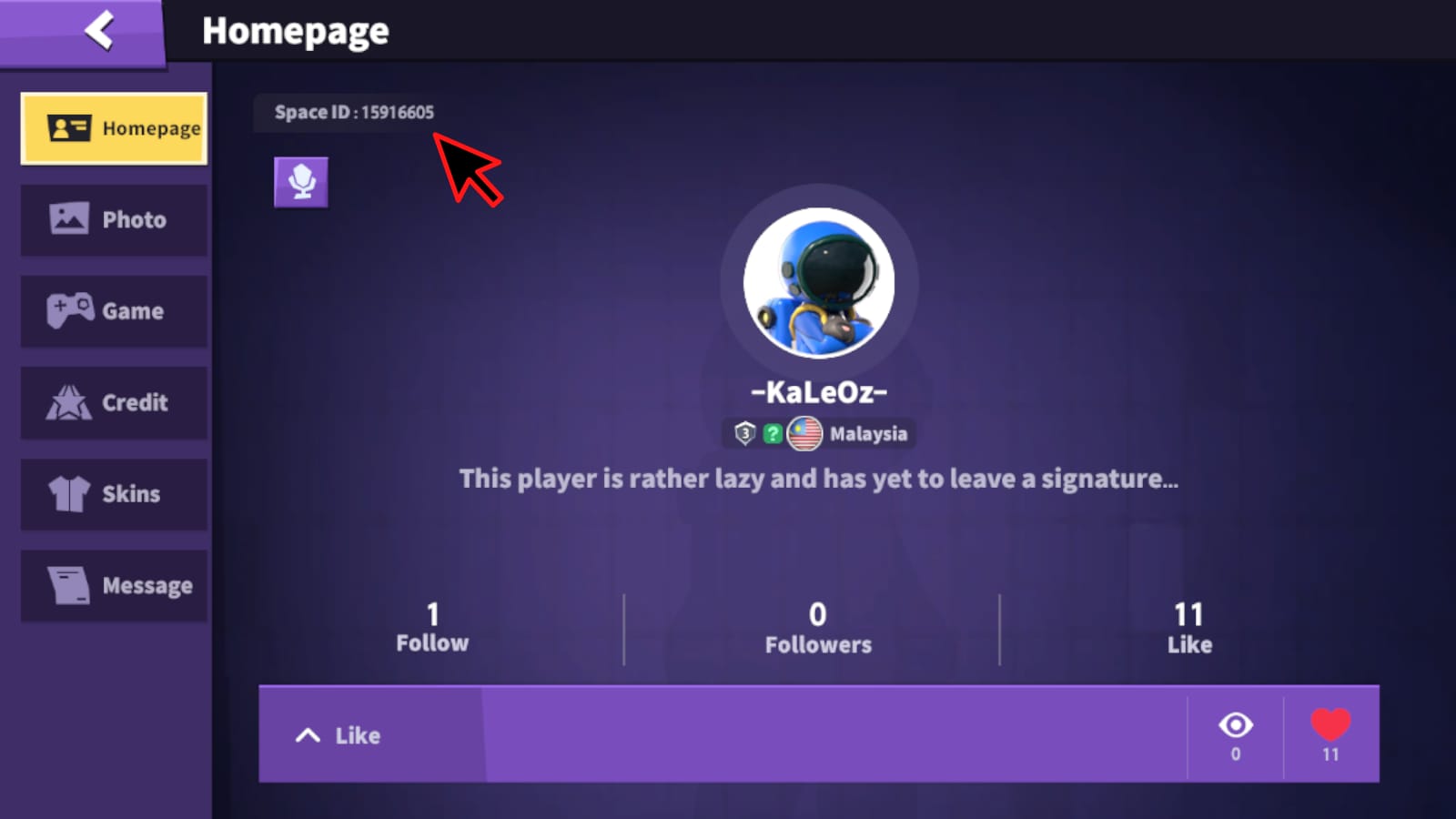
Before topping up SuperSus, verify the exact Space ID shown on the active account profile, not the username, email, or login method. SuperSus top-ups are tied to the numerical ID, and users commonly report that entering a valid but wrong ID sends Golden Stars to the wrong account with no guaranteed reversal.
The fast check is simple: open your profile, confirm the current account, match the 8–9 digit Space ID, and save a screenshot before paying. For SuperSus, server or region usually doesn't need checking because top-ups are generally handled through the universal Space ID.
Why is verifying your SuperSus Space ID before top up so important?
Yes — because the Space ID is the actual delivery target for a SuperSus top up. According to official and community guidance, SuperSus uses a unique numerical player identifier such as 176280345 or 130343131, and that ID matters more than your display name across recharge flows.
What trips people up is that several account details can look "right" at the same time:
From reviewing failed recharge cases, the most common cause isn't payment failure. It's entering a real ID from the wrong account session, old screenshot, or friend's profile.
What details do users most often get wrong when recharging SuperSus?
The usual mistakes are predictable: old ID, account switch, friend confusion, guest mix-up, and simple typos. And because the ID is valid, the system may still deliver successfully — just not to you.
Common wrong-account causes:
Copied old ID from a previous screenshot
Logged into a different account after reinstall or device switch
Using a friend's Space ID by mistake
Confusing guest progress with a bound Google/Facebook account
Typing one wrong digit
Reading the right profile name but entering the wrong numerical ID
One detail many guides miss: a screenshot can still be wrong if it's not fresh. Users commonly report screenshot mismatch as a major cause of wrong-account top-ups. I would check the ID directly inside the app every time, even if you've topped up before.
If you're preparing a SuperSus Space ID top up, this is the part that matters most — not the payment method.
Do I need to check server, region, or platform before a SuperSus top up?
Usually no — SuperSus top-ups generally don't require server or region selection because the Space ID identifies the account globally. Community reports also indicate the same Space ID format works across iOS and Android, and Apple Pay or Google Pay checkouts don't use a different ID system.
Still, check these conditions:
If the order form has no server/region field: the Space ID is normally enough
If the game or checkout explicitly asks for region/server: follow that prompt
If you changed devices recently: confirm you're on the intended account before using the ID
If you're on a guest account: bind it first to avoid later recovery problems
There is some community mention of US, Europe, and Asia servers, but top-up handling is widely described as universal through Space ID. So in practice, I would focus on ID accuracy first, server second.
How do you verify the correct SuperSus Space ID before paying?
Use this one-minute checklist. It's the safest routine for first-time and repeat buyers.
Open SuperSus and tap your avatar in the top-left corner.
Your Space ID appears below the profile picture.Confirm the account is the one you actually want to recharge.
Check the nickname, avatar, and current login state. This catches account-switch mistakes after reinstall, logout, or device change.Read the full Space ID carefully.
It should be an 8–9 digit numerical ID. Don't use your username, email, or display name.Take a fresh screenshot of the profile screen.
Include the visible Space ID, nickname, and avatar. Fresh proof is better than an old gallery image.If you're on a guest account, bind it before payment.
Official guidance recommends binding to Google or Facebook in settings. Guest accounts carry a real risk of progress loss.Enter the ID on the order page and compare digit by digit.
Don't skim. Most wrong-account cases come from one copied or mistyped number.Review the final order page before paying.
Some receipts show the entered Space ID. If that number is wrong, the mistake is already locked in.Save the order confirmation and payment receipt.
Keep the timestamp too. Support moves faster when your evidence is complete.
For users who want a repeatable checkout path, SuperSus wrong account top up prevention starts with this exact routine, not after payment.
What proof should you save in case a SuperSus top up goes wrong?

Save evidence before and after payment. Honestly, delayed delivery is frustrating when the charge already went through, but support is much easier when you can show the full chain.
Minimum proof to capture:
In support-heavy top-up flows, the fastest cases to resolve are the ones with:
Space ID screenshot
order ID
payment receipt
timestamp
missing-delivery or wrong-account description in one clear message
A successful bank charge does not always mean the order has fully cleared verification or reached the right account. If credits don't appear, official guidance says to check the bound account, restart the app, then contact support with the order ID and receipt.
What should you do immediately if the top up went to the wrong account or didn't arrive?

Act fast, but be realistic. Support may help investigate, yet reversals are uncertain once credits are delivered.
Check the active account first.
Make sure you're logged into the bound account you intended to top up. Guest/bound confusion is common after reinstall.Restart the app.
This is the first official troubleshooting step for missing credits.Review the receipt and entered Space ID.
If the receipt shows a different ID than your intended one, that usually points to user entry error.Contact support immediately.
The official support email listed by SuperSus is supersus.contact@gmail.com.Send complete evidence in the first message.
Include:correct Space ID
entered Space ID if visible
nickname
order ID
payment receipt
timestamp
profile screenshot
If the account was unbound, mention that clearly.
Community guidance says account recovery may require your Space ID and nickname, and some users also refer to PI ID as an alternative recovery binding option.
What support can and can't usually do
Personally, I would avoid topping up any guest account unless it's already bound. That's the cleanest way to prevent both delivery confusion and recovery headaches later.
FAQ
How do I find my SuperSus Space ID before top up?
Open SuperSus, tap your avatar in the top-left corner, and look below the profile picture. The Space ID is the numerical player ID used for recharge.
Is SuperSus Space ID the same as username?
No. The Space ID is a unique 8–9 digit number, while the username or display name is not the recharge identifier.
Can I top up SuperSus with only a Space ID?
Usually yes. Community guidance says most top-up forms use the Space ID, and some may also ask for character name, but server selection is usually not required.
What happens if I recharge the wrong SuperSus account?
Golden Stars can be delivered to that wrong account, and users commonly report that these cases are hard to reverse. Contact support immediately, but don't assume a refund.
Can a wrong-account SuperSus top up be refunded or reversed?
Sometimes, but there is no guarantee. Community experience suggests support may not reverse credits once they were successfully delivered.
What screenshots should I save before a SuperSus recharge?
Save your profile with Space ID visible, the selected package, the order page with the entered ID, and a timestamp. After payment, keep the order confirmation and receipt too.
Why did my SuperSus top up not arrive after payment?
First check that you're logged into the correct bound account, then restart the app. If it's still missing, contact support with your order ID, receipt, and Space ID screenshot.
Do I need to check region or server for SuperSus top up?
Usually no. Most SuperSus top-ups are tied to the universal Space ID, unless the checkout specifically asks for region or server.
SuperSus top-up mistakes are usually account-detail mistakes, not payment mistakes. Verify the live 8–9 digit Space ID on the active profile, bind guest accounts before paying, and save proof before checkout. If something goes wrong, send support a complete evidence set immediately. That's the best way to avoid a wrong-account recharge — and the fastest way to resolve one if it happens.