
To restore Ghost Story: Love Destiny premium purchases on a new iPhone, sign in with the same Apple ID used for the original payment, log into the same in-app account, then tap the app’s Restore Purchases option if it appears in the store, main menu, Settings, or Options. That’s the correct Apple-side and app-side recovery path.
If Apple shows the purchase as active but premium is still locked, the issue is usually account matching, receipt sync, or a non-restorable item type. In my experience reviewing purchase recovery issues, the fastest fix comes from checking Apple Purchase History first, then sending support your Apple order ID, Role ID, device details, and screenshots.
Why does Ghost Story: Love Destiny premium not show on a new iPhone?
Because restore depends on two identities matching: your Apple ID for billing and your Ghost Story: Love Destiny account for access. Most failed restores happen when one matches and the other doesn’t.
Ghost Story: Love Destiny on iOS is listed under App Store ID 6474838818 by VNG CORPORATION. Officially, you must use the same Apple ID that originally paid for the in-app purchase. But that alone may not unlock access if you signed into the wrong in-app account after changing phones. The app supports multiple login methods, including Apple ID, Google, Facebook, and Email/Phone, so this mix-up is common.
From comparing restore cases, I would check this first:
A lot of users also assume reinstalling the app restores everything automatically. It often doesn’t. The app still needs to validate the receipt and map it to the correct account.
If you’re trying to recover paid access after reinstalling, this is the right context for Ghost Story: Love Destiny restore purchase help: first confirm whether you’re restoring a premium entitlement or expecting one-time credits to come back.
Why can an App Store payment be successful but premium still stay locked?
Because a successful charge does not always mean the app has finished entitlement validation. That gap frustrates people, and honestly, it’s one of the most common support pain points.
Officially, if premium is active in Apple billing but locked in the app, you should use the in-app Restore Purchases flow or contact the developer. Users commonly report these failure points:
Wrong Apple ID on the new iPhone
Correct Apple ID, but wrong in-app account
App Store region change
Pending payment or billing issue
App version mismatch
iCloud/Apple ID logout before restore
Family Sharing assumptions
One edge case many generic guides miss: region mismatch. A payment can fail or restore can break if your App Store country changed and the billing setup no longer matches the original purchase environment. I would also treat Family Sharing as unreliable here; users commonly report that in-app purchases don’t transfer properly through it.
And there’s a product-specific boundary you need to know: Ghost Story: Love Destiny uses Jade and Ingots top-ups by Role ID through channels like the official shop, Codashop, or SEAGM, with payment methods such as GrabPay, Apple Pay, and cards. Those are effectively app credits/consumables, and official rules are clear: consumable credits like Jade are not restorable. Only non-consumables or subscriptions normally are.
That distinction matters more than people expect:
How do you restore Ghost Story: Love Destiny premium purchases on a new iPhone step by step?
Use the same Apple ID, the same app account, then force a receipt check inside the app. That order saves time.
Confirm the Apple ID that originally paid
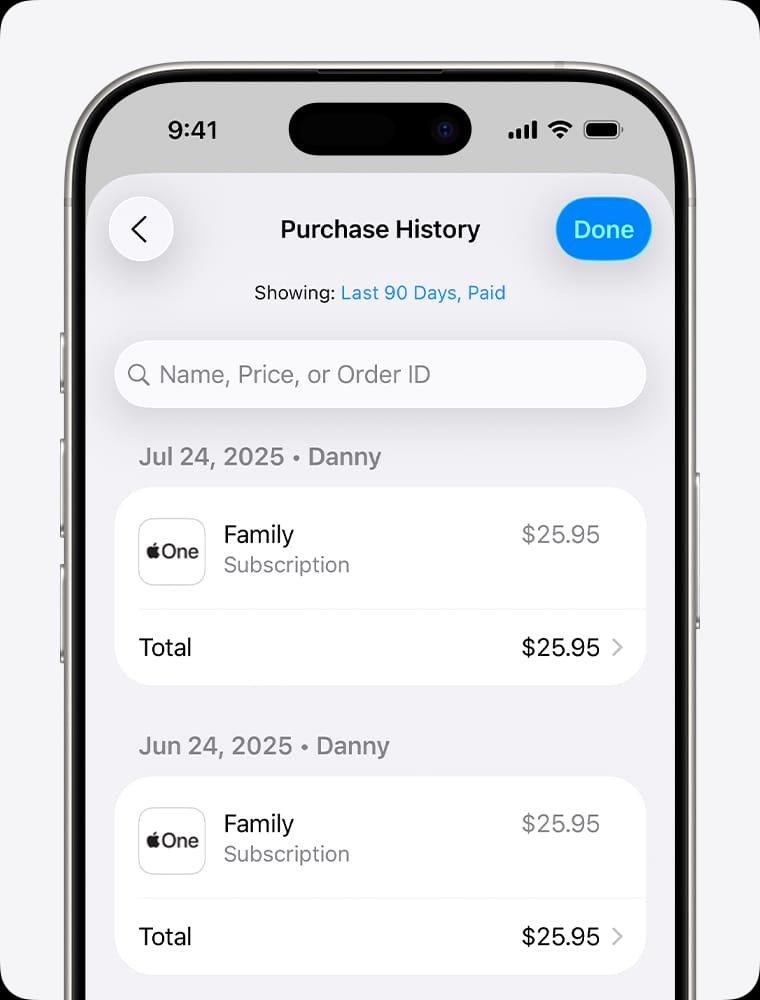
On iPhone, go to Settings > Apple ID > Media & Purchases > View Account > Purchase History.
Find the Ghost Story: Love Destiny transaction or related subscription.
If it’s not there, you’re likely on the wrong Apple ID.
Sign into the same Ghost Story: Love Destiny account
Open the app and verify you used the same login method as before: Apple ID, Google, Facebook, or Email/Phone.
If your old account used a different login method, restoring on the correct Apple ID still won’t attach premium to the right profile.
Update the app before restoring
Install the latest App Store version.
Community reports often point to app version mismatch as a restore blocker.
Tap Restore Purchases
Look in the store, main menu, Settings, or Options.
Wait for receipt validation to finish. Don’t close the app too quickly.
Check whether the item is actually restorable
If it was a subscription or non-consumable unlock, restore should work.
If it was Jade or another consumable credit, don’t expect it to restore like premium access.
If you recently signed out of iCloud or changed Apple account settings, sign back in
Users commonly report restore failures after Apple ID logout.
Re-sign into the correct Apple ID, reopen the app, and try again.
Escalate with proof if Apple shows paid but the app stays locked
Contact the app’s official support through the in-game customer service menu or the official support site.
For billing or receipt problems, contact Apple support.
How do you fix Ghost Story: Love Destiny restore purchase not working on iPhone?

Start with verification, not reinstalling. Reinstalling is often the first thing people try, but it rarely fixes an identity mismatch.
Use this checklist before contacting support:
If that still fails, prepare support evidence. In restore-purchase troubleshooting, receipt proof and the exact account identifier usually cut support time far more than vague screenshots.
Prepare:
Apple order ID / receipt
Purchase screenshot from Apple Purchase History
Your Role ID
Device model and iOS version
Screenshot showing premium locked or upgrade prompt
Date/time of purchase
Login method used in the app
Use official support channels:
App access problem: Ghost Story: Love Destiny in-game customer service or official support at
support.vnggames.com/products/ghost-storyBilling/receipt problem: Apple Support
If your issue is less restore and more paid access still missing after reinstall, this is the more accurate path to review: Ghost Story: Love Destiny premium not showing after reinstall. I personally prefer support requests that include the Apple receipt and Role ID in the first message; it avoids the usual back-and-forth.
How do I restore purchases on a new iPhone?
Use the same Apple ID, install the app, sign into the same app account, and tap Restore Purchases. Then verify the purchase in Apple Purchase History if access doesn’t return.
Why is Ghost Story: Love Destiny premium not showing after I changed phones?
Usually because the Apple ID or the in-app account doesn’t match the original purchase setup. Region changes, pending billing, and outdated app versions also show up often in user reports.
Do I need the same Apple ID to restore Ghost Story: Love Destiny purchases?
Yes. Officially, restore requires the same Apple ID that made the original purchase.
What if my App Store subscription is active but the app still says upgrade to premium?
Use the app’s Restore Purchases button first. If it still stays locked, contact the app’s official support with your receipt, Apple order ID, and account details.
Can I restore one-time app credits or only subscriptions?
Usually only subscriptions and non-consumables restore. Consumable credits like Jade are officially not restorable.
How do I find my Apple receipt for Ghost Story: Love Destiny?
Go to Settings > Apple ID > Media & Purchases > View Account > Purchase History. That’s the fastest place to confirm the transaction before contacting support.
Who should I contact first: Apple or Ghost Story: Love Destiny support?
If the charge, receipt, or billing status is wrong, contact Apple. If Apple shows the purchase correctly but the app won’t unlock access, contact Ghost Story: Love Destiny support.
To restore Ghost Story: Love Destiny premium on a new iPhone, match the original Apple ID, match the original in-app account, then use Restore Purchases inside the app. If Apple billing looks correct but access is still locked, don’t keep guessing—collect your receipt, Role ID, screenshots, and contact the official support team. And if the purchase was Jade or another consumable credit, treat it as non-restorable from the start.