
Before you pay for Asphalt 9: Legends after switching devices, confirm the live account you are currently logged into, not just the phone or store account you used before. The safest check is to verify the in-game identity, platform route, region if relevant, and save proof screenshots before checkout. Officially, Asphalt Legends progress sync works through the same Gameloft ID across iOS, Android, Windows, Xbox, and Steam, but not Nintendo Switch or PlayStation. That one distinction prevents a lot of wrong-account top-ups.
First checks that actually prevent a wrong-account top-up
I would check identity before price, payment method, or delivery speed. Most mistakes happen because the game opens normally, so people assume it's the same profile.
Use this checklist before any checkout:
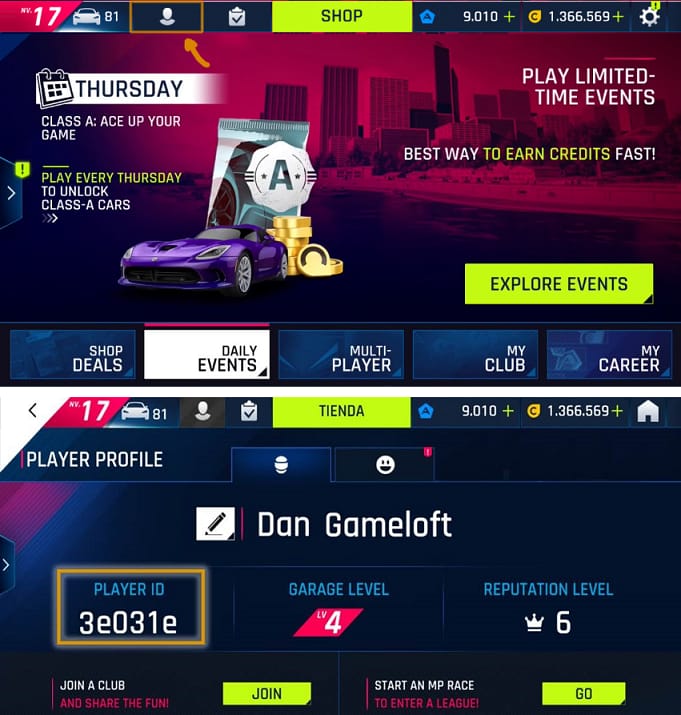
Open the game and find your Player ID in the profile area. Officially, it appears in the player profile top bar mail icon area or top-left corner.
Confirm your visible account format, such as playername#1234.
Go to Settings > Account and check which login is active: Gameloft ID, Google, Apple, or Facebook.
If you're still on a guest account, stop and bind it first. Officially, guest accounts can lose progress on switch.
If you changed phones, confirm the account on the new device matches the old one before paying.
Screenshot the current account state, including Player ID, username#ID, and active login method.
For direct ID-based checkout, this matters even more. Community reports consistently show that third-party top-ups usually require Player ID + platform. If you need a clean reference for that process, see Asphalt 9: Legends top up player ID verify.
Is your purchase tied to the game account or your Apple ID / Google account?
No — not always. And this is where people get burned.
Your payment identity and your game identity are separate things:
Officially, the same Gameloft ID syncs progress across iOS, Android, Windows, Xbox, and Steam. Officially, Nintendo Switch and PlayStation are excluded from that cross-platform sync. So if you moved between mobile and PC, a bound Gameloft ID is your anchor. If you moved from Switch or PlayStation expecting the same account to carry over, don't assume that.
Users commonly report another trap: Apple ID and Google account purchases are tied to the store, not automatically to the Asphalt account you intended to fund. That's why an old App Store receipt doesn't prove your current in-game login is correct.
What should you verify after switching from iPhone to Android, or Android to iPhone?

Verify the active game login first. The store account comes second.
From reviewing recharge issue patterns, the most common mistake is simple: someone changes phone, installs the game, sees a working profile, and assumes it's the old account. Sometimes it's a fresh guest profile. Sometimes it's the wrong Google or Apple-linked state. Sometimes both.
A careful platform check
And don't mix up restore purchase with top-up safety. Officially, restore-purchase troubleshooting means restarting the device, checking connection, and relaunching the game. That helps with store purchase recovery. It does not prove you're on the right Asphalt account for a new purchase.
If you're unsure which account is live, official guidance says you can generate a link code in Settings on the old device and enter it on the new one. That's the cleanest path when you still have access to the old phone.
Does UID, server, or region matter more?
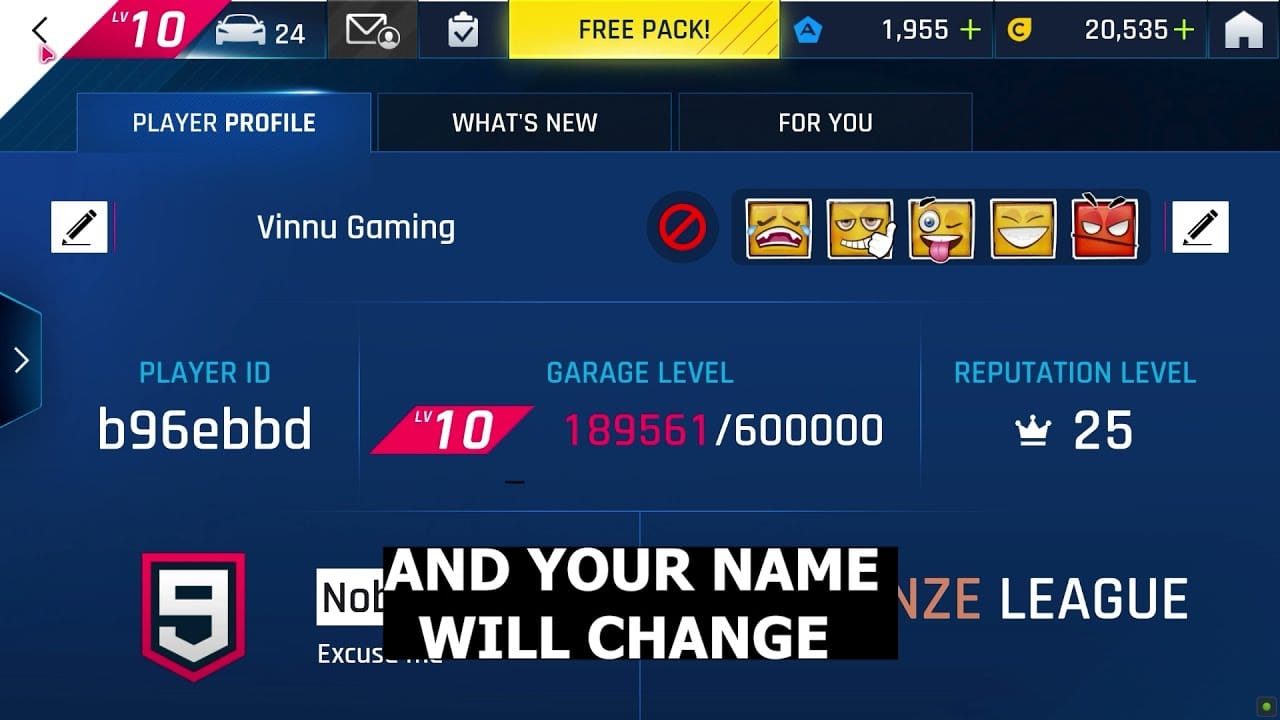
UID/Player ID matters most. Platform matters next. Server matters least for Asphalt Legends.
That order is more useful than the vague advice you usually see.
Player ID / username#ID: strongest practical identifier for top-up and support
Platform: important because many checkout flows ask whether the account is on iOS, Android, or Windows
Server: community consensus says Asphalt Legends doesn't use a manual server selection flow for players; it's effectively global through account identity
Region: only matters when login, payment verification, or support review is affected by region changes
Officially and in community practice, the same Player ID should work across devices if the account is properly linked to the same Gameloft ID. But there is one edge case worth respecting: users have observed rare post-update situations where the visible UID details seem changed or unclear. I wouldn't guess. Re-open the profile and verify again before paying.
A lot of buyers search for server check out of habit from other games. For Asphalt Legends, the better question is: am I on the exact account I mean to fund, and does the checkout ask for the correct platform?
Local payment route: app store or web checkout?
For many users, web checkout is safer after a device switch because it forces an account check. App-store billing is convenient, but it hides the identity problem.
Here’s the practical difference:
Market support varies by seller and region. Some checkouts are known to support local methods such as Mada, card, and STC Bank in certain markets, while others may offer local payment options more broadly. No official Asphalt Legends crypto or Binance Pay route is confirmed; if a third-party offers those, treat them as seller-specific, not game-official.
If you're using a browser-based route after changing devices, I personally prefer the path with clearer order tracking and an explicit Player ID field. That's usually easier to audit later. For a direct ID-based flow, Asphalt 9: Legends device switch recharge safe is the right mindset: verify first, then pay.
Field notes from the mistakes I see most often
The game opened fine — but it was a guest profile
This is the classic one. Officially, guest accounts can lose progress on switch. Community experience says guest-to-bound confusion is one of the most common causes of wrong-account top-ups. If the account isn't linked to Gameloft ID yet, bind it before doing anything else.
Same player, different store account
You may still be the same person, but your store receipt trail can change if you switched Apple ID or Google account. That doesn't mean the game account changed. It just means support may need better proof. Save the order ID, receipt, and timestamp.
Region changed, currency changed, panic followed
A region change can alter store display, pricing, or login behavior. One source notes region changes can cause login issues and may require support help before top-up. That's not a universal rule, so treat it as an edge case, not a confirmed platform-wide policy. Still, if your account region changed recently, I would pause and verify before buying.
What proof should you save before and after payment?
Save more than one screenshot. Honestly, delayed delivery is frustrating enough; delayed delivery with no proof is worse.
Before payment
Capture:
current Player ID
visible username#ID
Settings > Account screen showing linked login
current device/platform
if gifting, the recipient's in-game screenshot showing their current Player ID
After payment
Keep:
order ID
payment receipt
transaction timestamp
pre- and post-purchase account screenshots
This is the evidence support can actually use. In payment troubleshooting, the fastest cases to resolve are the ones with a clear order ID, timestamp, and screenshot of the target account taken before checkout.
Who should you contact if something goes wrong?
Contact seller support for delivery confirmation. Contact Gameloft support for account or credit issues.
That split is widely observed and it saves time.
Seller support usually needs
order ID
payment receipt
Player ID entered at checkout
platform selected
delivery status details
Gameloft support usually needs
account identification details
screenshots
purchase history
sometimes account recovery details such as car count or club name
If credits are missing after top-up, community reports often trace it back to the wrong Player ID entered after a device switch. A successful bank charge doesn't always mean the order cleared the right account verification. Stop retrying random payments. Gather proof and escalate once, clearly.
The shortest safe rule before checkout
Match these three things before you pay:
The live in-game account
The platform requested at checkout
The proof you can show later
If any one of those is unclear, don't guess. Recheck the profile, confirm the linked Gameloft ID, and only then proceed. If you're ready to buy, use VGTopup only after you've matched the correct Asphalt 9: Legends account details, platform route, and proof screenshots.