
To top up Poppo Live Coins with USDT, use a trusted seller that supports Poppo Live crypto checkout, enter your correct Poppo UID, choose the supported USDT network, send the exact amount before the quote expires, and keep the transaction hash until coins arrive. The two checks that matter most are UID accuracy and network accuracy, because USDT transfers are usually irreversible.
Officially, Poppo’s main checkout routes don’t offer direct USDT on Poppo.com or Codashop. So if you want Poppo Live Coins USDT top up, you’re usually relying on reseller checkout flows rather than official card or PayPal channels. If you want to compare a crypto-friendly route, Poppo Live Coins USDT top up is the kind of checkout path users look for when cards fail or aren’t available.
Why do users choose USDT to top up Poppo Live Coins?
Because USDT works where cards often don’t. Officially, Codashop supports PayPal, Cash App, and cards for Poppo Live Coins, but not USDT. Community reports consistently show users turning to crypto when they hit region locks, card declines, or simply don’t want to use a bank card.
From reviewing recharge issues, this pattern is clear: cross-border users often pick USDT because it’s borderless, but they underestimate the operational risks. A card failure is annoying. A wrong-chain USDT transfer can be permanent.
Common reasons users prefer USDT:
No credit card available
Card checkout blocked by region
Faster borderless payment from a crypto wallet
Better pricing on some resellers
Price can be a real factor too. One seller lists:
1,000 Coins at $0.11 vs $0.19 official-equivalent pricing
10,000 Coins at $1.10 vs $1.87
70,000 Coins at $5.50 vs $7.60 on Codashop
That said, cheaper isn’t always better. I personally prefer the path with clearer order tracking, even if the discount is smaller.
What should you check before paying USDT for Poppo Live Coins?

Check your Poppo UID, the USDT network, and the live quote. Those three details decide whether the order succeeds or becomes a support case.
Officially, your Poppo Live User ID is required before payment. In the app, go to Profile > My icon > number below picture. Don’t guess it. Don’t use a nickname. A wrong UID can send coins to the wrong account, and community reports are blunt here: crypto top-ups are generally non-refundable once processed.
The network check is even more important. Users commonly report TRC20 as the recommended USDT network for Poppo top-ups through agents and resellers. If the checkout says TRC20 and you send ERC20, that mismatch can cause permanent loss.
And watch the quote timer. Community reports note that:
The sender pays the blockchain network fee
Site quotes can expire if you wait too long
Even with USDT, you should confirm the quoted amount before sending
What should you verify before sending?
One detail many guides miss: a successful blockchain send does not always mean the order has cleared the seller’s payment matching yet. Honestly, that’s where users get frustrated. The wallet says sent, but the order still needs confirmation and account matching.
Why isn’t official Poppo Live USDT checkout the same as reseller USDT top-up?

Because official and reseller payment rails are different. Officially, Codashop is a Poppo Live partner, but it does not support USDT. Community and single-source listings show USDT support mainly through third-party sellers.
That difference affects three things:
In my experience reviewing support workflows, the fastest fixes happen when users understand this split early: if you paid a reseller with USDT, contact the seller first, not Poppo official. Poppo support is mainly relevant for in-app issues or account-side problems, not third-party crypto order matching.
How to top up Poppo Live Coins with USDT step by step?
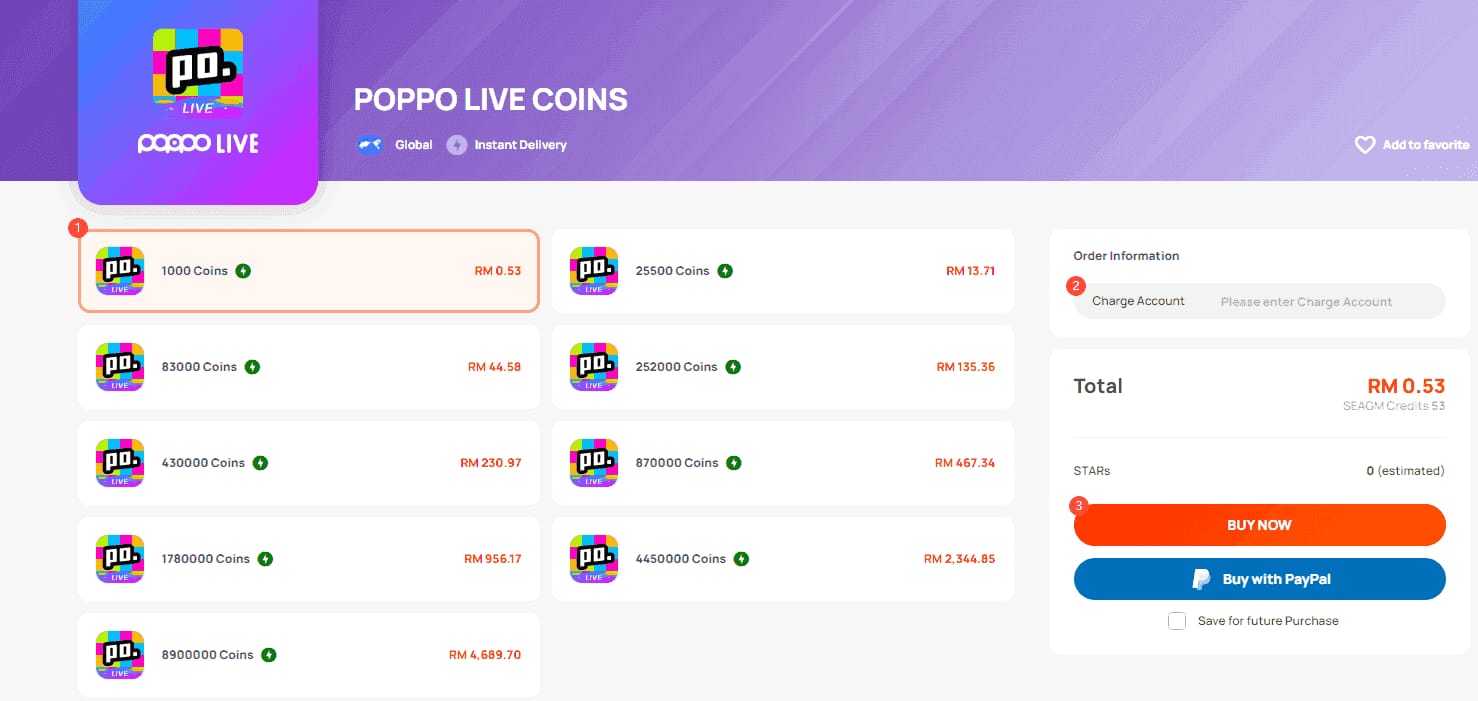
Use a seller that supports Poppo Live USDT checkout, then follow the payment flow carefully.
Open Poppo Live and copy your UID
Go to Profile > My icon
Copy the number shown below your picture
Recheck every digit before pasting it into checkout
Choose your coin package
Standard flow reported by users: select package, enter UID, complete payment, receive coins
Compare package value before paying, especially on larger bundles
Select USDT and confirm the network
If the checkout specifies TRC20, use TRC20 only
If no USDT option appears, don’t force it; use another supported route instead
Personally, I would avoid any page that is vague about the chain
Send the exact amount from your wallet
Copy the address carefully
Pay before the quote expires
Remember the sender covers the blockchain fee
Keep your proof
Save the order ID
Save the TXID / transaction hash
Take screenshots of the amount, address, and payment status
Wait for blockchain confirmation and delivery
Official and community sources both indicate instant delivery after payment confirmation is the norm
Community reports say coins usually arrive in seconds to a few minutes
One seller claims 98% of USDT top-ups deliver in under 5 minutes
If you’re comparing ways to buy Poppo Live Coins with crypto, prioritize clear network instructions and visible order tracking over headline discounts alone.
What’s the best way to handle delayed or missing Poppo Live Coins after USDT payment?
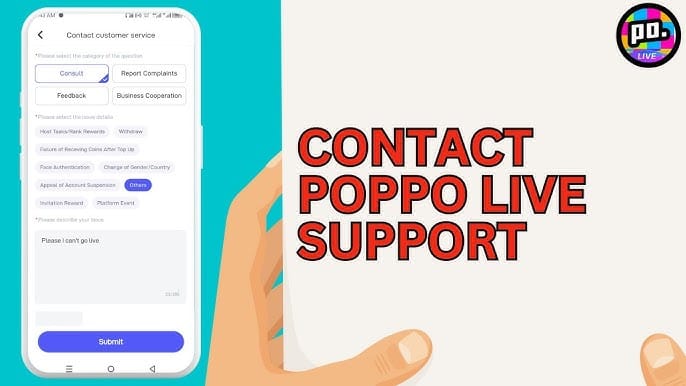
Start with seller-side checks first. Most delayed USDT top-ups are payment-matching or confirmation issues, not Poppo account bugs.
Do this in order:
Refresh the Poppo app
Coins can appear after a short delay
Community reports put normal delivery at under 1 minute to 5 minutes in many cases
Check your wallet transaction
Confirm the TXID exists
Confirm the network matches the seller requirement
Confirm the amount sent matches the quote
Check whether the quote expired
If you sent late, the order may not auto-complete
This is a common edge case generic guides skip
Contact seller support
Provide:
Order ID
TXID
Exact amount sent
Poppo UID
Screenshots of payment and order page
In digital top-up support workflows, this bundle gets the fastest response
Contact Poppo official only if it’s an account-side issue
Example: coins were credited to your own UID but not reflected properly in-app
For third-party payment problems, seller support is the right first stop
Quick troubleshooting table
And one hard truth: if you entered the wrong UID and the order completed, recovery is often unlikely. That’s why I would check the UID twice before even looking at price.
FAQ
Can I buy Poppo Live Coins with USDT?
Yes, but usually not through Poppo’s official main checkout routes. Officially, Codashop supports Poppo Live top-up but does not support USDT, so crypto payments are typically handled by resellers.
How long does Poppo Live coin top up take after USDT payment?
Usually seconds to a few minutes after payment confirmation. Community reports commonly place delivery under 5 minutes on trusted sellers, though blockchain confirmation and payment matching can delay it.
What network should I use to pay USDT for Poppo Live Coins?
Use the exact network shown at checkout, which users commonly report is TRC20 for Poppo-related reseller top-ups. Don’t substitute ERC20 or another chain unless the seller explicitly supports it.
Why did my Poppo Live Coins not arrive after crypto payment?
The usual causes are quote expiry, wrong network, amount mismatch, or delayed confirmation. Refresh the app, verify the TXID and payment details, then contact seller support with your order ID and screenshots.
Can I top up Poppo Live Coins without a credit card?
Yes. That’s one of the main reasons users choose USDT or other reseller-supported methods, especially in restricted regions where official card checkout fails.
Is it safe to use USDT for Poppo Live coin recharge?
It can be safe if you verify the site, use HTTPS, ignore fake support DMs, confirm the UID, and send on the correct network. The biggest safety risk isn’t USDT itself; it’s sending to the wrong address, wrong chain, or wrong account.
What should I do if I entered the wrong Poppo account ID?
Contact the seller immediately before delivery is processed. If the coins have already been credited to another account, community reports suggest recovery is often not possible.
Poppo Live Coins can be topped up with USDT, but usually through reseller checkout rather than official Poppo or Codashop payment flows. The safest approach is simple: verify your UID, match the required USDT network, send the exact amount before expiry, and keep your TXID. If anything goes wrong, contact the seller first with full proof. For urgent orders, choose the checkout with the clearest tracking, not just the lowest price.