
Yes—if PayPal is available in your checkout route, you can top up Poppo Live Coins by choosing a coin package, entering the correct Poppo UID, and authorizing payment through PayPal. For most users, PayPal access comes through supported checkout partners rather than the official Poppo website, which doesn't list a direct PayPal policy.
The main failure points are simple but costly: wrong UID, region mismatch, and pending payment verification. In my experience reviewing recharge issues, the wrong account entry is the most preventable mistake—and the hardest to fix after coins are delivered.
Why do some users see PayPal for Poppo Live Coins while others do not?
PayPal availability usually depends on region, checkout route, and device. Users commonly report that PayPal appears on some checkout pages but not others because App Store country settings, Poppo account country, and merchant payment configuration don't always match.
Two routes matter:
In-app/app-store billing: PayPal support can be limited by Apple App Store or Google Play region settings.
Direct top-up checkout: Third-party checkout pages often support PayPal even when the app route doesn't.
That's why overseas users sometimes can still complete a Poppo Live Coins top up with PayPal through a supported direct checkout flow despite app-region mismatch. But don't assume it's universal. Sources consistently show region checks matter, and users commonly report PayPal disappearing when the store country is unsupported.
A less obvious issue: device and browser differences. From comparing checkout paths, mobile PayPal pop-ups fail more often than desktop redirects. If PayPal won't load on mobile, switching to desktop is one of the first fixes I'd try.
What should you check before paying for Poppo Live Coins with PayPal?
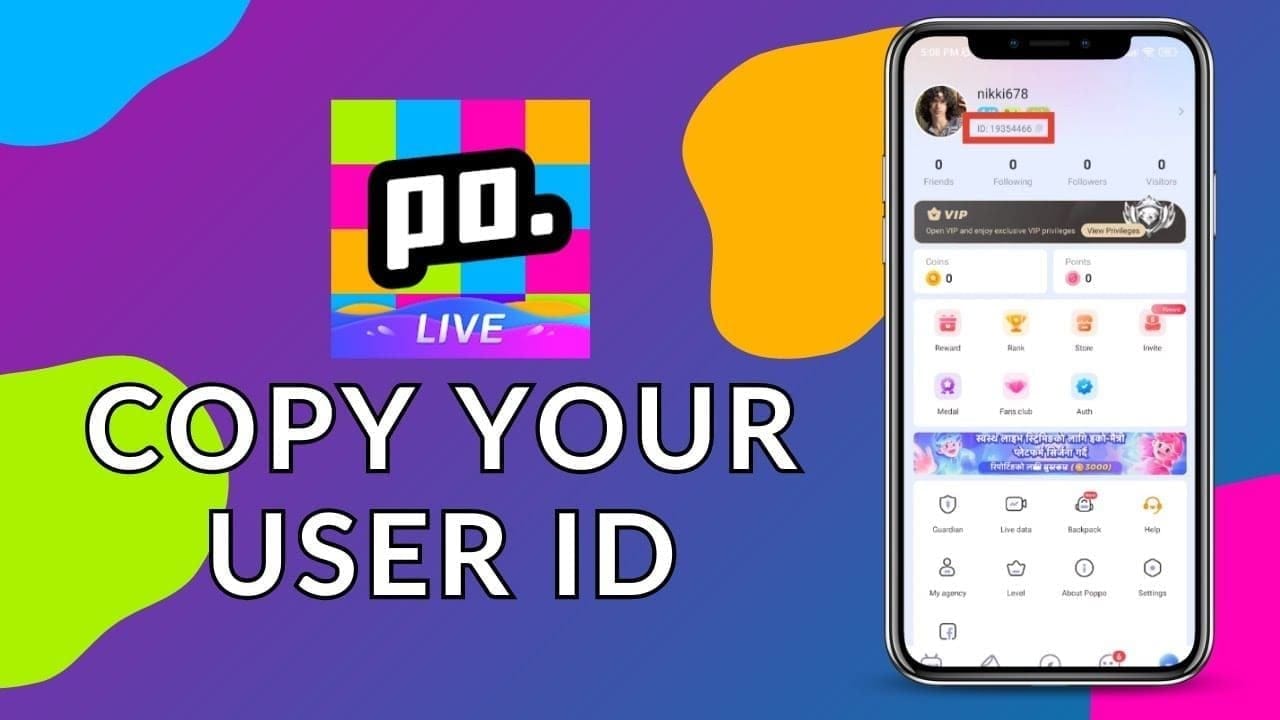
Check your UID, region, final price, and PayPal readiness before you pay. That sounds basic, but honestly, this is where most avoidable losses happen.
Use this pre-payment checklist:
Community and single-source data both show the standard flow requires UID entry before PayPal payment. Personally, I would never proceed until that UID is checked twice. One fact entry even flags a 7-step wrong-account checklist because submitted coins may not be reversible.
Price also needs context. Sample published rates vary widely:
Those numbers show why users compare checkout routes. Community data also reports 22% to 28% discounts on some third-party top-ups versus official pricing. But cheaper isn't always better if the checkout is unclear. I personally prefer the route with cleaner order tracking over the absolute lowest price.
Why can the final PayPal cost be higher than the listed coin price?
Because the listed package price may not include currency conversion, tax, or store markup. This is one of the details generic guides skip.
Common extra costs:
PayPal currency conversion fees on international top-ups
Local tax or platform markup depending on billing route
Bank-linked PayPal funding differences if your card/bank applies its own conversion
A package that looks cheap in USD can end up costing more in your local currency after conversion. If you're buying across regions, check the final PayPal review screen, not just the product page.
How to top up Poppo Live Coins with PayPal step by step?
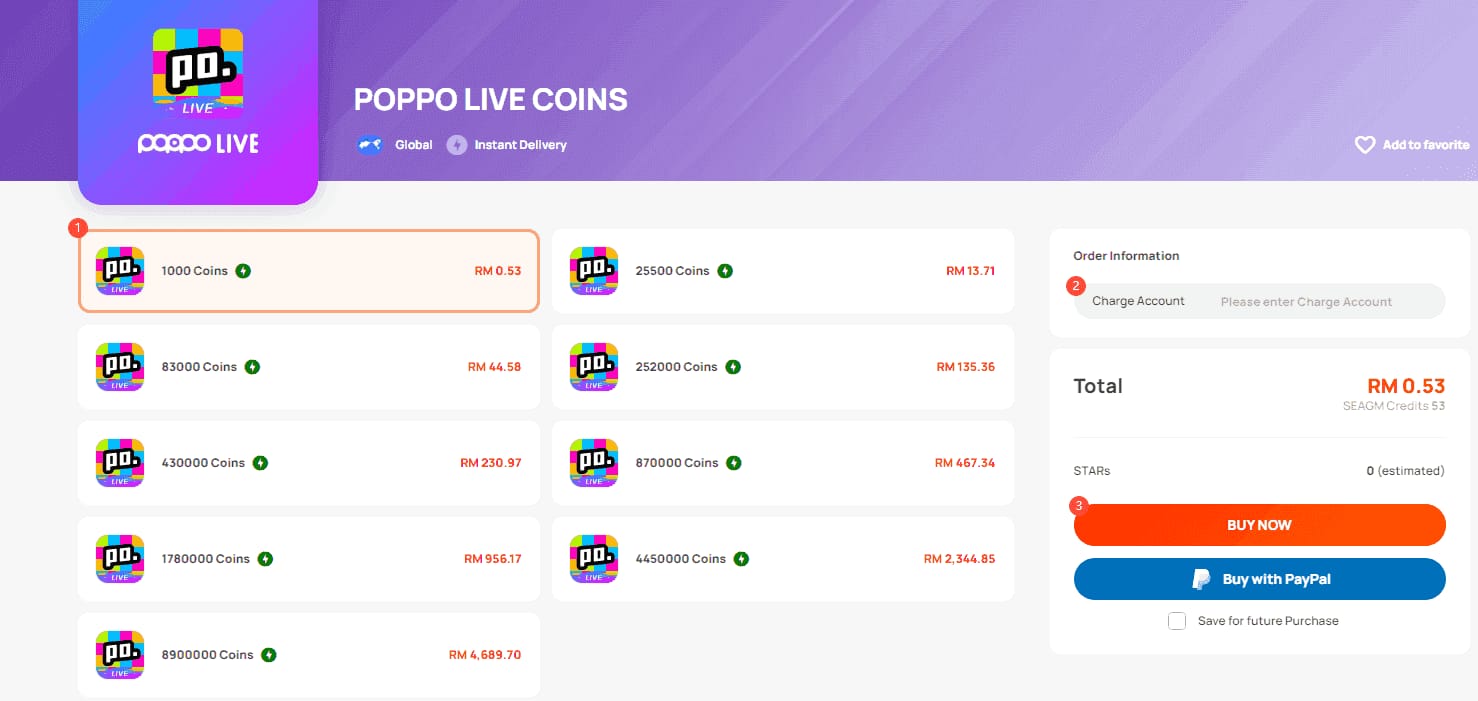
The process is short: select package, enter UID, choose PayPal, confirm, then verify delivery.
Open a supported Poppo Live top-up checkout
Direct in-app PayPal isn't consistently available by region.
If you're comparing routes, Poppo Live Coins PayPal recharge is easiest when the page clearly asks for UID and shows PayPal before you commit.
Choose the correct coin package
Match your budget and check the displayed currency.
If the price looks unusually low, review the final checkout total for conversion or tax.
Enter your Poppo UID carefully
Copy-paste from your Poppo profile.
Don't rely on nickname or display name unless the page explicitly asks for it.
Select PayPal at checkout
Log in to PayPal.
Confirm the funding source and billing currency.
If PayPal doesn't load on mobile, retry on desktop or another browser.
Complete payment authorization
Some failed orders come from 3D Secure timeouts, internet instability, or account verification checks.
A successful bank charge doesn't always mean the order fully cleared merchant verification.
Wait for coin delivery
Community reports say delivery is usually instant to 1–5 minutes.
Single-source data puts normal delivery at 30 seconds to 3 minutes, with 15 minutes max before you should contact support.
Verify the balance in Poppo Live
Restart the app if coins don't appear immediately.
Check wallet balance again before opening a ticket.
What should you do if Poppo Live Coins are not received or the PayPal payment fails?
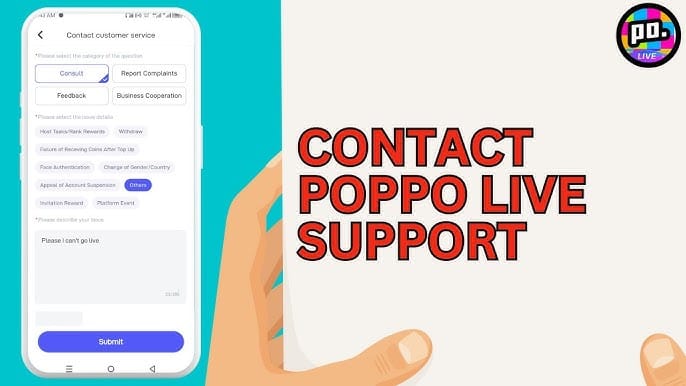
First, wait a few minutes and restart the app. Most delayed deliveries resolve within 2–3 minutes, and many users report the balance appears after a restart.
If the order still hasn't arrived, check this in order:
Payment status
Completed, pending, failed, or duplicated in PayPal history
Order details
Merchant order ID
PayPal transaction ID
Timestamp
Screenshot of payment result
Account details
Poppo UID used
Current in-app balance
Region/country settings if PayPal was missing or failed
Technical issues
Clear browser cache
Retry on another device
Check internet stability
Here's the practical troubleshooting table I would use first:
When contacting support, users commonly report the fastest resolution comes from sending UID, order ID, PayPal transaction record, timestamp, and screenshots in the first message. If you only say "coins missing," support will ask for all of that anyway.
And one hard truth: if you entered the wrong account and the coins were delivered there, recovery is often limited. I would treat UID confirmation as the single most important step in the whole process.
Can I top up Poppo Live Coins with PayPal safely?
Yes, if you use trusted checkout routes and verify every account detail before payment. Community experience consistently says official partners and established checkout pages are safer than random sellers on social media or forums.
Safer buying habits:
Use checkout pages that clearly request Poppo UID
Confirm PayPal appears before entering payment details
Save the order confirmation page
Avoid "manual delivery" promises from unknown sellers
Keep screenshots until coins arrive
Users also widely report that PayPal adds a layer of buyer protection compared with direct card sharing. That's a real advantage. But safety still breaks down if you send coins to the wrong UID or buy through unverified channels.
FAQ
Can I top up Poppo Live Coins with PayPal?
Yes, but often through a supported direct checkout route rather than the official Poppo website. PayPal availability depends on region, merchant setup, and sometimes device.
Why is PayPal not showing for Poppo Live Coins?
The most common reason is region mismatch. Users also report app-store country settings, merchant checkout configuration, and mobile browser issues can hide PayPal.
How long does Poppo Live Coins delivery take after PayPal payment?
Usually 30 seconds to 5 minutes. If nothing arrives after 15 minutes, restart the app, check your balance again, then contact support with your order details.
What should I do if my Poppo Live Coins were not received?
Wait 2–3 minutes first, then restart Poppo Live. If the balance still hasn't updated, prepare your UID, order ID, PayPal transaction ID, timestamp, and screenshots before contacting support.
Can I get a refund if I entered the wrong Poppo account?
Not reliably. Digital top-ups sent to the wrong UID are often hard to reverse once delivered, so double-check the account ID before payment.
Does PayPal charge extra fees for Poppo Live Coins?
Sometimes, yes. International purchases can trigger PayPal currency conversion fees, and the final cost may also include tax or markup depending on the checkout route.
Is it safe to buy Poppo Live Coins with PayPal?
Yes, if you use trusted partners and keep payment records. PayPal buyer protection helps, but it doesn't fix wrong-account submissions or purchases made through sketchy sellers.
Poppo Live Coins top-up with PayPal works well when PayPal is actually supported for your region and you verify the UID before paying. For most users, the safest path is a trusted direct checkout with clear order tracking, visible PayPal support, and saved payment records. Before you confirm, check the final price, country settings, and account ID one last time.