
Yes—if a checkout for Lita Coins offers USDT, you can buy without a credit card. But USDT is only the best route when you are already comfortable with wallets, network selection, and irreversible payments. Before sending anything, verify the exact Lita User ID, the intended recipient account, the displayed amount, the supported network, and the payment window. Most failed crypto top-ups are not dramatic scams; they are simple mismatches such as the wrong network, a late transfer, or an amount reduced by fees.
If you want the broader context first, it helps to compare this with a full Lita payment and top-up guide and a separate check on Lita account verification before recharge. For buyers who already know they need a no-card route, the practical question is not just Can I use USDT? but Should I?
When is USDT the right no-card option for Lita?
USDT makes the most sense for buyers who do not have access to a credit card, debit card, or local wallet option, especially overseas users who are already used to crypto transfers. In that narrow situation, a stablecoin payment can be efficient: you avoid card dependence, you can pay from an existing wallet, and you may still get a straightforward top-up flow if the checkout clearly supports it.
That said, the facts available here do not confirm an official Lita USDT payment policy. The official safety boundary is still the official Lita website, and the official top-up center at lita.gg/topup is the clearest default route. It also advertises up to 25% off versus in-app purchases, which matters because app-store convenience often comes with worse value.
So the recommendation is simple:
Choose official web top-up first when it meets your needs.
Choose local e-wallets first if your region has them and you want a no-card method with less technical risk.
Choose USDT only when you truly need a no-card alternative and understand how crypto checkout works.
From reviewing digital top-up failures, the biggest issue with USDT is not that it is inherently unsafe. It is that buyers often expect it to behave like a card payment. It does not. Once sent, a crypto transfer usually cannot be reversed just because the wrong chain or wrong order details were used.
Can you top up Lita Coins with USDT safely?
You can do it more safely if you treat the payment page as something to verify, not something to trust automatically. For Lita, that means separating official checkout from unofficial or third-party checkout and being honest about the trade-off.
The official guidance in the facts is clear: lita.gg is the official site, and buyers should avoid unverified third parties. That does not mean every non-official seller is automatically fraudulent. It means the burden of checking shifts to you.
A legitimate-looking page is not enough. Before paying, confirm five things in one sitting:
The first is the Lita account itself. Lita top-up commonly requires the User ID from the app Profile section. Copy it directly rather than entering it from memory. If you are topping up for another person, verify that you are using the intended account and not just a similar-looking ID.
The second is the platform. If you are on the official top-up center, you are inside the safest boundary supported by the facts. If you are not, slow down and inspect the checkout flow. A proper page should show a clear order summary, a payment amount, and some form of order tracking such as an order ID.
The third is the region and payment fit. Some no-card methods are regional. Community and single-source data point to options such as GCash in the Philippines, Touch 'n Go eWallet in Malaysia, GrabPay in supported markets, and MoMo in Vietnam. If one of those is available to you, it is often a simpler no-card route than manual USDT transfer.
The fourth is the displayed amount. With crypto, close enough is not good enough. If the checkout quotes a specific amount, that is the amount the system expects to receive.
The fifth is the payment window. Crypto quotes can expire. If the timer is nearly over, do not rush a transfer just to beat it. It is better to restart than to send late and create a support problem.
If you want a simpler Lita top-up flow, check VGTopup for the available payment route, confirm your account details carefully, and keep your order proof until the coins arrive.
How does a Lita USDT top up usually work in practice?
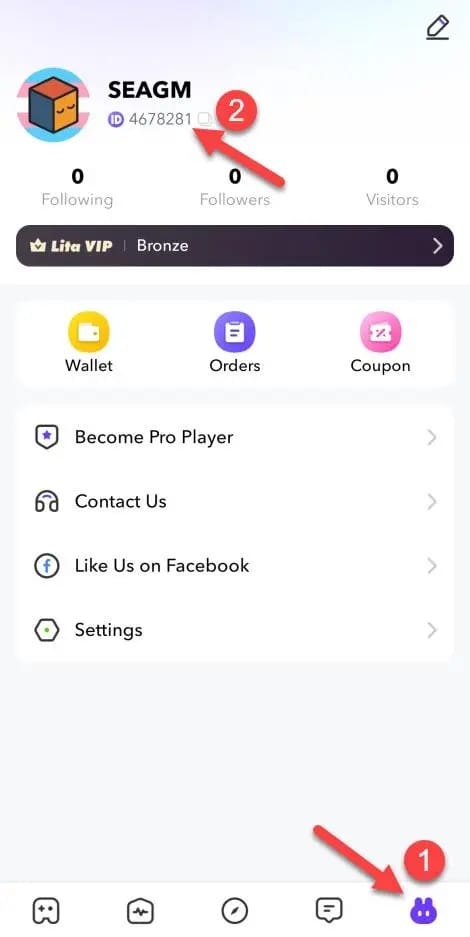
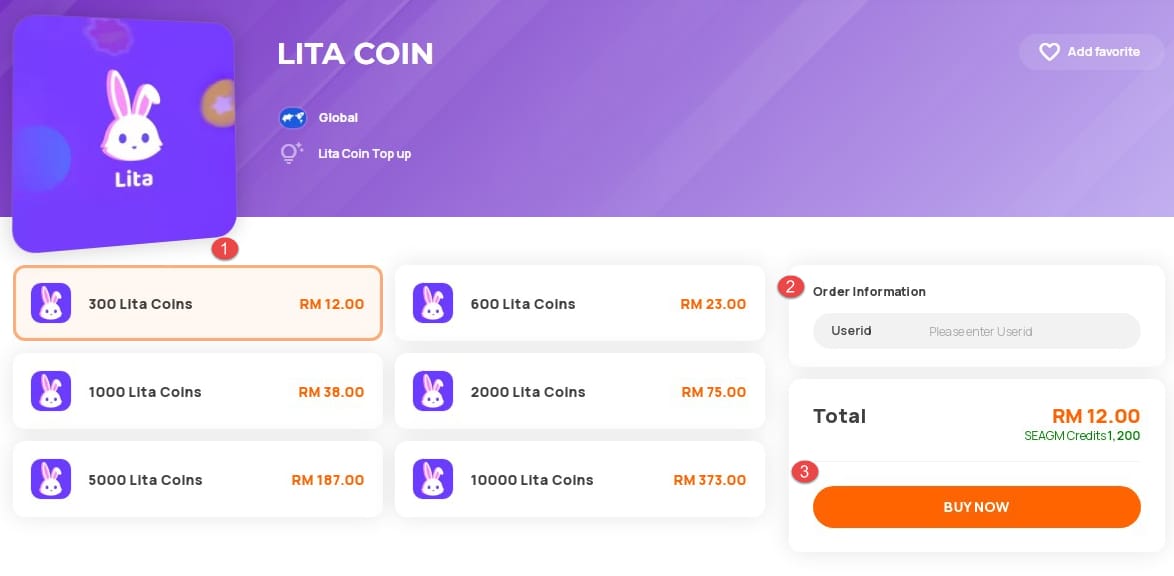
The common flow is straightforward on paper. You select a Lita Coins denomination, enter the Lita User ID from the app Profile section, choose a payment method, complete checkout, and then wait for delivery. Community reports describe coins as being credited instantly or within 30 minutes in normal cases.
Where USDT becomes more demanding is the middle of the process: the wallet and network step.
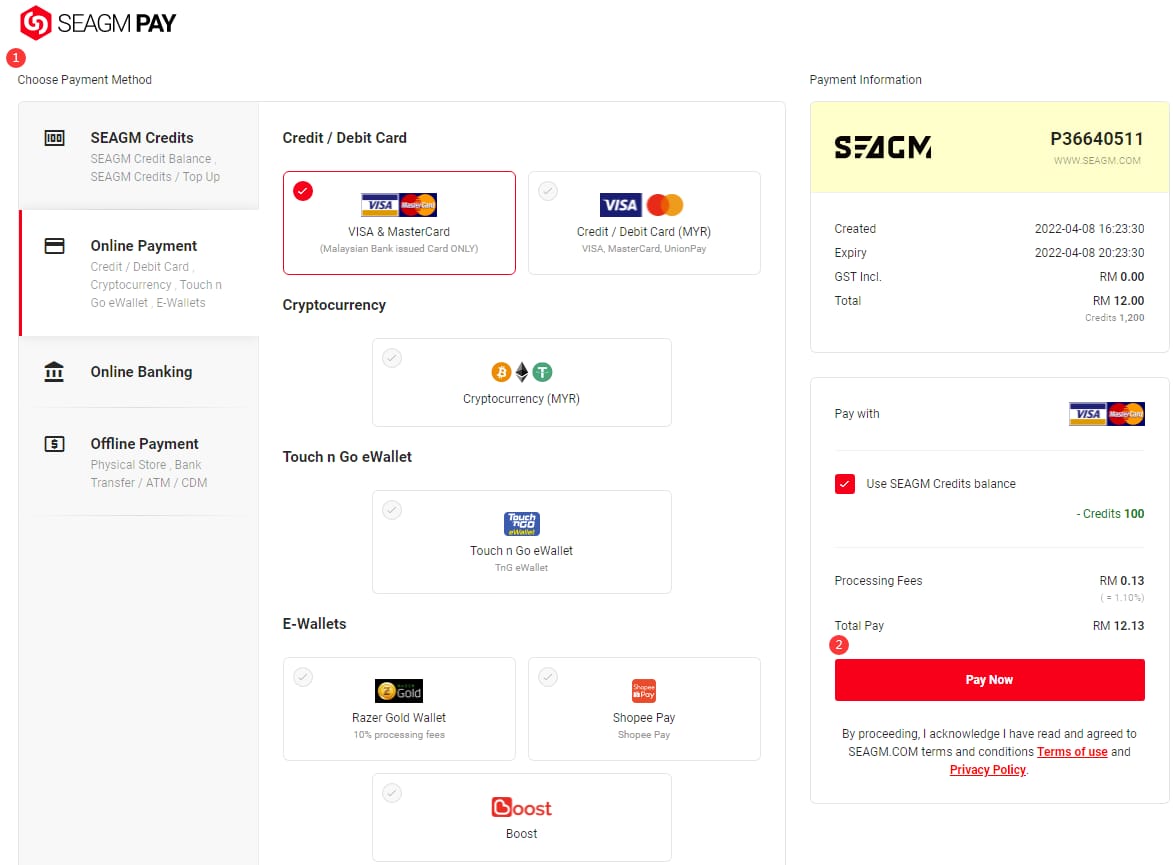
A typical crypto checkout will present a wallet address, specify a supported network, and show a payment timer. Your job is to send the exact quoted amount of the correct token on the exact chain shown. That is the point where many buyers make avoidable mistakes.
The most common example is TRC20 vs ERC20 confusion. USDT exists on multiple networks. If a checkout expects one chain and you send on another, a successful blockchain transfer does not guarantee a successful top-up. The funds may leave your wallet while the order remains unpaid or unrecognized.
That is why the safest answer to Which USDT network is best for Lita? is not TRC20 or ERC20. It is: the one explicitly shown at checkout. If the page supports TRC20, use TRC20. If it supports ERC20, use ERC20. If the page is vague, that is a warning sign, not an invitation to guess.
A normal confirmation flow usually looks like this in real life: you create the order, receive the payment details, send the transfer within the timer, wait for blockchain confirmation, and then the order moves into paid or processing status before the coins are delivered. If everything matches, this can be quick. If anything does not match, the order may stall even though the transfer itself is visible on-chain.
That is also why proof matters from the start. Save the order page, the amount shown, the network shown, and the wallet confirmation screen before you close anything.
Is USDT better than cards, app billing, prepaid methods, or Binance Pay?
For most first-time buyers, no. For some experienced no-card buyers, yes.
The official web top-up route is still the strongest default because it sits inside the official Lita environment and may offer up to 25% off compared with in-app purchases. If you have access to that route and a supported payment method, it is usually the cleanest choice.
App-store billing through the Apple App Store or Google Play is convenient, but convenience is not the same as value. The facts indicate the official top-up center can be cheaper than in-app purchase pricing, so app billing is best seen as the easiest route, not the smartest one for price-sensitive buyers.
Debit and credit cards remain simple when they work, but they are not useful to someone specifically searching for a no-card option. Prepaid cards can sometimes help, but acceptance is inconsistent enough that they feel more like a backup than a recommendation.
Regional e-wallets are often the strongest no-card alternative to crypto. If you are in a supported market and can use GCash, Touch 'n Go, GrabPay, or MoMo through an available checkout, that route is usually easier to track and less error-prone than a manual USDT transfer.
As for Binance Pay, the available facts do not support treating it as a standard Lita option. Current data says it is not directly supported for Lita, so buyers should not assume it will appear or work just because they prefer it. If a checkout offers standard crypto payment, treat it as a normal wallet transfer unless the page explicitly says otherwise.
In short, the buyer profiles break down like this:
Use official web checkout if you want the safest baseline and better value than app-store billing.
Use local e-wallets if you need no-card payment and your region supports them.
Use USDT if you lack those options and already understand wallet networks and transfer timing.
Avoid guessing with Binance Pay unless a checkout explicitly supports it.
If you are comparing routes more broadly, this is also where a separate look at Lita web checkout vs app purchase can save money, not just time.
Why do Lita USDT payments fail or stay pending?
Most failures come from a small set of repeat causes.
The first is wrong network selection. This is the classic TRC20-versus-ERC20 problem, but the broader issue is any chain mismatch between what the checkout expects and what the buyer sends.
The second is underpayment after fees. A buyer may think they sent the right amount, but the receiving side gets less because of withdrawal or transfer deductions. Crypto systems are often strict about exact amounts.
The third is an expired quote or payment window. If the order was created at one amount and paid after the timer ended, the system may not match the transfer cleanly.
The fourth is an unsupported token or unsupported chain. USDT is not enough by itself if the checkout only recognizes a specific version of it.
The fifth is account mismatch. If the wrong Lita User ID was entered, the payment may process but the coins may not reach the intended account.
The sixth is region or checkout mismatch. Some payment methods are tied to specific markets or checkout versions. A route that works in one region may not be available or stable in another.
There is also a softer issue that causes confusion: blockchain confirmation delay. The facts note that general crypto delays can happen from low fees or network conditions. That does not always mean the order is broken; sometimes it means the order is waiting for the transfer to become final enough for the seller’s system to recognize it.
The fastest support resolutions usually happen when the buyer sends a complete proof bundle immediately instead of opening with I paid, where are my coins? That is not about being formal. It is about giving support the exact data needed to match your payment to your order.
What should you do if the coins do not arrive?

Start with a quick diagnosis before contacting support.
Check whether the transfer was actually completed on-chain. Then compare the transaction details against the order details: same amount, same token, same network, same timing, same intended Lita User ID. If one of those does not match, you already know the likely cause.
If the transfer appears successful and the order still has not completed after the normal delivery window, gather your evidence before opening a ticket. The most useful bundle includes:
Order ID
Lita User ID
Paid amount
Network used
Transaction hash
Timestamp
Screenshots of the checkout page
Screenshots of wallet confirmation
Any available receipt or invoice record from the checkout
This is the same logic behind a dedicated guide to Lita Coins not received after payment and How to get a Lita receipt or invoice: support works faster when your proof is complete.
If you used the official route, escalate through the official Lita help center or official support path connected to the order. If you used a third-party checkout, use that seller’s official support channel for the order first, while keeping your blockchain proof ready. In either case, avoid rewriting the story each time. Send one clean summary with the order ID and transaction hash together.
That pairing matters more than buyers realize. The order ID tells support what the platform expected. The transaction hash tells support what the blockchain received. When both are present, the gap is easier to investigate.
Final verdict: which route should most buyers choose?
For a first-time buyer who simply wants Lita Coins without using a credit card, I would usually choose the official Lita web top-up first, or a regional e-wallet option if one is clearly supported and available. Those routes are easier to understand, easier to track, and less exposed to irreversible user error.
For an experienced crypto user who has no local wallet access and is comfortable checking chain details, USDT can be a practical no-card route. But it is only a good choice when the checkout clearly supports it and you are willing to verify every detail before sending.
For buyers who care most about cleaner receipts, simpler support, and fewer edge cases, crypto is rarely the first recommendation. It is the fallback for people who need flexibility, not the universal best option.
The buyer memo is straightforward:
Choose USDT if you are comfortable with wallets and have no better no-card option.
Choose another route if a local e-wallet or official web checkout is available.
Wait and verify first if the page is unclear about network, amount, timer, or account details.
If you want a simpler Lita top-up flow, check VGTopup for the available payment route, confirm your account details carefully, and keep your order proof until the coins arrive.