
If your Saada Top Up Not Credited After Payment issue just happened, the safest move is to stop and verify what actually failed. A deducted amount does not always mean the order was fully captured, and a successful payment screen does not guarantee the credits reached the Saada account you are currently viewing. In practice, most cases fall into four buckets: the payment failed after authorization, the order is still pending review, delivery is delayed, or the top-up went to the wrong account or login profile.
Why is my Saada top up not credited after payment?
The short answer is that payment, order creation, and credit delivery are not the same step.
That distinction matters because users often see only the payment side. A bank, card, Apple Pay, or Google Pay flow can show a charge or authorization first. The merchant order may still be processing, under review, or never fully created. From reviewing digital top-up complaints, this is one of the most common reasons people believe the transaction succeeded when the merchant side is still unresolved.
A useful way to think about the problem is to separate it into four likely states:
Failed payment or failed capture: money appears deducted, but the order was not finalized
Pending review or processing: the order exists, but delivery is paused
Successful payment with delayed delivery: the order is real, but credits have not posted yet
Wrong-account delivery: the credits were sent, but not to the Saada account or profile you expected
The purchase path also changes the diagnosis. In-app billing, web checkout, card payments, bank transfer flows, and wallet-based payments can all fail in slightly different ways. App-store purchases may sit in a pending state. Bank transfer and reconciliation flows can take longer than card authorizations. A 3-D Secure step can appear complete to the user even if the callback to the merchant never finishes cleanly.
If you already suspect this is really a broader delivery issue rather than a payment issue, the Saada top up not received page may help you narrow that down faster.
Start with diagnosis, not another payment

When users panic and pay again, they often turn one unclear transaction into two. That creates duplicate payment checks, refund delays, and support confusion. The better approach is to identify where the failure sits: payment side, merchant order side, or Saada account side.
First, compare the wording you see across every screen available to you. Your bank or wallet may say charged. The order page may say pending, processing, completed, reversed, or refunded. An app-store flow may show pending even when the card side looks fine. Those labels are not interchangeable.
Then verify the account details used at checkout. This is where many missing credit cases are solved. Users may pay while logged in with one phone number, then open the app under an older email login and assume nothing arrived. The same confusion can happen with UID entry, bound-account mismatches, or web checkout versus app login differences. Cross-platform purchases are especially prone to this.
A practical first-screen diagnosis looks like this in plain English:
If you have a charge but no visible order at all, the payment may have authorized without a clean order being created. If you have an order marked pending or processing, the issue is usually review, reconciliation, or a temporary technical hold. If the order says completed but your Saada balance, credits, coins, or premium entitlement are still missing, check for a wrong account or login mismatch before assuming the payment failed. If you used bank transfer, Raast, or IBFT-style funding, allow for reconciliation delay before escalating.
Official SadaPay-related guidance supports this cautious approach. Mobile top-ups are described as instant for GSM networks, but official support also tells users to report deducted-but-unsuccessful top-ups through in-app chat. That tells you something important: instant is the intended experience, not proof that every transaction settles instantly in real-world conditions.
What evidence should you collect before contacting support?
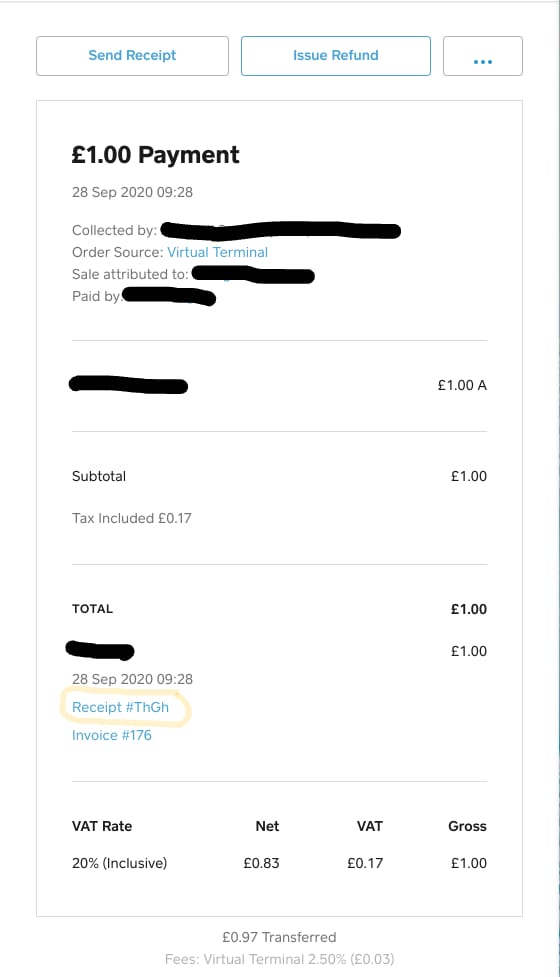
Support moves faster when you send one complete, traceable report instead of a vague money deducted, no credits message.
The minimum proof set should include your order ID, transaction ID or payment reference, amount, date and exact time, payment method, and the exact account identifier used at checkout. Depending on the flow, that identifier may be a phone number, email, UID, or another bound account detail. You should also note whether the purchase was made on web checkout, in-app, through Apple App Store, through Google Play, or through another payment route.
For SadaPay-linked complaints, official dispute details include your name, SadaPay account number, contact information, and transaction details. Official guidance also specifies amount, time, date, and recipient details for transaction disputes. That means a strong report should not just prove you paid; it should prove where the payment was supposed to go.
Screenshots help most when they show both sides of the mismatch:
the payment success, deduction, or authorization screen
the order status page
the Saada account or balance screen showing no credits
the account identifier visible in the app or checkout flow
the timestamp and amount
Keep sensitive information masked where possible. Full card numbers and security codes should never be visible. But do not hide the details support actually needs to trace the case, such as the last digits of the payment source if shown, the timestamp, the amount, and the order or transaction reference.
If you need a related walkthrough, the Saada receipt and order ID guide is the kind of resource worth checking before you open a ticket, because missing references are one of the biggest causes of support back-and-forth.
What usually causes a Saada payment to look successful but not arrive?
The most frustrating cases are the ones where everything appears normal until the credits fail to show up. In practice, several failure points can produce that exact experience.
One common issue is authorization without capture. Your card or wallet may reserve the amount immediately, so it looks like a successful payment. But if the merchant never captures the payment, the order may fail or disappear. This is why charged and completed are not always the same thing.
Another frequent cause is a 3-D Secure completion problem. The verification step may appear to pass, but if the browser closes, the app refreshes, or the return path to the merchant breaks, the user sees success while the order remains incomplete. This is especially easy to misread on mobile.
There are also pending review states. Anti-fraud checks, payment review, and technical interruptions can hold an order after payment starts. Community reports around SadaPay-style payment issues mention delays during outages or maintenance, with some transfers reflecting later rather than instantly. Those reports are not a universal guarantee, but they do explain why a top-up can be delayed even when the payment side looks finished.
For bank transfer routes, the issue is often reconciliation. SadaPay officially supports balance top-up via bank transfer, Raast, and IBFT. Those methods can require matching references and banking-cycle confirmation before funds reflect. Community reports suggest some transfers may reflect within 48 hours in certain cases, which is a reasonable cautionary window when the payment rail itself is slower.
Finally, there is the wrong-account problem, which is less dramatic but very common. A top-up can be delivered correctly to an older phone-number login, a different email profile, or a mistyped UID. In those cases, the payment did work; the user is simply checking the wrong destination.
How long should you wait before escalating?
There is no single universal timer for every payment method, but there is a sensible escalation pattern.
If the order is clearly pending or processing, wait through the normal delivery window shown in the order flow if one exists. If the payment was made through a bank transfer or similar route, allow extra time for reconciliation. If there is a known outage, maintenance issue, or app instability, a short delay is more plausible than usual. Community reports also note that technical issues and app downtime can affect transfers and top-ups.
But there is a point where waiting stops being useful.
You should escalate immediately if the order says completed and the credits are still missing after you have verified the correct account. You should also escalate quickly if you suspect a wrong account top-up, because reversals become harder once value has been delivered. Community reports around wrong transfers suggest reversals can take a minimum of 15 days via support, which is not an official promise but does show why speed matters.
For deducted-but-unsuccessful mobile top-ups, official guidance is clear: report the dispute through in-app chat. Official support channels listed in the facts are in-app live chat and hello@sadapay.pk, and there is no phone support. If the issue remains unresolved, there is also an official complaint resolution process with a State Bank escalation path.
A good rule is simple: wait briefly for a pending order, but do not wait passively once the evidence points to a completed order with no delivery or a wrong-recipient case.
Refund or redelivery: what should you expect?
Users often want a yes-or-no answer here, but the outcome depends on where the transaction failed.
If the payment was only authorized and never captured, the most likely outcome is an automatic reversal rather than manual redelivery. If the merchant order failed before delivery, a refund or reversal is usually more logical than trying to force credits through. If the order was completed to the wrong account, support may need to review manually, and reversal may be limited or slow. If you created duplicate payments by retrying, one transaction may complete while the other remains pending or requires dispute handling.
What you should not do while waiting is just as important. Do not keep retrying the same purchase. Do not open multiple tickets for the same transaction unless support specifically tells you to. And do not assume a visible deduction means the case is already settled. Repeated failed or declined attempts can create additional account problems; official guidance also warns users to avoid multiple declines to prevent restrictions or suspension.
If your issue is specifically a pending deduction, the more focused Saada payment pending but money deducted guide may be the better next step.
If you paid the wrong account, what now?

Wrong-account top-ups are among the hardest cases because the payment itself may be valid. The real dispute is about destination.
Start by checking every possible login method tied to your Saada use: phone number, email, UID, and any bound account you may have used previously. If you bought on web checkout, make sure you are checking the same profile in the app. This sounds obvious, but it is one of the most common causes of payment successful but no credits complaints.
If you confirm the top-up went to the wrong account, contact support immediately and provide the sender details, recipient details if known, and the exact identifier entered at checkout. Community guidance around wrong transfers suggests support may need sender account details to attempt a reversal. That does not guarantee recovery, but delay only makes the case harder.
For future purchases, prevention is much easier than recovery. First-time users, cross-border users, and anyone switching between web checkout and app billing should slow down at the confirmation screen. Verify the account identifier, save the receipt before closing the page, and avoid changing login methods mid-purchase. For larger purchases, that extra minute is worth more than any later support ticket.
The clean escalation path
When you are ready to escalate, contact the party that can actually see the failed step.
If the deduction happened inside a SadaPay-linked flow, start with in-app chat. If you need a formal written trail, use hello@sadapay.pk. Include your name, SadaPay account number, contact information, amount, date, time, transaction details, and screenshots. If the case is unresolved after normal support handling, use the official complaint process and State Bank escalation route.
A short message works better than a long emotional one. Something like this is enough:
Payment was deducted but my Saada top-up was not credited.
Order ID:
Payment reference / transaction ID:
Amount:
Date and time:
Account identifier used at checkout:
Payment method:
Current order status shown:
Attached screenshots: payment receipt, order page, account/balance screen.
That format gives support what they need to trace the payment side, the order side, and the account side without guessing.
Before you buy again, make sure the first transaction is clearly resolved. If it failed, confirm that it failed. If it is pending, let it settle or escalate. If it completed, verify the exact account before assuming the credits vanished. That one habit prevents most repeat cases of Saada Top Up Not Credited After Payment.