
Yes, you can often top up Honkai: Star Rail using UID only, and users commonly treat that as safe because a UID is publicly visible and doesn’t expose your password. But safety depends on four checks before payment: the exact UID, the correct server, the right item, and a seller with clear order tracking and support.
The real failure points aren’t mysterious. They’re usually wrong-account delivery, server or region mismatch, anti-fraud payment review, or using a site that asks for more than it should. If you want a Honkai: Star Rail UID top up safe flow, verify first and pay second.
Why do some Honkai: Star Rail top-ups only ask for a UID?
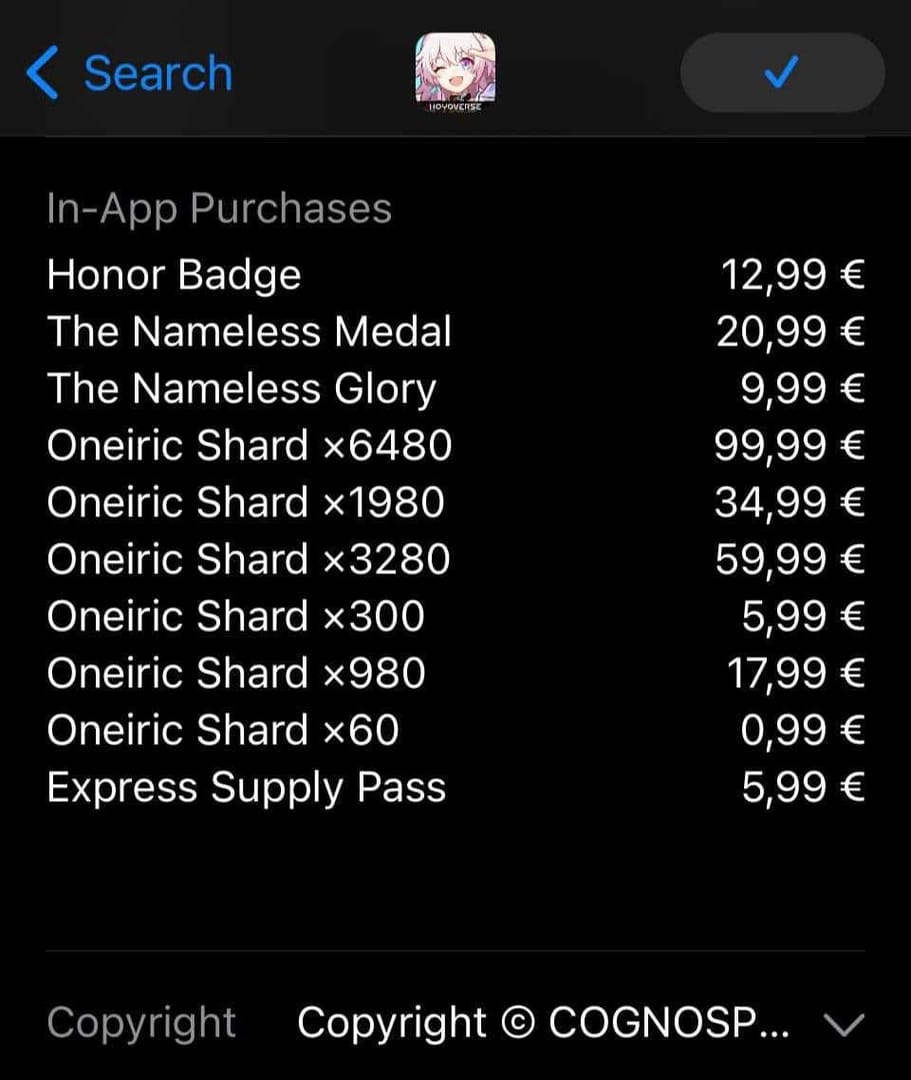
Because UID-only recharge is a common third-party fulfillment method that uses your account identifier, not your login. Community reports consistently describe this as legitimate for products like Oneiric Shards, Express Supply Pass, and sometimes Nameless Honor, depending on provider support and region.
What the UID confirms:
It identifies the account and server
It lets the seller target the correct game profile
It works across platforms if the same UID is tied to your account
What it does not confirm:
Account ownership
Your password
Whether you selected the correct server manually
That last point matters more than many guides admit. From reviewing failed recharge cases, the most common preventable mistake isn’t payment failure. It’s entering the correct 9-digit UID with the wrong server selection.
A normal UID-only checkout asks for:
UID
Server/region
Product choice
Payment method
A red flag is any UID top-up flow that also pressures you to share login credentials. Reddit and broader community consensus are pretty clear here: UID-only is widely accepted; login-sharing is where scam risk jumps.
Why is entering the correct server and region just as important as the UID?
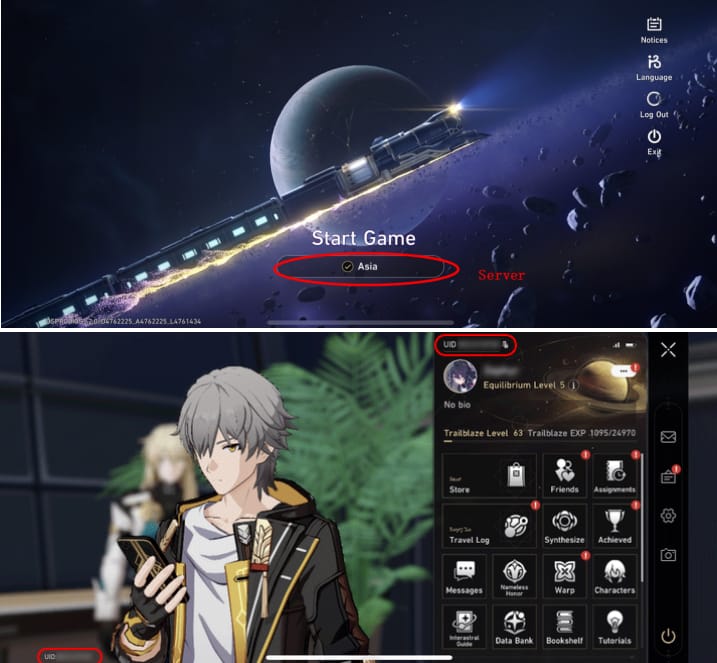
Because the UID alone doesn’t save you from a server mismatch. Community data says the first UID digit maps to server: 6 = America, 7 = Europe, 8 = Asia. If that prefix and your selected server don’t match, the order can fail with a UID not processed error or go into manual review.
Here’s the quick check:
And there’s a second layer: account region. Users commonly report that cross-border or restricted-region top-ups can trigger region-lock errors even when the UID format looks right. VPN use makes this worse; community experience says it increases rejection risk because payment systems and seller tools detect region inconsistencies.
One useful detail many articles miss: a successful bank charge does not always mean the order cleared verification. Anti-fraud checks can still hold the order, especially on bulk purchases or unusual payment patterns. Honestly, that’s the frustrating part—money leaves your account, but fulfillment stalls.
For safer buying, I’d personally prefer a checkout path with clear order status and support evidence over chasing the absolute lowest price. Discounts can be real—community pricing examples show 8080 Oneiric Shards at $73 on third-party checkout versus $99.99 officially, and 1980 Shards around $28—but the cheapest option is not automatically the safest. Some users also report select discounts up to 50%, though availability varies by provider and event.
If you’re comparing options for a Honkai: Star Rail safe third party recharge, check whether the site clearly explains supported servers, delivery expectations, and dispute handling before you pay.
What top-up items can you usually buy with UID only?
Usually Oneiric Shards are the most straightforward UID-based product, and Express Supply Pass is also commonly supported. Community reports also mention Nameless Honor, but product availability varies by provider and region, so don’t assume every item is offered everywhere.
Typical support looks like this:
Oneiric Shards are the cleanest option because they’re official premium currency. First-time top-up bonus resets are event-based and have reset roughly annually in some cycles, such as Version 3.2 in April 2025, so value can change depending on timing.
How to safely top up Honkai: Star Rail using UID only step by step?
Use a strict verification routine before payment. Across digital top-up flows, UID-only purchases are safer than login-sharing, but they demand more manual checking from you.
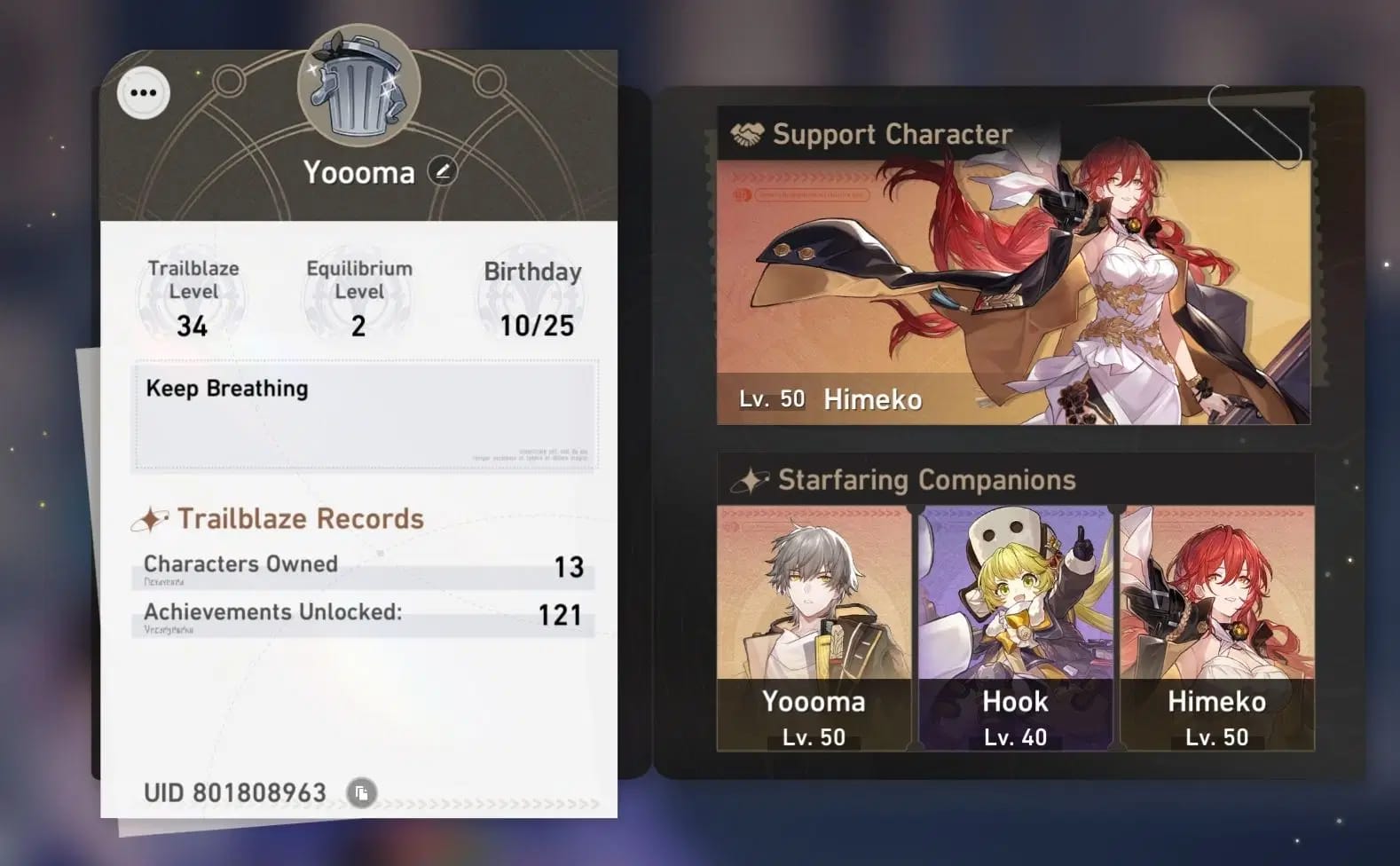
Copy the UID from the game profile
Open your profile and copy the UID shown at the bottom-left.
Honkai: Star Rail UIDs are 9 digits.
Don’t type it from memory. Copy-paste if possible.
Confirm the server from the first digit
6 = America
7 = Europe
8 = Asia
Match this to the server you select at checkout.
Confirm the recipient
If you’re topping up for a friend, ask them to send a screenshot of the UID and server.
I would check this first before discussing pack size or discounts. Wrong UID has no easy reversal.
Choose the item carefully
Oneiric Shards: best for direct premium currency
Express Supply Pass: common UID option
Nameless Honor: only if the seller explicitly supports it for your region
Pick a payment method with usable proof
Common methods reported: credit/debit card, Apple Pay, Google Pay, and on some sites crypto
If using crypto or USDT on a new site, test a small amount first
Review every checkout field before confirming
UID
Server
Item
Price
Payment method
Recipient/account confirmation if shown
Save proof immediately
Order ID
Payment receipt
Entered UID
Timestamp
That proof bundle is what speeds up support. In checkout troubleshooting, the fastest resolutions usually happen when the buyer already has the order ID, receipt, entered UID, and purchase time ready.
What should you do if your Honkai: Star Rail top-up is delayed, failed, or sent to the wrong UID?
Start with the seller if it was a UID-only third-party order. Officially, HoYoverse support handles official purchases, while seller support is the first contact for third-party fulfillment issues.
Use this sequence:
Wait a realistic window
Most UID top-ups are reported to arrive in under 5 minutes
But community experience says 10 minutes to 1 hour can happen depending on provider and payment method
Check the game properly
Relog
Check in-game mail
Confirm the item type you bought
Check payment status
If the bank charged you but the order is pending, it may be anti-fraud review
Payment failures are commonly linked to authorization flags; retrying or contacting the payment provider can help
Contact the seller with full proof
Order ID
Payment receipt
UID entered
Timestamp
Screenshot of the error or missing delivery
If the UID was wrong, act immediately
Contact the seller at once with proof
Community reports are blunt here: wrong UID can send items to the wrong account, and HoYoverse does not automatically reverse that
Contact HoYoverse only when appropriate
For official purchases, the official help center may ask for game/UID, purchase channel, order number, and payment time in UTC+8
For unauthorized third-party issues, official support may reject the case
Here’s the support split:
Can you top up Honkai: Star Rail with UID only?
Yes. Community experience widely supports UID-only top-ups for official currency and pass products, and no ban pattern is commonly reported when the recharge uses normal official items rather than account-sharing tricks.
Is it safe to recharge Honkai: Star Rail without logging in?
Usually yes, and safer than sharing your account password. A UID is public and doesn’t grant account access, but you still need to avoid fake sites and verify HTTPS, reviews, and support clarity.
How do I find my Honkai: Star Rail UID and server?
Open your in-game profile and check the bottom-left corner for the 9-digit UID. The first digit shows the server: 6 America, 7 Europe, 8 Asia.
What happens if I enter the wrong UID for a Honkai: Star Rail top-up?
The recharge can go to the wrong account, and that’s the hardest mistake to fix. Contact the seller immediately with your order ID, receipt, entered UID, and purchase time; don’t expect HoYoverse to reverse it automatically.
Why has my Honkai: Star Rail top-up not arrived yet?
Most orders arrive fast, but delays of 10 to 30 minutes—and sometimes up to an hour—are widely reported. Relog, check mail, then contact seller support if the order still hasn’t landed.
Can I top up Honkai: Star Rail for someone in another region?
Sometimes, yes, but region mismatch is a common failure point. Check the UID prefix, the account’s actual server, and whether the seller supports that region before paying.
Do I need the account password to recharge Honkai: Star Rail?
No, not for a normal UID-only recharge. If a seller asks for your HoYoverse login for a basic top-up, I would avoid that route.
How long does a UID-only Honkai: Star Rail recharge take?
Often under 5 minutes, based on reported platform performance. Still, payment method, anti-fraud review, and provider workflow can stretch that to 10 minutes or even 1 hour.
Safe UID-only top-ups for Honkai: Star Rail are real, but only when you treat UID, server, and region as a matched set. Double-check the 9-digit UID, confirm the first-digit server code, choose a supported item, and save your order proof before you pay. If anything goes wrong, contact the seller first for third-party orders and use official support only for official purchases.