
If your Honkai: Star Rail top up was not received after payment, don't pay again immediately. Most cases are a delay, a pending app-store/card verification, or an account mismatch involving UID, server, region, or platform—not a permanently lost order.
Check whether the payment actually settled, restart the game, relog, and trigger the purchase flow again without completing a new payment. If the Oneiric Shards still don't appear after the normal window—about 30 minutes to 24 hours depending on the payment channel—contact the seller or official support with your order ID, transaction ID, UID, server, screenshots, timestamp, amount, and platform.
Why is my Honkai: Star Rail top up not showing after payment?
The usual reason is that the payment was authorized or captured, but the delivery step didn't finish yet. Officially, delivery is usually instant, but Google Play and Apple App Store processing can delay fulfillment. Users also commonly report bank anti-fraud checks and app-store pending states that make a charge appear deducted before the order is fully settled.
From reviewing failed recharge cases, this is the mistake people make most: they treat a bank notification as proof of completed delivery. It isn't. A successful bank charge does not always mean the order has cleared verification and been credited to your game account.
Common causes:
If you're comparing recovery options for a Honkai: Star Rail top up not received, I would check payment status before anything else. That's the fastest way to separate a delay from a real fulfillment problem.
Can a wrong UID, server, or platform really cause a missing top up?
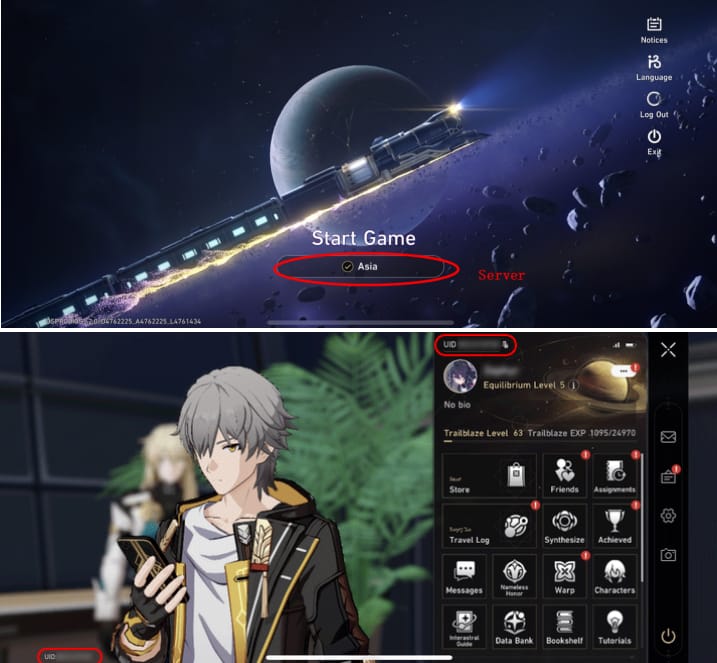
Yes. Wrong account details are one of the most common reasons a paid order doesn't show where you expect it. Community reports repeatedly point to wrong UID, wrong server, wrong region, or using a different platform/account than the one that made the purchase.
Officially, the top-up must use the same login account as the game account, and platform verification matters. A widely observed edge case: cross-platform visibility can be restricted, with iOS top-ups only visible on iOS in some cases. Server matters too—Honkai: Star Rail accounts are split across America, Europe, Asia, and TW/HK/MO.
I would check these first:
UID: found on the main game screen after entering the game
Server: America, Europe, Asia, or TW/HK/MO
Login account: the exact HoYoverse/game account used
Platform: iOS, Android, or the same platform used for payment
Region: some users report region-locked payment behavior
And one lesser-known issue competitors often miss: device or platform registration mismatches can block clean delivery. If the purchase was made on a different registered device or ecosystem, the credit may not appear until you open the game on that same platform.
How long should you wait before treating a Honkai: Star Rail top up as missing?
Wait at least 30 minutes after a completed transaction, and up to 24 hours if the payment channel shows processing. Official guidance and user reports line up here: most top-ups are instant, but app stores, card issuers, and anti-fraud checks can delay crediting.
Use this timeline:
Honestly, delayed delivery is frustrating when the payment already left your account. But in my experience reviewing recharge issues, waiting the right amount of time prevents the bigger problem: duplicate charges from impatient retries.
How do you fix a Honkai: Star Rail top up not received after payment step by step?
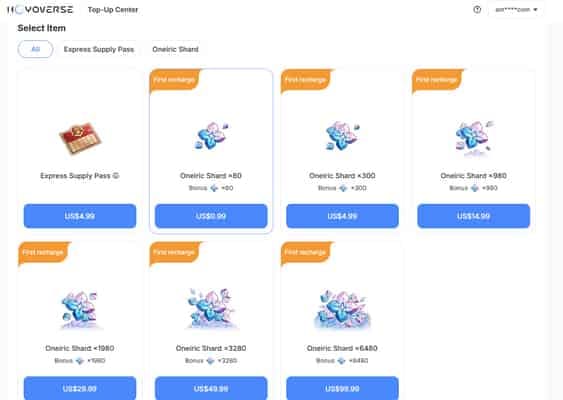
Follow the official recovery path in order. Don't skip to refund or chargeback unless fulfillment clearly failed.
Check whether the payment is completed or still pending.
Open your Apple App Store or Google Play purchase history and your bank/card history. Look for pending, processing, authorized, auto-reversed, or settled status. If it's pending, wait; if it's reversed, the order likely never completed.Confirm the exact receiving account details.
Verify your UID, server, region, platform, and the login account used for the purchase. If any of these are wrong, delivery can fail or go to the wrong place.Restart the game and relog.
Officially, restarting the game can refresh the Oneiric Shards balance. Then log out and log back in.Trigger the purchase activation without paying again.
This is an official fix many generic guides miss. Start the purchase process again on the same platform and same account, but do not complete a new payment. HoYoverse notes that this can trigger delivery when the purchase wasn't properly activated.Check the balance and mailbox again.
Recheck your Oneiric Shards and any in-game delivery notices after relogging and re-entering the purchase flow.Compare receipt details with the intended account.
Match the receipt amount, timestamp, platform, and account details against the account that should receive the top-up. This catches wrong-account and wrong-platform mistakes fast.Only then contact support or the payment channel.
If the order came from the official top-up site, use the official payment page at hsr.hoyoverse.com/payment and the HoYoverse Help Center at support.hoyoverse.com. Officially, if items were not received from an authorized channel, you should also contact that payment channel directly.
If you're troubleshooting a Honkai: Star Rail recharge payment failed or a charge that looks successful but isn't credited, the same rule applies: verify status first, then refresh, then escalate. Personally, I would avoid any rapid repeat payment until I know whether the first order settled.
What should you prepare before contacting support about a missing Honkai: Star Rail purchase?
Prepare a clean proof bundle. This is what speeds up support the most.
Officially, you should include:
Order ID
Transaction ID
UID
Server
Screenshots
Payment timestamp
Amount paid
Platform used
Best places to contact:
When writing the report, keep it tight:
**Payment completed on [platform] at [time]
**UID [number], server [region]
**Order shows [settled/pending]
Restarted, relogged, re-entered purchase flow, still no Oneiric Shards
That format helps support trace the order faster than a long complaint paragraph.
FAQ
Why is my Honkai: Star Rail top up not showing after payment?
Usually because the payment is still pending, the purchase wasn't activated, or the account details don't match. Check settlement status, then restart, relog, and verify UID/server/platform before escalating.
How long does Honkai: Star Rail top up take to arrive?
Usually it's instant. If Apple, Google Play, or your card issuer is still processing the order, delays of 30 minutes to 24 hours are widely reported.
What should I do if I was charged but did not receive the top up?
First, don't pay again. Check purchase history, restart the game, relog, trigger the purchase flow again without completing a new payment, then contact support with your receipt and account details if nothing changes.
Can a wrong UID or server cause a missing Honkai: Star Rail top up?
Yes. Wrong UID, wrong server, wrong login account, wrong platform, or region mismatch are common causes of non-delivery or delivery to the wrong place.
How do I check whether my Honkai: Star Rail payment is still pending?
Check Apple App Store or Google Play purchase history and your bank/card status. If it shows pending, processing, authorized, or auto-reversed rather than settled, the order hasn't fully cleared yet.
Who should I contact for a missing Honkai: Star Rail purchase?
Start with the official HoYoverse Help Center or the payment support email. If the payment channel itself shows a pending or abnormal transaction, contact Apple, Google Play, or your bank as well.
Can I get a refund if my Honkai: Star Rail top up never arrives?
Yes, but only after you've confirmed the order didn't fulfill. If the payment remains unresolved after the normal delay window and support can't deliver it, request a refund or charge investigation through the payment channel; be careful with wrong-account cases, because forced reversals can create account issues such as negative balance or even bans.
If your Honkai: Star Rail top up wasn't received after payment, the safest path is simple: verify settlement, confirm UID/server/platform, refresh the game, and trigger the purchase flow again without repaying. Wait 30 minutes to 24 hours depending on the payment channel, then escalate with full proof. Final recommendation: don't stack new payments on top of an unresolved order. That causes more problems than it solves.