
If your Bigo Live Diamonds payment failed, don't keep retrying right away. First confirm whether the payment was declined, is still pending, or was charged without delivery, then verify your Bigo ID, payment method, and region before trying again. That order matters because duplicate retries are one of the most common ways users turn a simple payment error into a bigger mess.
In failed recharge cases I review, the fastest fixes are usually basic but specific: refresh Me > Wallet > History, check that your balance covers the purchase plus possible 1-3% fees, and make sure 3D Secure or OTP approval actually completed. If you need a clean retry path, this guide covers the safest Bigo Live Diamonds payment failed fix without risking duplicate charges.
Why did my Bigo Live Diamonds payment fail?
The usual causes are bank declines, insufficient funds, 3D Secure failure, app store billing issues, region mismatch, or anti-fraud review.
Here’s the practical breakdown:
Users commonly report issuer fraud filters on entertainment apps. In plain terms, your bank may block Bigo even when your card is fine. Personally, I would check this early if the card works elsewhere but fails only on Bigo.
Another overlooked issue is prepaid cards. They often fail because of authorization limits or poor international support. And if you're buying through Google Play or the App Store, the failure may be on the store layer, not Bigo itself. That's why switching to the official recharge site often works when in-app billing doesn't.
Why were my Bigo Live Diamonds not received even though payment went through?
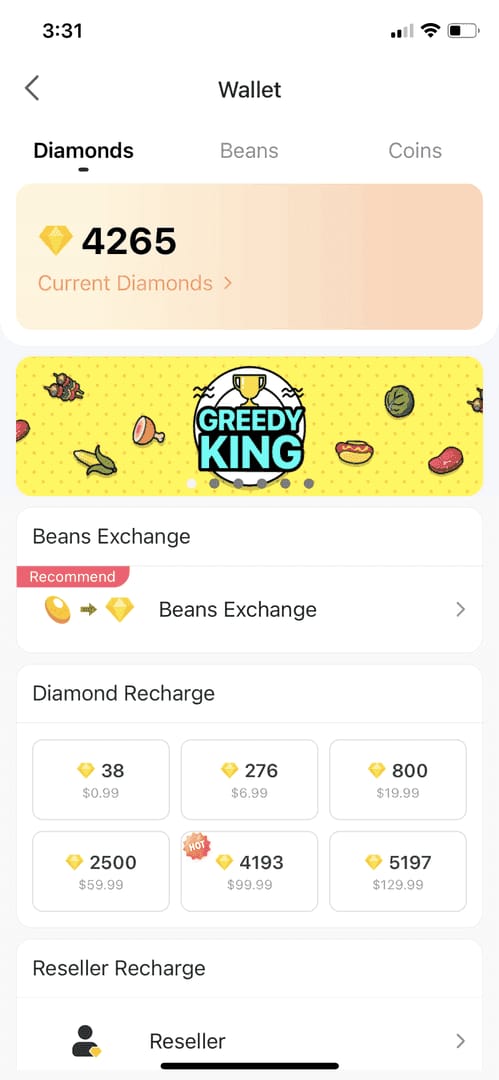
Because a successful charge doesn't always mean the order has fully cleared verification or synced to your wallet yet.
This is where many guides get sloppy. You need to separate three different states:
The fastest check is simple: look at your bank or PayPal statement, then refresh Me > Wallet > History by pulling down for 5-10 minutes. Community data says 68% of pending payments clear this way, and 80% of pending diamond transactions resolve within 48 hours without intervention.
Honestly, delayed delivery is frustrating when the payment already left your account. But don't assume it's lost. Delayed top-ups can take 24-72 hours for sync, and larger purchases on new accounts can trigger security review. Users also report freezes on buys above $50 on newer accounts, with diamonds unfreezing in 7-14 working days after review.
If you're dealing with a deducted payment and no delivery, this is the right moment to read a focused Bigo Live Diamonds top up not received path instead of guessing and paying again.
Can account region mismatch really cause Bigo Live payment failure?
Yes. Region support is a confirmed failure point, and it's one of the most missed checks.
Bigo payments depend on account region and payment-method support lining up. A mismatch can block cards, wallets, or gift cards, and error 4301 is specifically tied to region mismatch on gift cards. VPN use can also trigger security alerts that stop recharges.
From comparing checkout paths, this is where users get trapped:
The account is registered in one region
The payment method is issued in another
The app store country is set differently again
That three-layer mismatch is why a card may fail in-app but work on web, or why a gift card won't redeem even though the code is valid. I would verify your Bigo ID and account region before using any third-party recharge, because the payment page often doesn't explain this clearly.
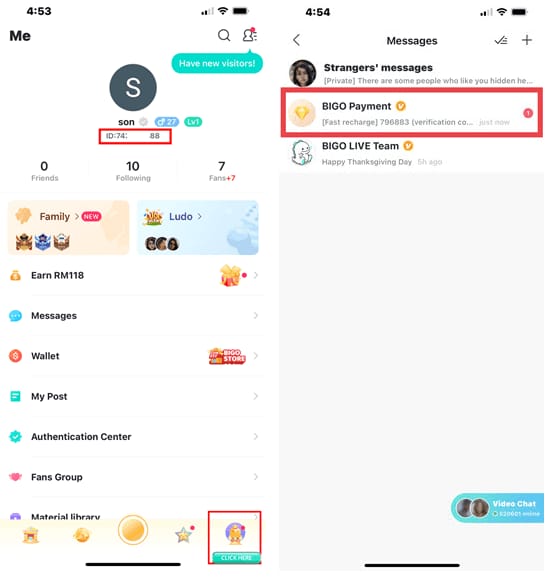
Officially, your Bigo ID is the 7-10 digit number under the Me tab. Use that exact ID for recharges. Wrong ID entry is still one of the most common avoidable mistakes.
How can you fix a Bigo Live Diamonds payment failed error step by step?
Start by checking status before you submit another order. In my experience reviewing recharge issues, users retry too quickly and create duplicate-charge risk.
Check whether the first payment is failed, pending, or charged
Look at your bank, PayPal, Apple Pay, or Google Pay record.
Refresh Me > Wallet > History for 5-10 minutes.
Wait at least 10 minutes before assuming failure.
Verify your Bigo account details
Confirm you're logged into the correct Bigo account.
Check the 7-10 digit Bigo ID under Me.
Reconfirm package selection before paying again.
Check payment method readiness
Make sure funds cover the purchase plus 1-3% fees.
Re-enter CVV, expiry, and billing address.
Enable 3D Secure or OTP approval; check spam for codes.
If your bank blocked it, call and whitelist Bigo.
Fix app or device-side issues
Update the app.
Restart your phone.
Clear cache.
If Google Play or App Store billing keeps failing, use the official web recharge site instead.
Check region and security flags
Turn off any VPN.
Make sure your payment method is supported in your account region.
If you hit a freeze after a large first purchase, don't keep retrying.
Retry once, not repeatedly
Community experience shows 70-90% of recharge issues are fixed by ID verification, cache clearing, and enabling 3D Secure.
If the second attempt fails the same way, stop and escalate.
A useful small-package test can help. If your details were wrong, trying a low-value purchase first is safer than repeating a larger failed order.
What's the safest way to recharge Bigo Live Diamonds after a failed payment?
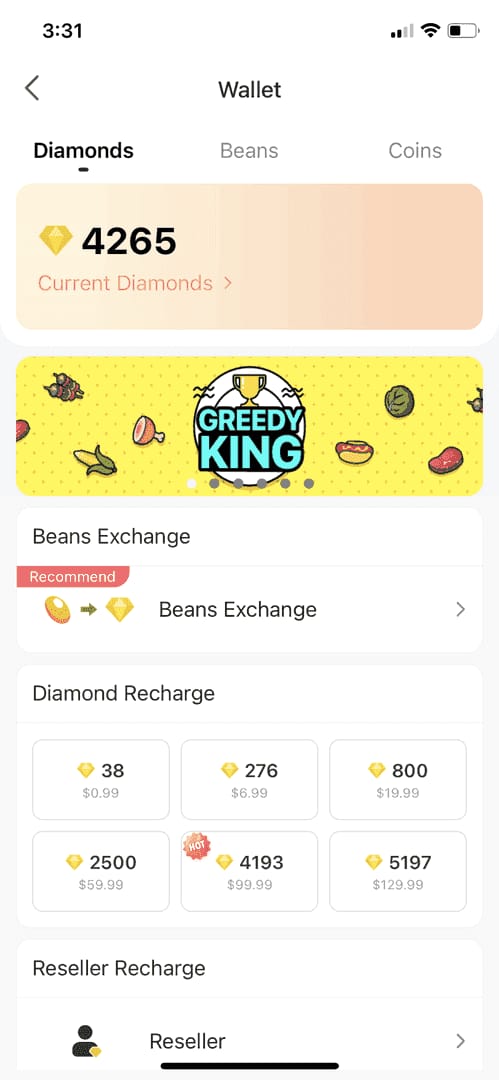
The safest route is official checkout first, then a trusted recharge channel only after you've identified the cause.
Officially, mobile.bigo.tv accepts Visa, Mastercard, and PayPal. On mobile, users also report Apple Pay on iOS and Google Pay on Android. If you don't have a credit card, PayPal and supported local wallets are usually easier than forcing a prepaid card that keeps failing.
Safe recharge checklist:
Use a trusted channel
Official: mobile.bigo.tv
Authorized options are commonly recommended by users
Avoid random off-platform links
Match the account correctly
Enter the exact Bigo ID
Confirm account region before payment
Don't use a VPN during checkout
Choose the right payment method
Best for clarity: PayPal or official card checkout
Best if in-app billing fails: web recharge
Best without card: PayPal, Apple Pay, Google Pay, supported local wallets
Crypto users: community reports gift-card routes exist, but there is no direct USDT payment in-app
Prefer trackable orders
I personally prefer methods with clear order history, even if they aren't always the cheapest.
A successful bank charge does not always mean the order has cleared verification.
Watch delivery timing
Third-party orders are commonly reported to process in about 3 minutes
Official and pending orders can still take up to 48 hours to settle
Users commonly report 30-60% savings on some trusted third-party recharges, and the cheapest observed rate in April 2026 was $0.0121 per diamond with bonuses. For comparison, a 1000-diamond web package was listed at $19.60, or about $0.0163 per diamond. Savings are real, but only if the account ID and region are correct. If you need a careful retry, VGTopup is one option to use only after you've confirmed those details.
What should you prepare before contacting support about a failed Bigo Live recharge?
Prepare your Bigo ID, order time, payment reference, screenshots, and receipt before you open a ticket.
This speeds things up more than long explanations. The best evidence set is:
Bigo ID
Payment timestamp
Order or transaction ID
Screenshot of the error
Screenshot of the deduction or receipt
Package selected
Whether the issue happened in-app or on web
Official support path: Me > Settings > Help & Feedback. Users also report support emails such as feedback@bigo.tv and cs_bigoamerica@bigo.tv. Live chat reportedly resolves 60% of issues in under 5 minutes.
Contact timing:
Within 10 minutes: refresh wallet and check payment status
Up to 48 hours: wait if charged but still pending
After 48 hours: contact Bigo support with proof
Bank-only decline with no order: contact your issuer first
App Store / Google Play billing issue: contact the store if the charge sits on their side
Remember the refund rule: officially, diamonds are non-refundable once credited. All sales are final after diamonds hit the account, with no cash exchange.
FAQ
Why did my Bigo Live Diamonds payment fail?
Usually because of issuer decline, low balance, failed 3D Secure, app store billing problems, or region mismatch. Wrong Bigo ID and VPN-triggered security checks also cause avoidable failures.
What should I do if Bigo Live charged me but I did not get Diamonds?
First refresh Me > Wallet > History and wait. Most pending cases clear within 48 hours; if not, contact support with your Bigo ID, receipt, and transaction ID.
How long does Bigo Live Diamonds delivery usually take?
Many successful orders arrive almost instantly, and third-party orders are commonly reported around 3 minutes. But delayed sync can take 24-72 hours, and pending transactions often resolve within 48 hours.
Can account region mismatch cause Bigo Live payment failure?
Yes. Region mismatch is a common cause, especially with gift cards, app-store billing, and cross-region payment methods. Error 4301 is tied to gift-card region mismatch.
Why is my card declined when buying Bigo Live Diamonds?
Banks often flag entertainment-app purchases as suspicious. Check available funds, enable 3D Secure, re-enter billing details, and call your bank to whitelist Bigo if needed.
Is it safe to retry a Bigo Live payment after a failed transaction?
Yes, but only after you confirm the first attempt truly failed. If the payment is pending or already charged, retrying too soon increases duplicate-charge risk.
Conclusion
If your Bigo Live Diamonds payment failed, the safest fix is to diagnose the status first: failed, pending, or charged without delivery. Then verify your Bigo ID, region, and payment authentication before retrying once through official or trusted checkout. My recommendation is simple: don't spam retries. Check the wallet, confirm the payment trail, and escalate with proof after 48 hours if the diamonds still haven't arrived.