
Most Yoho recharge myths fall apart under one rule: if an offer promises free coins, guaranteed refunds after delivery, or a shortcut around account checks, it's usually adding scam risk, not value. Officially, Yoho recharge works through YoHo ID verification, payment authorization, and coin delivery. That flow leaves very little room for generator tricks.
From reviewing recharge issue patterns, the safest move is simple: use the official Yoho site or a clearly UID-based checkout, verify your account details before paying, and keep your order proof. If you're comparing options, focus on Yoho coins safe top up paths that never ask for your password.
Why are free Yoho coins offers almost always fake or unsafe?
They’re fake because legitimate Yoho coin delivery requires account identification and payment verification. Officially, Yoho uses YoHo ID verification in its recharge flow: enter the YoHo ID, input the verification code, confirm, then pay. A random free generator can’t bypass that system.
Users commonly report three scam patterns:
Fake generator pages that mimic official branding
Free recharge apps that funnel you into payment scams
Voucher-code or survey offers that end in phishing or malware
One extracted data point is blunt: 97% of free coin generators steal data or install malware. Even if that exact figure varies by sample, the direction is clear and consistent across community reports: no legitimate external Yoho free coin tool exists.
What warning signs show a fake Yoho free coins offer?
The warning signs are usually obvious once you know the real flow. I would check these first:
Official Yoho pages are tied to yoho.media and the help center at yoho.media/en/help.html. If the domain is off by even one character, leave.
Why do Yoho chargebacks and payment reversals often fail after delivery?
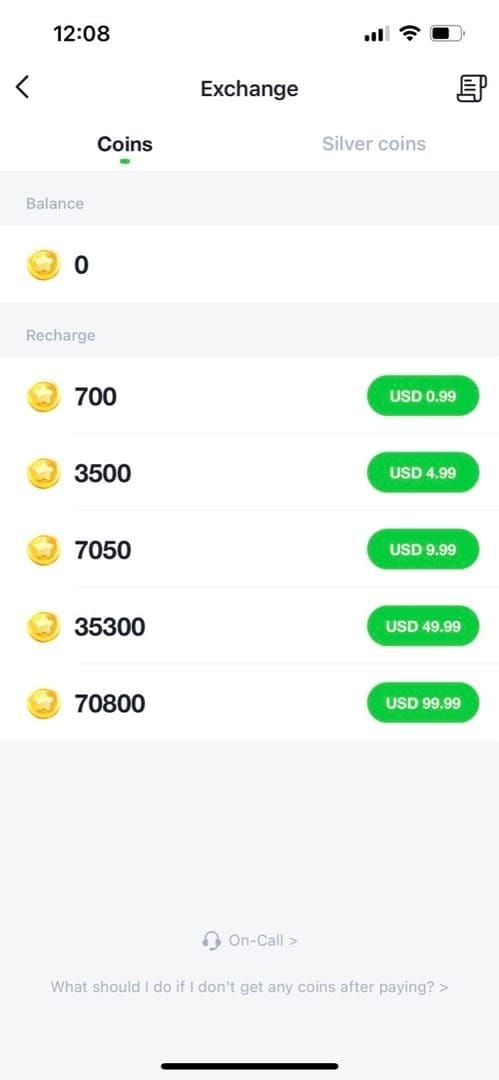
They often fail because digital top-ups are not treated like undelivered physical goods. Community patterns consistently show chargebacks are usually denied once Yoho credits were delivered, and especially once they were consumed.
That catches people off guard. A bank debit alert is not the same as a refund right. And a successful dispute is even less likely if the platform can show:
the account ID used
payment authorization completed
coins delivered to that account
some or all credits already spent
From comparing recharge dispute cases, the biggest misconception is this: If I paid by card or wallet, I can always reverse it. No. For digital goods, that assumption breaks fast.
What makes chargeback cases weaker in practice?
Three things usually hurt the case:
Credits were delivered
Community reports say digital goods chargebacks often fail after delivery.
Credits were consumed
Refund chances drop further once coins are used for gifts or room activity.
The buyer made the mistake
Wrong account, wrong region, or duplicate purchase usually doesn’t become fraud just because you regret it later.
There’s also a second risk: disputed top-ups can create account or balance issues. Users commonly report account penalties or recharge problems after disputes, especially when the original payment source looks suspicious.
If you want to avoid the whole mess, Yoho recharge scam avoid starts with one boring habit: verify the account ID before you pay.
Which Yoho recharge shortcuts are most likely to create account, payment, or delivery problems?
The worst shortcuts are unofficial sellers asking for more than UID, stolen-payment discounts, account sharing, and region workarounds. They look cheaper. They create harder failures.
Community reports say third-party Yoho top-ups can be safe if they are UID-only and never request your password. That distinction matters. A clean UID-based top-up is very different from a seller asking you to hand over the account.
Are big Yoho discounts always scams?
No, but the source of the discount matters. One extracted stat says third-party Yoho coins can be 40% to 60% cheaper than Google Play or the Apple App Store. That can happen through pricing differences and checkout structure. So cheaper than app billing is not automatically fake.
Personally, I would avoid any discount that comes with these conditions:
seller asks for login access
payment must be sent to a personal crypto wallet
region mismatch is brushed off as works for all accounts
support only exists in Telegram, WhatsApp, or a random DM
receipt looks edited or manually typed
And there’s a line many buyers miss: stolen-card or compromised-wallet discounts can trigger fraud checks later. The cheap price is not the real cost if your account gets locked.
Can region workarounds and borrowed accounts break delivery?
Yes. Community reports say region workarounds can cause delivery failure, and account-sharing shortcuts can lead to bans or security breaches. Officially, Yoho also has no tolerance for abusive users and can block IDs or devices.
This is where experienced buyers get more careful than first-time buyers. If your account is region-locked, don’t assume a workaround will be reversible. A failed region mismatch is frustrating; a compromised account is worse.
How can you recharge Yoho safely and avoid fake offers, wrong-account mistakes, and payment disputes?
Use a verified checkout path, confirm the exact account details, and keep evidence before leaving the payment page. That’s the safest routine whether you use the official Yoho site or a UID-based seller.
What should you verify before paying for a Yoho top-up?
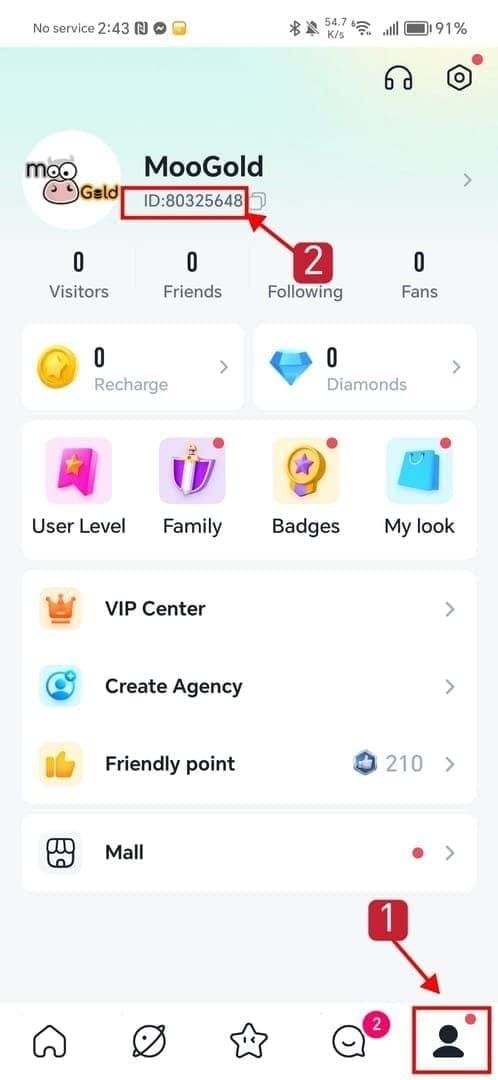
Follow this checklist:
Check the site or app
Official Yoho recharge and help pages are on yoho.media.
If using a third-party, it should be UID-only and should not ask for your password.
Confirm the account details
Verify the exact YoHo ID
Check server/region if the checkout requires it
Recheck the amount before payment
Review payment method fit
Officially, Yoho uses third-party PCI-DSS certified payment gateways.
Apple Pay is commonly considered safer because tokenization means card details aren’t stored in the merchant flow.
Some buyers use Google Pay, credit/debit cards, crypto, or Binance Pay depending on region and support.
If you don’t have a card, this is usually where mistakes start, so verify method support before you commit.
Know the refund boundary
Don’t assume digital goods are reversible after delivery.
If the order is wrong, support evidence matters more than a rushed dispute.
Save proof immediately
Order ID
Transaction ID
YoHo ID
Timestamp
Payment screenshot
Platform used
That last step is where many users fail. In digital top-up troubleshooting, people who keep the order ID and exact timestamp usually get faster help than people who only send a screenshot of a bank debit.
What’s the safest way to buy discounted Yoho coins without crossing the line?
Use a checkout that stays inside normal payment flow and account-ID delivery. One relevant example is VGTopup, which supports Apple Pay, Google Pay, credit/debit cards, and crypto for Yoho, with UID delivery and buyer protection according to the extracted facts. Still, I’d verify region support and final amount before paying, because no serious platform should promise unsupported regions.
What should you do if your Yoho payment succeeded but the credits did not arrive?
First, don’t panic-buy again. A successful bank charge does not always mean the order has fully cleared verification, and duplicate payments make support harder.
Official Yoho guidance is clear: if coins don’t arrive after deduction, first check whether the deduction auto-refunds, then retry in Me → Recharge Coins. If payment succeeded but no credits arrived, save screenshots and email cs@yoho.media.
How should you handle a missing Yoho recharge step by step?
Check whether the charge is still pending
Some app crashes during checkout can still produce a charge record.
Pending charges may auto-reverse.
Check your Yoho balance and recharge history
Make sure you’re looking at the correct account.
Do not open multiple disputes at once
Bank dispute + seller ticket + duplicate order often slows resolution.
Collect the full evidence set
Order ID
Transaction ID
YoHo ID
Timestamp
Payment screenshot
Platform used
Contact the right party
Official Yoho issue: cs@yoho.media
Official help center: yoho.media/en/help.html
Third-party order issue: contact that platform with the same evidence set
Honestly, delayed delivery is annoying when the money already left your account. But the fastest path is usually evidence first, emotion second.
What are the most common Yoho recharge questions users still ask?
Are free Yoho coins generators real?
No. Community and single-source data both point the same way: no legitimate external Yoho free coin generator exists, and these offers usually lead to phishing, malware, or fake payment funnels.
Why do Yoho chargebacks often fail?
Because digital top-ups become hard to dispute once credits are delivered, and even harder once they’re used. Community patterns consistently show post-delivery reversals are weak cases.
Can Yoho ban or restrict accounts for risky top-up methods?
Yes, risky behavior can create account problems. Officially, Yoho can block IDs or devices for abusive use, and community reports tie account sharing and suspicious payment activity to penalties.
What should I do if I paid for Yoho credits but received nothing?
Check whether the payment is pending or auto-refunding, then retry through Me → Recharge Coins if appropriate. Save screenshots and send the full evidence set to cs@yoho.media or the platform you used.
Is it safe to buy discounted Yoho coins from unofficial sellers?
Only if the process is UID-based, traceable, and never asks for your password. If the seller pushes personal-wallet crypto, fake support, edited receipts, or region bypass promises, walk away.
Can I get a refund if I topped up the wrong Yoho account?
There’s no reliable bank will fix it shortcut here. Recovery depends on support review and whether the credits were delivered or consumed; community patterns suggest refunds are weak once digital credits are used.
How do I verify an official Yoho recharge page before paying?
Check that the domain is yoho.media, confirm the help center path, verify your YoHo ID, and review the final amount and payment method before authorizing. A real Yoho flow centers on ID verification, payment auth, and delivery.
Yoho recharge myths usually fail at the same point: they ignore how digital top-ups actually work. Free coin generators aren’t real, chargebacks are weak after delivery, and risky shortcuts create bigger problems than they solve. Use an official or UID-based verified checkout, double-check your YoHo ID and region, and save your order proof before you leave the payment page.