
If your PUBG Mobile UC top up was paid but not received, don't pay again yet. First check the player ID, order status, payment receipt, and account region, then fully close and relaunch PUBG Mobile. Most UC arrives in 30 seconds to 10 minutes, but delays of 2–8 hours are widely reported, and fraud reviews on some card or cross-border payments can stretch to 24 hours.
If you're dealing with PUBG Mobile UC top up not received or a charge that shows as successful without UC in your account, the key is to separate payment approval from actual UC delivery. If the order remains missing after relogging and the normal wait window, contact the correct support team with your player ID, order ID, and receipt.
Why is my PUBG Mobile UC not showing after payment?
Because payment success does not always mean UC delivery completed. From reviewing failed recharge cases, this is the most common misunderstanding: your bank, card, wallet, Apple Pay, or Google Pay may approve or authorize the charge first, while the UC delivery still waits for account sync, store processing, or fraud checks.
Users commonly report four different states getting mixed together:
A successful bank charge also doesn't always mean the order cleared verification. That's the part many generic guides miss. Community reports repeatedly show anti-fraud reviews delaying card and cross-border payments, especially when billing region and game account region don't match.
Common causes behind missing UC:
Wrong player ID entered at checkout
Region mismatch between top-up store and PUBG Mobile account
Network sync delay between payment and in-game balance
App store processing lag
Bank hold or decline that looks like success at first
Duplicate order created during a sync issue
Anti-fraud review on card or cross-border payment
Officially, your first move is simple: completely close PUBG Mobile, reopen it, and check the UC balance again.
How long does PUBG Mobile UC take to arrive after payment?
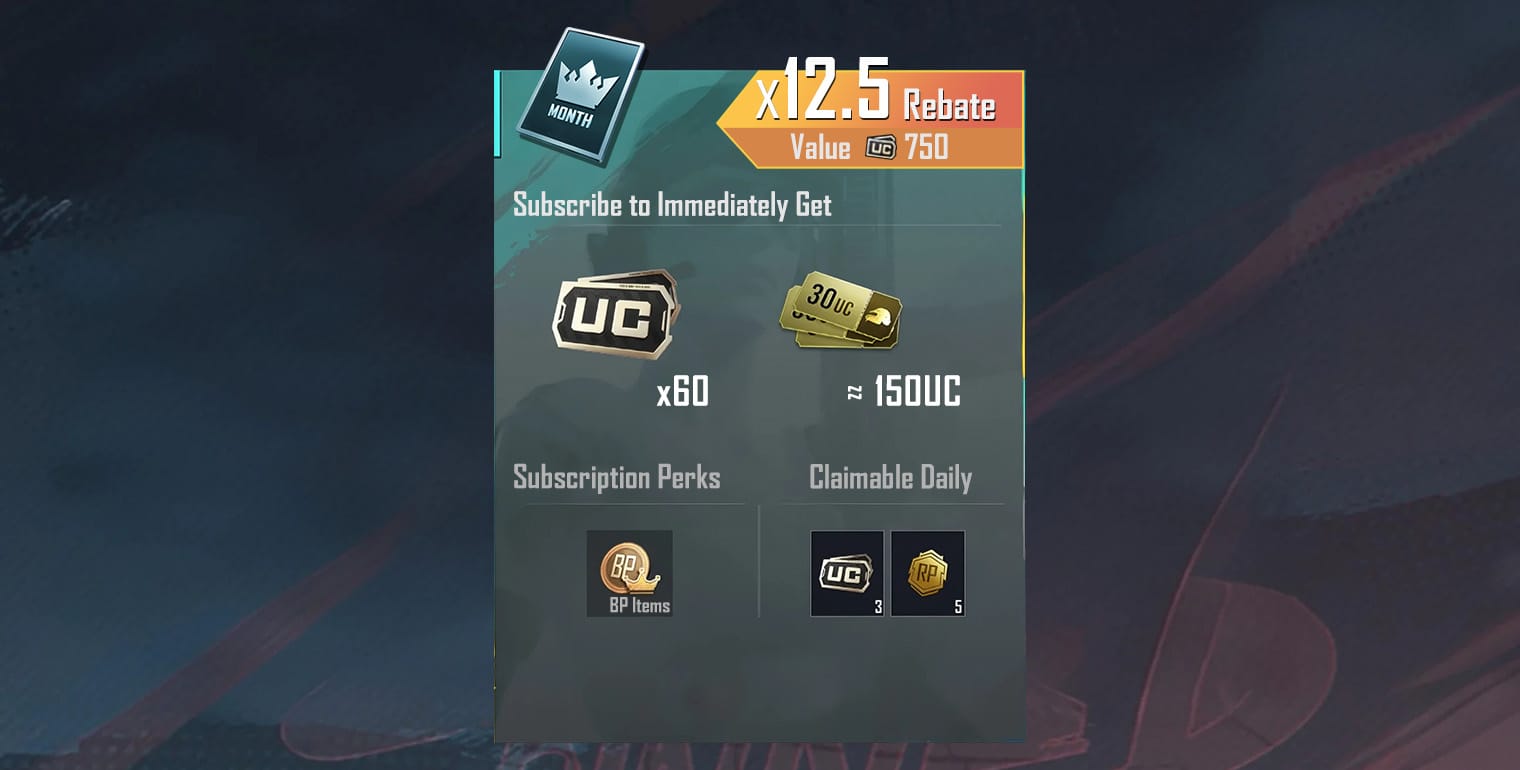
Usually seconds to minutes, but a few hours can still be normal. Community reports put normal delivery at about 30 seconds to 10 minutes for many top-ups, with delays of 2–8 hours being common enough that I would not escalate too early unless the order clearly failed.
Delivery timing also depends on the channel:
Officially, Midasbuy is PUBG Mobile's global top-up partner. In my experience comparing checkout paths, official channels are usually easier to trace when something goes wrong, even if another route feels more convenient.
When is it a real support case?
Under 10 minutes: usually too early to panic
10–30 minutes: relog or clear cache/restart if direct top-up
2–8 hours: still within a commonly reported delay window
24 hours: contact support if no UC and payment is settled
Peak-time store delays also happen. And yes, they're frustrating when the money already left your account.
What should I do if my PUBG Mobile payment was successful but I got no UC?
Use a short decision tree and collect proof before contacting anyone. The fastest resolutions usually happen when users send the right evidence in the first message.
Close and relaunch PUBG Mobile
Official first step.
Check the UC balance again after reopening.
If you paid in-game, this alone sometimes fixes a sync delay.
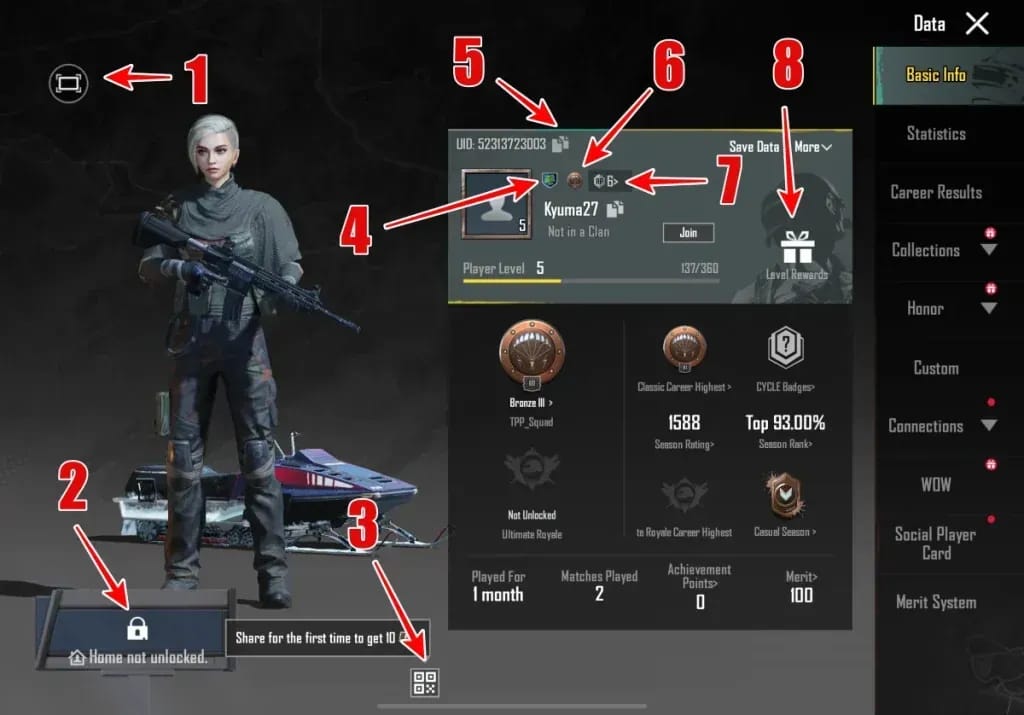
Verify the player ID
Find it in-game: avatar > Basic Info/Profile.
Compare it with the ID used during checkout.
Wrong player ID is one of the most common causes of missing UC.
Check region and server
Match the top-up region to the game account region.
Community reports specifically flag India/global mismatches as a delivery problem.
If a purchase required VPN or region switching, double-check that the account region actually matches.
Confirm the payment route and order status
In-game/App Store: check Google Play or Apple purchase history.
Midasbuy: verify the transaction record there.
Bank/card: check whether the payment is fully posted or only authorized/held.
Wait before repeating payment
Official guidance and user experience both point the same way: don't place a second order while the first is still processing.
Duplicate orders happen during sync issues, and they're avoidable.
Try a light local fix if it's a direct top-up
After 10–30 minutes, force stop the app, clear cache, and restart the device.
I would avoid aggressive troubleshooting if you're still under 2 hours, because many delayed orders resolve on their own.
Contact the right support team
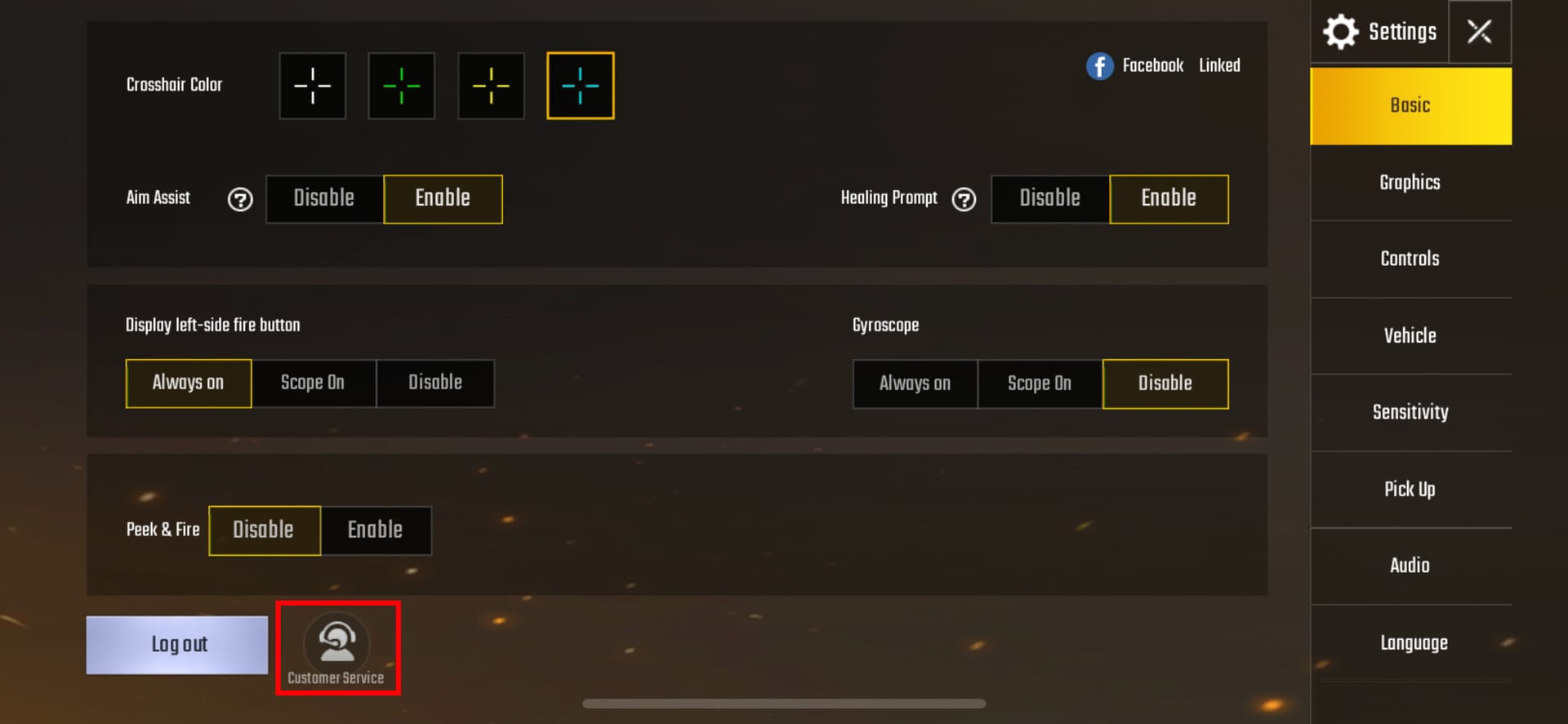
In-game top-up: PUBG Mobile help center via Settings > Customer Service > Submit ticket
Midasbuy: contact Midasbuy support with order details
App store billing: check purchase history, then request refund through Google Play or Apple if undelivered
Other seller: contact the seller first, then payment provider only if needed
Use this checklist in your first support message:
If you need a clearer record for future purchases, PUBG Mobile UC payment deducted but no UC cases are much easier to resolve when you keep the order ID and player ID confirmation from checkout.
Can I get a refund if PUBG Mobile UC was not received?
Yes, but only in the right cases and through the right channel. Officially, refunds are available within 7 days for undelivered UC or wrong purchases, and official guidance also says refunds are appropriate for undelivered or unspent UC within that window.
Here's the practical split:
One hard warning: don't rush into a chargeback if UC later arrives or has already been spent. Users commonly report negative UC balances and account restrictions after chargebacks, and spending UC before disputing makes the situation worse. If a chargeback already caused negative UC, community reports say repaying the full amount is often required to lift restrictions.
Personally, I would use chargebacks only after you've confirmed the order is truly undelivered, the seller or official support hasn't resolved it, and the payment route gives no normal refund path.
What is the fastest safe way to fix missing PUBG Mobile UC after payment?
The fastest safe fix is: relaunch, verify ID and region, confirm whether the payment is authorized or fully completed, then contact the correct support team with complete proof. That's faster than random retries, and much safer than reordering.
Use this order:
Relaunch the game and recheck UC.
Confirm player ID and region.
Check whether the charge is authorized, captured, or still pending.
Wait within the normal window:
up to 10 minutes for most orders
up to 2–8 hours for common delays
up to 24 hours for card/cross-border review
Do not place a duplicate order.
Submit one complete support request with:
player ID
order ID
receipt screenshot
payment timestamp
top-up channel
server/region
And avoid two bad ideas:
sharing your account for "recovery"
using unofficial recovery offers
Users commonly report both as scam or ban risks. Stick to official support or the original seller.
FAQ
Why is my PUBG Mobile UC not showing after payment?
Because the payment may be approved before UC delivery finishes. The usual causes are sync delay, wrong player ID, region mismatch, app store processing, or fraud review.
How long does PUBG Mobile UC take to arrive after payment?
Most orders arrive in 30 seconds to 10 minutes. Delays of 2–8 hours are commonly reported, and some card or cross-border payments can take up to 24 hours.
What should I do if my PUBG Mobile payment was successful but I got no UC?
Close and reopen PUBG Mobile first, then verify your player ID, region, order status, and receipt. If the UC still doesn't appear after the normal wait window, contact the support team for the exact payment channel you used.
Can I get a refund if PUBG Mobile UC was not received?
Yes. Officially, refunds are available within 7 days for undelivered or unspent UC, and app store purchases should be checked through Google Play or Apple purchase history first.
What happens if I entered the wrong PUBG Mobile player ID?
The UC can be credited to the wrong account or fail to reach yours. Check your ID in avatar > Basic Info/Profile and send the correct and entered IDs to support immediately.
Does region mismatch cause PUBG Mobile UC top up delays?
Yes, users commonly report region mismatch blocking or delaying delivery. This is especially relevant for cross-border purchases and India/global account mismatches.
Should I pay again if my PUBG Mobile UC has not arrived yet?
No, not until the first order is confirmed failed or refunded. Duplicate orders are a common mistake during pending or delayed processing.
Missing UC after payment is usually fixable, but speed matters less than accuracy. Relaunch the game, verify player ID and region, confirm whether the payment is only authorized or fully completed, and wait through the normal delivery window before escalating. If UC still doesn't arrive, send one complete support request with your order ID, receipt, and account details. That's the safest path—and the one most likely to get resolved cleanly.