
Yes — you can top up Bigo Live Diamonds without a credit card. The cleanest official route is PayPal on Bigo’s mobile recharge site, and many users also rely on debit cards, app-store billing, mobile wallets, local payment rails, or gift-card/crypto workarounds depending on region.
If you want Bigo Live Diamonds top up without credit card, check two things before paying: your Bigo ID and your account region. From reviewing recharge issues, those two details cause more failed orders than the payment method itself.
Why do some Bigo Live users need to top up without a credit card?
Because in practice, card-free checkout is often easier than card checkout. Many users don't have a credit card, some banks block entertainment payments, and in some regions local wallets are simply the normal way to pay.
The bigger reason is platform friction. In-app purchases go through Apple App Store or Google Play billing, which often pushes you toward stored card methods. External top-up flows usually ask only for your Bigo ID and send Diamonds directly through Bigo’s server-side recharge path. Users commonly report these web checkouts are 20% to 60% cheaper than in-app because they avoid app-store fees.
Honestly, if you don't have a credit card, this is usually where things break: users assume the app and the web offer the same payment methods. They don't.
Which payment methods can work for Bigo Live Diamonds without a credit card?
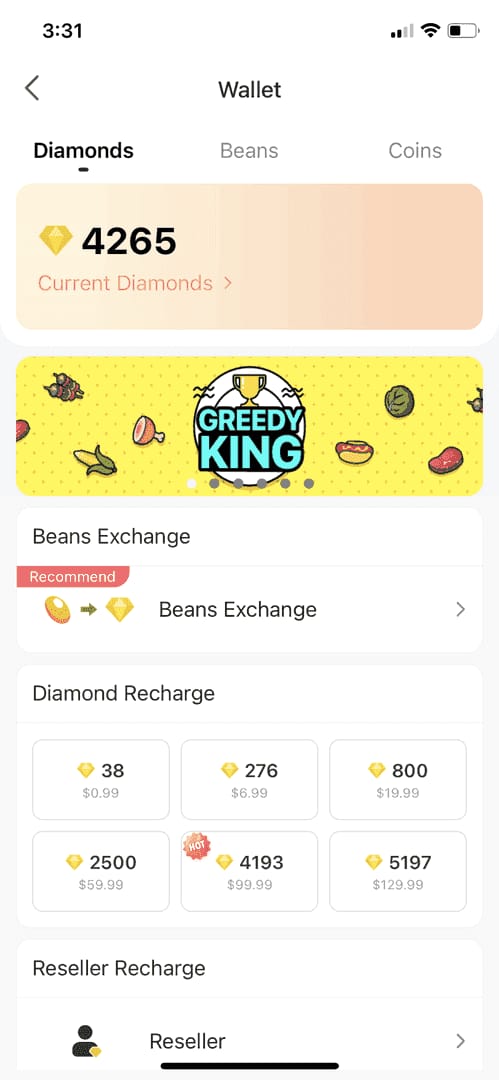
Several methods can work, but availability is region-dependent.
Officially, Bigo’s mobile recharge site accepts PayPal, VISA/MASTERCARD (US-issued), and Dinopay. No direct bank transfer is confirmed on the official checkout. Community and single-source reports show local wallets and online banking on some external top-up sites.
A useful shortcut: if your goal is to buy Bigo Live Diamonds no credit card, external ID-only checkout is usually the first place to look, not the in-app store. That's why many users compare buy Bigo Live Diamonds no credit card options by payment method first, not by package size.
What usually gives the least friction?
From comparing checkout paths, these are usually the easiest:
PayPal on official web checkout if available in your country
Local wallets if your region supports them
Apple Pay / Google Pay when your app-store account is already set up
Gift cards via crypto only if you already use crypto comfortably
I would avoid jumping straight to crypto unless other methods fail. There is no official direct crypto recharge for Bigo Live; the crypto route is indirect through gift cards, then redemption.
Why are web top-ups often cheaper than in-app purchases?
Because app-store billing adds platform fees, while external top-up flows often don't. Community reports put external top-ups at 20% to 60% cheaper than in-app, and discounts of up to 35% are widely observed.
Official package pricing gives a useful baseline:
Single-source pricing examples show some external offers around $0.0196 per Diamond, while official pricing is often $0.03+ per Diamond depending on package. That gap is why users leave the app and use ID-only recharge.
But cheaper isn't the only reason. Web checkout also tends to be clearer for no-card users because:
you enter a Bigo ID, not app-store account details
payment methods are often more localized
order tracking is easier if you save the receipt and transaction ID
How do you top up Bigo Live Diamonds without a credit card step by step?
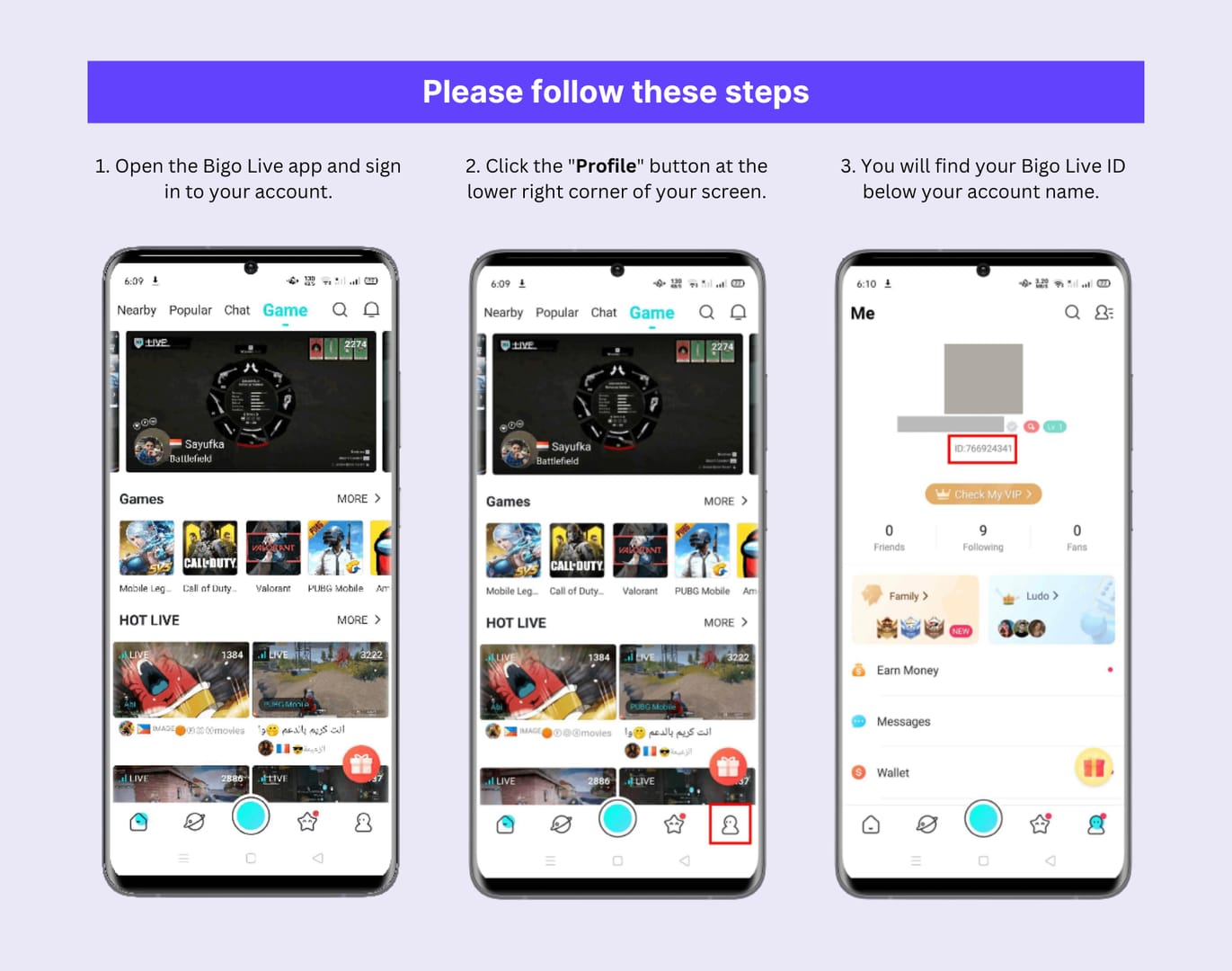
You only need your Bigo ID and a supported payment method. You do not need to share your password.
Find your Bigo ID
Open Bigo Live
Go to Me > Profile
Copy the ID exactly
Officially, it is 7 to 10 digits, numbers only
Choose the checkout path
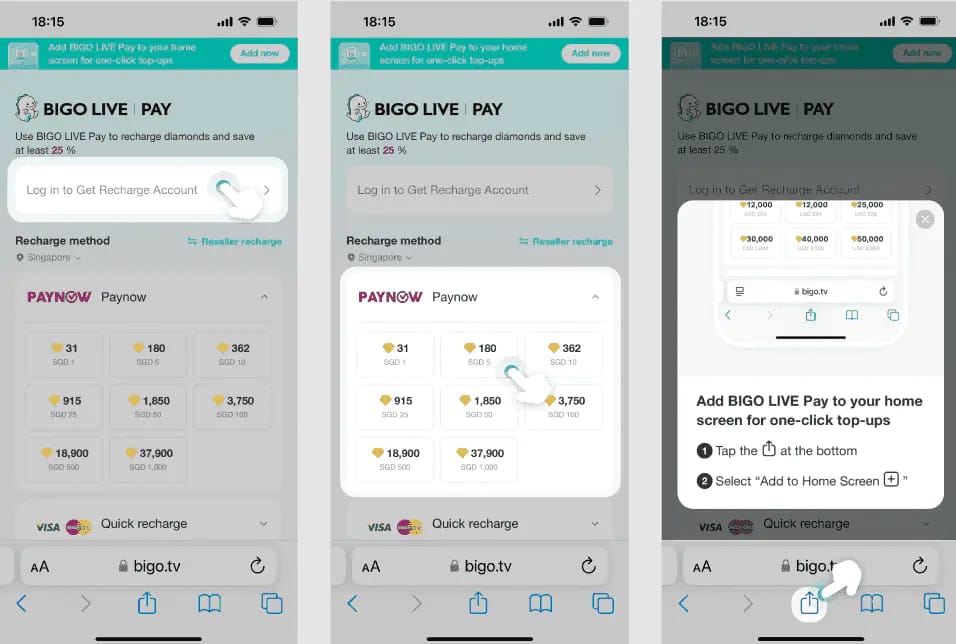
Use mobile.bigo.tv for the official route
Or use an authorized ID-only reseller if you need local wallets or other non-card methods
Enter your Bigo ID
Double-check every digit
In failed recharge cases, wrong ID is one of the most common causes; community reports put ID mistakes at 40% to 70% of failures
Select the Diamond package
Compare total cost, not just sticker price
Watch for currency conversion fees if the site charges in USD and your wallet pays in local currency
Choose a non-credit-card payment method
PayPal, wallet, app-store billing, online banking, or gift-card route depending on region
If using a gift card, redeem through the Bigo wallet Diamond page and select the correct region
Pay and save proof
Keep the order ID
Save the payment receipt
Note the timestamp
In my experience reviewing recharge issues, these three details solve support cases much faster than screenshots alone
Check delivery
Typical delivery is instant
Community/single-source data says about 98% arrive within 3 minutes on third-party top-ups, while bank-transfer-style methods can take up to 24 hours
What’s the best way to avoid failed payments, duplicate charges, and wrong-account delivery?
Verify the account first, then the region, then the payment status. That order matters.
Use this quick check before you pay:
Common failure causes:
wrong Bigo ID
insufficient funds
region mismatch
prepaid/debit restrictions through app-store billing
retrying before the first order finishes verification
A practical point many guides miss: a successful bank or wallet charge does not always mean the order has cleared verification. So don't immediately submit a second payment. Confirm delivery first.
Personally, I would avoid any site asking for your Bigo password. Safe top-up flows use ID only. Community users repeatedly warn that login-based recharge pages are where scams happen.
What should you do if your Bigo Live Diamonds payment fails or the Diamonds do not arrive?
First, separate a payment-side issue from a delivery-side issue. If money never left your account, it's usually payment-side. If you were charged but Diamonds are missing, it's usually delivery or verification delay.
Follow this order:
Refresh the wallet 3 to 5 times
Wait 10 to 30 minutes
Clear the app cache
Check your bank, wallet, or PayPal statement
Confirm the Bigo ID and package on the order
Do not pay again until the first order is resolved
Community reports say 95% of missing-Diamond cases are fixed by wallet refresh within 5 to 30 minutes. Delayed delivery is frustrating when the payment already left your account, but immediate re-payment is how duplicate orders happen.
If the Diamonds still don't arrive, contact official support through Me > Settings > Feedback > Payment Issues. Prepare:
Bigo ID
order ID
payment receipt
payment timestamp
selected package
The official help center is the right escalation path for top-up issues. If a transaction is under security review, single-source reports say frozen Diamonds can unfreeze in 7 to 14 days if the payment is legitimate.
FAQ
Can I buy Bigo Live Diamonds without a credit card?
Yes. Officially, PayPal works on Bigo’s mobile recharge site, and users also commonly use debit cards, app-store billing, wallets, and local payment methods where available.
What payment methods can I use for Bigo Live Diamonds?
The main options are PayPal, debit/prepaid cards, Apple Pay, Google Pay, mobile wallets, local banking methods, and gift cards bought with crypto. What you actually see depends on your region and checkout path.
Can I top up Bigo Live Diamonds with a debit card?
Often yes, but not everywhere. Debit card support depends on the issuer, app-store rules, and whether you're paying in-app or through a web checkout.
Why did my Bigo Live Diamonds payment fail?
Most failures come from wrong Bigo ID, insufficient funds, or region mismatch. I would check the ID first, then the region, then whether the payment method itself was declined.
How long does it take for Bigo Live Diamonds to arrive?
Usually instantly or within a few minutes. Some payments, especially bank-transfer-style methods, can take much longer, sometimes up to 24 hours.
What should I do if I entered the wrong Bigo ID?
Stop and don't place another order until you confirm the first one. Then contact support with the order ID and receipt; recovery depends on whether the Diamonds were already delivered to another account.
Can I top up Bigo Live Diamonds from another country?
Usually yes, if the checkout supports overseas recharge and the region matches the target account. Region-locked gift cards are the main exception, so check the account region before paying.
Bigo Live Diamonds can absolutely be topped up without a credit card, but the best method depends on your region and how quickly you need delivery. For most users, official PayPal or an authorized ID-only external checkout is the safest path. Verify your Bigo ID, avoid VPNs, save the receipt, and don't retry payment until you've confirmed the first order's status.