
If your One Punch Man: The Strongest top-up voucher says already used, don’t keep retrying blindly. The fastest path is to confirm the account and server match, check whether the Coupons or item were added silently through in-game mail or Mall, and then collect your receipt, order ID, UID, and SID before contacting support. In my experience reviewing recharge issues, this error is often caused by wrong-account or region mismatch, not just a truly redeemed code.
Why does my One Punch Man: The Strongest voucher say already used?
It usually means one of six things: the value was already claimed, it was delivered to the wrong account, the code or redeem route is region-specific, the code was copied incorrectly, the seller fulfilled by direct top-up rather than PIN redemption, or the payment is stuck in review.
For this game, many top-ups are not classic voucher-code redemptions. Officially, SEA top-ups commonly work by entering account details such as UID and SID, then the reward is sent to in-game mail. On Codashop and similar direct top-up flows, rewards are confirmed as sent to mail after purchase. That matters because some buyers expect a prepaid PIN, then assume already used when there was never a manual redeem step.
A quick separation test:
You bought a direct top-up: check Mail and Mall first.
You received a promo gift code: check whether it’s for the correct server/region. Community reports commonly note SEA and Global codes are not interchangeable.
You bought a gift for someone else: verify the exact UID/SID used at checkout. Wrong account delivery is a very common failure point.
And yes, silent credit happens. Official redemption steps for Coupons are simple: open Mail at the bottom left, open Please claim your Coupon, tap Claim, then check Mall. If the redeem page failed but the mail is there, the code wasn’t lost.
A related issue buyers search for is One Punch Man: The Strongest voucher code already used. In practice, I would first confirm whether you actually received a redeemable code or a direct account top-up.
Quick diagnosis before opening a ticket
Answer these in order. It saves a lot of back-and-forth.
Did you log into the right account and server?
Yes, this alone can decide the case. SEA top-up flows often require UID and SID, and official server examples include formats like S652. If the wrong SID was entered, support may trace a successful delivery to another character even though your current login shows nothing.
Check:
Your current login method
Your in-game UID
Your SID/server
Whether the account is bound via Avatar > Account to the official website
If you’re on a guest account, fix that first. Officially, account binding is available through the account menu, and clearing data on server select can delete a guest account. Don’t experiment there unless you know exactly what account is bound.
Could this be a region mismatch?
Yes. Promo and gift codes are commonly server-specific. A SEA code may fail on a Global account, and vice versa. Official support and announcements for this title are centered around the SEA ecosystem, including the official site and the OnePunchManMobileSEAEN Facebook page.
Use this rule:
Could I have copied the code wrong?
Yes, especially with partial copy on mobile. A mistyped character can trigger invalid, but some systems also throw generic redeem errors. Re-enter carefully, and avoid screenshots with cropped characters. If the code was sent in chat, copy the full string into notes first and compare.
Evidence that actually helps support
Broad screenshots waste time. Order-level proof solves cases faster.
From comparing checkout paths, order ID + timestamp + UID/SID usually matter more than a dozen gallery screenshots. Support teams can trace a delivery with those. They can’t do much with it didn’t work and a cropped error popup.
If your issue is really a One Punch Man: The Strongest top-up PIN redeem error, include whether the product was sold as a PIN/code or as a direct top-up. That one detail changes the whole investigation.
What should the account screenshot show?
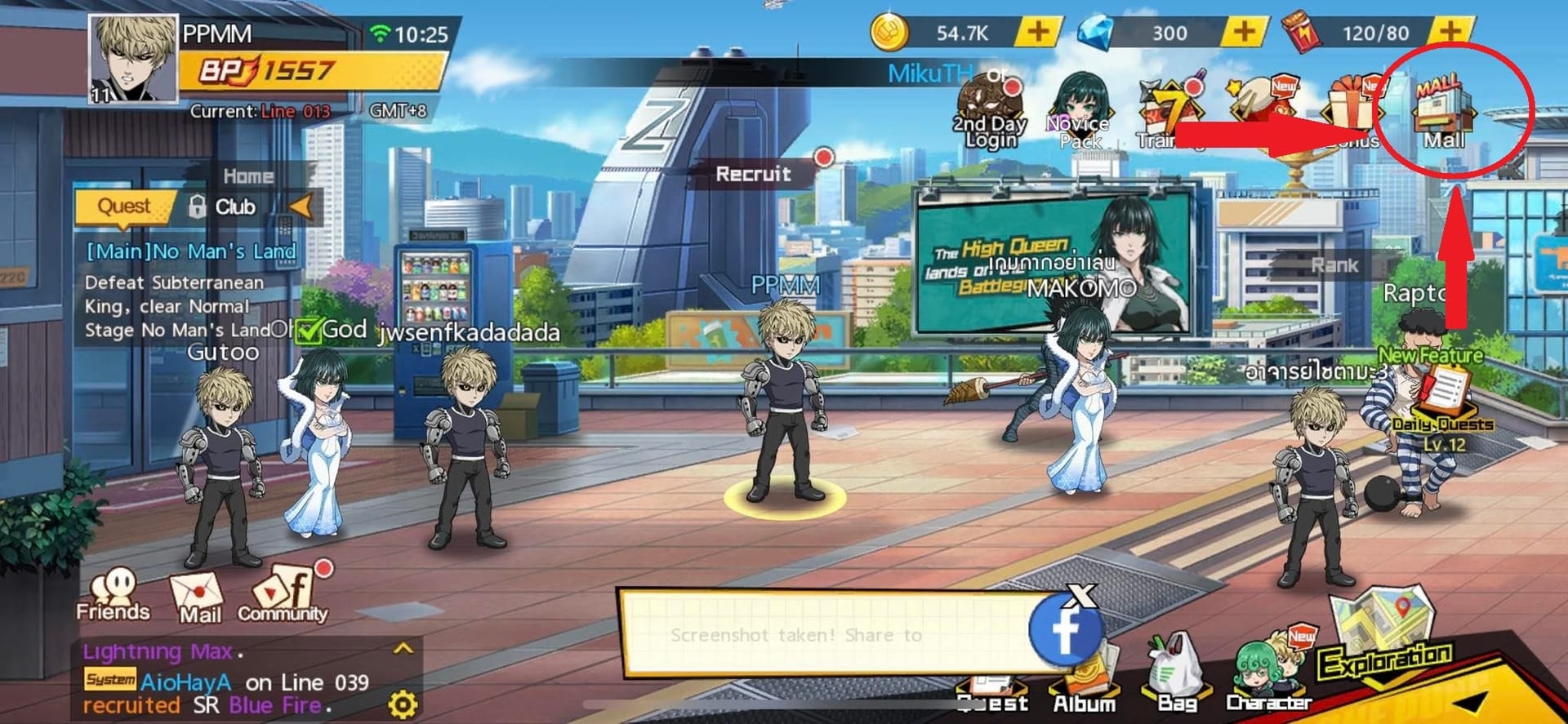
It should show:
Character name
UID
Server/SID
Current Coupon or relevant balance if visible
Date/time if your device overlay shows it
A screenshot of the home screen without identifiers is weak evidence.
Should I wait if payment succeeded but redeem failed?
Sometimes yes, but not for long.
A successful bank or wallet charge does not always mean the order cleared verification. Honestly, this is one of the most frustrating parts of digital top-ups. Payment can leave your account while the seller still needs to confirm the order.
Wait first if:
The purchase was a direct top-up and the game says rewards arrive by mail
The payment just completed
There’s no sign of wrong UID/SID
The seller page still shows processing
Escalate now if:
The code says already used on first attempt
You notice the wrong server or account after payment
The code came from a gift/event and your account is on another region
You have an order ID but no delivery after checking Mail, Mall, and re-login
The product page promised direct top-up, but you only received a generic code
Community users also report that re-login can fix some invalid bonus-code situations after updates. For SEA login issues, an official Facebook-login fix has included restarting the game. That won’t recover a truly redeemed code, but it can clear a stale client state.
Mini case note: gift for another player
This is where mistakes pile up. The buyer assumes I’ll send a code, but the seller may actually require the recipient’s UID and SID for direct top-up. If the buyer enters their own account by habit, the top-up can land there correctly. Support may verify delivery, but that doesn’t mean they can reverse it.
How do I contact support without getting a generic reply?
Start with the team that can see the transaction.
Seller/payment support first if you have an order ID and payment receipt
Official SEA support if the issue looks like account access, server, or event-code eligibility
App store support only for direct Google Play or Apple App Store purchases
Official paths you can verify:
Fingerfun official site:
onepunchman.fingerfun.comSEA support channel:
OnePunchManMobileSEAENofficial FacebookSeller support: use the order support path tied to your receipt; official guidance confirms contacting Codashop support with order details for top-up issues
Use a short, traceable message:
I purchased a One Punch Man: The Strongest top-up on [date/time].
Order ID: [ID]
Payment method: [GCash / Touch 'n Go eWallet / card / app store]
Intended account UID: [UID]
Intended server SID: [SID]
Error shown: [exact message]
Checks completed: Mail checked, Mall checked, re-login done, server confirmed.
Please verify whether the value was delivered, delivered to another UID/SID, or blocked by region/account mismatch.
That format works because it asks support to check three concrete outcomes: delivered, misdelivered, or blocked.
Safer buying and gifting next time
My view is simple: for this game, direct top-up with clear account verification is safer than mystery gift codes.
Use this buying filter:
A few practical notes:
Officially, 1 USD = 7 Coupons on supported top-up channels.
Codashop officially supports GCash in the Philippines and Touch 'n Go eWallet in Malaysia for this title.
Community reports also mention direct purchases through Google Play or Apple App Store, but those follow store billing rules, not the same redeem flow.
Some sellers offer no PIN needed direct top-up. That can be safer if you verify UID/SID carefully before paying.
Avoid sharing full gift card PINs or voucher screenshots. Official scam warnings around PIN sharing exist for digital goods, and once exposed, a code can’t be trusted.
Personally, I would avoid any purchase flow where you can’t tell whether you’re buying a code, a gift membership, or a direct account recharge. That ambiguity causes most already used panic.
Final recommendation
Treat already used as a diagnosis problem, not just a refund problem. First check Mail, Mall, UID, SID, and server region. Then gather order ID, receipt, timestamp, and a proper account screenshot before contacting the seller or official SEA support. If you need a cleaner route next time, use a purchase path with clear account verification and region match before you pay.