
If you need Whiteout Survival Frost Stars for Transfer Passes before an event deadline, the safest answer is simple: do not leave it to the last few minutes. Verify your UID, confirm the in-game event end time, and buy early enough to survive a billing delay. A practical safety window is 24 to 48 hours before the cutoff, because a payment can be charged, reviewed, or marked pending without delivering instantly. If something goes wrong, your best chance is having proof ready before the timer disappears.
If you want a broader overview, this page on Whiteout Survival top up before state transfer event is a useful starting point. But when the clock is running, timing and documentation matter more than speed claims.
How late is too late before a Whiteout Survival event ends?
For a deadline-sensitive purchase, too late is usually any point where you cannot absorb a delay. In practice, that often means the same day, and especially the final hours.
Frost Stars bought through the official top-up site, store.centurygames.com, are delivered by in-game mail, and many players see them arrive within minutes. That is the normal path. The problem is that urgent buyers tend to plan around the best-case outcome and ignore the review steps that can happen in the background. A payment may still be held by platform billing, card verification, or bank fraud checks even when the event timer keeps moving.
That matters even more because Transfer Passes are not simply a direct Frost Stars button by default. According to the available game information, Transfer Passes are obtained through shop packs or through the Alliance Shop for 150,000 Alliance Tokens. So if your plan is to top up Frost Stars and then use them for the relevant pack, you are managing a deadline across two actions, not one.
There is also a timing trap around event displays. State Transfer is commonly reported on a 4 to 6 week cycle, with announcements appearing 3 to 4 days before in-game. That short notice encourages last-minute buying. Add timezone confusion, reset assumptions, or a shop page that looks available until the final moment, and players can feel safer than they really are.
The practical takeaway is straightforward: if the purchase is important, buy early enough that a review delay does not decide the outcome for you.
What should you verify before paying?
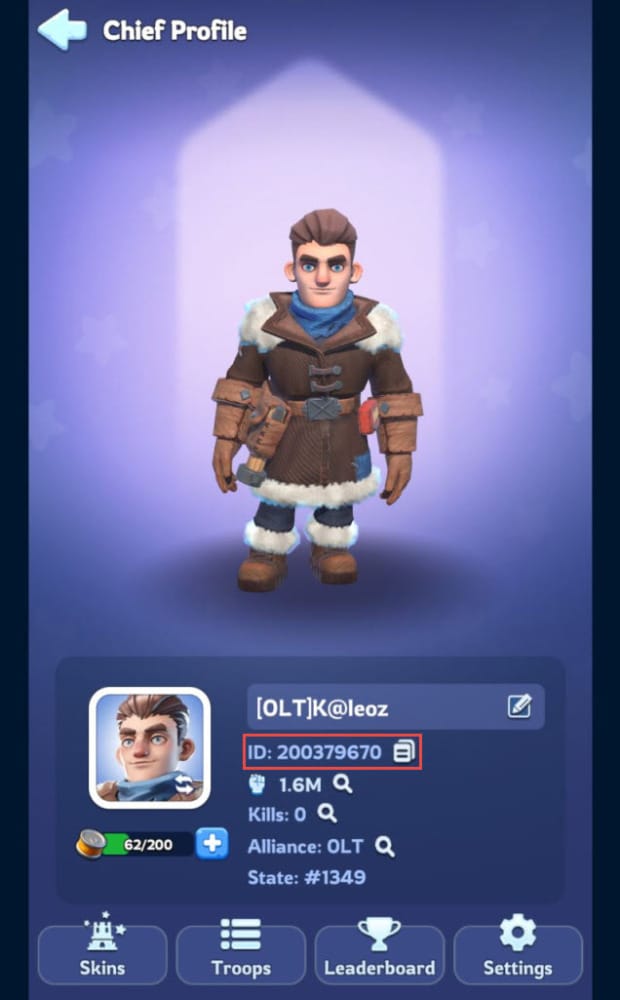
Before you spend anything, verify four things: the right account, the right event timer, the right purchase path, and the right context for the character you intend to help.
The most important detail is the UID. Whiteout Survival uses a 9-10 digit Player ID, found in the profile Basic Info tab, and it is required for top-ups. This is not a minor formality. A wrong-UID top-up is widely understood to be effectively irreversible: the receiving account gets the Frost Stars, and there is no reliable expectation of recovery. When people rush, they often trust memory, copy from chat, or switch between accounts on one device. That is exactly when mistakes happen.
The second check is the event end time shown in-game. Do not rely on a friend’s screenshot, a guild message, or your memory of when reset usually happens. Open the event page and look at the timer directly. If the event shop or transfer window is what matters, capture that screen before checkout.
Third, confirm how Transfer Passes are being acquired right now. The facts available here are clear on one point: Transfer Passes come from direct packs or the Alliance Shop, not from a universal direct Frost Stars conversion. Frost Stars are premium currency, with a base rate of 100 FS per $1 USD, and 1 FS equals 1 USD cent. They are used to buy in-game packs, but you still need to confirm the current route for the pass you want.
Finally, keep the account context straight. If you are topping up for a friend, entering their UID at the official store is considered safe only if you verify it carefully. The same UID-based process applies to new accounts as well. What matters is not who pays, but whether the destination account is correct.
A good habit before any urgent purchase is to take two screenshots: one of the UID in Basic Info, and one of the event page with the visible timer. Those two images solve a surprising number of support disputes later.
Why can a payment be charged but Frost Stars still not arrive?
Because payment success and item delivery are not the same status.
This is the point many thin guides skip. A bank notification, card authorization, or app-store line item can make a purchase look finished when it is still somewhere in the billing pipeline. For urgent Whiteout Survival purchases, the difference between these states changes what you should do next.
If the order is instantly confirmed, the usual pattern is simple: Frost Stars arrive by in-game mail within minutes, you claim them, and then you buy the pack you need.
If the order is pending, the payment has not fully cleared for delivery yet. This is where platform-specific delays matter. Community experience in the provided facts notes that:
Google Play pending can last up to 48 hours
Apple billing review can take around 24 hours
3-D Secure prompts can halt the process if authentication is interrupted
A pending state does not mean the purchase is lost, but it does mean you should stop assuming the event deadline is safe.
Then there is the most frustrating case: charged but no delivery. In that situation, the recommended first response is not panic and not duplicate buying. Restart the game, check in-game mail, and wait a short period. The available guidance suggests waiting 30 minutes, then escalating with proof if the Frost Stars are still missing.
There are several realistic reasons this happens. A browser session can time out after card authentication. A local bank can flag an unusual digital purchase for fraud review. A platform can show a billing record before the game-side delivery completes. None of these are rare enough to ignore when the event ends soon.
Imagine the worst-case scenario: you pay at 11:58 and the event ends at midnight. Even if the charge appears immediately, that does not guarantee the Frost Stars or the Transfer Pass pack will be usable before the timer expires. In that moment, your priority is to document the event deadline, the payment proof, and the target account before the event page disappears.
What proof actually helps support resolve a missing top-up?
When a Whiteout Survival top up is delayed or missing, support works faster when your evidence connects the payment, the intended account, and the deadline in one clear bundle.
The most useful set of proof is usually:
order ID
payment receipt or invoice
UID screenshot
event page screenshot with the timer visible
billing record from the platform or card issuer
screenshots with visible timestamps where possible
Each item answers a different question. The order ID helps locate the transaction. The receipt shows the amount and payment route. The UID screenshot proves which account should have received the Frost Stars. The event page capture shows that the purchase was tied to a real deadline. A billing record from Google Play, Apple billing, or your card statement helps confirm that the charge was not just an abandoned checkout screen.
What slows cases down is vague or incomplete evidence. A cropped bank alert without date and time is weak. Typing the UID manually in a ticket without a screenshot invites confusion. Sending a general complaint like I paid and got nothing often leads to a generic reply because support still has to ask for the basics.
A stronger ticket is short and factual. Include the UID, order ID, payment method, exact purchase time, what is missing, and the event end time shown in-game. Then attach the screenshots. In urgent cases, that is far more useful than a long explanation.
If you need related troubleshooting, readers often look for help on Whiteout Survival top up not received, Whiteout Survival UID and server check before recharge, or a Whiteout Survival receipt and order ID guide. Those are the practical subtopics that usually decide whether a case gets resolved quickly.
How long should you wait before escalating?
The right waiting time depends on the payment route, but the general rule is this: wait briefly for normal delivery, not indefinitely for hope.
For the official store flow, the expected path is fast. The top-up steps are simple: enter the UID, select the Frost Stars pack, complete payment, then check in-game mail. If nothing appears, the first few minutes are for basic checks only. Restart once, re-open mail, and confirm whether the payment is actually complete or still pending.
A realistic escalation rhythm looks like this in prose:
In the first 10 minutes, check mail and confirm the order status.
By 10 to 30 minutes, if the charge appears but nothing has arrived, keep checking mail and avoid placing a duplicate order.
At around 30 minutes, if the Frost Stars are still missing, gather the proof bundle.
At about 1 hour, an official-store purchase with no delivery is strong enough to justify a support ticket.
If the issue is clearly tied to Apple billing review, a longer wait can be normal, sometimes up to 24 hours.
If it is Google Play pending, the delay can stretch much longer, even up to 48 hours.
The key is that event urgency changes the decision. If the event deadline is close, you should not sit quietly just because a platform can theoretically take longer. Open the ticket early, attach the deadline screenshot, and make it clear that the purchase is event-sensitive. That does not guarantee a faster fix, but it preserves your timeline.
One more caution: do not spam repeat purchases because the first one feels slow. Duplicate orders can create a second problem while the first is still unresolved.
If the event ends before delivery, what outcome is realistic?
The honest answer is uncomfortable: there is no guaranteed remedy.
If the event ends before the Frost Stars or Transfer Passes arrive, the first thing to do is preserve evidence. Take a screenshot of the deadline, keep the receipt, save the order ID, and submit a support ticket. That is the correct process. But it is important to frame expectations properly.
Support may be able to confirm whether the payment succeeded, whether the currency was delivered, and whether the account details match. What support may not be able to do is retroactively grant an event-limited opportunity just because the charge happened before the timer expired. Community experience in the provided facts is explicit on this point: if the event ends first, there is no guaranteed post-event remedy.
That is why deadline evidence matters so much. Once the event page disappears, it becomes harder to show exactly what was visible when you paid. If your case depends on I bought before the cutoff, the screenshot of the timer is often the difference between a clear claim and an unprovable one.
There is at least one consolation: Frost Stars do not expire. They carry over and remain usable for future packs and future events. So a delayed top-up is not necessarily wasted currency. The real loss is the event-bound opportunity to use it for Transfer Passes during the State Transfer event.
This is also where planning beats urgency. If you know state transfer matters to you, the safer long-term approach is not just emergency top-ups. It is also using the Alliance Shop route to stockpile where possible, since Transfer Passes can be bought there for 150,000 Alliance Tokens and the shop refreshes weekly.
Buy early, document everything, and avoid rushed mistakes
For players searching How to Top Up Whiteout Survival Frost Stars for Transfer Passes Before Event Deadline, the best advice is not complicated. Use the official store, verify the 9-10 digit UID, confirm the in-game event timer, and give yourself a 24 to 48 hour buffer whenever possible.
That buffer matters because the biggest last-minute problem is often not a total payment failure. It is a purchase that looks successful but sits in pending, billing review, or another delay state long enough to miss the event. When that happens, the fastest path to help is a clean proof bundle: order ID, receipt, UID screenshot, billing record, and event timer capture.
And when urgency makes you tempted to cut corners, be careful. The facts here support a simple safety rule: use the official store only, double-check the UID, and avoid suspicious discounted sellers or any service that pushes risky shortcuts. A wrong-recipient top-up can be permanent, and a rushed bargain is not worth losing the event entirely.
If you buy early and keep your records until delivery is confirmed, you give yourself the best chance of getting the Frost Stars in time—and the best support position if something still goes wrong.