
To top up Knives Out Vouchers safely, verify the exact Player ID or UID first, confirm the correct server or region if checkout asks for it, and save screenshots of both your account page and order details before paying. Most wrong-account mistakes happen when users rely on a nickname, an old screenshot, or the wrong server instead of matching the numeric account identifier carefully.
From reviewing failed recharge cases, I would check three things first: the numeric ID shown in your profile, the server tied to your game location, and whether the checkout form asks for extra details like character name. A successful card charge doesn't always mean the order passed verification.
Knives Out Vouchers top up correct player ID server matters most when you want a checkout flow that clearly shows the account fields before payment. That review step is where many wrong-account orders are prevented.
Why do users send Knives Out Vouchers to the wrong account?
They usually send them to the wrong account because they enter the wrong numeric ID, trust a nickname, or pick the wrong server. According to official and community guidance, Knives Out top-ups commonly require server selection plus a character ID or Player ID, and third-party checkouts often ask for UID/User ID and server as well.
The biggest mistakes I see repeated:
Copying the nickname instead of the numeric ID
Using an old screenshot from another account
Assuming server doesn't matter
Typing the ID manually and missing one digit
Letting someone else place the order without checking the profile page live
Community reports describe the Player ID/UID as a numeric string such as 12345678, usually shown below the nickname. That's safer than any display name because names can look similar, while the ID is the real delivery target.
Which account details are safest to trust?
The safest details to trust are the numeric Player ID/UID and the selected server. Nickname alone is not a safe identifier.
Use this priority order:
One detail many guides miss: Knives Out usually doesn't show a separate "region" field at checkout. Community reports say the server often implies the region. So if you're searching for region, check the server first.
Why should you verify Player ID, server, and region before paying?
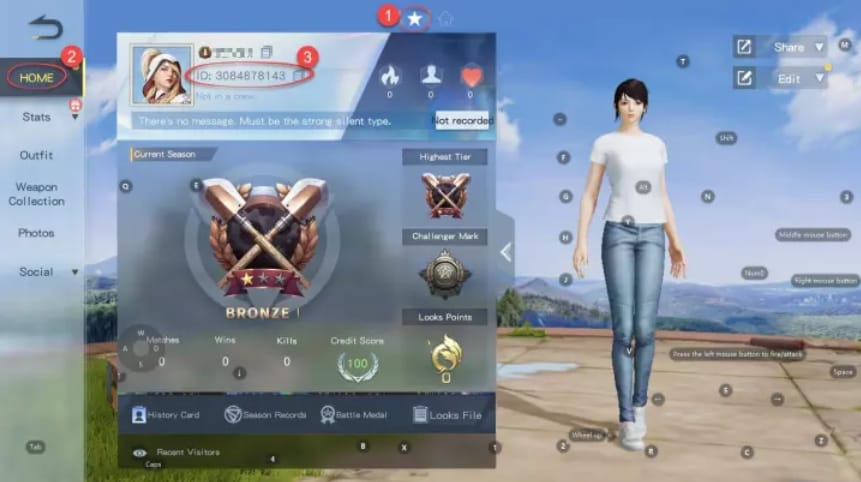
Because wrong-account top-ups are often hard to reverse, and some users report no recovery once vouchers land on the wrong account. Honestly, that's the frustrating part: the payment can be completed perfectly while the delivery still goes somewhere else.
Officially, the NetEase GamesClub Top-up Center uses game account login for verification and requires server selection plus character ID entry. That's the clearest path if your priority is reducing account-detail mistakes. Community sources also note that server is based on location and usually can't be changed easily in the app, which is why region mismatch can block or misroute a recharge.
Use this pre-payment checklist:
Open Knives Out and go to your profile
Find the numeric ID below your nickname
Confirm the active server tied to that account
Check whether the checkout asks for:
Player ID / UID / User ID
Server ID
Character Name
Compare every field with the live in-game profile, not an old gallery image
Screenshot the profile page before checkout
And be careful with unusually discounted voucher offers. Community reports say illegitimate vouchers can be added and later removed, sometimes leaving a negative balance or debt. I would personally avoid any deal where the discount looks too aggressive and the verification flow is unclear.
How can you tell delayed delivery from a wrong-account delivery?
You can usually tell by checking whether the order is still processing or whether the submitted account details were wrong. This split saves time when you're deciding who to contact.
Quick diagnosis table
Community guidance says trusted top-ups are often credited shortly or instantly after successful payment. So if delivery is late, don't guess. Check the order status, then compare the exact ID and server you submitted.
In digital top-up support workflows, the fastest cases to resolve are the ones with clear screenshots of the account page, checkout form, order ID, and payment confirmation saved before and after purchase.
How to Top Up Knives Out Vouchers with Correct Player ID, Server, and Region?
Use a verification-first checkout process: confirm the live account details, enter them exactly, and save proof before and after payment.
Open your Knives Out profile
Tap the profile or star icon at the top-left.
Find the Player ID/UID shown below your nickname.
Don't use nickname alone.
Confirm the server
Check which server your account actually uses.
If the checkout asks for server, match it exactly.
If you're unsure about region, treat server as the key region clue because checkout often doesn't show a separate region field.
Choose the voucher pack
Common community-listed denominations include 80, 240, 400, 750, 1200, 1900, and 2500 Vouchers.
Other packs reported include 1280+110, 1390, and 3280.
Pick the pack only after account details are confirmed, not before.
Enter account details carefully
Fill in Player ID/UID/User ID exactly.
Add server and character name if required.
Read the order summary once more before paying.
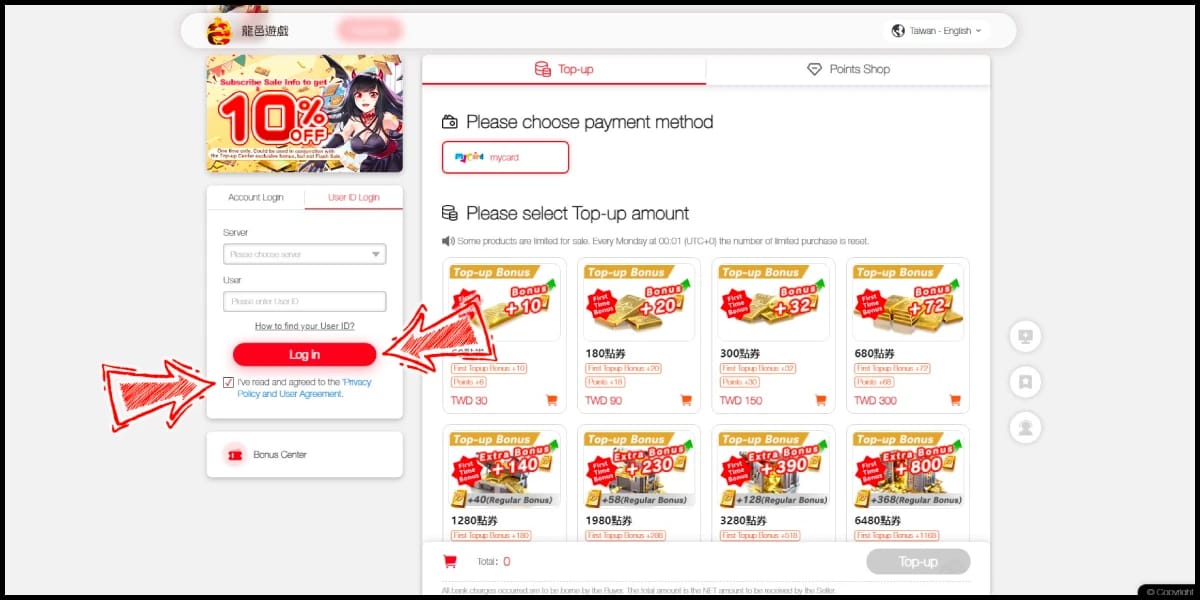
Use a payment method that gives clear records
Commonly reported options include credit/debit card, GCash, Razer Gold PIN, NetEase Pay PIN, and some local payments depending on region.
No-card users can use prepaid PINs or local wallets where supported.
Requirements vary by platform and region, so check the form before you commit.
Screenshot everything
Account profile with visible ID
Server selection
Order summary
Order ID
Payment confirmation / transaction ID
Final credited balance if delivery succeeds
Check delivery on the same account
Reopen the same Knives Out account.
Confirm the vouchers were credited there, not on another profile.
If you want a simple reminder while buying, Knives Out Vouchers recharge right UID avoid wrong account is the exact mindset to keep: ID first, server second, payment last.
What should you do immediately if you submitted the wrong details?
Contact the seller support first, immediately, with screenshots and your order ID. Community experience says seller support is the first stop for wrong details, while official support is better for disputes or account-side issues.
Use this evidence checklist:
I would not wait hours if you already know the ID or server was wrong. Fast contact gives support the best chance to stop or review the order before completion. But if the vouchers have already been delivered to another account, recovery may be limited according to user reports.
FAQ
How do I find my Knives Out Player ID or UID?
Open Knives Out, tap the profile or star icon at the top-left, and check the number shown below your nickname. Community reports describe it as a numeric ID such as 12345678.
Do I need server and region to top up Knives Out Vouchers?
You usually need the server if the checkout asks for it, and region is often implied by that server. Official and community sources both show server selection as a common requirement, while a separate region field is not always present.
What happens if I enter the wrong Player ID for a voucher top up?
The vouchers can be sent to the wrong account. Users commonly report that wrong-account top-ups are difficult to recover, so contact seller support immediately if you notice the mistake.
Can I cancel a Knives Out Voucher order after payment?
It depends on processing status and the seller's policy. If payment is already completed and delivery has started, cancellation may not be possible, so act fast and provide the order ID right away.
Why are my Knives Out Vouchers delayed after checkout?
The order may still be processing, or the payment may have gone through while verification is still pending. First compare the submitted ID and server with your live profile, then check order status before escalating.
What proof should I save for Knives Out top up support?
Save your in-game profile screenshot, submitted account details, server selection, order ID, payment receipt, and final delivery result. From comparing support cases, this is the evidence set that resolves issues fastest.
Can region mismatch stop Knives Out Voucher delivery?
Yes, it can if the selected server doesn't match the account's actual game location. Since server often acts as the region signal, a mismatch can cause failed or misrouted delivery.
Knives Out Vouchers top-ups are safest when you verify the numeric Player ID/UID, match the correct server, and keep full screenshot evidence before paying. That's the real prevention workflow. If you're ready to buy, use VGTopup only after double-checking your Player ID, server, and region so your Knives Out Voucher order goes to the correct account.