
If your Shadowverse Worlds Beyond account region is set to Other, the official Cygames WebStore top-up route is blocked. That part is confirmed: Region Other accounts can't buy items on the WebStore, and the account country/region can't be changed later, even through support.
What still works depends on three separate checks: your in-game account region, your platform store country, and your payment method's billing country/currency. In practice, many users with Region Other accounts recharge through App Store/Google Play or third-party Crystal services instead. If you're comparing options, this is the core issue behind Shadowverse Worlds Beyond top up region other and most cross-border payment failures.
Why does Shadowverse Worlds Beyond top up fail when the account region is set to Other?
It fails because the game's official WebStore checks the account's registered country/region, not just where you're physically located. According to the official help information, if your account region is Other, you can't purchase items on the Cygames WebStore.
Here's the part many guides blur together:
From reviewing failed recharge cases across digital products, the biggest mistake isn't the card itself. It's assuming "I'm in a supported country now" fixes an account that was registered under a different region. It usually doesn't.
Officially confirmed:
Region Other prevents WebStore top-ups
Account region can't be changed
WebStore access requires a linked Cygames ID for supported accounts
Commonly reported by users:
If the in-game account region and Cygames account region don't line up, WebStore purchase attempts fail
App Store and Google Play purchases depend heavily on the store country matching your current payment setup
Does it matter where I am now versus where my Shadowverse Worlds Beyond account was registered?
Yes — and current location is only one piece of the puzzle. Your current country, account registration region, and store/payment region can all be different, and each one can break a different step.
A simple way to think about it:
Users commonly report that the game checks both device location and IP for access restrictions in places like BE, NL, and CN. Some also report using a VPN with matching device location to get past access locks. That's a community workaround, not an official payment rule, and I would not confuse it with a top-up fix. Accessing the game and paying successfully are not the same thing.
This is the insight most pages miss:
A cross-border payment can succeed at the bank level and still fail at the game/account level. Honestly, that's the frustrating part. A successful card charge doesn't always mean the order cleared the publisher's verification or matched the right account path.
Why does Shadowverse Worlds Beyond say my country is unsupported even when I can open the game?
Because game access and payment eligibility are checked differently. You may be able to install or launch the game through Apple App Store, Google Play, Steam, or Epic Games Store, but that doesn't guarantee your account region qualifies for every purchase channel.
Shadowverse Worlds Beyond is officially available on:
Apple App Store
Google Play
Steam
Epic Games Store
But official policy still says:
Region Other accounts can't use the Cygames WebStore
Account region can't be edited later
So if you can log in but see unsupported-country or purchase errors, check these in order:
In-game registered region
Platform store country
Checkout currency
Card issuer country
Whether you're trying WebStore or platform billing
Personally, I would check the in-game region first before touching payment settings. It's the fastest way to avoid wasting time on a route that is officially blocked.
How do I top up Shadowverse Worlds Beyond safely when my region shows Other?
The safest method is to verify the account region first, then use a payment path that matches your platform and billing setup instead of forcing the WebStore.
How do I check my Shadowverse Worlds Beyond account region before paying?
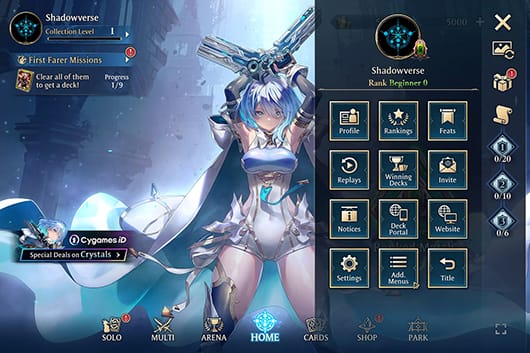
Use the in-game menu path officially provided by Cygames:
Open the game home screen.
Tap Menu in the top-right.
Open Add Menus.
Tap Other.
Open Registered Info.
If it shows Other, stop assuming the WebStore will work. It won't, officially.
Then verify:
Your exact account identifier shown in-game
Your platform: iOS, Android, Steam, or Epic
Your linked Cygames ID status
The package you want to buy, such as Crystals
Your store country on Apple ID or Google Play profile
Crystals are the in-game currency used for packs and items, so package mistakes matter. If you're buying through a third-party service, the exact account details must match what the service requests.
What's the best cross-border top-up workflow for a Region Other account?
For most Region Other users, the practical workflow is:
Confirm Region Other in-game
If confirmed, rule out the official WebStore immediately.Check your platform route
iOS/Android: App Store or Google Play may still work if the store country and payment profile are valid
PC: Steam/Epic availability depends on your account and local store/payment setup
Match billing country and currency where possible
If your card is issued in one country but the store is charging another currency, expect foreign transaction fees, tax differences, or anti-fraud checks. This is where many "random" declines happen.
Use a supported alternative if needed
Users commonly use third-party Crystal top-up services for Region Other accounts. Reported options include BuffBuff, Kaleoz, LDShop, Lootbar, Z2U, and SEAGM. One reported detail: Kaleoz supports e-wallets, internet banking, and credit cards. BuffBuff has listed Crystal packs such as 60 for $0.92, 220 for $2.76, and 450 for $5.51.Save proof before closing the checkout page
Keep:Order ID
Payment receipt
Exact package selected
Account ID / UID
Platform
Error code or message if shown
Wait for crediting, then escalate with evidence if needed
If payment is captured but Crystals don't arrive, support will usually need the details above first.
If you're comparing routes for Shadowverse Worlds Beyond recharge account region mismatch, I prefer the path with the clearest order tracking over the one that only looks cheapest. When delivery is delayed, clear receipts save a lot of time.
What should I do if Shadowverse Worlds Beyond payment fails or the top up does not arrive?
First, separate a payment failure from a delivery failure. They look similar, but the fix is different.
Use this checklist:
When delayed delivery happens after a successful payment, order ID, exact package selected, and account identifier are the first details support teams usually need. That's true across digital recharge support, and Shadowverse Worlds Beyond is no exception.
Contact official support through the Shadowverse Worlds Beyond help center at shadowverse-wb.com/en/usersupport or the Cygames user support form. Officially, support requests may require:
Email
Error code/message
Device info
Country
Payment receipt or order proof
I would contact official support when:
The payment succeeded but Crystals didn't arrive
You received a game-side error code
The order appears completed but nothing was credited
I would contact your payment provider when:
The charge is pending unusually long
The card was declined without a game-side order
You suspect a bank fraud block or duplicate authorization
FAQ
Can I top up Shadowverse Worlds Beyond if my account region is set to Other?
Yes, but not through the official Cygames WebStore. Officially, Region Other accounts are blocked from WebStore purchases, so users usually rely on App Store/Google Play billing or third-party Crystal top-up services instead.
Why does Shadowverse Worlds Beyond say my country is unsupported?
Usually because one of three things doesn't match: account region, store country, or payment-country setup. You can still access the game on a platform and still fail payment if the purchase channel checks a different region rule.
Does my current location matter if my Shadowverse Worlds Beyond account was created in another region?
Yes, but less than most people think. Your current location can affect store access and fraud checks, while your original account region can still control WebStore eligibility.
Will my card be charged in a different currency for Shadowverse Worlds Beyond top up?
Often, yes, if your store country and card issuer country differ. That can trigger conversion fees, tax differences, or a bank decline even before the game processes the order.
What should I check before paying for Shadowverse Worlds Beyond from abroad?
Check four items in this order: account ID, platform, store country, and payment currency. In my experience reviewing recharge issues, that sequence isolates the problem fastest.
What do I do if Shadowverse Worlds Beyond payment went through but the top up did not arrive?
Save the receipt, order ID, package name, account ID, and any error message. Then contact the official help center or Cygames support form with those details.
Can I change my Shadowverse Worlds Beyond account region after registration?
No. Officially, the account country/region can't be changed, even through support inquiry.
Shadowverse Worlds Beyond Region Other top-up is mostly a mismatch problem, not just a location problem. If your account shows Other, the official WebStore is off the table, and retrying it usually wastes time. Check your in-game region first, then your platform store country, then your payment currency and card setup. If payment clears but Crystals don't arrive, go straight to official support with receipts, order ID, and the exact account details shown in-game.