
Yes — you can usually top up Honkai: Star Rail without a credit card by using debit cards, app store balance, Apple Pay, Google Pay, PayPal, prepaid cards, gift cards, or a trusted UID-based seller, depending on your region and platform. The safest option is the one that matches your billing region and asks for the least sensitive information.
For most players, the easiest no-card routes are Google Play or Apple gift card balance, PayPal balance on supported official checkout, or a UID-only seller flow for Honkai: Star Rail top up without credit card. Double-check your UID and server before paying. Wrong-account top-ups are commonly unrecoverable.
Why do users look for ways to top up Honkai: Star Rail without a credit card?
Because the real blocker usually isn't "no card" — it's payment compatibility. From reviewing failed recharge cases, the most common issue is a billing-region mismatch between the game account, app store, and payment method, not the game itself.
Common reasons:
Bank declines or anti-fraud blocks
No access to a credit card
Age limits or family-controlled payment settings
Privacy concerns about storing card details
Unsupported cards in a specific country or app store region
Officially, payment options vary by country, device OS, and store setup. So one player may see PayPal or mobile payments, while another only sees card billing. That's why repeated retries with the same failed card usually waste time.
Which non-credit-card payment methods usually work for Honkai: Star Rail top up?
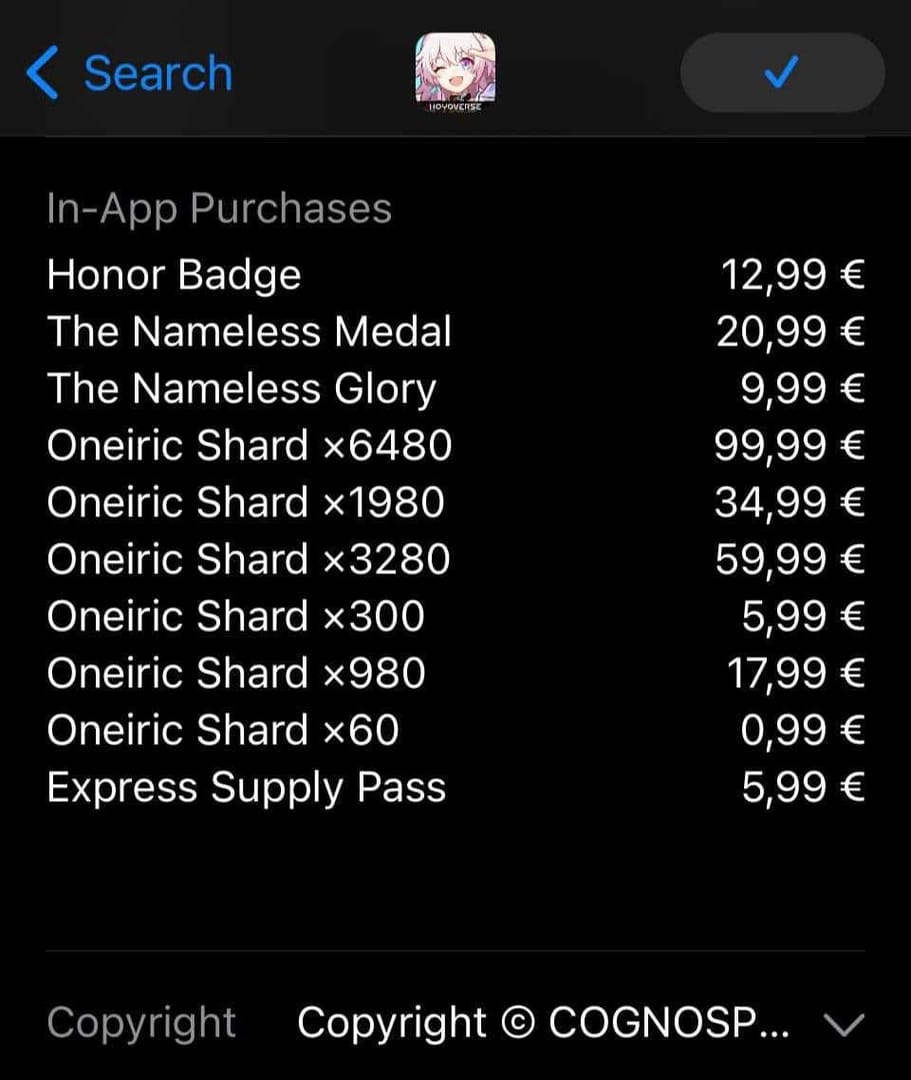
The best non-credit-card methods are app store balance, PayPal balance where supported, prepaid cards linked through PayPal, Apple Pay on iOS, and UID-based seller checkouts that support local wallets or crypto.
Officially confirmed routes include the HoYoverse top-up center at hsr.hoyoverse.com/payment, where you log into the matching HoYoverse account and buy Oneiric Shards. Oneiric Shards convert 1:1 into Stellar Jade, and Express Supply Pass can also be purchased through top-up flow using shards. First-time top-up bonuses officially double each Oneiric Shard pack once per account.
Users commonly report these no-credit-card options:
Two details many guides miss:
There is no official crypto/USDT payment support. If you pay with crypto, that's through a third-party seller, not HoYoverse.
Apple store balance isn't universal for every store-billed product type. Community reports note some Apple subscription-style purchases don't use store balance, so if one route fails, switch to direct shard top-up or another payment path.
If you want a simple comparison point for Honkai: Star Rail recharge with paypal, check whether the checkout is official account-login based or UID-only. Personally, I prefer the route with clearer order tracking, even if it's not always the cheapest.
Can I top up from another region, and is that a good idea?
Sometimes yes, but I wouldn't rely on cross-region tricks. Officially, top-up availability depends on country, billing region, device OS, and store setup. Community pricing reports also show Oneiric Shard prices can be cheaper in some regions, but VPN-based region switching is widely reported as risky because payment enforcement is often region-locked.
Safer rule:
Same region as your account/store: best chance of success
Different region with VPN: risky, often blocked
UID-based seller flow: often easier for region-locked users because it bypasses app-store billing, but you still need a trusted service and correct UID/server
Servers commonly include America, Europe, Asia, and TW/HK/MO. Server selection matters as much as UID. A valid UID on the wrong server can send the order nowhere useful.
How do you top up Honkai: Star Rail without a credit card step by step?
Use the route that fits your platform first, then verify account details before payment.
Official method
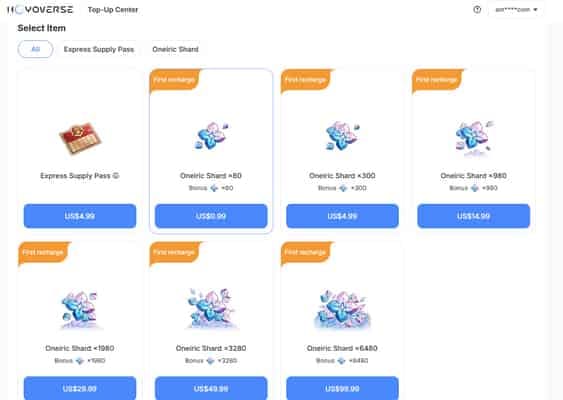
Go to
hsr.hoyoverse.com/payment.Log in with the HoYoverse account linked to your game account.
Select the Oneiric Shard pack you want.
Check whether PayPal or another non-credit-card option appears in your region.
Pay and save the order confirmation.
Reopen the game and check your balance or mail.
App store method
Add funds with a Google Play or Apple gift card.
Open Honkai: Star Rail on the same device/account tied to that store balance.
Choose Oneiric Shards or the item you want.
Confirm the store balance is selected at checkout.
Finish payment and wait for delivery.
UID-based seller method
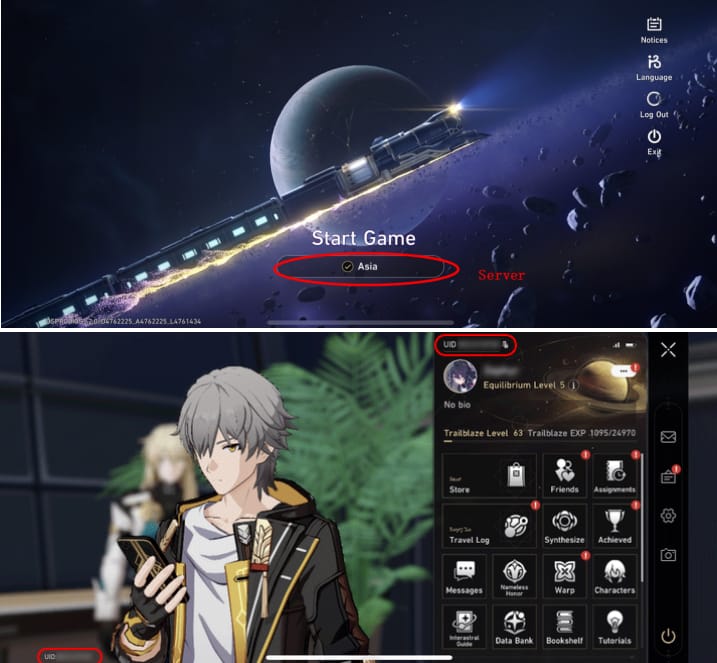
Open the seller checkout.
Enter your UID and server exactly.
Pick the correct pack.
Pay with the available method: PayPal, local wallet, prepaid option, or crypto if supported.
Save the order ID.
Wait for delivery, usually within minutes.
In checkout comparisons, users trying to avoid credit cards usually succeed faster with app store balance or PayPal balance than with repeated direct card retries. And if a seller asks for your full game login for a standard top-up, I would avoid that. Official guidance is clear: use official channels or trusted UID sellers, and never share full login credentials unless an official flow explicitly requires it.
What should you check if your Honkai: Star Rail top up fails or gets delayed?

First, don't pay again immediately. A successful bank or wallet charge does not always mean the order has cleared verification, and duplicate payments are a headache.
Check this in order:
Official troubleshooting steps:
Relog the game.
Restart the purchase flow without repaying.
Check in-game mail and purchase history.
Clear cache or try another payment method if checkout fails.
Contact the right support team.
Who to contact:
Official top-up issue: HoYoverse Help Center at
support.hoyoverse.comCharged but payment verification failed: your bank, PayPal, or payment provider first
UID seller order issue: the seller's support with order ID, UID, server, and payment proof
Honestly, delayed delivery is frustrating when the money already left your account. But chargebacks are a bad idea. Community reports warn they can risk account penalties, and official policy says digital top-up refunds are generally unavailable.
What is the best way to top up Honkai: Star Rail without a credit card?
For most users, the best method is the simplest supported one in your own region: app store balance on mobile, PayPal balance on official checkout if available, or a trusted UID-only seller when official billing won't cooperate.
My recommendation by user type:
Android users: Google Play balance is usually the cleanest no-card option.
iPhone users: Apple Pay or Apple gift card balance is usually fastest.
No bank access at all: prepaid gift cards or local-wallet seller checkout.
Region-locked or unsupported official checkout: UID-based top-up is often easier than forcing cross-region app-store billing.
Urgent orders: choose the route with clear order tracking and average delivery in minutes.
FAQ
Can I top up Honkai: Star Rail without a credit card?
Yes. Common alternatives include debit cards, app store balance, PayPal, Apple Pay, Google Play balance, prepaid cards, and UID-based seller checkout. Availability depends on region and platform.
What payment methods work for Honkai: Star Rail top up?
Officially, supported methods vary by country and device. Users commonly use PayPal, app store billing, mobile payments, gift cards, prepaid cards, and local wallets where available.
Can I use Apple Pay or Google Pay for Honkai: Star Rail?
Apple Pay is commonly reported to work on iOS in-game checkout where supported. Google Play balance is widely used on Android; whether Google Pay itself appears depends on your store and region setup.
Why is my Honkai: Star Rail payment failing?
The usual causes are insufficient funds, bank blocks, fraud review, or billing-region mismatch. I would check region alignment first, then payment status, then try an alternate method.
Can I top up Honkai: Star Rail from another region?
Sometimes, but it's unreliable. Cross-region pricing exists, yet VPN-based payment workarounds are widely reported as risky and often blocked.
What should I do if my Honkai: Star Rail top up is delayed?
Relog, check mail and purchase history, and do not repay right away. If the charge is complete but items don't arrive, contact HoYoverse for official purchases or the seller for UID-based orders.
Do I need my UID to recharge Honkai: Star Rail?
For official web top-up, you usually log into your HoYoverse account. For many third-party top-ups, yes — UID and server are the key details, and they must be exact.
Is it safe to top up Honkai: Star Rail through a third-party seller?
It can be safe if the service only needs UID and server and does not ask for your full login. Test small orders first if you're unsure, and avoid any checkout asking for unnecessary account access.
Honkai: Star Rail can absolutely be topped up without a credit card, but the right method depends on your device, billing region, and what checkout options actually appear. If you want the fewest problems, start with official or app-store balance methods, then use a trusted UID-only seller if regional billing gets in the way. Above all, verify UID, server, and payment status before trying again.