
Yes—US players can top up Honkai: Star Rail through the official HoYoverse payment center, in-game App Store/Google Play checkout, or UID-based top-up sites. The real problems usually aren't US access. They're wrong UID/server entries, app-store region mismatch, and bank fraud blocks.
For most people, the safest route is the official top-up center at hsr.hoyoverse.com/payment. If you want simpler UID-only checkout or better pricing, compare options carefully and test a small order first. If you're looking at a Honkai: Star Rail US top up, verify your America server UID before you pay.
Why do US players sometimes run into top-up or payment issues?
US players usually hit payment friction because of region checks, issuer fraud screening, or account-detail mistakes—not because Honkai: Star Rail can't be topped up from America.
From reviewing failed recharge cases, the most common preventable issue is incorrect account identification rather than lack of payment options. Honkai: Star Rail uses a 10-digit UID shown at the bottom-left of the game screen, and US accounts normally use the America server. Enter the wrong UID once, and support generally can't transfer the purchase to another account.
A second issue is platform rules:
Official web top-up: log in to the matching HoYoverse account, then select UID/server
iPhone/iPad in-game: App Store billing, with Apple Pay where supported
Android in-game: Google Play billing, with Google Pay where supported
PC: official site or Epic-based purchase flow depending on setup
And region mismatch is a quiet killer. Official guidance confirms App Store or Google Play region must match the payment location. If your store region and payment setup don't line up, the charge can fail even when your card is fine.
What should you check before you top up Honkai: Star Rail from the US?
Check the product, the UID, the server, and the purchase platform before you spend anything.
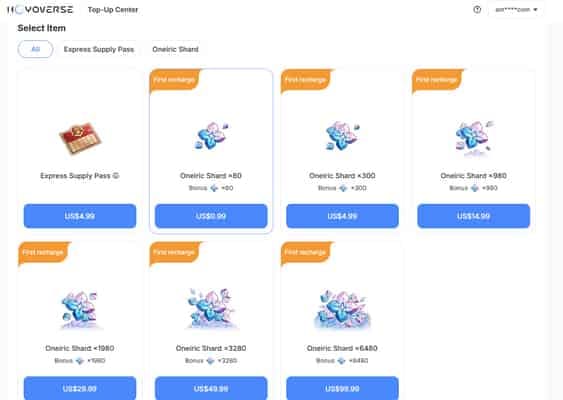
What US buyers can officially purchase:
Oneiric Shards
Express Supply Pass
Nameless Honor
Oneiric Shards are the premium currency and convert 1:1 into Stellar Jade. Community pricing commonly listed in USD includes:
Express Supply Pass is widely reported at $4.99, with 300 Oneiric Shards + 30 bonus and a 30-day duration.
I would check these four things first:
One detail many guides miss: a successful bank charge does not always mean the order has cleared platform verification. Users commonly report 5-30 minute delays when payment is pending review or when the game needs to sync after purchase.
What is the safest and easiest way to top up Honkai: Star Rail from the US?
The safest way is the official HoYoverse top-up center; the easiest depends on your payment method and whether your app-store region is clean.
Official is straightforward and confirmed:
Visit
hsr.hoyoverse.com/paymentLog in to the HoYoverse account linked to your game
Select the correct UID and America server
Choose Oneiric Shards, Express Supply Pass, or another available item
Pay
But official isn't always the smoothest for every US buyer. In checkout comparisons, people care most about whether card, Apple Pay, or Google Pay works without store-region friction. If your in-game mobile payment keeps failing, web checkout is often cleaner because it bypasses some app-store issues.
Third-party UID top-up is commonly used because it only needs:
UID
Server
Payment
No password should be required. Community reports say delivery is usually 1-5 minutes, sometimes up to 30 minutes if manual claim or review is involved. Some sites also support PayPal, e-wallets, gift-card-funded balances, or even crypto. Officially, though, HoYoverse warns that non-authorized third-party purchases can lead to account penalties or negative balance issues. My view: if safety is your top priority, stay official. If you use UID checkout, keep it to reputable UID-only flows and test small.
How to top up Honkai: Star Rail from the US step by step?
Use the method that matches your platform and payment setup. For urgent orders, I personally prefer the path with the clearest order tracking, even if it isn't always the cheapest.
How do you top up through the official HoYoverse center?
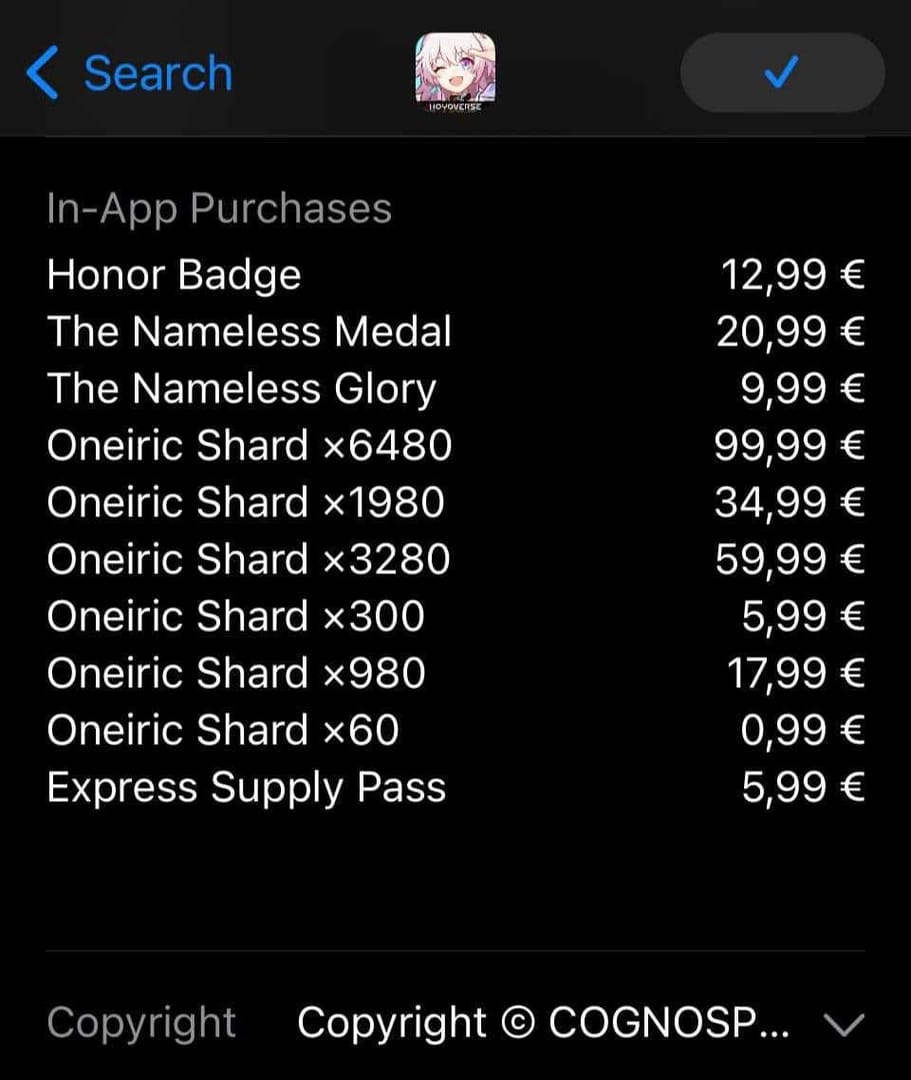
This is the best option for most US players who want the lowest account risk.
Open
hsr.hoyoverse.com/payment.Sign in with the same HoYoverse account used in-game.
Confirm your character UID and select America server.
Pick your item: Oneiric Shards, Express Supply Pass, or Nameless Honor.
Pay with an available method such as credit/debit card or PayPal where supported.
Relog if the currency doesn't appear immediately.
Common pitfalls:
Logging into the wrong HoYoverse account
Assuming all US cards pass automatically
Forgetting that bank anti-fraud checks can block gaming purchases
If your bank declines the payment, official guidance says to verify balance, card validity, region match, and authorize gaming transactions with the issuer.
What's the best way to top up if you use iPhone, Android, or a UID checkout?
For mobile-first users, in-game purchase is convenient. For no-credit-card users, UID checkout or gift-card-funded store balance is often easier.
In-game on iPhone/Android
Open the in-game phone/store.
Select the pack or pass.
Pay through App Store or Google Play.
If nothing appears, relog and check the same platform first.
UID-based checkout
Copy your 10-digit UID from the game.
Select America server.
Choose the exact product and amount.
Pay with supported methods such as card, PayPal, or other listed options.
Wait for instant delivery or in-mail fulfillment.
For US buyers comparing convenience, Honkai: Star Rail recharge USA options can make sense when you want UID-only checkout instead of app-store billing. Still, I would always do a small test order first on any non-official flow.
What should you do if your Honkai: Star Rail top up fails or is delayed?
First, identify whether the problem is payment approval, platform sync, or wrong account details.
When troubleshooting delayed delivery, the first details that actually move support forward are:
Order ID
UID
Payment timestamp
Receipt or proof of charge
Use this quick check:
Official experience-based guidance is clear: relog the game, restart the device, and check on the same platform first. Honestly, delayed delivery is frustrating when the payment already left your account, but many orders do clear after a short sync window.
For refunds, official guidance says to contact the payment provider or platform first. HoYoverse may reverse mistaken purchases if unspent, but wrong-account top-ups generally aren't transferable. That's why UID verification matters more than people think.
Can I top up Honkai: Star Rail from the US?
Yes. US players can top up through the official HoYoverse center, in-game mobile stores, and some UID-based checkout services. The key is using the correct America server and matching payment region where required.
What payment methods can I use to top up Honkai: Star Rail in the US?
Common US payment methods include credit card, debit card, PayPal, Apple Pay on iOS in-game, and Google Pay on Android in-game. If you don't have a card, prepaid Google Play or iTunes gift cards can also work through store billing.
Do I need a UID to recharge Honkai: Star Rail?
For UID-based top-up, yes—you need your UID and server. On the official web center, you log into your HoYoverse account and then confirm the matching UID/server.
Why did my Honkai: Star Rail payment fail?
Most failed payments come from bank fraud checks, app-store region mismatch, or incorrect account/platform setup. Users in the US commonly fix this by confirming store region, authorizing the charge with the bank, or switching to PayPal.
How long does Honkai: Star Rail top up take?
Usually it's instant. Community reports put most deliveries at 1-5 minutes, with 5-30 minutes possible if payment is pending or the platform needs to sync.
What should I do if my Honkai: Star Rail top up is not received?
Relog first, then restart the device and check the same platform used for purchase. If it's still missing, contact support with your order ID, UID, payment time, and receipt.
Can I get a refund for a wrong Honkai: Star Rail top up?
Sometimes, but don't count on account transfers. Officially, refunds are handled through the payment provider or platform, and mistaken purchases may be reversed only if unspent.
Is it safe to top up Honkai: Star Rail on a third-party site?
Safer if it's a reputable UID-only checkout that never asks for your password, but it still carries more risk than official purchase. HoYoverse has warned that non-authorized third-party transactions can lead to penalties or negative balance issues.
US players can top up Honkai: Star Rail without much trouble if they get three things right: UID, server, and payment path. My recommendation is simple: use the official HoYoverse center first, switch to in-game or UID checkout only when your payment setup makes that easier, and always verify the America server before paying.