
Yes—if you are in the Philippines, GCash is one of the easiest no-card ways to top up Dragon Nest M Classic. For most buyers, the best route is a web checkout that asks for your game account details before payment, shows the amount in PHP, and gives you a usable order ID after checkout. In practice, that usually means starting with an official-style web flow such as Codashop PH, then saving both the seller order ID and your GCash reference number in case delivery is delayed.
If you are comparing routes, the safest rule is simple: choose the one that clearly identifies the recipient account before you pay. That matters more than convenience, and often more than a small price difference. It is also the easiest way to avoid the most common preventable mistake in Dragon Nest M Classic top ups: sending Cash to the wrong account, server, or ID field.
For a broader overview, readers can also compare options in the Dragon Nest M Classic Top Up Guide.
Why web checkout is usually the best choice for PH buyers
If your goal is How to Top Up Dragon Nest M Classic with GCash in the Philippines, the cleanest answer is usually web checkout first, app-store billing second.
The reason is not just payment method support. It is traceability. A proper web checkout for Dragon Nest M Classic in PH typically asks for your User ID and Zone ID / Server ID before payment, then lets you choose GCash and complete the purchase in PHP. That gives you a clearer audit trail if something goes wrong.
Codashop Philippines is listed as a platform for Dragon Nest M: Classic top ups and supports GCash, along with other local methods such as Maya, GrabPay, Coins.ph, and bank payment. The official-style flow is straightforward: visit the Dragon Nest M: Classic page, enter your User ID and Zone ID, select a Cash pack, and complete payment for instant delivery.
That is why many PH buyers prefer web checkout over store-linked billing. Community guidance around this game is consistent on two points: web top up is easier to verify before payment, and it helps avoid account mismatch issues that can happen when the billing layer is less explicit about which game account will receive the purchase.
There is also a practical support advantage. When a buyer saves both the order ID from checkout and the GCash reference number, missing-credit cases are easier to trace. That may sound minor, but it is often the difference between a quick resolution and a long back-and-forth.
What should you prepare before paying?
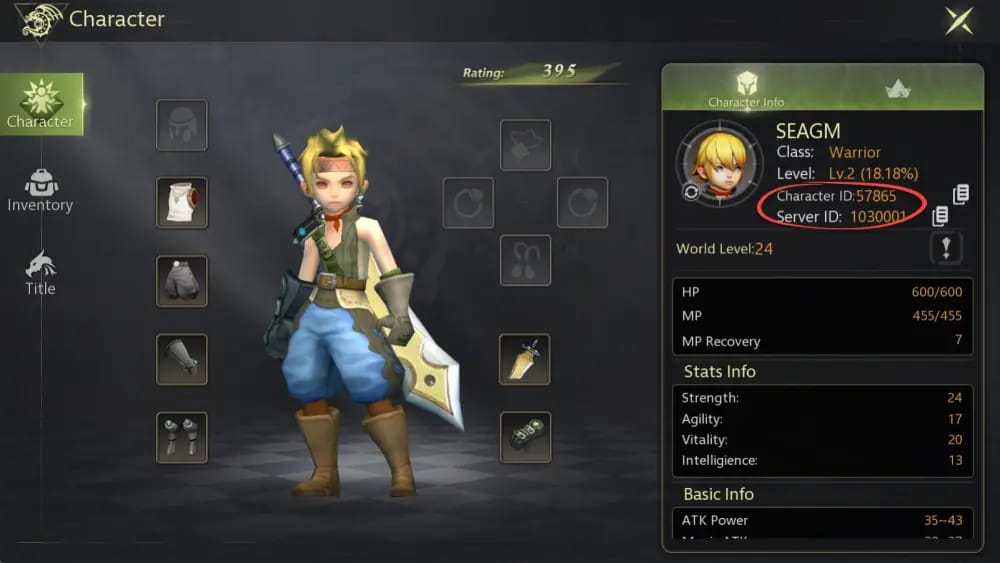
Before you open any Dragon Nest M Classic GCash checkout page, gather the account details first. Do not try to fill it in from memory while rushing through payment.
For official-style checkout, the key details are:
User ID
Zone ID / Server ID
enough GCash wallet balance
your chosen Cash pack
Community guidance says these IDs can be checked from the in-game avatar or settings area. Some non-official sellers may ask for Character ID and Server ID instead of User ID and Zone ID, so the exact field labels matter. Do not assume those are interchangeable.
That distinction is where many failed top ups begin. A buyer sees a familiar name on screen, enters the wrong identifier, completes GCash payment successfully, and only later discovers the order was tied to the wrong account details. There is a specific warning in the available facts that wrong UID top ups fail and there is no auto-refund. So the most important step in the whole process is still the least glamorous one: verify the exact ID pair before you pay.
If you are a first-time buyer, it is also sensible to decide your package before checkout rather than browsing while the payment session is open. Community-reported pack options on Codashop and similar SEA sellers include:
600 + 26 bonus Cash
3000 + 130 bonus Cash
6000 + 366 bonus Cash
12000 + 800 bonus Cash
For cautious first purchases, community buying patterns often point to the 600 + 26 pack as the easiest starting point. Small-budget buyers also tend to begin there rather than committing to a larger order before they are comfortable with the process.
How to Top Up Dragon Nest M Classic with GCash in the Philippines?
The practical flow is simple once your account details are ready.
Start on a checkout page that is known to support Dragon Nest M: Classic in the Philippines. Official checkout pages listed in the facts include:
codashop.com/en-ph/dragon-nest-m-classic
cherrycredits.com
On Codashop PH, the process is described as follows: enter your User ID and Zone ID, choose your Cash pack, select GCash, and complete payment. The checkout uses PHP currency and includes OTP confirmation through GCash.
In real buyer terms, here is what that should feel like:
You open the Dragon Nest M: Classic page, type in the exact account identifiers from the game, choose the package you want, and then move to the payment section. Once you select GCash, you should expect a wallet authentication step, including OTP. After successful payment, you should land on a confirmation page that shows the transaction status and an order ID.
Before tapping the final pay button, pause for a few seconds and check four things:
the recipient account details shown are yours
the selected pack is the one you intended to buy
the amount is displayed in PHP
the payment method is clearly GCash
That short review matters because a successful wallet debit does not automatically mean the order was submitted correctly. If the account details were wrong, or if the payment is still pending, the money movement alone will not fix the delivery.
As for timing, instant is the common expectation on supported web checkout, but community reports still place normal delivery in a 5 to 60 minute window depending on server conditions. So if the top up does not appear immediately, that is not automatically a failed order.
Are you paying with GCash directly, or through another billing layer?
This is an important distinction for Dragon Nest M Classic PH buyers.
When people say they want to buy Dragon Nest M Classic with GCash, they may mean one of two things: a direct local-wallet web checkout, or a purchase that is routed through another billing layer first. For this game, the facts strongly favor the first option. Community guidance specifically notes no Google Play billing for Cash and recommends web top-up to avoid account mismatch.
Why does that matter? Because support responsibility changes depending on the route.
If you use a web checkout that asks for your UID/User ID and Server/Zone ID before payment, the transaction is easier to trace. The seller can match the order to the game account, and you can match the order to your GCash payment record. If you use a less transparent route, it becomes harder to prove where the purchase was supposed to go.
A legitimate checkout page should also look official in basic ways. The facts database identifies official checkout pages such as Codashop PH and Cherry Credits, and official support resources such as sea.dragonnest.com and seaclassic.dragonnest.com. If a page claims to top up your account but asks for your password, that is a red flag. Community safety guidance is clear: avoid sharing your account password and prefer sites that require only ID and server details.
That is also why suspiciously cheap offers deserve caution. Discounts do exist in the PH market, and some community sellers accept GCash using Character ID and Server ID. But if the route is unclear, the recipient account is not shown, or the seller asks for account access, the risk is no longer worth the savings.
What usually goes wrong with Dragon Nest M Classic GCash payments?
Most failed or delayed cases fall into a few familiar categories, and nearly all of them are easier to handle if you know where the problem started.
The first category is account mismatch. This includes the wrong UID, wrong User ID, wrong Character ID, or wrong server/zone. It is the most preventable issue and often the hardest to reverse. If the wrong details were submitted, there may be no automatic refund path.
The second category is wallet-side friction. In the Philippines, common GCash issues include:
insufficient wallet balance
OTP or authentication delays
maintenance windows
pending status during peak periods
The facts specifically note that insufficient GCash balance is common, and that OTP delays can happen during authentication. A practical response is to wait around five minutes and retry if needed. There is also community guidance that GCash may be unavailable during maintenance, in which case Maya is the recommended alternative wallet.
The third category is delivery delay after successful payment. Community reports place the normal delivery window at 5 to 60 minutes, while official guidance says to check the game cash shop after 10 to 30 minutes and then escalate if the top up is still missing.
This is where buyer behavior matters. An urgent buyer trying to recharge just before an event deadline should not wait until the final minute. Community experience points to Codashop as the preferred route for urgent GCash processing, but even then, instant should be treated as a goal, not a guarantee. If timing is critical, build in a buffer.
If you want a deeper troubleshooting path, this is also the point where a guide like Dragon Nest M Classic top up not received after payment is useful to compare against your case.
If your payment succeeded but the top up did not arrive, what proof should you save?
Support works best when you can connect the wallet payment, the seller order, and the target game account in one message.
The most useful proof set is:
order ID
GCash reference number
screenshot of the success or pending page
the User ID / UID and Server or Zone ID you entered
payment time and PHP amount
receipt or invoice screenshot if available
The facts explicitly say that if credits are not added, you should save the GCash reference number and order ID, then contact the top-up site support. Official guidance also says to verify in the game cash shop after 10 to 30 minutes and resubmit a ticket with proof if the top up is still missing.
A good escalation path looks like this:
If the payment was debited but the order appears pending, contact the top-up site support first with the order ID and GCash reference. If the seller confirms the order but the Cash still does not appear in game, then submit a 1:1 inquiry through sea.dragonnest.com/support with the same proof set. If the issue is clearly on the wallet side—such as authorization failure, no matching paid order, or a payment that never fully posted—then the payment provider is the better first contact.
For high-value buyers, proof discipline matters even more. Community guidance specifically notes that buyers making larger purchases should save order history and GCash receipts for support escalation. If you need a paper trail, do not close the success page too quickly, and keep screenshots while the transaction is fresh.
Refund expectations should also stay realistic. The available official policy wording from Cherry Credits says refunds are unavailable after delivery, and disputes go through the payment gateway. In other words, once the top up is successfully delivered, do not expect a simple reversal because you changed your mind or picked the wrong pack.
When should you avoid a route, and who should use which option?
Not every buyer needs the same path.
If you are a first-time buyer, the best choice is usually an official-style web checkout with a small pack. The goal is not just to complete the purchase, but to confirm that you understand which account identifiers the form requires. A smaller first order reduces the cost of any mistake.
If you are an urgent buyer trying to top up before an event or deadline, use the route known for instant processing and clear order status. Community experience points to Codashop for this use case. Even so, do not leave the purchase until the last few minutes, because wallet maintenance, OTP delays, or server congestion can still happen.
If you are a small-budget buyer, the lowest pack tier is the most practical starting point. Community buying patterns often point to the 600 + 26 bonus Cash pack as the entry-level option.
If you are a high-value buyer who needs receipt proof, prioritize the route with the clearest order history and save every transaction record. This is also where a comparison such as How to find Dragon Nest M Classic order ID and receipt can help you organize what to keep.
And when would I avoid a route entirely? Three cases stand out:
A route that hides the recipient account before payment is not ideal, because it increases mismatch risk. A route that asks for account sharing or your password should be avoided outright. And a route that looks suspiciously cheap without clear support or order tracking is not a bargain if it leaves you with no safe recovery path.
Final buyer memo
For most players searching How to Top Up Dragon Nest M Classic with GCash in the Philippines, the best answer is still the simplest one: use a web checkout that supports GCash, shows your account details before payment, and charges in PHP. In practice, that usually means starting with Codashop PH or another clearly supported checkout page, not a vague billing flow that hides the recipient account.
Before paying, prepare your User ID and Zone/Server ID from the in-game avatar or settings area, choose your pack carefully, and make sure your GCash wallet has enough balance. After payment, save the order ID and GCash reference number immediately. If the top up does not arrive, check the game cash shop within 10 to 30 minutes, then escalate with proof.
For first-time buyers, start small. For urgent buyers, do not wait until the event is about to end. For high-value buyers, keep every receipt and screenshot. And for everyone: never share your password just to top up a game account.