
Yes, you can usually top up Blood Strike without a credit card. The workable options are debit cards, prepaid cards, Google Play or App Store balance, Apple Pay, Google Pay, local e-wallets, mobile billing, and in some regions crypto through UID-based sellers. The right path depends on three checks first: your platform, your account region, and the payment methods shown in your country.
From reviewing failed recharge cases, the biggest blocker usually isn’t no credit card. It’s a region or store mismatch. If you want a smoother Blood Strike top up without credit card, verify your UID, server/region, and checkout method before you pay.
Why do some Blood Strike users need a non-credit-card top-up method?
Because Blood Strike doesn’t rely on one universal checkout flow. Officially, the web top-up page supports Visa, Mastercard, and PayPal, while in-app purchases go through Google Play or the App Store. In practice, many users need alternatives because they don’t have a credit card, their issuer blocks gaming payments, or local wallets are easier and more reliable.
What actually works varies by market:
Officially confirmed Blood Strike products include Golds and Strike Pass tiers such as Elite at USD 3.99 and Premium at USD 8.99. On PC or Steam-style wallet setups, users also report that buying Gold first can be the easier route if pass checkout fails.
Why can Blood Strike payment options change by region, device, or account setup?

Because Blood Strike payment availability is tied to region rules, app store country, and account matching. Officially, your Player UID must match the correct server/region. There are also separate environments such as MENA versus Max/Global, and MENA UIDs must be topped up on MENA-compatible channels.
This is where many guides stay too vague. The real decision path is:
Platform first — Android, iPhone, or web
Region second — account server and app store country
Account verification third — correct UID before payment
Payment selection last — only from methods shown for your setup
Common failure points users report:
Wrong UID entered
Region/server mismatch
Google Play or App Store country doesn’t match your account
Insufficient wallet/card balance
3D Secure verification failure
Unsupported issuer
Temporary anti-fraud review
Server-side purchase issues during updates
Honestly, delayed delivery is frustrating when the money already left your account. But a successful bank charge still doesn’t always mean the order cleared verification. Anti-fraud review delays do happen, and support usually needs proof before they release or trace the order.
What is the safest way to top up Blood Strike without a credit card?
The safest method is the official route first: in-app billing through Google Play/App Store or the official NetEase top-up page. Officially, NetEase warns that unauthorized third-party top-ups can risk a permanent ban. At the same time, users commonly use UID-only sellers without sharing login details, and that’s the trust boundary I would stick to.
Personally, I would avoid any seller asking for your password or account login. A safer non-card top-up should require only your UID, not account access.
Use this rule set:
If you’re comparing checkout paths, I personally prefer the one with clearer order tracking over the cheapest one. Some third-party listings report discounts of roughly 20% to 33% or bonus Golds, and users do chase that value. But official is still the cleaner choice when it supports your region and payment method.
How can you top up Blood Strike without a credit card step by step?
Yes — the process is simple if you verify the account details before checkout.
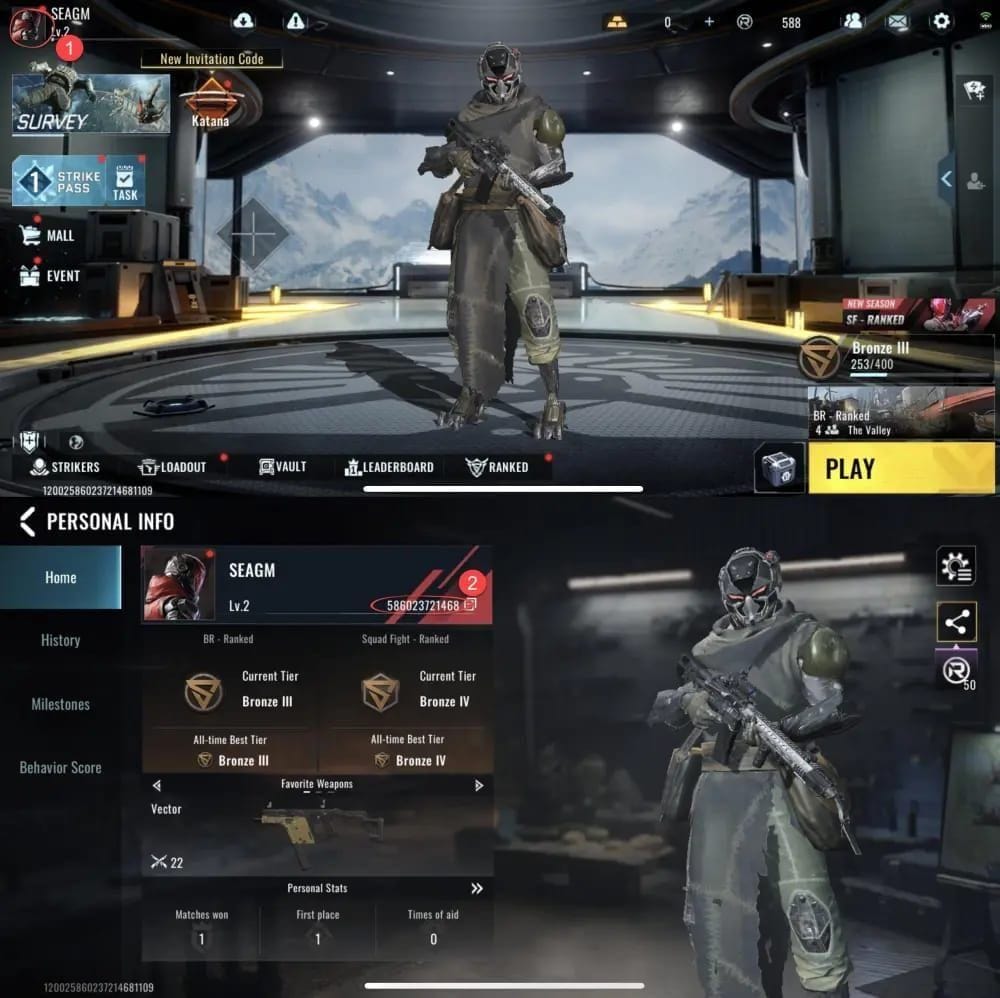
Find your Player UID
Open Blood Strike and check the avatar area at the top-left.
Copy the UID exactly.
Confirm your server/region. This matters for MENA and other separated environments.
Choose the right payment path
In-app: Mall/Shop > select Golds or pass > pay through Google Play or App Store.
Official web: log in on the official NetEase Blood Strike top-up page, select amount, pay with supported methods.
UID-based seller: select denomination, enter UID, choose local wallet, prepaid, mobile billing, PayPal, or crypto if available.
Pick a no-credit-card method
Best first checks:
App store balance from gift cards
Debit card
PayPal balance/bank-linked PayPal
Apple Pay / Google Pay
Local wallets like GCash, Maya, GrabPay, Coins.ph, bKash
Mobile billing or cash retail in supported regions
If you need more local checkout flexibility, compare a Blood Strike gold recharge no card option only after confirming UID and region.
Review the checkout details before paying
UID correct
Region/server correct
Product correct: Golds vs Strike Pass
Payment method supported in your country
App store country matches your current account if paying in-app
Pay and save proof
Keep the order ID, payment timestamp, screenshot, and transaction receipt.
This matters if the order is delayed or flagged for review.
Wait for delivery
Users commonly report delivery in 1 to 5 minutes.
Rare cases can take up to 24 hours.
How do you fix Blood Strike payment problems or delayed top-ups?
Start with the account and region checks. In my experience reviewing recharge issues, wrong UID and store-country mismatch cause more failures than payment balance itself.
Use this checklist:
If your top-up hasn’t arrived:
Wait up to 24 hours.
Gather:
Order ID
UID
Payment receipt
Exact payment time
Screenshot of missing balance/item
Contact the seller or official support channel used for that purchase.
And don’t repurchase immediately unless support confirms the first order failed. Duplicate charges are harder to unwind than a single delayed order.
FAQ
Can I top up Blood Strike with a debit card instead of a credit card?
Yes, often. Debit cards usually work anywhere Visa or Mastercard payments are accepted, including the official web flow and some UID-based checkouts, but issuer support and 3D Secure can still block the payment.
What payment methods work for Blood Strike if I do not have a credit card?
The most practical options are debit card, prepaid card, PayPal, Google Play balance, App Store balance, Apple Pay, Google Pay, local e-wallets, mobile billing, and in some regions crypto. Availability changes by country, platform, and seller.
Why is my Blood Strike payment failing even though I have enough balance?
Enough balance isn’t the only requirement. Users commonly report failures from wrong UID, unsupported issuer, failed 3D Secure, app store country mismatch, region mismatch, or temporary anti-fraud review.
How do I top up Blood Strike from a country where card payments are not supported?
Use the payment methods actually shown for your region. That usually means app store balance, local wallets, mobile billing, or a region-supported UID top-up channel; VPN-based workarounds are risky and often create more verification problems.
What should I do if my Blood Strike top up was charged but not received?
Wait up to 24 hours first. Then contact the payment channel’s support with your order ID, UID, receipt, and payment timestamp so they can trace whether the order is delayed, misapplied, or blocked in review.
Can I use Google Play or App Store balance for Blood Strike?
Yes, if you’re buying through in-app billing. Gift card balance is one of the cleanest no-credit-card options, but your store country must match the account setup or the payment option may fail or disappear.
Is it safe to top up Blood Strike through unofficial sellers?
Only if the seller uses UID-only delivery and never asks for your login. Official channels are safest; I would avoid any assisted top-up that requires your password because that crosses the line from payment help into account risk.
Blood Strike can be topped up without a credit card, but the winning formula is simple: check platform first, region second, UID third, then choose the payment method. For most users, app store balance, debit card, PayPal, or local wallets are the easiest non-card routes. If speed and safety matter, use official checkout when possible and keep your order proof until the Golds or pass arrives.