
Before any Magic Chess: Go Go diamond top up, verify the exact UID or Player ID shown on your account screen, then cross-check the server or region if the checkout asks for it. Most wrong-account orders happen because buyers rely on a nickname, an old screenshot, or the wrong logged-in account on a shared device. In Magic Chess: Go Go, the safe source is your in-game profile: the User ID is a 9-digit number, and the Zone ID/Server is the 4-digit number in parentheses. If either detail looks unclear, stop the order first.
If you want a quick reference before paying, this Magic Chess: Go Go top up UID server check topic is exactly the right mindset: verify first, pay second.
Pre-payment checklist that prevents most wrong-account top-ups
Use this before every order, even if you've topped up before.
Open Magic Chess: Go Go and log in to the exact account you want to recharge.
Tap your avatar in the top-left corner.
Go to Basic Info.
Find the ID shown below your nickname in this format: 123456789 (1234).
Copy the 9-digit number as your UID / User ID / Player ID.
Use the 4-digit number in parentheses as your Zone ID / Server.
Match the nickname on the profile with the account you intend to top up.
Check your login method if you recently changed phone, reinstalled, or switched accounts.
If you're on a shared device, log out of other accounts first.
Take a fresh screenshot of the profile page before payment.
Enter the UID and server carefully at checkout.
For a first order or uncertain account, start with a small test top-up.
That list looks basic, but in my experience reviewing recharge issues, the failures usually happen in the boring parts: copied the wrong number, used an old screenshot, or forgot the game was still logged into someone else's account.
How do I find my Magic Chess: Go Go UID or Player ID?

You can find it in the in-game profile, and that's the official place to trust first.
The path is simple:
Log in to Magic Chess: Go Go.
Tap your avatar in the top-left corner.
Open Basic Info.
Look below your nickname.
You should see something like:
123456789 = User ID / UID / Player ID
(1234) = Zone ID / Server
For top-up purposes, official and seller-side naming usually mean the same thing here: Player ID = User ID. That's the number recharge pages ask for. Don't enter your nickname. Users commonly report that copying the visible name instead of the numeric ID is one of the easiest ways to misdirect a purchase.
A useful detail many guides skip: iOS and Android use the same UID/server format for top-up. So the number format doesn't change just because you switched devices.
Do I need server and region for a Magic Chess: Go Go diamond top up?
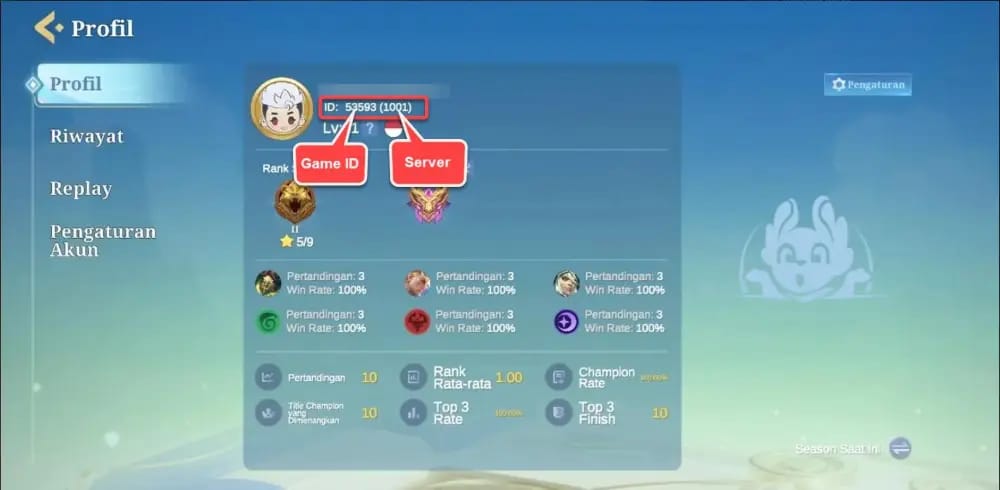
Yes, if the checkout asks for it, use the in-game Zone ID/Server — not your guessed region.
This is where buyers get tripped up. Server is not the same as region. A checkout may ask for server, zone, or region in loose wording, but the reliable value for top-up is the 4-digit Zone ID shown in your profile. A lot of wrong entries happen because people choose a country or market label instead of the in-game server number.
Here’s the clean way to think about it:
Officially, the game is available in markets such as Cambodia, Indonesia, Laos, Malaysia, Myanmar, the Philippines, Singapore, and Thailand. But that availability info is not the same as the server field needed for a recharge.
And one more edge case: community reports say the Advance Server is separate and tied to special access. If you're not sure whether you're on a special server build, don't guess. Check the profile again or pause the order.
What mistakes cause wrong-account top-ups most often?
The repeat offenders are old screenshots, shared devices, and account switching.
Here’s the short diagnosis table:
Honestly, delayed delivery is frustrating when the payment already left your account. But a successful card charge or wallet payment doesn't always mean the order was verified against the account details you intended. That's why I would check the profile screen first, not the checkout page.
A common returning-buyer trap: you changed phones, used guest login temporarily, or re-bound the account after the tutorial. Officially, connecting your M Account after the tutorial links MLBB progress to MCGG. Community guidance also points to binding via settings after completing the tutorial. If your login path changed recently, confirm you're back on the correct bound account before any diamond purchase.
What proof should I save before and after payment?
Save both account proof and payment proof. Support works faster when you send a complete packet, not one random screenshot.
Before payment
Capture:
Profile screenshot showing nickname + UID + server
The exact account currently logged in
Device/platform context if relevant, especially after a phone change
After payment
Keep:
Screenshot of the entered UID/server at checkout
Order ID
Payment receipt
Timestamp
Platform or device details if you later need support
Community reports consistently recommend saving the profile screen and the entered UID/server confirmation. That matters because support tickets are much easier to review when the account proof and order proof line up.
If you need a practical follow-up on evidence and recovery steps, this Magic Chess: Go Go wrong account diamonds recharge fix context is the right next read: it focuses on what to document before the case goes cold.
What happens if I enter the wrong Magic Chess: Go Go UID?
Usually, the diamonds go to the wrong account, and confirmed refund options are extremely limited.
This is the hard truth. Community and seller-policy evidence align on one point: wrong-account top-ups caused by incorrect UID/server entry generally cannot be refunded. Single-source policy references from recharge sellers say support can't reverse those mistakes. Community reports from similar Moonton recharge cases say the same thing.
So what can support do?
Support can usually help with:
Verifying what UID/server belongs to your current account if the UI is unclear
Reviewing your ticket when diamonds are missing despite correct details
Checking order proof, receipt, and device/platform information
Support usually cannot fix:
A completed top-up sent to the wrong UID because you entered the wrong number
A wrong server selection if the order was processed successfully to that destination
If the ID display is unclear, pause the order. That's the moment to contact in-game customer service with your UID question, not after payment.
Is a small test top-up safer before buying a larger diamond pack?
Yes. If the account details are uncertain, a small test order is the smartest risk-control step.
From comparing checkout paths, this is one of the few places where "buy less first" is genuinely good advice. Magic Chess: Go Go diamonds are usually added instantly after payment confirmation when the UID/server is correct. That makes a small test top-up useful for first-time buyers, returning players after a device change, and anyone topping up for a friend.
A simple decision view:
Yes, a larger pack may look better if first recharge bonuses are active. Officially listed examples include bonus structures like 50+50, 150+150, 250+250, 500+500 Diamonds. Still, I would avoid chasing bonus value until the account details are confirmed. Saving a few dollars means nothing if the diamonds land on the wrong UID.
Short FAQ
Can I top up Magic Chess: Go Go using only my player name?
No. You need the numeric UID, and often the server/Zone ID too.
Where should I verify the account details first?
In the in-game profile under avatar > Basic Info. That's the most reliable source.
What if my UID or server isn't shown clearly?
Stop the order and contact in-game support for verification. Don't guess.
Does platform matter for UID format?
No. Community reports indicate iOS and Android use the same UID/server format for top-up.
What payment methods are commonly available?
Officially cited options on supported checkout flows include Google Pay, Apple Pay, GCash, and credit card. Some non-card routes such as crypto or USDT may exist on some sites, but payment convenience doesn't reduce wrong-account risk.
Final recommendation
For Magic Chess: Go Go, the safe workflow is simple: verify the 9-digit UID, verify the 4-digit server, take a fresh profile screenshot, then save your order ID and receipt after payment. If anything looks off — unclear UI, recent account switch, shared device, new phone — pause and verify first. Once your account details are confirmed, you can proceed carefully with a diamond purchase on VGTopup and keep your proof until delivery is complete.