
To enter the correct User ID for Sugo Coins top up, use the exact numeric UID shown in the Sugo app under ME > Profile / Personal Information. For Sugo, the required identifier is typically an 8-12 digit numeric UID only—not your display name, account name, or password. And in most cases, no server or region selection is needed for coin delivery.
Most wrong-account mistakes happen for three reasons: users type one wrong digit, paste an old or autofilled UID, or confuse a nickname with the real account ID. I would check those first. Before paying, copy-paste the UID, compare every digit once, and save screenshots of the profile page and checkout preview. If you need a clean checkout flow after verifying details, review Sugo Coins Top Up correct User ID.
Why do users enter the wrong User ID for Sugo Coins top up?
They usually enter the wrong ID because Sugo uses a numeric UID that looks easy to copy, but small mistakes are hard to spot. From reviewing failed recharge cases, the most common preventable issue is entering a profile name or display name instead of the actual account ID.
Common causes:
Digit swap or typo: one number off is enough to send coins elsewhere
Autofill problems: saved browser data can insert an old UID
Wrong field confusion: users enter nickname, account name, or player name
Buying for someone else: the buyer uses a screenshot that’s cropped, outdated, or unclear
Two facts matter here. First, community guidance consistently says Sugo top-up uses a strictly numeric UID, not a player name. Second, wrong UID entry is widely reported as permanent in most cases once coins land on another account.
A useful warning sign: a successful payment does not prove the UID was correct. One data point shows User ID mismatches account for 30% of successful payments where no coins are received. Honestly, that’s the frustrating part—your card or wallet can be charged while the delivery issue is still unresolved.
Why do server, region, or account mismatch cause confusion for Sugo Coins delivery?
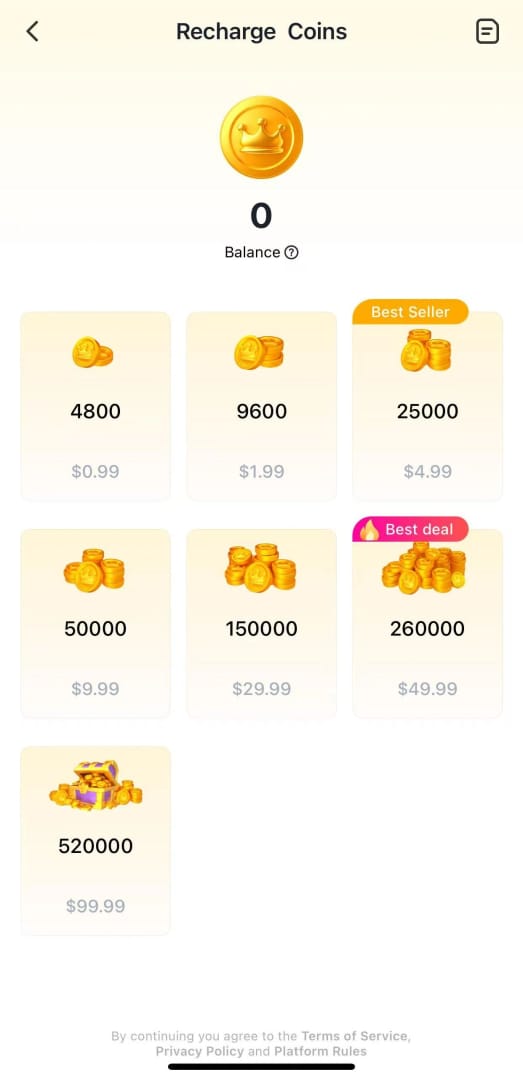
For Sugo, server selection usually does not matter, and region selection usually is not required for the top-up itself. Community sources consistently report that Sugo Coins are delivered using a global UID, with no server field needed.
Here’s the clean distinction:
But there’s one edge case many guides miss: account region at creation can affect package multipliers, according to a single-source report. That doesn’t change the UID entry rule, but it can affect what package value you see. So if pricing or bundle options look odd, think account-region setup—not server mismatch.
Another practical point: some official checkout pages for certain countries support Sugo UID entry directly for regions like PHL, USA, and SGP. That supports the broader pattern that the UID is the key field, not server selection.
Why can a paid Sugo Coins order still be pending or uncredited?
Because payment success and delivery clearance are not always the same thing. Most Sugo top-ups arrive fast—community reports put normal delivery at 30 seconds to 5 minutes, and one data point says 85% credit within 1-5 minutes—but delays still happen.
The usual reasons:
UID mismatch
Payment verification delay
Anti-fraud review on first purchase
CodaPay or similar payment verification not cleared yet
VPN interference or fraud detection
Bank charge posted, but merchant verification still pending
In delayed-delivery troubleshooting, the fastest support resolutions usually happen when users provide the entered UID, order ID, payment receipt, and timestamp together. I’d also check whether you used a VPN. That’s an easy thing to forget, and it can trigger a charged-but-no-coins case.
If your order is still pending:
Check your email confirmation
Wait 5 minutes first
Confirm the UID you entered
Then contact support with the transaction record
How do you check the correct User ID for Sugo Coins top up before paying?
You check it inside the app, confirm the numeric format, and verify that the checkout UID matches exactly. Don’t rely on memory.
30-second pre-payment checklist
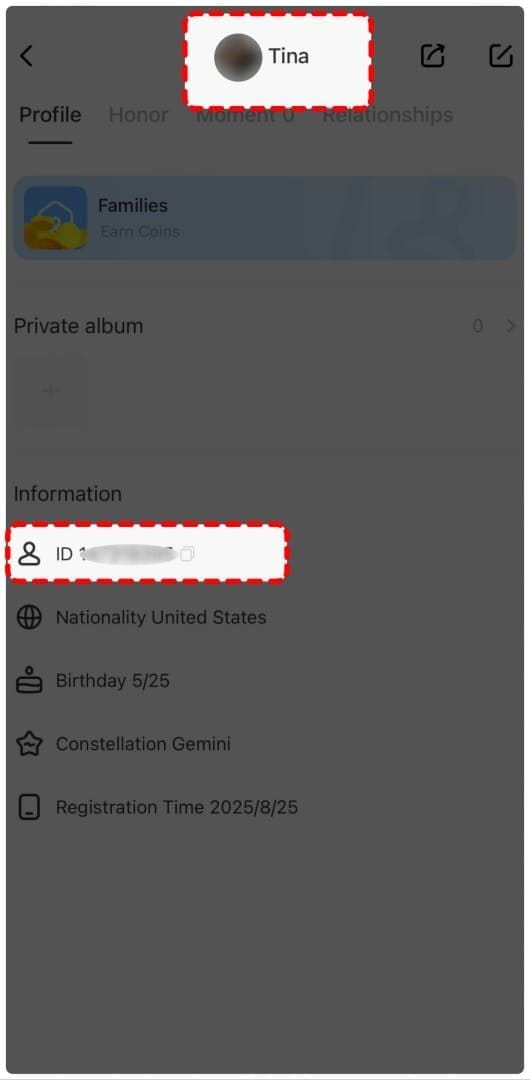
Open Sugo app
Log in.
Tap ME at the bottom-right.
Open View/Edit Profile or Personal Information.
Find the real UID
Look for the profile info column.
Use the numeric User ID / UID, usually 8-12 digits.
Do not use your display name.
Copy-paste the UID
Copy directly from the app if possible.
If typing manually, compare digit by digit once before paying.
Personally, I would avoid manual entry unless copy-paste isn’t available.
Check for autofill errors
Clear browser cache if the checkout keeps showing an old UID.
Uncheck Remember Me if available.
This matters more than people think.
Confirm server/region fields
If the checkout shows no server field, that’s normal for Sugo.
If a region label appears for payment processing, don’t confuse it with account delivery requirements.
Screenshot before payment
Your Sugo profile page with UID
Checkout page with entered UID
Selected package and amount
Pay only after one final match
Last four digits first
Then full UID
Then package
For a safer purchase flow, the same rule applies on Sugo Coins Top Up wrong account prevention: verify the UID first, then pay.
How do you document your Sugo Coins order so support can help faster?
You save proof before and after payment, with the exact UID entered and the transaction details visible. This is the part most buyers skip, and it slows support down later.
Support-evidence checklist

Support commonly asks for:
Order ID
Payment proof
Account ID entered
Package selected
Timestamp
If available, include the transaction ID in the format often shown as TXN- + 12-20 alphanumeric characters. And don’t over-redact your screenshots. Hide sensitive card data, yes, but leave the UID, order number, amount, and time visible.
If coins did not arrive or went to the wrong account
Contact top-up support immediately
Send order ID, payment proof, UID entered, package, timestamp
Explain whether the issue is delay or wrong UID
Act within 5-24 hours if you suspect wrong-account delivery
Community experience says recovery is possible only in limited cases, usually before coins are claimed. In most wrong-UID cases, coins sent to another account are irrecoverable. That’s why prevention matters more than escalation.
Where can I find my Sugo user ID for top up?
Open the Sugo app, tap ME, then go to Profile, View/Edit Profile, or Personal Information. Your Sugo top-up ID is the numeric UID shown there, not your display name.
Do I need a server or region for Sugo Coins top up?
Usually, no. Community guidance consistently says Sugo Coins top-up uses a global UID and does not require server selection.
What happens if I enter the wrong Sugo account ID?
Coins can be delivered to the wrong account, and that is usually permanent. Payment success does not protect you from UID mistakes.
Can a Sugo Coins top up be reversed if sent to the wrong account?
Sometimes support can try if you report it quickly, but most cases are not reversible. Contact support within hours and send full proof immediately.
Why is my Sugo Coins order still pending after payment?
The most common reasons are payment verification delay, anti-fraud review, VPN interference, or a UID mismatch. Wait 5 minutes first, then check your email and transaction record before contacting support.
What proof should I save for a Sugo Coins support request?
Save the UID screenshot, checkout screenshot, payment receipt, order ID, package, amount, and timestamp. If there’s a TXN ID, include that too.
How do I verify a Sugo account before buying coins for someone else?
Ask the recipient for a fresh screenshot from ME > Profile showing the numeric UID clearly. I would not accept a typed UID alone for gifting; a live screenshot prevents most wrong-account mistakes.
Enter the exact numeric Sugo UID from the app, not a nickname, and don’t overthink server selection—Sugo top-up usually doesn’t need one. The real risk is wrong-account delivery from a single bad digit or old autofill. Copy-paste the UID, save screenshots, and keep your order proof ready. If everything matches, complete the purchase using the same verified details and contact support fast if delivery stalls.