
To buy Identity V Echoes for gifting or creator support, first confirm the exact account UID and server, then use the right top-up path for that account. That’s the part most people get wrong. In Identity V, Echoes are premium currency for Illusion Hall items, but direct Echoes transfer or built-in live streamer gifting isn’t available according to widely reported community experience.
So if you want to support a creator, you’re usually topping up your own or another player’s account by UID/server, then using that balance for the intended in-game purchase or support-related action. Buy only the amount you need, because wrong-account top-ups are often irreversible and delivered Echoes are usually non-refundable.
Why do people buy Identity V Echoes for gifting, creator support, or social features?
People buy Identity V Echoes because Echoes are the premium currency used for Illusion Hall purchases such as characters, costumes, accessories, and essences. That’s the confirmed practical use case fans are actually paying for.
The key catch: Identity V does not have direct Echoes gifting between players, and there’s no native in-game live streamer gifting flow widely reported by users. If a streamer asks for support, that usually means one of these:
topping up the streamer’s account by UID and server
topping up your own account to buy an item tied to a social interaction
funding a planned in-game purchase during a stream or event
From reviewing recharge issues, this is where generic guides fail. They explain how to buy currency, but not whether your end goal is even possible. In Identity V, gift can mean three very different things:
Another detail many buyers miss: recharge rewards can matter. Community reports say cumulative recharge gifts can trigger at Echoes thresholds, with rewards like Clues and Fragments, and even some third-party top-ups count toward those thresholds. If your creator-support goal lines up with a recharge event, timing changes the value of the same purchase.
If you’re comparing ways to fund a support purchase, Identity V echoes top up for gifts makes sense only after you’ve confirmed the account details and the exact in-game action you want.
Why should you check UID, server, platform, and region before paying for Identity V Echoes?
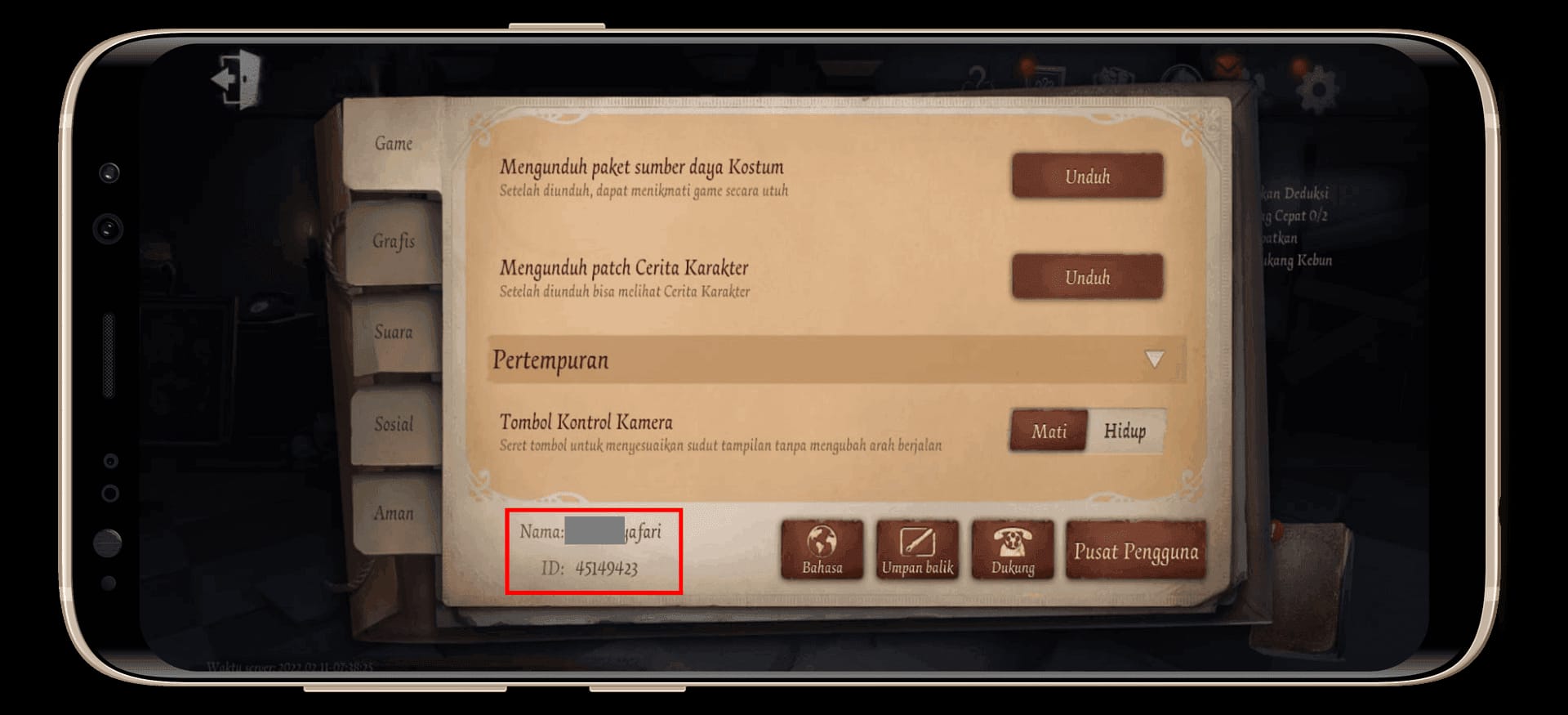
You should check UID and server first because those are the fields that actually determine delivery. Nickname, platform, and region matter too, but they’re secondary to UID/server verification.
Community guidance is consistent here:
top-up requires the exact UID
you must choose the correct server
Identity V servers commonly referenced are Global and Asia
cross-server transfers between regional accounts are blocked
Honestly, this is the most expensive avoidable mistake. Users commonly report that wrong-UID top-ups are irrecoverable, and support usually won’t transfer delivered Echoes to another account. Random Echoes appearing on accounts are often traced back to someone else entering the wrong UID.
Which account details matter most before checkout?
Use this order of importance:
PC and mobile use the same UID/server logic, which is useful if you’re topping up for a player who switches devices. But payment flow can still differ by platform. From comparing checkout paths, the biggest difference isn’t just price. It’s whether you’re paying through App Store, Google Play, official redemption, or a UID-based top-up route, because each can trigger different verification holds.
A successful bank charge also doesn’t always mean the order has fully cleared. That’s frustrating, but it’s a real pattern with digital payments.
Why do payment methods and prices differ for Identity V top-ups?
Payment methods differ because top-up options are regional and channel-specific. Credit and debit cards are the broadest option, but local wallets can be easier if your card fails 3DS or issuer checks.
Examples from the available top-up ecosystem:
For no-credit-card buyers, this is usually where things break. If your card keeps failing, I would check local wallet support or store-balance redemption before retrying the same card three times.
Price also varies by package and seller. Community data says the $9.99 package often gives the best Echoes-per-dollar value, while some sources report bonus Echoes or discounts on selected top-up channels. That can help, but don’t chase a discount before confirming the account. Saving 10% means nothing if the Echoes land on the wrong server.
How do you buy Identity V Echoes to gift your favorite live streamers?
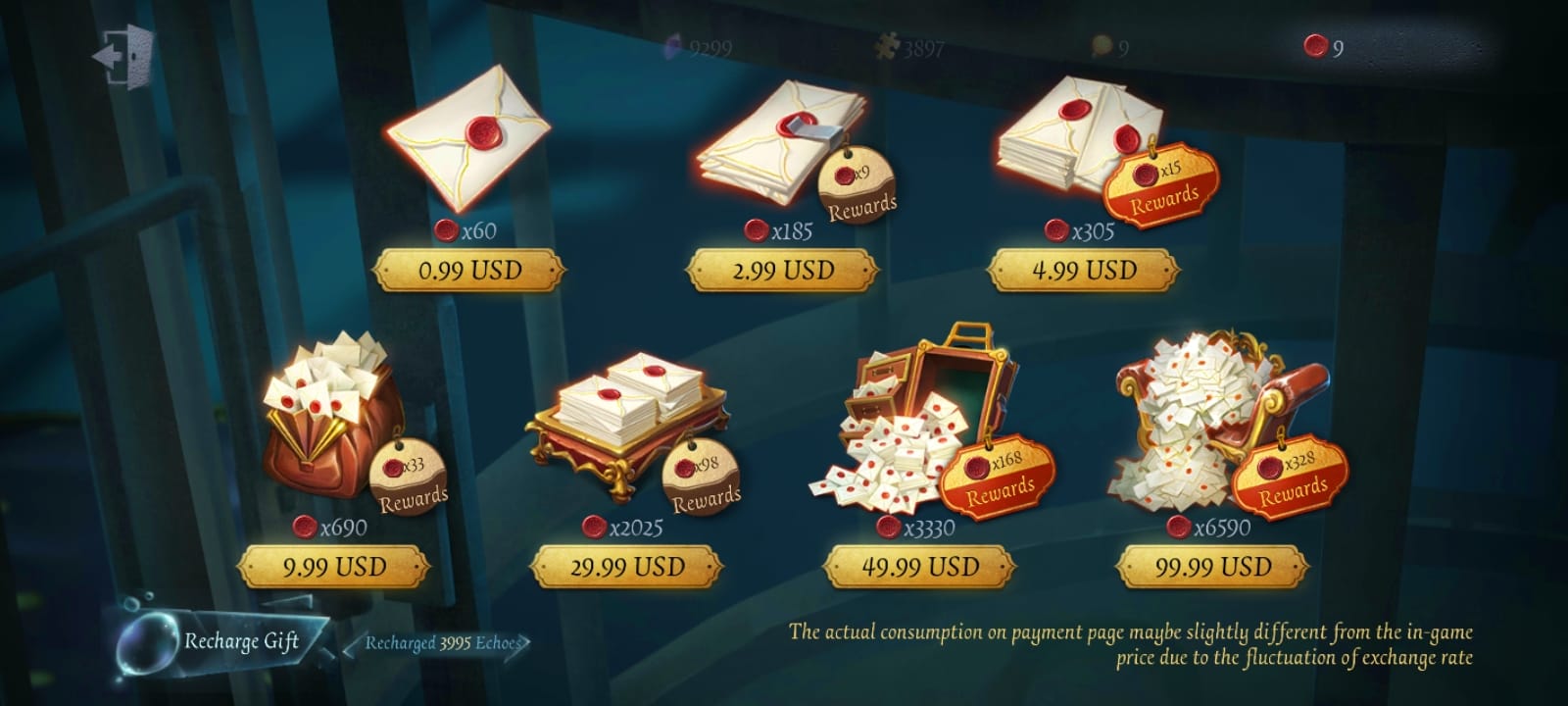
You buy Identity V Echoes for creator support by topping up the correct account, then using the balance for the intended in-game purpose. Follow this order.
Confirm the target account
Get the exact UID.
Confirm the server: usually Global or Asia.
If you’re topping up for another person, ask for a screenshot of the profile page. I would check this first.
Confirm what the Echoes are for
Is it for a costume, essence pull, accessory, or recharge event threshold?
If the goal is skin gifting, check whether the account relationship requirement applies. Community reports mention Intimacy Level 8 for skin gifting.
Estimate the amount before paying
Don’t buy a huge pack just in case.
If your goal is one support action or one event purchase, start with the smallest amount that covers it.
For better value, compare whether the $9.99 tier fits your target better than stacking smaller packs.
Choose the payment route
Card users: official or standard top-up checkout is usually simplest.
No-card users: local wallets, store gift cards, Binance Pay, or USDT-funded gift card routes may be easier depending on region.
Pre-top-up before a stream if timing matters. That avoids last-minute verification delays.
Pay and save proof immediately
Keep the order ID.
Save the receipt or invoice screenshot.
Note the payment timestamp.
Wait briefly, then verify in game
Delivery is usually instant according to user reports.
If nothing arrives, give it up to 10 minutes, restart the game, and recheck the balance.
If you already know the UID/server and just want a cleaner checkout path, buy Identity V echoes to support streamers can be a practical option.
How do you fix Identity V Echoes payment failed, delayed, or wrong-account issues?
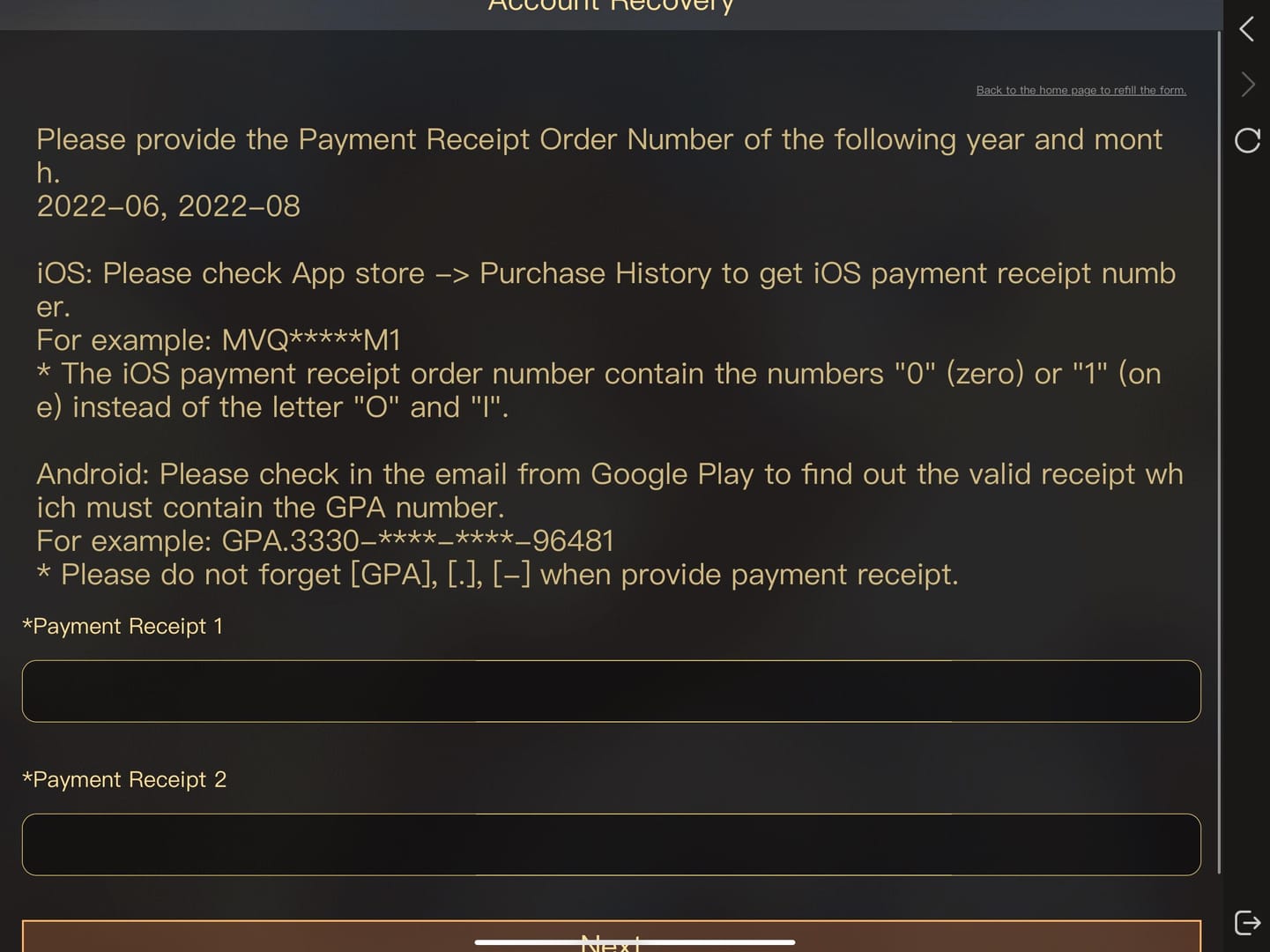
You fix most Identity V top-up issues by checking whether the payment actually cleared, whether the UID/server was correct, and whether the order is still under verification. Support works faster when you submit complete proof in one go.
From reviewing delayed top-up cases, the fastest escalations usually start with five details ready at once:
UID
server
payment timestamp
order ID
receipt screenshot
What should you do first for each problem?
Use this escalation order:
Check the account details again
Wrong server is enough to break delivery.
Nickname matching doesn’t override a bad UID.
Restart the game
Community users commonly report this resolves some missing balance cases.
Wait up to 10 minutes
Instant is normal, but short delays happen.
Open a support ticket
Include order ID, receipt, UID proof, server, and time of payment.
If the charge succeeded but delivery didn’t, say that clearly.
Don’t expect easy refunds after delivery
Digital purchases are usually non-refundable once Echoes arrive.
If you bought the wrong amount but the currency was delivered correctly, support often won’t reverse it.
Personally, I prefer any checkout path with clearer order tracking, even if it isn’t always the cheapest. When money has already left your account, visibility matters more than squeezing out a tiny discount.
Can you use Identity V Echoes to send gifts to streamers?
Not directly. Community experience consistently says Echoes can’t be transferred player-to-player, and Identity V doesn’t have native live streamer gifting. Support usually means topping up an account by UID/server or funding an in-game purchase.
How many Identity V Echoes do I need for gifting or creator support?
You need enough Echoes for the exact item, event threshold, or support action you plan to use. Check the in-game cost first, then buy only that amount or the nearest efficient pack; community data suggests the $9.99 pack often has the best value.
What account details do I need before buying Identity V Echoes?
You need the exact UID and correct server first. Region and platform are worth checking too, especially if the account uses a different store region or you’re topping up for someone else.
Why did my Identity V Echoes payment fail?
Most failed payments come from card verification issues, store checks, or using a payment method not supported for that region. A bank charge alone doesn’t confirm final top-up approval, so check order status and receipt before retrying.
What should I do if my Identity V Echoes do not arrive?
First verify UID and server, then restart the game and wait up to 10 minutes. If the balance still doesn’t appear, contact support with your order ID, receipt, UID proof, server, and payment time.
Can I top up Identity V Echoes for another person?
Yes, if the top-up path accepts UID/server delivery to that account. But be careful: wrong-account top-ups are widely reported as irreversible, and cross-server regional transfers are blocked.
Are Identity V Echoes refundable if I bought the wrong amount?
Usually no once the Echoes have been delivered. That’s standard for digital currency, so it’s smarter to do a smaller test purchase if you’re unsure about the account or amount.
Identity V Echoes can support a creator or streamer only indirectly: by topping up the right account and using the balance for the intended in-game purchase. The safest approach is simple—verify UID and server first, estimate the exact Echoes you need, then use a payment route that gives clear receipts and order tracking. If you’re unsure, start small. That one step prevents most expensive mistakes.