
Yes—sometimes. You can top up Lords Mobile from abroad, but cross-border payments often fail when four region layers do not match: your current location, your game or account history, your App Store or Google Play country, and your card or payment profile country. The practical fix is usually not to keep retrying. It is to identify which layer is blocking the purchase, then send the right proof if payment was charged or stuck. In most failed cases, the store region or payment profile causes more trouble than the game account itself.
What actually breaks when you try a Lords Mobile top up from abroad?
When players say they have a Lords Mobile region mismatch, they often mean one problem, but there are really several different checks happening at once.
The first is your physical location. Travelers commonly report that purchases fail after they move countries, even though nothing changed inside the game account. Community reports describe location-related checks that can make an in-app purchase look suspicious or unavailable abroad.
The second is your account history or registration context. This matters most for players who created the account in one country and now live in another, or for gift buyers paying for an account tied to a different market. Still, this is not always the main blocker. A lot of users blame the Lords Mobile account first when the real issue sits one layer above it.
The third is your store country. This is where many failures begin. Officially, Apple requires the Apple ID country to match the payment method region for iOS purchases. On Android, Google Play country must match the payment card country for in-app Lords Mobile purchases. Google also limits country changes to once per year, and official guidance says to wait 48 hours after a region change before retrying.
The fourth is the merchant or payment processor side. Even if your card is valid, the issuer country, wallet rules, or local currency setup can still trigger a block. That is why a foreign credit card, a local voucher, or a region-specific wallet may fail even when the game account itself looks normal.
If you are trying to diagnose a Lords Mobile top up from abroad, start with the store country and payment profile before assuming the account is broken.
Why does a region mismatch stop payment even when your account is fine?
Because Lords Mobile purchases do not rely on just one identity. They sit at the intersection of game account data, app-store rules, and payment verification.
That is why a player can migrate kingdoms, switch servers, or continue logging in normally and still be unable to buy packs. Migration Scroll and server movement are not the same thing as payment eligibility. Official and community information around migration points to kingdom movement, not to any direct top-up permission change. In other words, changing where your turf sits does not automatically change where your payment is allowed.
This is also why the visible symptom can be misleading. A wrong currency at checkout may look like a game-side bug, but it often points to a store profile still tied to another country. A payment method unavailable message may sound like a card problem, but it can really mean your Apple ID region or Google Payments profile does not line up with the card you are trying to use.
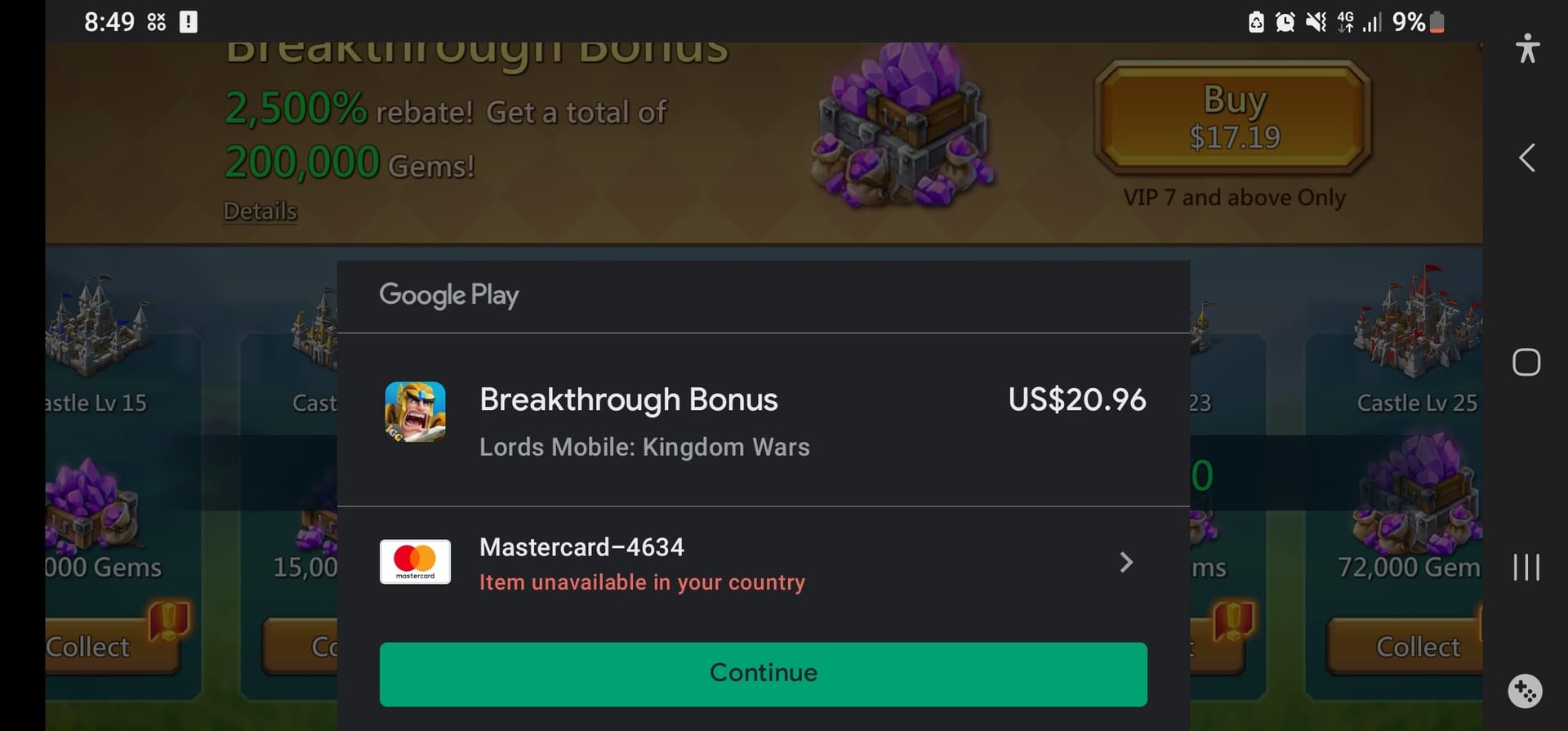
On Google Play, the mismatch is often explicit. Users report messages such as:
Couldn't complete your transaction. Your Play balance cannot be used because you are in the wrong country
Couldn't complete your purchase. Check that you have the correct country selected in your Play account
Those messages are very different from a simple bank decline. They point to a region rule, not just a temporary payment hiccup.
For Android users, the official place to verify this is Google Pay under Settings > Payments profile > Country/Region. If you changed countries recently, remember two limits that matter: Google Play country can only be changed once annually, and the change may take up to 48 hours before a Lords Mobile retry makes sense.

For iPhone users, the same logic applies through Apple ID. If your Apple ID is still set to your old country while your payment method belongs to your new one, the purchase can fail before Lords Mobile ever gets a clean authorization.
Is in-app billing or direct web checkout less likely to fail?
Carefully put: in-app billing is usually more exposed to region mismatch because it must satisfy Apple or Google store rules first.
That does not mean every direct web-style recharge will work, and official support detail is limited here. But community experience consistently suggests that app-store billing is the route most likely to break when your Apple ID region, Google Play country, or payment profile no longer matches your real-world setup. A direct IGG-style checkout may avoid some of those app-store country checks, which is why players often look at it when they are traveling or living abroad.
The important point is not to treat this as a guaranteed workaround. It is simply a different payment path with different friction points. If your issue is specifically an App Store or Google Play country mismatch, changing the checkout route may help. If your issue is a broader unsupported-country restriction or a payment processor block, it may not.
This distinction matters for a few common buyer profiles:
Travelers often keep the same account and same card, but their current location changes. In-app billing can suddenly fail even though the account worked at home.
Expats often have the opposite problem. Their current location and local card are stable, but their Apple ID or Google Play country is still tied to the old country.
Gift buyers may be paying for someone else’s account. In those cases, the recipient’s account details and region context can matter as much as the payer’s payment method.
Players in unsupported countries may find that no amount of retrying fixes the issue if the store simply does not offer the purchase there.
How do you tell a true region restriction from a temporary bank or 3-D Secure decline?
The fastest clue is the wording and behavior of the failure.
A temporary issuer or 3-D Secure problem usually looks like a normal card verification issue. You may see a failed authentication step, a fraud alert from your bank, or a payment that works later after the bank confirms the transaction. Community reports note that these cases often succeed on a later retry once the bank side is cleared.
A true region restriction behaves differently. It tends to mention country selection, wrong country, unavailable payment method, or not available in your country. It may also block the use of store balance abroad. In those cases, retrying the same setup rarely helps because the payment is being rejected by policy, not by a temporary authorization failure.
A delayed delivery case is different again. Here, the charge may appear successful, but the gems or pack do not arrive. Community reports describe cases where store support ultimately resolved gems not added after payment due to a region-related error. That is why a successful charge is not the same thing as confirmed delivery.
As a rule of thumb:
If the bank alerts you and the error is generic, think issuer or 3-D Secure first.
If the message mentions country, region, or unavailable location, think store policy first.
If money left your account but nothing arrived, think delivery trace and support evidence first.
That is also why the exact error message matters more than a screenshot that only says payment failed.
What proof actually helps if your Lords Mobile recharge is blocked or not received?
Support moves faster when the first ticket is complete. Partial screenshots and repeated messages usually slow things down.
The most useful evidence is the set that connects your game account to a specific payment event:
Account ID or UID / IGG ID
Server or character details, if relevant
Order ID
Payment timestamp
Currency charged
Receipt screenshot
Exact failure message
This combination does two jobs at once. It tells support which account should receive the purchase, and it tells them whether the problem happened at the game, store, or payment layer.
For example, the order ID is what lets support trace a real transaction instead of guessing from a screenshot. The timestamp helps them find a pending or delayed order. The charged currency is especially useful when the checkout showed the wrong local currency or when the payment route crossed borders. The exact error wording helps separate a region lock from a bank decline.
Community guidance around Lords Mobile top-up issues repeatedly points to IGG ID, order ID, and receipt screenshot as the core proof set. If you need more detail on receipts and records, this is also where a related guide such as Lords Mobile receipt and invoice help naturally fits.
What should you avoid? Do not start by sending ten screenshots without context. Do not open multiple tickets for the same payment. And do not file a dispute too early if the order may simply be delayed.
Should you wait, retry, or escalate right away?
This is where many players make the expensive mistake.
If the payment shows as charged or pending and there was no clear region-block message, a short wait is reasonable. Delayed delivery can happen, and immediately paying again can create duplicate charges. Community reports specifically warn against duplicate payments in Lords Mobile when delivery is only delayed.
If the message clearly says the purchase is unavailable in your country, or tells you to check the country selected in your Play account, waiting will not solve it. That is a policy mismatch, not a slow delivery problem.
A sensible timeline looks like this:
In the first few minutes, save everything: receipt, order ID, timestamp, currency, and the exact error text.
Within the first few hours, avoid repeated retries if the card was already charged. If the issue looks like a bank or 3-D Secure decline, contact the bank or confirm the card is enabled for the transaction before trying once more.
After a recent Google Play country change, follow the official 48-hour wait before assuming the new region is active for Lords Mobile.
By 24 hours or more, if payment completed and nothing arrived, or if the same region error persists after you corrected the store profile, it is time to escalate with complete proof.
The safest escalation path is layered:
First, contact official Lords Mobile support if the payment completed but the content was not delivered, or if account-side verification is needed.
Then contact official App Store or Google Play support if the error clearly points to store country, payment profile, or billing-region restrictions.
Contact your bank or card issuer when the evidence points to fraud checks, 3-D Secure failure, or issuer decline rather than a country mismatch.
If you are comparing next steps, related troubleshooting pages such as Lords Mobile top up paid but not received, Lords Mobile Apple ID region mismatch guide, or Lords Mobile Google Play country mismatch guide are the logical follow-ons.
What if you are in an unsupported country or cannot add a local payment method?
This is the hardest case because the answer may simply be that your current route is not available.
Players commonly report not available in your country messages for gem purchases in unsupported markets. If that is what you see, changing cards alone is unlikely to fix it. The problem is availability, not just authorization.
The same logic applies when local payment methods cannot be added. Some wallets and vouchers are region-specific. The facts available here show examples of that pattern: GCash top-ups are reported as region-restricted for Philippines use cases; Boost overseas use requires a Malaysian mobile number login, and foreign Visa cards are reported as not accepted for Boost top-up; Razer Gold cards are region-specific and need to match the relevant region. These examples matter because they show how often the payment method itself is tied to a country rule outside Lords Mobile.
That is also why changing store region casually can create new delays. On Google Play, you only get one country change per year, and you need a payment method from the new country. If you switch in a hurry without understanding the consequences, you may lock yourself into a setup that is still unusable.
A safer approach is:
confirm which country your store profile is actually set to
confirm whether your card or wallet belongs to that same country
avoid VPN-based region changes, since community reports associate them with purchase blocks
stop retrying once you see a clear country restriction
escalate with full proof instead of stacking failed attempts
Before trying again, it is also reasonable to do the basic housekeeping that some users report helps with stuck purchases: clear app cache, reinstall Lords Mobile, and verify available funds. Those steps will not override a region policy, but they can remove local app issues from the equation.
Before you try another Lords Mobile overseas payment
The safest re-check sequence is simple.
First, verify that you are logged into the correct linked account in Lords Mobile under Settings > Account > Switch Account. That prevents a support case from being confused by the wrong Google or Apple login.
Second, check your Apple ID region or Google Payments profile country. On Android, use Google Pay settings to confirm the country/region. If you changed it recently, respect the 48-hour wait.
Third, compare that store country with the country of your payment method. If they do not match, in-app billing is likely to fail.
Fourth, look at the currency shown at checkout. If it is wrong, treat that as a store-profile clue, not just a cosmetic issue.
Fifth, if payment already went through, stop and collect proof rather than paying again.
And finally, save everything you may need later: receipt, order ID, timestamp, charged currency, and screenshots of any error. Those records matter not only for support, but also for any later refund or invoice request. Just be careful with disputes: if delivery is only delayed, filing a chargeback too early can complicate account support and make resolution slower.
The short version is this: yes, a Lords Mobile top up from abroad can work, but region mismatch is real, and it usually sits in the store or payment profile rather than the game account alone. Diagnose the failed layer first, then escalate once with complete evidence instead of turning one blocked purchase into several.