
If your Blood Strike Top Up Payment Failed, don't keep retrying right away. First confirm whether the order was declined, still pending, verification-held, or charged without delivery. That status decides the safe next step and is the best way to avoid duplicate charges.
In my experience reviewing recharge issues, the biggest preventable mistake is repeated checkout attempts before the first payment status is clear. Most Blood Strike failures come from wrong UID, insufficient funds, bank fraud checks, 3D Secure failure, wallet limits, app store region mismatch, or temporary payment gateway issues. Officially, the safest recharge path is the NetEase top-up site or in-game purchase flow. If you're dealing with Blood Strike top up payment failed, start with status checks, not another payment.
Why did my Blood Strike top up payment fail?
The usual causes are incorrect UID, insufficient balance or credit limit, bank verification failure, region mismatch, or store billing issues.
What matters is separating the failure type:
Users commonly report that bank fraud prevention and 3D Secure are major silent blockers. You tap pay, the page spins, then nothing clears because the OTP or verification prompt failed in the background. A successful bank charge also doesn't always mean the order fully cleared verification. That's where people get trapped into paying twice.
Another common issue is account detail error. Blood Strike top-ups depend on the correct UID, found in game settings. From comparing checkout paths, I would check UID before anything else. UID mistakes cause more delivery disputes than most users expect, especially when topping up through a direct UID flow instead of an in-app purchase.
Can a region mismatch or payment verification block a Blood Strike recharge?

Yes. Region mismatch is one of the most common cross-border failure causes, especially on Google Play and the Apple App Store.
The conflict usually looks like this:
Your game account is fine, but your store country doesn't match your billing country
Your local wallet or card currency doesn't match the checkout region
You're overseas and trying to use an app store tied to another country
Apple Pay or Google Play billing has stale card or country data
For in-app purchases, users widely report more region-locked pricing and billing errors than on the official website. The official NetEase top-up site supports Visa, Mastercard, and PayPal, and official payment methods also include Apple Pay, Google Pay, and local wallets. In practice, the website usually has fewer region limits and no app store fee layer, so it's often the cleaner option for overseas users.
If Apple Pay fails, official guidance is clear: contact your bank, update iOS, verify funds, and remove/re-add the card. For Google Play region errors, users commonly fix them by clearing Google Play cache and matching the billing country.
One edge case many guides miss: wallet limits. Large top-ups can fail even when your card is valid. If that happens, splitting the purchase is often safer than forcing one large payment.
How can I fix a Blood Strike top up payment failed error safely?
Fix it in this order: stop retries, verify details, check payment status, wait the right window, then retry once with a confirmed method.
Stop repeated retries
Don't spam checkout.
If the first order is pending or verification-held, a second attempt can create duplicate charges.
Check your bank app, wallet app, email, and order page first.
Verify your Blood Strike UID and package
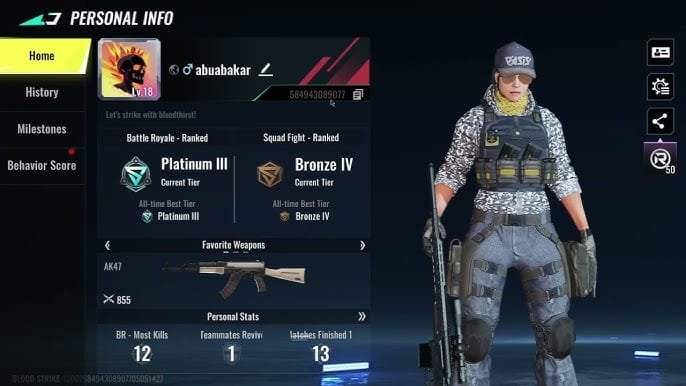
Open game settings and confirm the UID exactly.
Recheck package size and platform.
On Steam/PC, users report a specific pass issue: buying 520 or 1040 Gold in-game first may be necessary before purchasing the Strike Pass. Community reports also note Strike Pass pricing at 520 Gold basic or 1040 Gold premium.
Check what actually happened to the payment
Declined: bank/app says failed, canceled, or rejected
Pending: payment gateway or bank shows processing
Charged: money deducted or authorized
3DS/fraud hold: bank asks for OTP or flags unusual activity
Wait the correct window
For pending payments: wait 24-48 hours
For charged but no Gold: restart the game, check mailbox/wallet, then wait up to 24 hours during high traffic
For server update errors: retry later, not immediately
Retry once, not repeatedly
Retry only after the first order is clearly canceled or expired
If the same method failed from bank checks, switch to another supported method such as PayPal or a different card
If region is the issue, use the official website instead of app-store billing when possible
Personally, I would avoid unauthorized top-up routes after a failed payment. Officially, NetEase warns that third-party top-ups can lead to fraud risk, incomplete transactions, Gold removal, or account bans, and a crackdown was announced on Dec 18, 2024. Third-party top-ups using others' accounts on iOS, Google, or PC are prohibited. If you need another path after checking eligibility, Blood Strike top up payment failed should only be approached after confirming UID, region, and prior order status.
What should I do if Blood Strike charged me but the top up did not arrive?
First, don't repay. Restart the game, check your wallet or mailbox, wait up to 24 hours, then open the right support case with proof.
Use this evidence checklist from the start:
When a payment is deducted but Gold hasn't arrived, the fastest support cases are usually the ones submitted with full evidence immediately. Honestly, delayed delivery is frustrating when the money already left your account, but support can do much more with a complete record than with "I paid but got nothing."
Contact the right team based on the issue:
Official Blood Strike / NetEase support for charged-but-not-delivered or account delivery issues
NetEase contact: overseabd@global.netease.com
Payment provider or bank for declines, fraud checks, 3D Secure failure, or pending authorizations
Apple App Store / Google Play for in-app billing disputes and store-side payment errors
Refunds aren't handled through a clear official site refund section. In practice, failed or pending payments are usually handled by the payment provider, while duplicate or canceled cases are reviewed case by case. One important warning: if a refund reverses delivered Gold, your Gold balance can go below zero, and official rules say that can block matchmaking until the balance is corrected.
Why should you use the official Blood Strike recharge channel after a failed payment?
Because it's the safest way to reduce account risk and simplify support.
Officially recommended safe channels:
NetEase official top-up site
In-game purchase flow
Why I prefer the official website for many users:
Direct UID top-up
Fewer app-store region restrictions
Clearer payment method support: Visa, Mastercard, PayPal
No extra app-store billing layer
A quick comparison:

Community reports say some authorized UID-only top-up flows are generally safe if they don't ask for your login, but I still recommend official NetEase channels first after any failed transaction. Cleaner audit trail. Easier support. Less risk.
FAQ
Why did my Blood Strike top up payment fail?
Usually because of a wrong UID, insufficient funds, bank fraud checks, 3D Secure failure, wallet limits, or region mismatch. App store billing problems are also common for overseas users.
What should I do if Blood Strike charged me but I did not receive the top up?
Restart the game, check your wallet or mailbox, and wait up to 24 hours before paying again. Then contact official support with your order ID, transaction ID, UID, amount, timestamp, and screenshots.
How long should I wait before retrying a Blood Strike payment?
Wait 24-48 hours if the order is pending. If the payment was clearly declined, you can retry after fixing the cause, but don't retry while the first transaction is still processing.
Can a region mismatch cause Blood Strike recharge failure?
Yes. It's widely observed on Google Play and the Apple App Store when the store country, billing country, and payment method don't match. The official website usually has fewer region-related failures.
How do I avoid duplicate charges when retrying a Blood Strike top up?
Confirm whether the first order is canceled, declined, or still pending before trying again. Check bank notifications, email receipts, and gateway status first; don't assume a failed screen means no charge happened.
Who should I contact for a Blood Strike payment issue: the game, app store, or bank?
Contact NetEase support for missing delivery after a successful charge. Contact your bank or payment provider for declines, verification failures, or pending authorizations, and contact the app store for in-app billing issues.
Can I get a refund for a failed Blood Strike top up?
Usually yes, but the route depends on where it failed. Failed or pending payments are generally handled by the payment provider or app store, while duplicate or canceled cases are reviewed individually.
Blood Strike payment failures are usually fixable, but the safe move is to identify the order state before doing anything else. Check UID, region, bank verification, and order status first; then wait the proper window and contact the correct support team with full proof. If you need to recharge again, use the official NetEase site or in-game flow first, and only retry after the first transaction is clearly resolved.