
If your Bleach: Soul Resonance Google Play purchase is pending, don’t buy the same item again yet. First identify the billing channel: Google Play, Apple ID, or direct web checkout. A pending Google Play order is usually a store-side review, authorization hold, or payment verification delay, and it can block new purchases until it clears or is canceled. Restore purchase only helps in specific cases—mainly subscriptions or one-time unlocks on the same account—not consumable currency. If the payment happened on web checkout, app-store restore usually won’t fix it.
Quick diagnosis: where did the payment happen?
The right fix depends almost entirely on who billed you.
What this means for you: if you send a bank screenshot to the wrong team, you lose time. In my experience reviewing recharge issues, the fastest cases are the ones where users match the receipt type to the billing channel immediately.
If you’re comparing alternatives because your store order is stuck, this page on Bleach: Soul Resonance Google Play top up pending is relevant only after you’ve confirmed the original order won’t still complete.
If you’re not sure which channel billed you
Check these in order:
Google Play Order History at your Play account page.
Apple purchase history if you paid on iPhone.
Web confirmation email or invoice if you used the official webstore or another direct checkout page.
Your bank statement last. A bank charge alone does not prove the game order fully cleared.
That last point trips people up a lot. Honestly, it’s frustrating when money leaves your account and nothing shows in-game, but a successful bank authorization still doesn’t always mean the order passed store verification.
Why is my Bleach: Soul Resonance Google Play purchase pending?

A pending Google Play purchase usually means the store hasn’t fully cleared the order yet.
Officially, the first checks are simple: confirm connectivity, force stop and reopen the app, verify the payment status, and restart the device. Google Play pending purchases can also block new buys until the earlier order resolves. Official guidance says to wait up to 48 hours or cancel the previous order; community reports say some authorization holds or store reviews can stretch to 3 days.
What the official rule means
Pending is not the same as delivered-but-missing.
If the order is still pending in Google Play, the game often can’t grant the item yet.Retrying is risky.
Officially, you should avoid repeating the purchase while one is pending because duplicate charges can happen.A completed charge changes the support path.
Once Google Play shows a completed order number, but the item still isn’t in your account, that becomes a missing entitlement case for the game support team.
I would check this first
Open Google Play Order History and confirm whether the order is pending, completed, or canceled.
Restart the game and your phone.
Log out and back in if the charge completed but the item didn’t appear.
Don’t queue another purchase of the same pack.
If your order is still pending, wait before switching channels. If you buy again on web while the Play order later clears, you may end up paying twice.
Should you restore purchase, wait, or use web checkout instead?
Restore purchase helps only when the item type supports restoration. That’s the key decision.
Rule vs action
Community reports consistently say restore works for subscriptions and one-time unlocks, but not for consumables like credits. That matches what I’d expect from store-linked entitlements. So if you bought a Monthly Card, restore is worth trying. If you bought spendable currency, I would not assume restore will bring it back.
When switching to web checkout makes sense
Switching to web checkout makes sense only after the pending app-store order is canceled or clearly failed. Community reports say web checkout can be faster than app stores, though bank or country delays of up to two days still happen. The official webstore also advertises a first-purchase limited avatar frame delivered by in-game mail.
There are also reports of web packs being cheaper or offering a small bonus in some cases. Useful, yes. But from comparing checkout paths, I still prefer the route with the clearest receipt trail when you’re already dealing with a stuck order.
For a direct comparison point, Bleach: Soul Resonance restore purchase web checkout is the right topic only after you’ve separated pending store payment from confirmed web order not delivered.
Why is the subscription or paid access not showing on the right account?
The most common cause is the wrong account, not a broken payment.
Officially, multiple Google accounts can cause missing entitlements. Community reports add another common failure: after changing phones or reinstalling, users log in with a different method than before, then wonder why restore finds nothing.
Common account-state mistakes
You paid with Google account A but opened the game under Google account B
You switched devices and didn’t relink the same game account
You changed store country/region, and the local currency no longer matches the payment profile
You’re trying to restore a consumable item
A family payment or child-account approval is still unresolved
Local currency mismatch: what this means for you
Officially, local currency mismatch comes from your account region and can require updating Google Play country and profile settings to match the payment method. Community reports also mention region mismatch as a reason restore or checkout fails.
A practical example: if your store profile is set to one country but your card or billing method belongs to another, you may see the wrong currency, hidden subscription options, or checkout rejection. Users have also reported odd currency displays on some event packs. If the store shows a currency that doesn’t match your profile, fix the region first. Don’t brute-force the payment.
Changed phone or reinstall?
If you changed phones or reinstalled:
Update the app first.
Log in with the same game account and same store account.
Try restore purchase in-app.
If it’s a subscription, also check the Google Play subscriptions section.
If it’s consumable currency, prepare proof and contact support instead of repeating restore.
What proof should you keep?
Keep the proof that matches the billing channel. That’s what support can actually act on.
Evidence checklist
For Google Play billed orders:
Google Play order number
Screenshot of Order History status
Screenshot showing the item is missing in-game
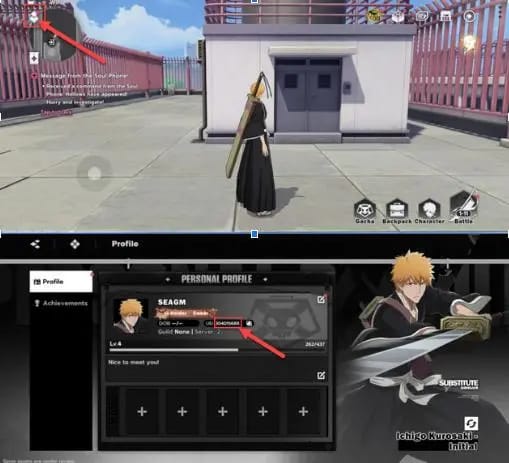
Your UID or account identifier
Device/account details if you use multiple Google accounts
For Apple billed orders:
Apple receipt
Screenshot of the missing entitlement
Note that Apple can show grouped charges, which is normal for multiple items
For web checkout orders:
Web invoice or confirmation number
Payment confirmation
Screenshot of in-game mail if expected but absent
UID and server/account details
When support needs evidence
Officially, for store-billed charges, start with the store support if the payment is pending. For missing items after a completed charge, contact the game’s support team with the order number and screenshots. For Bleach: Soul Resonance, Crunchyroll support is the official support route, and community guidance points users to the in-game help menu to submit a ticket with UID and order ID.
What this means for you: a bank statement is supporting evidence, not primary proof. The actionable proof is the store order number, Apple receipt, or web invoice.
App-store billing vs web checkout: which path is easier to troubleshoot?
Neither is perfect. But they fail differently.
My take: if you’re a first-time buyer or you switch devices often, app-store billing is easier to audit because the account linkage is clearer. If you care more about direct checkout options and cleaner web invoices, web can be attractive—but only if you’re sure the account link is correct before paying.
And if you don’t have a credit card, this is usually where things break. Web checkout may offer more flexibility depending on region, but don’t assume every local method or stablecoin rail is supported unless the checkout page actually shows it.
Who should you contact first?
Contact the billing owner first, then the game team if the payment completed but the item didn’t arrive.
Google Play pending charge: Google Play support first
Apple pending charge: update payment method, try gift card if needed, wait up to 7 days, then contact Apple billing support
Completed store charge, item missing: game support / Crunchyroll support
Web checkout confirmed, item missing: web checkout support first, then game support with invoice and UID
If you’re on a PC Google Play version and it’s stuck loading, community reports suggest using mobile or an emulator instead. That’s an edge case, but it matters.
Your safest next move
If the order is still pending, wait and don’t repurchase. If the charge completed, verify the exact account, login method, and item type before trying restore. Use restore for subscriptions and unlocks on the same account; don’t expect it to recover consumable currency. And when you escalate, send the right proof to the right team: Google Play order number, Apple receipt, or web invoice.
If you want a cleaner direct checkout next time, compare the billing details carefully and verify your account info before paying. One careful check now is better than untangling two charges later.