
If your Bigo Live Diamonds top up payment failed, first confirm whether it actually failed or is only pending. Then check four things before retrying once: your Bigo ID, payment method status, account region, and whether your bank already placed a hold.
From reviewing failed recharge cases, the biggest mistake is retrying too fast. That often turns one pending authorization into duplicate charges or extra fraud checks. If money was deducted but Diamonds didn't arrive, save the order ID, receipt, timestamp, amount, and screenshots immediately, then use the right support path instead of paying again.
If you need a cleaner retry path after checking the basics, this guide to Bigo Live Diamonds top up payment failed issues can help you avoid the most common checkout mistakes.
Why did my Bigo Live Diamonds top up payment fail?
The usual causes are bank declines, 3D Secure failures, insufficient balance, ID mistakes, region mismatch, or app billing interruptions. Community data shows about 30% of declines come from bank flags, ID errors, and regional blocks combined.
What payment errors happen most often?
The most common card-side failures are straightforward:
51 = insufficient funds
05 = do not honor
3DS timeout = authentication failed or expired
In practice, international charges over $100 or several rapid attempts often trigger fraud screening. I would check that first if your card works elsewhere but Bigo rejects it here. And don't forget fees: your balance needs to cover the package price plus roughly 1-3% in extra charges.
Why does a payment look successful but Diamonds still don't arrive?
Because a bank authorization isn't the same as a cleared top-up. That's the part many guides miss.
Users commonly report that the charge appears first, while the Diamonds arrive after wallet sync or security review. A simple wallet refresh in Me > Wallet > History resolves 68% of pending cases in 5-10 minutes, and refresh plus cache clear resolves about 90% of payment failures within 10 minutes.
Can app or store billing cause different failures than direct checkout?
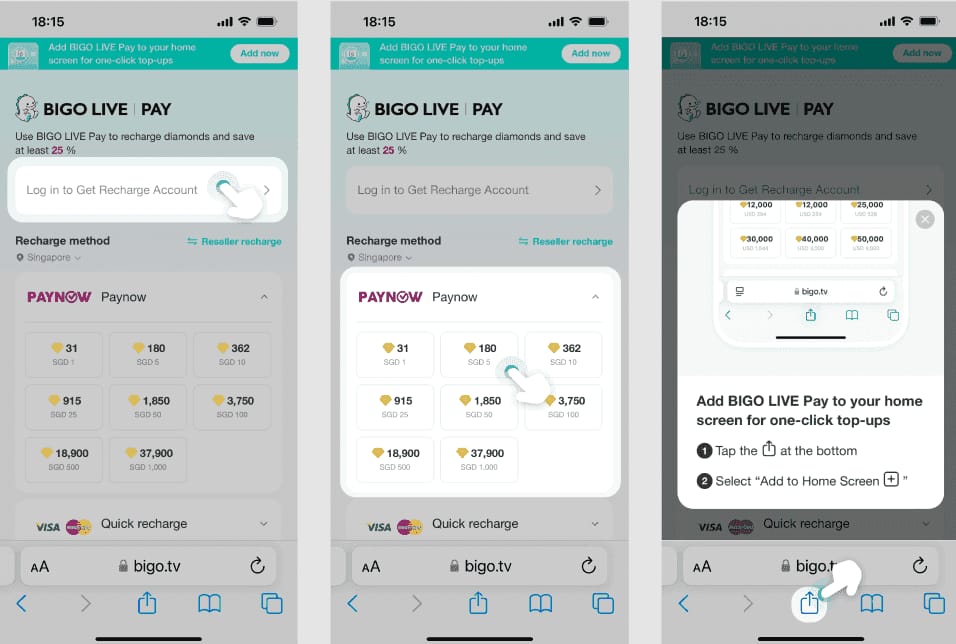
Yes. App-store billing and direct checkout fail in different ways, so the fix changes.
Officially, Apple Pay declines should be checked in Settings > Apple ID > Payment & Shipping. Community reports also show outdated apps cause many billing bugs; one source attributes 50% of payment bugs to outdated app versions.
Can account region or currency mismatch cause a Bigo Live payment failure?
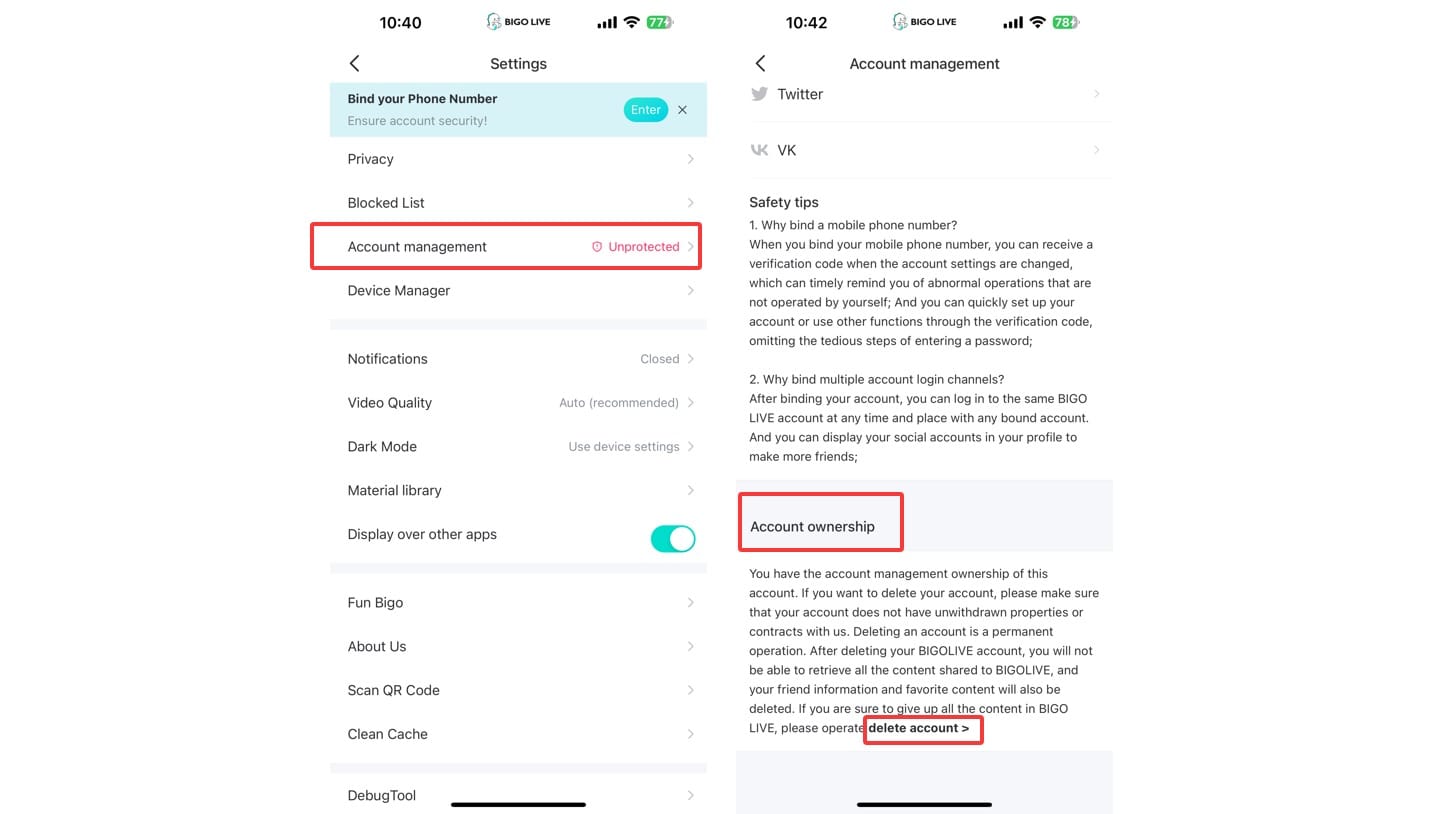
Yes. Region, country, and currency mismatches are a major cause of blocked or delayed top-ups, especially with cross-border cards and wallets.
The clearest example is error 4301, which users widely report when the recharge country doesn't match the account region. Some regions also have restrictions; Austria and Belgium are commonly reported as blocking certain recharge flows.
What exactly should you match?
You should match these details as closely as possible:
Personally, I would verify the Bigo ID before anything else. It's a small detail, but it causes more failed recharges than people expect because one wrong digit sends the order into manual review or nowhere useful.
Does changing region fix it immediately?
Sometimes, but not always. If you update the region, log out and back in so account data refreshes properly.
And turn off any VPN before retrying. VPN use is commonly linked to security blocks during recharge, especially when your IP country doesn't match your account or billing country.
How can I fix a failed Bigo Live Diamonds payment step by step?
Use a controlled checklist, not repeated guesses. That's the fastest way to solve a Bigo Live recharge failed issue without creating duplicate charges.
Check whether the order is failed, pending, or only authorized.
Look at your bank statement and Bigo wallet history. If the bank shows a hold but no Diamonds, wait at least 10 minutes and refresh Me > Wallet > History. About 80% of pending payments auto-resolve within 48 hours.Verify your Bigo ID and account details.
Open Me > Profile and confirm the Bigo ID is the correct 7-10 digit number. Then check Me > Settings > Region and make sure it matches the payment country.Clear cache and restart the app.
On Android: Settings > Apps > Bigo > Storage > Clear Cache. Users commonly report this fixes 70-95% of sync-related issues. If that fails, update the app, restart the device, and reinstall only as a last sync fix.Check your payment method properly.
Confirm enough balance for the order plus 1-3% fees. Enable 3DS/OTP, and if your bank blocked the charge, call the fraud line and whitelist Bigo before retrying.Retry once, not repeatedly.
Community guidance is clear: after a small $1 test purchase and bank approval, retry no more than 3 times. In my experience reviewing recharge issues, blind retries are where simple declines turn into account flags.Switch method if the first one is the problem.
If your card keeps failing, a digital wallet like PayPal is a common workaround. If Apple Pay failed, update the Apple payment profile first rather than changing random app settings.Escalate after the right waiting window.
If it's still pending after 24-48 hours, contact support. If Diamonds are frozen after delivery, security review can take 7-14 working days.
For users who want an alternative checkout path after verifying ID and region, Bigo Live Diamonds recharge not working fix resources are most useful when they also provide clear order tracking. I personally prefer any route that makes the order ID and payment status easy to retrieve later.
What should I do if Bigo Live charged me but the Diamonds did not arrive?
Wait briefly, refresh, then escalate with proof if the order doesn't clear. Don't dispute the charge immediately unless the waiting window has passed.
What proof should you collect before contacting support?
Gather everything in one shot:
Order ID
Payment receipt
Bigo ID
Timestamp
Amount paid
Screenshots of wallet/order status
Last four card digits for bank disputes
When troubleshooting delayed delivery, these details matter more than long explanations. Support teams usually move faster when the evidence is complete on the first message.
Who should you contact first?
The right order is:
Recharge seller or checkout provider first
Bigo support
App store billing support if the purchase was through Apple or Google
Bank for holds, fraud blocks, or settled charges with no resolution
Use Me > Settings > Help & Feedback in the app, or the official Bigo Live Help Center at bigo.tv/blog/bigo-help. Community-listed support emails include feedback@bigo.tv and cs_bigoamerica@bigo.sg.
When should you not dispute the payment yet?
Don't dispute a pending transaction too early. Users commonly report that chargebacks during the pending stage can cause reversals, delays, or account complications. Waiting up to 7 days before a bank dispute is the safer path unless the bank confirms the charge is fully settled and the seller won't help.
Why did my Bigo Live Diamonds payment fail?
Usually because of bank fraud checks, 3DS timeout, insufficient funds, wrong Bigo ID, or region mismatch. If you see repeated declines, stop retrying and verify the payment country, account region, and bank approval first.
What should I do if Bigo Live charged me but Diamonds did not arrive?
Wait 10 minutes, refresh the wallet history, and check whether the charge is only authorized. If nothing changes after 24-48 hours, contact the seller and Bigo support with your order proof.
How long does a Bigo Live top up pending payment take?
Most pending orders resolve within 48 hours, and many clear much faster. Community reports say 80% auto-resolve in that window, while frozen Diamonds can take 7-14 working days after security review.
Can a region mismatch cause Bigo Live payment failure?
Yes. It's one of the most underexplained causes, and error 4301 is commonly linked to it. Match your account region, billing country, and payment currency as closely as possible.
How do I get a refund for a failed Bigo Live top up?
Refunds are usually limited because Diamonds are generally sold under an all sales final policy. Exceptions are commonly made for failed delivery, so your best chance is proving the charge succeeded while the Diamonds never arrived.
Should I retry a Bigo Live payment after a failed transaction?
Only after you confirm it truly failed. If the payment is pending or the bank placed a hold, retrying can create duplicate charges and more fraud flags.
Conclusion
If your Bigo Live Diamonds top up payment failed, treat it like a diagnosis problem, not a speed problem. First separate a true decline from a pending authorization, then verify your Bigo ID, region, payment profile, and bank status before one careful retry. If money was taken and Diamonds didn't arrive, save full proof and escalate in the right order. That's the fastest, safest way to get the recharge fixed without making it worse.