
If your TAKA Live Coins Top-Up Order Tracking check shows pending, don’t place a second order yet. Most delayed top-ups resolve within 5–15 minutes, and the fastest safe move is to confirm your UID/account ID, region, payment status, and order ID first. There’s no official TAKA order tracking page, so you usually track through the seller’s order record, your payment receipt, and your in-app coin balance.
For urgent buyers, I would check three things immediately: whether the payment was actually completed, whether the UID and region were entered correctly, and whether the app wallet updates after a refresh or relogin. If the order is still missing after the normal window, contact support once with complete proof. That gets faster results than repeated payment attempts. If you need a cleaner reference point while waiting, keep your TAKA Live Coins top up order tracking details in one place.
Why is my TAKA Live Coins top-up still pending after payment?
A pending TAKA Live Coins order usually means the payment or fulfillment is still being verified, not that the order is lost.
In digital top-up workflows, these statuses usually mean:
The part many guides miss: payment success on your banking side does not always mean fulfillment is complete. In my experience reviewing recharge issues, this is where buyers get tripped up. A card or wallet can show a successful authorization while the seller is still waiting for final confirmation or risk checks. That’s why paid and coins delivered are related, but not identical.
Common delay triggers:
Payment verification
Bank transfer lag — some bank transfers can take up to 30 minutes to verify
Crypto confirmations — usually still fast, but blockchain confirmation can slow it
Wrong UID/account ID
Region mismatch
First-time or unusual payment pattern review
App wallet not refreshing
Users commonly report that pending is normal for the first 5–10 minutes. After that, you should start checking details, not reordering.
How long does TAKA Live Coins delivery usually take?
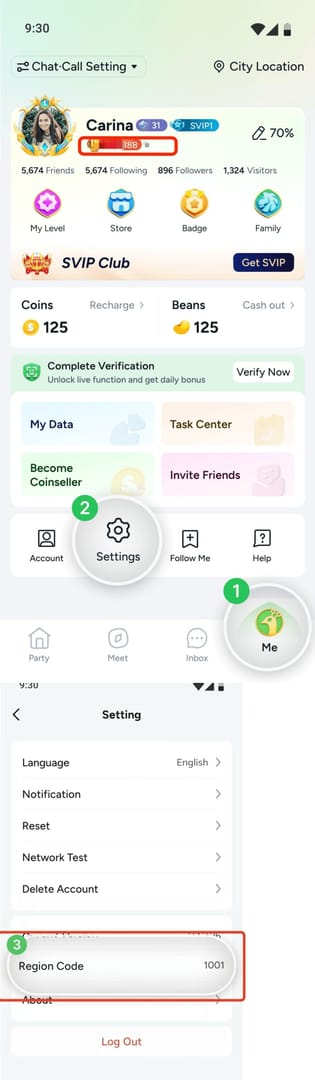
Most TAKA Live Coins top-ups arrive in 1–5 minutes, and many complete in seconds after payment confirmation.
Across sellers, the consistent pattern is fast automated delivery by UID/player ID, with no password required. Community and seller data align on this point: about 98% of top-ups complete within seconds to 5 minutes on automated services. Some services report 1–2 minutes after successful payment, while others state instant delivery after confirmation.
Here’s the practical timing range:
Personally, I prefer payment methods with clearer status visibility. Credit card and instant wallet flows are usually the fastest for urgent orders, but USDT and Binance Pay can be excellent if you know how to verify the transaction. With crypto, use a blockchain explorer such as Tronscan for USDT to confirm whether the payment itself is still pending.
And yes, region matters more than many buyers expect. TAKA top-ups commonly require UID and region, and restricted-region accounts can stall if the wrong region is selected. From comparing checkout paths, this is one of the most overlooked causes of paid but not received.
How can I track my TAKA Live Coins order safely without risking a duplicate charge?
You can track it safely by matching your seller order ID, payment reference, UID, region, and purchase time before doing anything else.
There is no official TAKA Live Coins order tracking page confirmed in the available product information. So your tracking stack is usually:
Seller order ID
Payment reference or receipt
UID / player ID
Selected region
Email receipt or checkout confirmation
Timestamp of purchase
Current in-app balance screenshot
That’s the core of a proper TAKA Live Coins recharge pending fix. Honestly, delayed delivery is frustrating when the money already left your account, but duplicate orders create a worse mess: double charges, chargeback risk, and slower support handling.
A safe tracking checklist:
Check payment status first.
Confirm whether the payment is completed, still authorizing, or reversed. For crypto, verify on-chain confirmation. For cards, check whether the charge is pending or fully posted.Match the exact UID and region used at checkout.
A single wrong digit or wrong server/region can block delivery. If the seller supports region selection, make sure it matches your account.Refresh the app wallet properly.
Pull down the wallet page 2–3 times. If nothing changes, force-close the app and log in again. Community troubleshooting suggests this resolves a large share of missing coins cases.Wait through the normal window.
For most orders, that means up to 15 minutes. For bank transfer, longer is normal.Do not pay again unless the first order is clearly failed or canceled.
This is the biggest avoidable mistake. I would avoid any second purchase until the first order’s status is settled.
What should I do while waiting for a delayed TAKA Live Coins top-up?
Follow a short decision tree: verify, refresh, wait, then escalate with proof.
How do I handle a delayed TAKA Live Coins order step by step?

Confirm the basics
Check your UID/player ID
Check the region/server
Check the coin package ordered
Check the purchase time
Confirm payment actually cleared
Card: see whether it’s authorized or completed
Crypto/USDT: check blockchain confirmations
Bank transfer: allow extra verification time
Local wallet: confirm the wallet deducted funds successfully
Check the app
Open the wallet/balance page
Refresh 2–3 times
Force-close and relogin if still unchanged
Wait the right amount of time
0–5 min: normal for most automated orders
5–15 min: still common for pending review
15+ min: verify details again, then contact seller support
Up to 30 min: still possible for bank transfer verification
Contact seller support once, with complete evidence Send everything in one message:
Order ID
Payment receipt/reference
UID/account ID
Region
Screenshot of current balance
Device/platform
Exact purchase time
Only involve official product support if the seller confirms fulfillment but the app account still shows no coins That usually points to an account-side issue, such as wrong account details or region mismatch.
What proof speeds up support the most?
The fastest support cases usually include complete evidence from the start.
From reviewing delayed digital top-up cases, the first details that unlock a resolution are almost always the order ID, exact account identifier, and payment proof. If you send only I paid but got nothing, support has to ask follow-up questions and you lose time.
How long does TAKA Live Coins top-up usually take?
Usually 1–5 minutes. Most automated top-ups complete within that window, though bank transfer checks can take longer.
Why is my TAKA Live Coins order still pending after payment?
Because payment verification or fulfillment hasn’t fully cleared yet. The most common causes are card or wallet review, crypto confirmation delay, wrong UID, or region mismatch.
What should I do if I paid but did not receive TAKA Live Coins?
First refresh the wallet, relogin, and verify the UID and region used at checkout. If nothing arrives after 15 minutes for normal payment methods, contact seller support with your order ID, receipt, and balance screenshot.
Can I place another order if my TAKA Live Coins top-up is pending?
No—unless the first order is clearly marked failed or canceled. Users commonly report duplicate payments causing slower resolution and possible double-charge problems.
What details does support need for a delayed TAKA Live Coins order?
Send order ID, payment receipt/reference, UID, region, current balance screenshot, device/platform, and purchase timestamp. That’s the minimum set for fast troubleshooting.
Does payment method affect TAKA Live Coins delivery speed?
Yes. Credit card, Binance Pay, and many local wallets are usually fastest, while crypto depends on network confirmation and bank transfer can take the longest to verify.
Can a wrong account ID cause TAKA Live Coins delivery delays?
Yes, and sometimes it prevents delivery entirely until corrected. Wrong UID and wrong region are two of the most common non-payment causes of missing coins, and refund help may only be possible within the seller’s processing window.
TAKA Live Coins top-ups are usually fast, but urgent buyers should treat pending as a tracking problem first, not a reason to reorder. Check payment status, UID, region, and app balance immediately; wait through the normal 5–15 minute window; then escalate once with complete proof. If you need a fast, trackable purchase path after the first order is resolved, keep your TAKA Live Coins top up order tracking details ready so any delay can be handled quickly and safely.