
If your SuperLive Coins Not Credited After Payment issue happened right after checkout, don’t pay again yet. First verify the UID, payment status, and order reference, because most missing top-up cases come from pending verification, wrong account details, or delayed delivery, not permanent loss.
Start with a quick triage: confirm the exact 7–10 digit UID, make sure you’re logged into the same SuperLive account, check whether the payment is failed, pending, or captured, then refresh the wallet and review order history. Honestly, delayed delivery is frustrating when the money already left your account, but a successful bank charge still doesn’t always mean the order has fully cleared.
Why are my SuperLive Coins not credited after payment?
The short answer: most cases come from pending payment confirmation, wrong UID, guest/unbound account issues, or a balance that hasn’t refreshed yet.
I would check these in order:
Users commonly report that 1–5 minutes is the usual delivery window after payment confirmation, and around 98% of orders are credited within minutes. That’s why the first five minutes are usually a waiting-and-checking phase, not a refund phase.
The part many guides miss: there are four different states, and they are not the same problem.
Payment failed: card declined, wrong billing data, or checkout error. No delivery should happen.
Payment pending: app store, bank, or 3-D Secure review hasn’t finished. Coins usually won’t arrive yet.
Payment captured: money is taken, but delivery may still be processing.
Delivered but not visible: coins landed, but you’re in the wrong account or the wallet hasn’t refreshed.
If you’re trying to diagnose SuperLive coins not received after payment, separating those four states is the fastest way to avoid a bad next step.
Why does SuperLive show payment successful but my balance is still unchanged?
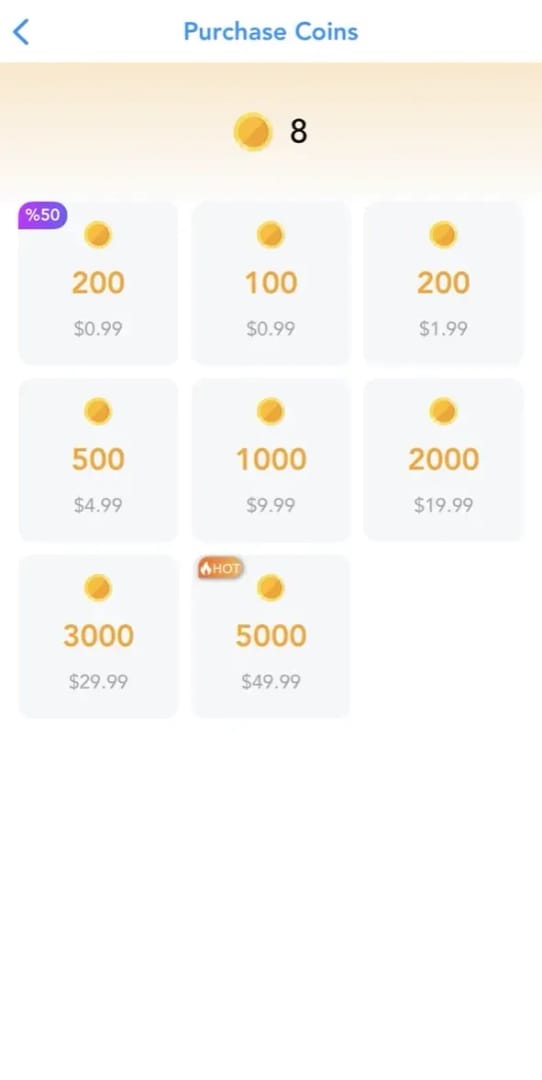
Because payment successful often means the payment request passed, not that coin delivery has fully completed.
From reviewing digital top-up support cases, this is the most common confusion. It happens a lot with:
Google Play or Apple App Store pending flows
Card payments with 3-D Secure timeout or delayed verification
Risk review after the bank authorizes the charge
Region or currency mismatch cases, which some users report can slow delivery
Official terms confirm coins are credited after purchase completion. That wording matters. If the purchase isn’t fully completed in the billing chain, the coins may not post yet.
There’s also a simple account-side cause: if you reinstalled the app or switched login methods, coins may not show unless you log back into the same UID. Community reports consistently point to guest or unbound accounts as a hidden reason balances look unchanged.
How long should I wait before treating a SuperLive top-up as delayed?
Wait up to 5 minutes first if the payment is confirmed, because that delay is still normal in many cases.
A practical timing guide:
Delivery delays are reported as rare outside peak events. In my experience reviewing recharge issues, if you’re past 15 minutes with a confirmed charge and no wallet update, you should stop troubleshooting blindly and start collecting evidence.
Don’t make a second payment just because the first one feels slow. Duplicate attempts create the worst support cases: one order may later complete while the second stays pending, and then you’re arguing over duplicate charges instead of one missing delivery.
What should I check first if my SuperLive UID top-up is missing?
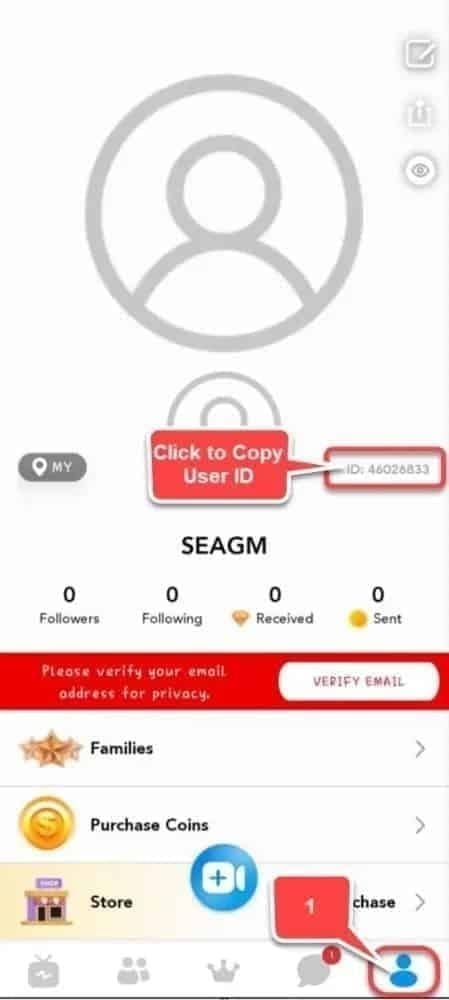
Check the UID, account, payment status, order history, and wallet refresh—in that order.
Confirm the exact UID
Open SuperLive, tap your profile, and copy the UID.
Community guidance says SuperLive UID is usually 7–10 digits.
Copy-paste it. Don’t type it manually if you can avoid it.
Make sure you’re in the correct account
Check whether you logged in with a different method after reinstalling.
If you used a guest account before, coins may not appear where you expect.
Coins are server-side, so reinstalling alone doesn’t remove them—but logging into the wrong profile hides them.
Check whether the payment actually completed
Look at app store purchase history or your card/bank record.
Distinguish:
Pending/authorized = not final
Captured/settled = payment likely completed
Declined/reversed = no delivery expected
Review SuperLive order history
Check profile > wallet/recharge section for order status.
If the order is processing, wait a few more minutes before escalating.
Refresh the balance
Manually refresh the wallet.
Restart the app.
Log out and back in to the same account.
Check for wrong-account delivery
If the UID entered was wrong, coins usually go to that account.
Community experience is clear here: there’s no automatic transfer back to your intended account.
Collect proof before contacting support
Order ID
Transaction ID
UID
Amount/package
Timestamp
Platform used
Receipt
Screenshots of wallet and payment
If you’re comparing retry options after a failed or stuck order, SuperLive top up not credited cases are much easier to resolve when you save the confirmation page immediately instead of relying only on a bank SMS later.
How do I contact support for SuperLive Coins not credited after payment?
Use one complete message with all evidence. That gives you the best chance of a fast manual review.
Official support contact listed in the available information is help@superlivellc.com. Some complaints also mention in-app support, but email is the clearest documented route.
Send this checklist in your first message:
A useful support message is simple:
State the problem: Coins not credited after payment.
Include UID and order ID in the first line.
Say whether the payment is pending, captured, or completed in the app store.
Attach screenshots once, clearly labeled.
Ask for either manual credit review or refund review, depending on status.
Personally, I would avoid two things:
Paying again too soon
Starting a chargeback immediately
Community experience shows early chargebacks and duplicate payments complicate resolution. And if coins were already delivered, official terms say they are non-refundable after delivery. If the issue is a wrong UID, refund chances are better before delivery is confirmed; after that, expectations should be modest.
For in-app purchases, users commonly report that refund handling may go through Google Play or Apple App Store, with developer-side requests becoming more relevant after 48 hours.
How can I avoid SuperLive top-up problems next time?
Use a short prevention routine before every payment.
Copy-paste the UID
Don’t type it from memory.
Double-check all 7–10 digits.
Confirm the account is bound
Avoid guest mode.
Make sure you can log back into the same profile after reinstalling.
Use stable checkout conditions
Good internet
Don’t close the payment page early
Complete 3-D Secure if your card asks for it
Check package and platform
Confirm the coin pack before paying.
Stick to one checkout path when possible so your receipts are easier to track.
Save proof immediately
Screenshot the order confirmation page
Save the receipt email
Note the timestamp and payment reference
If you need to retry after confirming the first order truly failed, I prefer a checkout path with clearer order tracking, even if it isn’t always the cheapest. That’s usually the safer move for urgent top-ups.
What else do users ask about SuperLive Coins not credited after payment?
Why are my SuperLive Coins not credited after payment?
Usually because the payment is still pending, the UID was wrong, the app is showing a different account, or the wallet hasn’t refreshed yet. A captured charge is not the same as completed coin delivery.
How long does SuperLive coin delivery usually take after a successful payment?
Typical delivery is 1–5 minutes after payment confirmation. Past 15 minutes, treat it as delayed and start preparing support evidence.
What should I check first if my SuperLive UID top-up is missing?
Check the UID first, then the logged-in account, then payment status, then order history. That sequence catches most real-world mistakes faster than contacting support immediately.
Can I get a refund if I topped up the wrong SuperLive UID?
Sometimes, but only if the provider can stop or verify the order before delivery. Once coins are delivered, official terms and common provider policies make refunds much harder.
Should I pay again if my SuperLive order is still pending?
No. Wait, verify the payment state, and check order history first. A second payment can turn one delayed order into a duplicate-charge dispute.
What is the difference between app-store pending and completed payment for SuperLive top-ups?
Pending means Apple or Google hasn’t fully finalized the purchase yet, so coins may not post. Completed means the store has finished the transaction and delivery should follow shortly.
SuperLive coin delivery problems are usually fixable, but the right first move is diagnosis, not another payment. Verify the UID, confirm you’re in the correct account, separate pending from captured payment, and gather full proof before contacting support. If the order is still unresolved after the normal delivery window, email help@superlivellc.com with your UID, order ID, transaction reference, receipt, and screenshots in one message.