
If your One Punch Man: The Strongest top-up is pending, do not pay again right away. The safest first move is to confirm three things: your order ID, the actual payment result, and the UID/SID or server details tied to the purchase. Most delayed recharges turn out to be a normal processing lag, a payment review, or an account-detail mismatch. If you already placed the order, keep the order page open and check your One Punch Man: The Strongest recharge order tracking details before taking any further action.
Quick diagnosis: is this a normal delay or a real problem?
When a digital top-up feels stuck, the biggest mistake is guessing from a single clue. A bank debit screenshot does not automatically mean the game delivery completed, and an in-game balance that has not updated yet does not automatically mean the order failed.
The fastest way to diagnose a pending order is to compare the visible symptom with the order status, payment status, and account details you entered.
A practical rule helps here. Reports commonly point to instant delivery or credit within 10 minutes for direct game recharge, while some top-up sites state 5 to 60 minutes as a standard processing range. Peak periods can stretch direct recharge beyond 10 minutes. But if the payment status or delivery status has not changed after 2 hours, stop treating it as a routine delay and start treating it as a support case.
Why is my One Punch Man: The Strongest top-up still pending?
A pending order usually means the payment flow and the delivery flow have not fully matched yet. That sounds technical, but in practice it comes down to a few recurring causes.
One of the most common is that the payment was authorized but not fully cleared for delivery. This is especially frustrating because, from the buyer’s point of view, the money appears to be gone already. But digital goods often pass through extra checks before the top-up is released. A credit card, debit card, bank transfer, or e-wallet can show a successful debit while the merchant side still marks the order as under review.
Another common cause is manual review or anti-fraud screening. Fast checkout is not always the same as fast release. Payment methods with extra verification layers, including 3-D Secure flows, can reduce fraud risk but also create longer pending windows. That is why a payment completed message and a delivery completed result are not always simultaneous.
Then there is the account-detail problem, which is more common than buyers expect. ONE PUNCH MAN: The Strongest in SEA is server-specific and typically requires both UID and Server ID/SID. Players commonly find these by launching the game, opening the main city area, tapping Mall, then Top up/Recharge, where the UID and SID appear at the bottom left. If the wrong UID or server was entered, the order may not fail cleanly. It can remain pending while the seller checks what happened.
There are also delays that sit outside the game itself. App-store processing, bank settlement lag, wallet confirmation delays, or temporary publisher-side delivery issues can all slow the final crediting step. That is why money deducted and credits missing should be treated as related but separate checks.
How can I track my order safely without making it worse?
Safe tracking starts with the seller order page, not with repeated purchase attempts. If you were logged in during checkout, order history is usually much easier to retrieve later, which is one reason logged-in checkout is worth doing for future purchases.
Start with the references that actually matter:
Order ID
Payment status
Transaction or bank reference
UID
SID/server
Selected package
Timestamp
This is the core tracking stack. If one piece is missing, support can still help, but the case usually slows down. From reviewing delayed digital recharge cases, the biggest time-waster is not the delay itself but incomplete proof. Many users save only the bank debit screenshot and forget the order ID or account identifier, which forces support to ask basic questions before they can even investigate.
Most top-up sites provide a My Orders page or order history after payment. That should be your first stop. If the platform has chat support, some sellers may also ask you to notify them after payment for manual delivery. In that situation, send one complete message rather than several fragmented ones.
If you need to re-check your purchase path, use your One Punch Man: The Strongest top up pending order details and compare them against your receipt and your in-game balance. That is much safer than trying another payment while the first one is still unresolved.
What you should not do matters just as much as what you should do. Do not submit duplicate payments because the first order feels slow. Do not change account details in the middle of a review. Do not start making chargeback threats while the order is still within a normal processing window. And do not spam purchases from multiple devices or across multiple accounts. Community warnings specifically note that multi-device recharge behavior, such as using two phones and a tablet, can create suspicious-activity issues, and multi-account top-ups carry similar risk.
What should you do in the first hour?
A pending top-up feels urgent, but the cleanest cases are handled in stages. The goal is to preserve evidence while giving the normal processing window time to work.
In the first 5 minutes, confirm whether the payment actually completed on your bank, card, or wallet side. Then save the seller order page, capture the order ID, and compare the UID and SID with the intended account. Relaunch the game once and check whether the Coupons or Funds have appeared. Since many platforms report instant credit or delivery within about 10 minutes, this is still too early to assume failure unless the order clearly shows an error.
By around 15 minutes, it becomes worth documenting the case properly. Screenshot the order status, the payment confirmation, and the in-game Recharge screen showing the UID and SID. This is the point where many buyers either save themselves time later or create a longer support loop. If the status changes after the fact and you never captured it, you lose useful context.
By 60 minutes, you should be able to tell whether this is still a plausible processing delay or whether it is drifting into a support issue. Re-check whether the order says pending, processing, or paid but undelivered. Confirm that the selected package was the one you intended to buy. If the seller offers chat support, send a single message with the full evidence set rather than opening multiple partial requests.
That single complete message point matters more than it sounds. Support can usually move faster when they do not have to ask for the order ID, then the UID, then the timestamp, then the receipt in separate rounds.
Payment went through, but the credits are still missing?
When payment appears successful but the in-game balance has not changed, the first question is not Did the payment fail? It is Did the recharge go to the correct account and server?
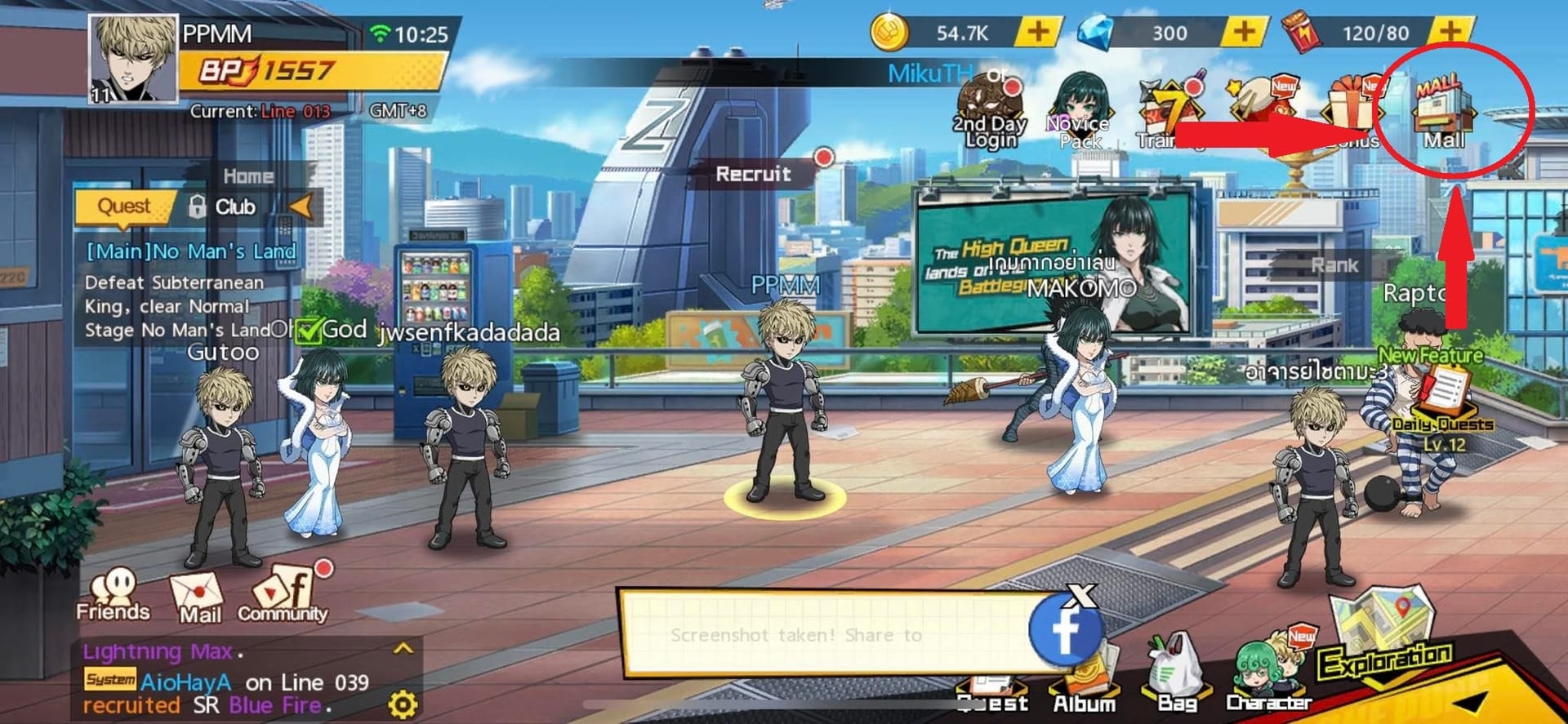
Open the game and follow the usual path: Mall > Top up/Recharge. Check the UID and SID shown there. For SEA players, the server detail matters because the top-up is server-specific. Then compare those details with what was entered on the order, along with the package selected and the account currently logged in.
This is where rushed purchases often go wrong. A player may switch devices, use a guest account, or assume they are on the same server when they are not. The result looks like a missing-credit problem, but the real issue is an account mismatch.
A common slow-resolution case looks like this: the buyer tells support that money was deducted and sends only a payment screenshot. Support still has to ask for the order ID, UID, SID, package, and purchase time before they can trace anything. That back-and-forth can waste another hour or more.
A faster support case usually includes all of the following in one bundle:
order ID or invoice number
payment receipt or authorization result
transaction reference
screenshot of the in-game UID/SID
selected package
purchase timestamp
screenshot showing the current balance or missing credits
If the seller later confirms that delivery completed but nothing appears in-game, that is the point where checking the official help center or any developer/publisher announcements becomes more relevant. Seller-side support is usually the first stop for order tracking, but official product support matters more once the seller says the delivery itself is done or there is a server-side issue.
When should you contact support, and what should you say?
The cleanest escalation timing is simple: if the payment status or delivery status is still unchanged after 2 hours, contact support. That aligns with the commonly stated threshold in available guidance.
When you do escalate, avoid vague messages like top-up not received. A better support request is short, specific, and complete. Include the order ID, payment result, transaction reference, UID, SID, package, and exact purchase time. Also state clearly that you have not made a duplicate payment. That last detail helps support understand they are dealing with one unresolved order, not several overlapping attempts.
A useful support message might read like this in structure:
Order ID attached. Payment completed at [time]. UID/SID attached. Package selected attached. No duplicate payment made. Order still pending / credits still missing after 2 hours.
That kind of message gives support a timeline, an account target, and a payment trail in one pass.
As for refunds, they should usually come later, not first. A refund request makes sense when the seller confirms the order failed, cannot be delivered, or explicitly instructs you to request one. Jumping straight to refund language while the order is still under review can complicate a case that might otherwise resolve normally.
Before you try again: how to avoid the same delay next time
Urgent buyers often assume speed comes from choosing the fastest-looking checkout. In practice, speed usually comes from cleaner inputs and better tracking.
For future purchases, log in before paying so your order history is saved. Copy the UID and SID directly from the in-game Recharge screen instead of typing from memory. Double-check the server before confirming the package. Keep the receipt, order ID, and timestamp together in one place. And most importantly, keep only one active payment attempt for the same purchase.
It is also wise to avoid behavior that can look suspicious, especially repeated top-ups across multiple devices or multiple accounts. Community guidance warns that multi-device recharge and multi-account activity can create ban or review risks, particularly through unofficial-looking patterns.
For repeat buyers, the safer habit is to prefer a checkout path with clear order tracking over one that only promises speed. If you want a cleaner tracking path next time, keep your purchase details together and use a page where you can easily review your One Punch Man: The Strongest recharge order tracking status if anything slows down.
In short: most pending top-ups are solved by patience plus documentation, not by another purchase. For One Punch Man: The Strongest, many normal deliveries clear within minutes, some providers state 5–60 minutes, and peak traffic can stretch that further. But once you cross the 2-hour mark, stop guessing and escalate with a complete proof set. That is the safest and fastest route to a real resolution.