
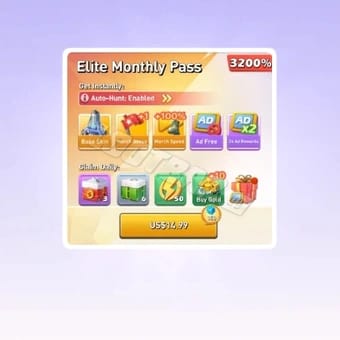
If your Top War Elite Monthly Pass is close to expiring, top up before the final hours and verify your account, platform, and payment method first. The biggest risk isn’t the pass itself — it’s payment review, app-store pending status, or buying on the wrong account too late to fix it. The pass is widely reported as a 30-day, non-auto-renewing subscription, so manual repurchase matters. If you need continuity, don’t treat expiry like a countdown on your phone; treat it like a payment workflow with possible delays.
Can you top up Top War before the Elite Monthly Pass expires?
Yes — but waiting until the last minute is the part that causes trouble.
Community reports consistently describe the Elite Monthly Pass as a 30-day pass with manual renewal, not auto-renew. That means you can plan your repurchase, but you still need enough time for payment verification and entitlement sync.
From reviewing urgent recharge cases, I would not aim for the final hour. A bank charge can appear successful while Apple, Google Play, or the game is still validating the purchase. Honestly, that’s the frustrating scenario: money leaves your account, but the pass doesn’t activate before reset.
A practical note: some players intentionally let passes expire before repurchasing because users commonly report better reward timing in certain situations, including double daily reward or chest-related benefits. That’s a timing strategy, not an official rule. If you’re trying that approach, do it on purpose and with a buffer after expiry — not by accident because checkout got stuck.
If you’re comparing purchase routes, Top War elite monthly pass top up is easiest when you’ve already confirmed the exact account and server.
What should you verify before paying?
Check these first. In a rush, this is where most avoidable mistakes happen.
Quick pre-payment checklist
Account ID: The official Top-Up Center requires your account ID.
Server selection: Officially required. A wrong server can send value to the wrong profile.
Platform route: Was your current pass bought through Apple App Store, Google Play, or a direct top-up route?
Payment method readiness: If your card often triggers 3-D Secure or fraud checks, leave more time.
Current pass status: Confirm whether you’re renewing after expiry on purpose or trying to avoid any gap.
Why platform route matters
If your original purchase was in-app, restoration and billing issues usually follow app-store logic. Officially, iOS users can use Restore Purchases in the in-game store section. Community guidance also notes restoring via the same Apple ID on a new device.
If you’re using the official Top-Up Center, the flow is simpler on paper:
Access the official purchase center
Select Elite Monthly Pass
Complete payment
But simple doesn’t mean foolproof. Third-party or direct top-up routes often still require account information after payment, so entering the wrong details is still a real risk.
What I would check first
Personally, I would check account ID + server before touching payment. Price differences are annoying; wrong-account delivery is worse.
How early should I top up Top War before my pass expires?
For most players, a same-day purchase is fine if it’s not close to reset and your payment method usually clears fast. For cautious timing, earlier is better.
Here’s the lean version:
Why this matters: your device clock isn’t the only clock. Server reset, app-store sync, receipt validation, and fraud screening can all matter more than I paid at 11:58.
Community advice also warns against last-minute top-ups because processing and verification delays happen. I agree with that. In digital top-up troubleshooting, the most common last-minute failure isn’t a hard decline — it’s a pending state that resolves too late.
Why do Top War payments get delayed right before expiry?
Because payment completion has more than one gate.
The usual delay points
Card verification: 3-D Secure, issuer OTP, fraud review
Apple or Google pending states: payment accepted but still under review or not yet synced
Store receipt validation lag: the app hasn’t recognized the purchase yet
Network/app sync issues: relogin or cache refresh may be needed
Bank authorization mismatch: users are charged or pre-authorized, but the order hasn’t fully cleared
A useful reality check: a successful bank charge does not always mean the order has fully cleared verification.
Community and single-source reports both point to bank auth errors and app-store sync lag as common causes. On Android, checking Google Play purchase history is a sensible first step. On iPhone, restore purchases is the first thing I’d try if the charge is visible but the pass isn’t.
Last-day checklist if you’re close to expiry
Don’t switch between multiple payment attempts too fast
Don’t buy on a guessed server
Don’t assume charged = activated
Check in-game mail for delayed rewards after a late pass purchase
Relogin once before opening a support ticket
Keep the receipt and order ID immediately
Is renewal instant on iPhone and Android?
Usually yes, but not always.
Most successful Top War pass purchases are delivered quickly, and some top-up services advertise delivery within 30 minutes. But usually quick is not the same as guaranteed instant activation, especially through app stores.
iPhone
If the payment shows in Apple billing but the pass doesn’t appear:
open the game
go to the store section
use Restore Purchases
make sure you’re on the same Apple ID used for the purchase

Android
If Google Play shows the purchase:
check purchase history
relogin to the game
if still missing, contact the developer with proof
If you’re under deadline pressure, I personally prefer the route with clearer order tracking, even if it isn’t always the cheapest. Fast support starts with traceable order data.
If the pass is about to end, should you renew it or buy a one-time pack?

If time is short and you can’t risk a delayed entitlement, a one-time pack can be the safer fallback. If you still want long-term value, the pass usually wins.
Quick verdict
Community pricing snapshots put the Elite Monthly Pass around $12–15 USD, with examples near $12.02–$12.03 on some sellers and a higher reference point around $14.99. Exact offers change, so treat those as observed examples, not fixed pricing.
A few timing nuances matter:
If you’re active daily, the monthly pass is usually the smarter spend.
If you only need resources for a short push and the pass is minutes from expiry, a one-time pack avoids renewal timing stress.
Some players delay renewal on purpose for reward optimization. That can work, but only if you understand the timing and accept a temporary gap.
If you’re weighing urgency against value, Top War monthly pass recharge before expiry makes sense only after you’ve ruled out account/server mistakes.
What happens if my Top War payment is still pending at expiry?
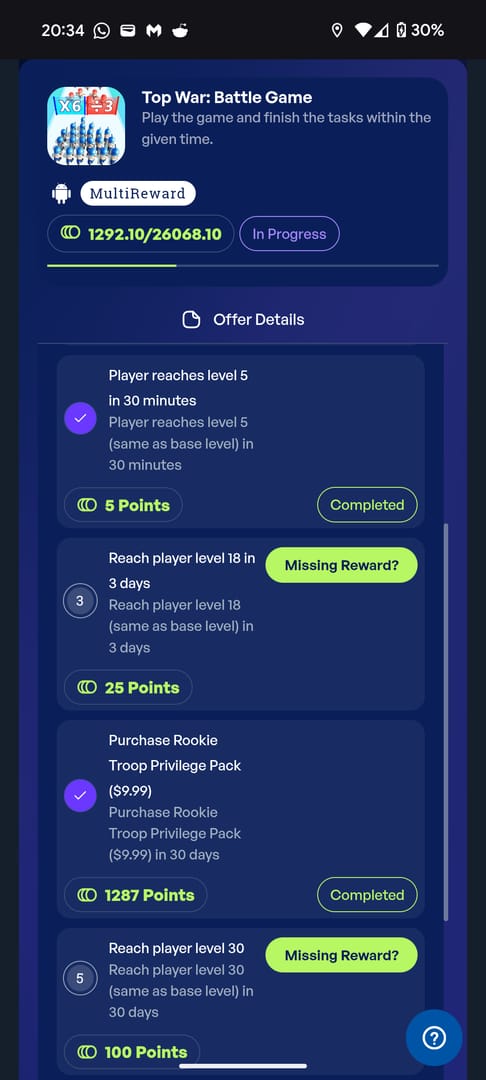
If payment is still pending at expiry, you should assume the pass is not safely renewed yet until the game actually grants the entitlement.
That’s the careful answer. Starting payment before expiry doesn’t guarantee the pass will count as active before the old one ends. Official support language in the provided data doesn’t confirm a grace rule, so don’t rely on one.
What to do immediately
Check whether the order is actually completed or only pending.
Relogin and check in-game mail.
On iPhone, use Restore Purchases.
On Android, verify Google Play purchase history.
If still missing, prepare support evidence before retrying payment.
Support packet that speeds things up
In my experience reviewing recharge issues, support moves faster when you send everything in one message:
receipt
order ID
payment timestamp
account ID
server
screenshots
short description: charged but Elite Monthly Pass not activated
That’s far better than my top-up didn’t work.
Why did my Top War top up not activate the Elite Monthly Pass?
Most cases come down to one of four things: wrong account details, pending verification, app-store sync lag, or a purchase route mismatch.
Quick diagnosis
Community troubleshooting steps are straightforward:
verify funds
clear cache
relogin
contact support if unresolved
And if you bought late, check in-game mail. Users commonly report mailed rewards after late pass purchases or after tasks were already completed.
A careful renewal routine that works
If you want the least stressful path, this is the routine I’d recommend:
One day before planned expiry, confirm account ID and server.
Choose the payment route you trust most — usually the one that has cleared fastest for you before.
Avoid the final reset window.
Save the receipt/order ID immediately.
If activation doesn’t appear, relogin once, then restore/check store history.
Stop repeated retries if one payment is already pending. That’s how duplicate-charge headaches start.
And if your strategy is to let the pass expire first for better reward timing, do it deliberately. Community tips mention waiting until expiry for double daily rewards or chest optimization, but that only works when you’re not gambling on a delayed checkout.
Final call
For most players, the safest answer to How to Top Up Top War Before Elite Monthly Pass Expires is simple: don’t buy in the final minutes, and don’t pay before checking account ID, server, and platform route. If you’re under real time pressure, a one-time pack is often the lower-risk move. If you need a fast, clear purchase flow, check VGTopup’s Top War page only after confirming your account and server details first.