
To top up SuperLive with GCash in the Philippines, you usually can’t pay by GCash directly inside the app. The working route is typically a web-based third-party checkout that asks for your SuperLive UID, lets you pick a coin pack, then hands off payment to GCash. Before you pay, check the UID, product type, PHP total, and checkout route. If GCash isn’t showing, the problem is often the payment path or account setup, not your wallet balance.
If you want a cleaner PHP checkout path, SuperLive GCash top up pages are worth checking before you authorize payment.
Why do Filipino users search for SuperLive top up with GCash instead of card payment?
Because GCash is the default payment language for many Filipino buyers. In local use, people are more comfortable with wallet authorization, OTP, and app handoff than entering a credit card on a recharge site.
That matters for SuperLive because current PH buying behavior is wallet-first. Community reports consistently show no direct in-app GCash checkout for SuperLive, while PH-supported web top-up routes commonly offer GCash through selected sellers/platforms. And when users say top up SuperLive, they usually mean buying coins for gifts or boosts, not a separate premium renewal flow.
From comparing checkout paths, I’d say this is the key distinction many guides miss:
A practical note: coins, diamonds, and credits are often used loosely by buyers, but the confirmed flow here is standard coins recharge. There’s no specific membership renewal path found, so don’t assume a premium plan uses the same checkout labels.
Why can a SuperLive top up with GCash fail even when the wallet has balance?
Because balance alone doesn’t clear the whole payment chain. Official GCash guidance confirms failures can happen from insufficient balance plus fees, unstable internet, maintenance, or validation delays. In SuperLive top-ups, I would check the checkout route and UID first.
The most common failure points are:
Wrong route: GCash may not appear on one checkout path even if it works on another PH-supported seller page
Wrong account detail: SuperLive top-up usually needs a 7-10 digit UID, not just a username
OTP/session timeout: users switch from merchant page to GCash, complete OTP late, then return to an expired session
Maintenance or InstaPay delay: official GCash support says stuck transfers can take 2 hours to 2 business days
Fees reducing usable balance: the displayed package price and final charge can differ because of platform fees or GCash service fees
Unverified wallet limits: a fully verified GCash account is needed for transaction limits
Honestly, delayed delivery is frustrating when the money already left your wallet. But a successful debit doesn’t always mean the order has fully cleared verification. That’s why the order page and wallet receipt both matter.
Can I top up SuperLive with GCash in the Philippines?
Yes, Filipino users commonly can top up SuperLive with GCash, but usually through selected third-party web checkouts, not direct in-app GCash billing. That’s the confirmed practical answer.
Community and single-source data point to PH support via GCash on selected SuperLive top-up sites, with instant delivery after successful payment commonly reported. The app path may still redirect you outward, so in-app and web can blur in practice. What matters is where the payment is actually processed.
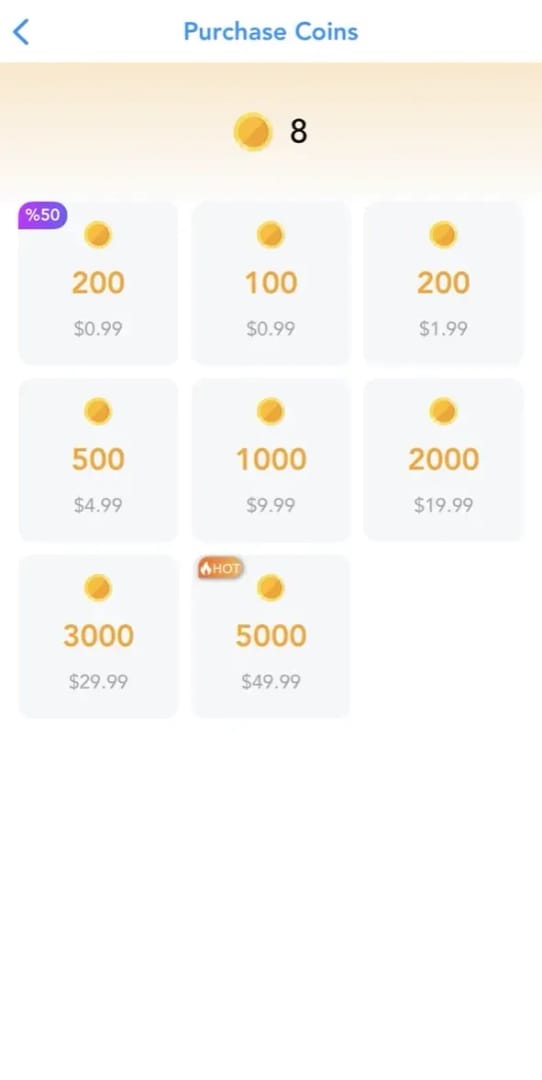
For value, bulk packs usually win. After the April 2026 Coins Carnival ended, rates reportedly increased 30% to 55%, so small packs became less efficient. Current package data shows:
In my experience reviewing recharge issues, buyers in a rush often choose the smallest pack first to test. That’s fine for safety, but if you already trust the checkout and your UID is correct, bulk packs usually give better PHP-equivalent value.
How do you top up SuperLive with GCash step by step?
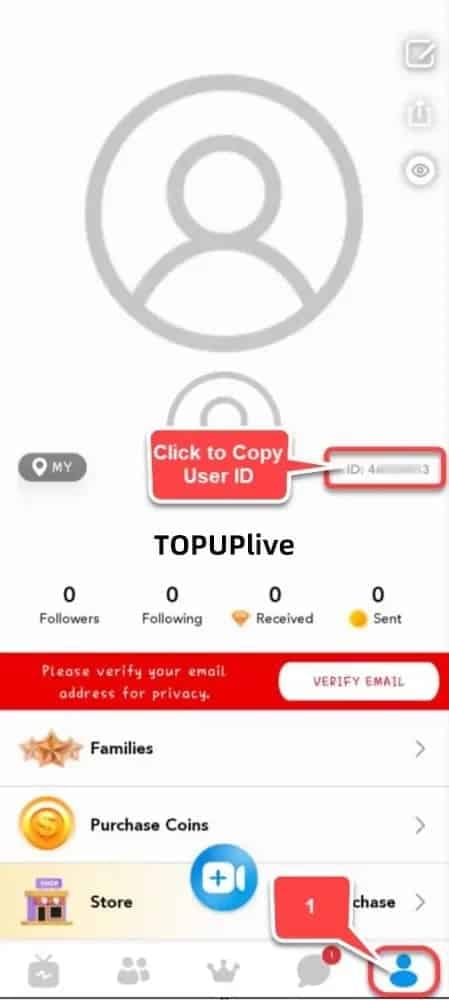
You top up by preparing your SuperLive UID, choosing a PH-supported checkout, then completing the standard GCash authorization flow.
Open SuperLive and find your recharge details.
Go to Profile > Wallet/Recharge and note your account identifier. For most top-up pages, you need the 7-10 digit UID. Don’t rely on display name alone.Confirm what you’re buying.
Use the standard coins recharge flow. If you’re trying to buy something described as premium or membership, check carefully first because there’s no distinct membership renewal path confirmed.Use a PH-supported web checkout that shows GCash.
If the app route doesn’t show GCash, switch to a supported web top-up path for Philippine users. This is where many successful SuperLive recharge with GCash orders start: clear UID entry, visible PHP payment method, and better order tracking.Enter the UID carefully.
Double-check every digit before paying. Personally, I would pause here for ten extra seconds. Wrong UID is one of the few mistakes that can turn a simple top-up into a support case.Choose the coin pack and review the final payable amount.
Check:package size
displayed currency or PHP equivalent
any service fee
final amount charged in GCash
Don’t assume the first shown amount is the exact wallet deduction.
Select GCash and complete the wallet handoff.
The standard flow is:choose GCash
enter your mobile number
authorize in the GCash app
enter MPIN
complete OTP if prompted
Return to the merchant page after payment.
This is where users often slip. Don’t close the browser too early. Let the page confirm the order status.Save proof before leaving.
Keep:merchant order ID
GCash reference/transaction ID
receipt screenshot
screenshot of the UID entered
Check your SuperLive balance.
Community reports say delivery is usually instant after successful third-party payment. If it doesn’t appear right away, wait through the normal processing window before paying again.
What payment statuses should you expect?
These are the useful ones to recognize:
A local tip: if GCash keeps failing on Wi-Fi, some users report better results on mobile data. I wouldn’t call it universal, but it’s a sensible retry before escalating.
What should you do if your SuperLive GCash payment is successful but the top up is delayed?
First, don’t pay again immediately. Official GCash guidance says some transactions can stay in processing/pending up to 2 business days, and InstaPay-related delays can take 2 hours to 2 days during maintenance or validation.
Then work through this checklist:
Check the merchant order status.
If it says paid or processing, wait before creating a second order.Match all proof items.
The fastest support resolutions usually happen when you send these together:merchant order ID
GCash transaction/reference number
exact SuperLive UID
receipt screenshot
Check GCash Activity/Transactions.
If the receipt is missing, official guidance says you can check Activity and download it using the reference number.Use the right support path.
If the wallet was charged but credits didn’t arrive, contact the top-up platform support with full proof
If the GCash transfer itself looks wrong or incomplete, go to GCash app > Transactions > Get Help and choose the issue that matches your case
Avoid duplicate payments.
This is the expensive mistake. Users often retry after app switching or a blank return page, then end up with two successful charges.
For safety, stick to official or clearly authorized payment pages and avoid random sellers. That one decision prevents a lot of avoidable support trouble.
FAQ
Can I top up SuperLive with GCash in the Philippines?
Yes, usually through a PH-supported web checkout rather than direct in-app GCash billing. You’ll normally need your SuperLive UID and a checkout page that explicitly shows GCash.
Why did my SuperLive GCash payment fail?
The usual causes are insufficient balance plus fees, unstable internet, OTP timeout, maintenance, or using the wrong checkout route. I would also verify that you entered the correct UID, not just your username.
How long does a SuperLive top up take after paying with GCash?
Most successful third-party top-ups are commonly reported as instant. If the payment shows processing/pending, official GCash guidance allows up to 2 business days in some cases.
What should I do if my SuperLive credits did not arrive?
Wait through the normal processing window first, then contact the top-up platform support with your order ID, GCash reference, UID, and receipt. If the wallet transaction itself is the issue, file it in GCash Transactions > Get Help.
Do I need a SuperLive ID or username before topping up?
You usually need the UID, typically a 7-10 digit account identifier. Don’t assume your display name or username is enough for recharge.
Is it cheaper to top up SuperLive on the web or in the app?
Often yes. One data point shows 605 coins at $4.28 on third-party sites versus $5 in-app, and bulk packs usually have the best per-coin value.
Can I get a receipt for a SuperLive GCash payment?
Yes. Check GCash Activity/Transactions, and if needed, download the receipt using the reference number. Keep that together with the merchant order ID.
SuperLive top up with GCash works for many Filipino users, but the reliable route is usually a web-based checkout with UID entry, not direct in-app GCash billing. Check your UID, product type, final PHP charge, and wallet status before paying. If the order is delayed, don’t double-pay—save your proof and escalate with the order ID, GCash reference, and UID.