
Yes—if you're in the Philippines, the normal way to top up Marvel Snap with GCash is through Google Play on Android, not a separate UID recharge page. Marvel Snap usually sells Gold and the Season Pass as in-app purchases, so your GCash payment works only if your Google Play country/profile is set to the Philippines, your wallet is verified, and you have enough PHP balance.
If GCash doesn't appear, that's usually a billing setup problem, not a Marvel Snap problem. On iPhone, direct GCash support is much more limited, so Android is the cleaner route for most PH players.
Why do most users buy Marvel Snap with GCash through Google Play instead of a direct top-up page?
Because Marvel Snap usually handles purchases as app-store billing, not a classic game recharge page where you enter a UID and pay separately.
This is the first thing many guides miss. From reviewing top-up support cases, the biggest confusion is the word "top up" itself: players search for recharge, top up, or buy credits, but Marvel Snap normally sells Gold bundles and Season Pass access inside the app through Google Play or the App Store. There isn't an official Marvel Snap GCash payment page from Second Dinner.
That matters because your payment success depends less on your Marvel Snap account and more on your store billing setup:
If you're comparing options for Marvel Snap GCash top up, keep that distinction in mind: for most users, "top up" really means completing an in-app purchase in PHP.
Can you use GCash for Marvel Snap on Android and iPhone in the Philippines?
Yes on Android in most cases; on iPhone, not directly in the same way.
Android: GCash is an officially supported Google Play payment method in the Philippines. Google Play can show Marvel Snap prices in PHP, and GCash can be linked as your payment method for digital content. In practice, Android is the easiest no-credit-card route for PH users.
iPhone: users commonly report that the App Store doesn't offer the same direct GCash path. Billing is usually limited to Apple-supported methods such as Apple Pay or cards available on your Apple ID. So if your goal is specifically "Marvel Snap with GCash," Android is the better fit.
A few checks decide whether GCash appears:
Google Play country must match the Philippines
Payment profile must match the store region
GCash wallet must be verified
Balance and transaction limits must allow the purchase
Internet connection must be stable
Personally, I would check the store country before anything else. In failed local-wallet payments, region mismatch is more common than an actual GCash outage.
Why can Marvel Snap prices in PHP differ by device or checkout path?
Because platform region, taxes, and store billing rules affect the final PHP price.
Google Play Philippines commonly shows Marvel Snap pricing in Philippine peso, but users still notice differences between Android and iPhone, or between one account and another. That's usually caused by:
Store region differences
Tax handling
Platform pricing rules
Old payment profiles tied to another country
Community listings have shown third-party PH pricing such as 10k Gold at PHP 1,800 and 15k Gold at PHP 2,300 in March 2026, but those are not official app-store benchmarks and come with different risk trade-offs. In my view, cheaper isn't automatically better here. Official billing is usually worth it because order tracking is clearer and account risk is lower.
How do you top up Marvel Snap with GCash step by step?
Use Google Play on Android, then buy Gold or the Season Pass inside Marvel Snap.
Check your Google Play country
Open Google Play.
Confirm your account/payment profile is set to the Philippines.
If your profile is tied to another country, GCash may not appear.
Link GCash to Google Play
Go to Play Store > Payments & subscriptions > Payment methods.
Choose Add GCash if available.
Complete the wallet authorization steps.
Prepare the wallet
Make sure your GCash account is verified.
Confirm you have enough balance in PHP.
Check transaction limits if you're buying a larger bundle.
Open Marvel Snap
Go to the in-game shop.
Select the Gold bundle or Season Pass you want.
Pay through Google Play
Choose GCash as the payment method.
Review the PHP amount before confirming.
Save proof immediately
Keep the GCash receipt
Keep the Google order ID
Screenshot the purchase confirmation if needed
Check delivery
Gold or pass access usually appears quickly.
If not, restart the app and check purchase history first.
For users who want another route to Marvel Snap recharge with GCash, compare the payment flow carefully. I personally prefer the path with clearer receipts and less account ambiguity, even if it isn't always the cheapest.
What should you do if Marvel Snap with GCash is not working or the payment is pending?
Start with the billing checks, then verify whether the order actually cleared.
A successful wallet deduction does not always mean the purchase fully passed verification. That's a common pain point. Honestly, it's frustrating when the money already left your account, but the order is still under review.
Quick checks for failed or pending GCash payments
Official troubleshooting steps include:
Use one primary Google account
Update Google Play and Marvel Snap
Clear Play Store cache
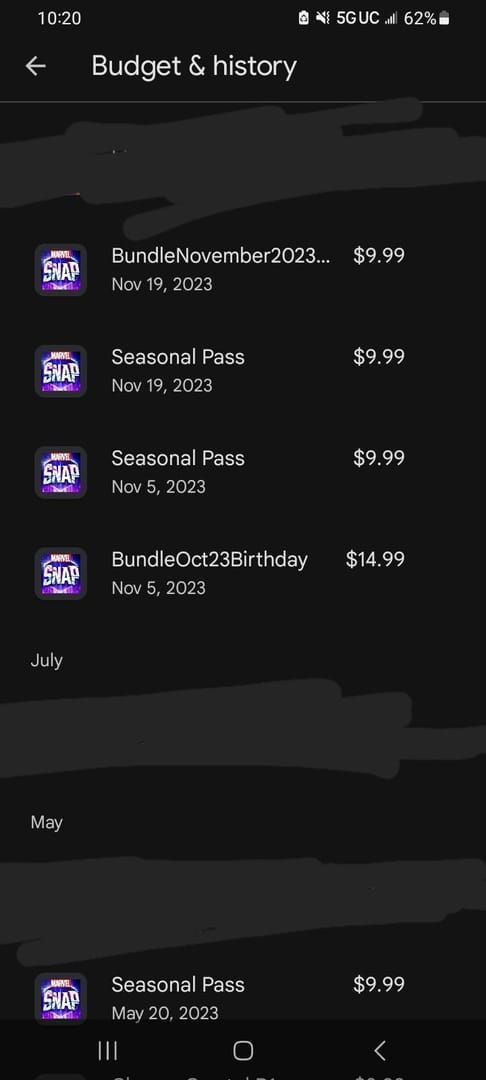
Check whether the charge appears in purchase history
Restart the app
Wait for processing if the order is pending
Users commonly report these GCash decline causes:
insufficient balance
exceeded wallet limits
unstable connection
merchant mismatch
pending authorization or risk checks
If your Google Play country is wrong, fix the payment profile and address so they match the Philippines. That's one of the most overlooked causes of "payment method unavailable."
What should I do if Marvel Snap charged me but I did not receive Gold?
First, verify the order in Google Play and keep the receipt.
The fastest path is usually:
Check GCash history
Was money actually deducted?
If yes, save the transaction record.
Check Google Play purchase history
Look for the Marvel Snap order.
Confirm whether it shows completed, pending, or failed.
Restart Marvel Snap
Reopen the app and check your Gold balance or Season Pass status.
Try basic restore checks
Review Google Play or App Store history.
Relink the account if needed.
Wait a short processing window
Delays happen, especially when billing review is involved.
Contact the right support
For charged-but-not-received issues, contact Marvel Snap support via Helpshift
If GCash processed a failed transaction, contact the merchant for refund handling
Prepare these details before contacting support:
Google order ID
GCash receipt
screenshot of the missing Gold/pass
account details
time of purchase
And one important warning: refunds are not supported for Gold, bundles, or Season Pass purchases once processed. So double-check the account and purchase before confirming.
Can I buy Marvel Snap with GCash in the Philippines?
Yes, on Android through Google Play; on iPhone, usually not as a direct GCash billing option.
If you play on Android, this is the most practical setup for Marvel Snap top up Philippines users who don't want to use a credit card. If you play on iPhone, check your Apple ID payment methods first, but don't expect the same direct GCash flow you get on Google Play.
FAQ
Can I buy Marvel Snap with GCash in the Philippines?
Yes. The standard PH route is Android + Google Play + GCash. Marvel Snap purchases are usually in-app, so you pay through the store, not a separate official recharge page.
How do I add GCash as a payment method on Google Play?
Open Play Store > Payments & subscriptions > Payment methods > Add GCash. If it doesn't appear, your Play country or payment profile is often the issue.
Why is my Marvel Snap GCash payment failing?
Most failures come from low balance, wallet limits, verification issues, unstable internet, or a country/profile mismatch. I would also check for pending authorization or risk-review holds before retrying too many times.
What should I do if Marvel Snap charged me but I did not receive Gold?
Check GCash transaction history and Google Play purchase history first. Then restart the app, wait for processing, and contact Marvel Snap support with your order ID and receipt if the purchase still hasn't arrived.
Can I use GCash for Marvel Snap on iPhone?
Usually not in the same direct way as Android. Community reports consistently point to the App Store relying on Apple-supported billing methods instead of direct GCash support.
Does Marvel Snap use a UID top up page or only in-app purchases?
For most users, Marvel Snap works as an in-app purchase game. That's why "top up" in this case usually means buying Gold or the Season Pass through Google Play or the App Store.
How do I check my Marvel Snap receipt or order history?
Check Google Play purchase history on Android or App Store purchase history on iPhone. Keep the store order ID and your GCash receipt because those are the first proofs support will ask for.
Marvel Snap with GCash works best in the Philippines when you use Android + Google Play billing in PHP. That's the cleanest official path for buying Gold or the Season Pass without a credit card. Before paying, verify your Play country, GCash status, balance, and receipts setup. If anything goes wrong, check the order ID first—then go to support with proof instead of guessing.