
Yes—if the checkout supports USDT, you can top up Marvel Snap Gold & Bundles without a credit card by choosing the correct package, entering the right account details, and sending the exact amount on the correct network. The main failure points are simple but costly: wrong Player ID, wrong USDT network, underpayment, or a quote that expires before you send.
Officially, Marvel Snap does not support USDT or crypto payments. The official web shop uses credit/debit cards, and app purchases go through Apple or Google. So if you need a no-card route, use a supported seller checkout path carefully, keep your order ID and TxID, and verify region before paying. If you're comparing options, Marvel Snap Gold & Bundles USDT top up is the kind of checkout path to review only after those checks are done.
Why do users choose USDT to top up Marvel Snap Gold & Bundles without a credit card?
USDT is usually the best fit when cards are blocked, unsupported, or tied to the wrong region. Officially, Marvel Snap only supports cards on the web shop and Apple/Google billing in-app. That leaves no direct crypto path on the official side.
From comparing checkout paths, USDT solves one problem very well: it bypasses card approval friction. Community reports also show no-card buyers in restricted regions often prefer crypto or Binance Pay over cards. And in practice, the issue isn't crypto volatility here—it's checkout accuracy. Most failed crypto orders come from sending on the wrong network or after the payment window expires.
A few realities matter:
Official route: clearer, but card-only
USDT route: better for no-card buyers, but more manual
Binance Pay/local wallets: often easier than raw USDT if available at checkout
Prepaid/debit cards: can still fail on region or 3DS checks
Can I use USDT, Binance Pay, debit cards, or local wallets instead of a credit card?
Yes, but the best method depends on why your card isn't working. If your problem is "I don't have a credit card," USDT, Binance Pay, and local wallets are often the cleanest alternatives. If your problem is "my card keeps getting declined," region mismatch may still affect debit and prepaid cards.
Here's the practical comparison:
Personally, I would avoid prepaid cards first if your account region is already tricky. They look simple, but they still ride on card rules. For no-credit-card users, Binance Pay or local wallets are often smoother than manual USDT transfers when available.
What should you verify before paying for Marvel Snap Gold & Bundles with USDT?
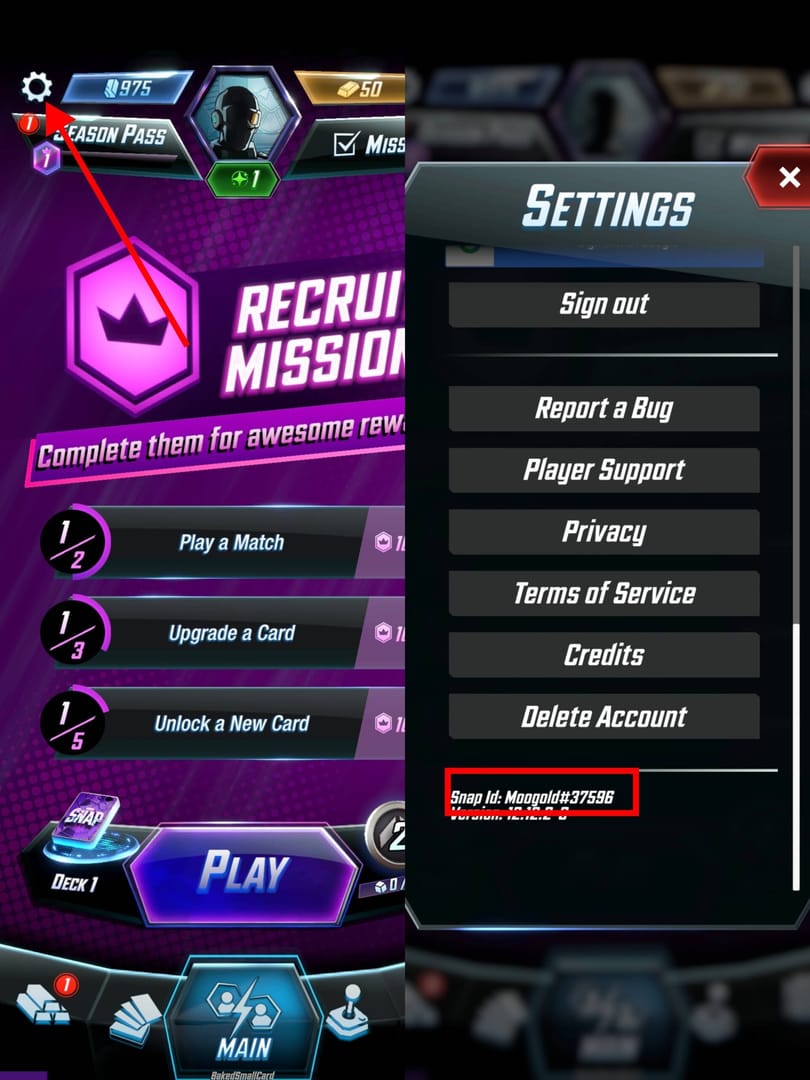
Verify four things before checkout: product, account ID, region, and wallet network. This is the stage most guides skip, and it's where most preventable mistakes happen.
Product check
Marvel Snap Gold is the premium currency and is bought directly with cash. Bundles and Season Pass purchases exist on the official web shop, but refunds are officially unsupported for variants, credit bundles, and season pass purchases. So don't rush the package selection.
Account check
Community guidance consistently points to Player ID as the key delivery detail for third-party top-ups. Users commonly find it in Marvel Snap profile settings. Some seller checkouts ask only for User ID; others may ask for global UID. Entering the wrong ID is a classic non-delivery cause.
I would check this first:
Exact Player ID/User ID format
Whether the checkout asks for server or not
Whether you're topping up the correct account if you use multiple logins
Screenshot the entered ID before paying
Region and platform check
Officially, the web shop requires a credit/debit card matching the purchase region. Community reports also say VPN use can block web shop payments even if your country setting looks correct. And official app purchases are limited to Apple/Google linked accounts.
That means:
Card buyers should match card country to purchase region
No-card buyers should still confirm the account isn't tied to a region-locked offer
If you use multiple Google accounts, official purchases can fail
Wallet network check
For USDT, this is the big one. Some seller checkouts support TRC20 or ERC20. You must send on the exact network shown at checkout. Wrong network and underpayment are widely reported crypto failure causes.
How to top up Marvel Snap Gold & Bundles with USDT step by step?
Use a seller checkout that supports USDT, then treat the payment like a verification process, not a casual transfer.
Choose the exact Gold or Bundle package.
Double-check denomination and whether you're buying Gold, a Bundle, or Season Pass. Community pricing often shows 700 Gold around 10 USD, but offers vary.Enter your Marvel Snap account details carefully.
Use the Player ID or User ID exactly as requested. Don't guess. Account mismatch is one of the most common reasons for non-delivery.Select USDT or Binance Pay at checkout.
If both are available and you want fewer manual steps, Binance Pay is usually easier. If you use USDT directly, confirm the quoted amount and payment timer.Match the network exactly.
If the checkout says TRC20, send TRC20. If it says ERC20, send ERC20. Never assume USDT is interchangeable across networks.Send the exact amount before the quote expires.
Underpayment can leave the order pending. Overpaying doesn't guarantee automatic correction either.Save proof immediately.
Keep:Order ID
TxID/TxHash
Selected package
Entered account details
Payment timestamp
Wait for confirmations and delivery.
Community reports say pending crypto orders often clear after blockchain confirmation, then delivery follows. Officially, item delivery delays can reach 1–3 hours during high payment volume.
If you want a no-card path with checkout options in one place, Marvel Snap Gold & Bundles crypto recharge no card is worth reviewing—but only after you've confirmed your ID, package, and network.
Why did your Marvel Snap Gold & Bundles USDT payment fail or get stuck?
Most stuck USDT orders fail for one of five reasons: wrong network, underpayment, expired quote, account mismatch, or delayed confirmation. In my experience reviewing recharge issues, those beat every other cause.
Use this quick diagnosis table:
Official troubleshooting also recommends:
Check whether your bank was actually charged
Restart the game
Contact the platform if the purchase wasn't received
And if the game itself looks broken after purchase, official guidance includes backing up the account, reinstalling, and waiting about 10 minutes for assets to load.
Honestly, delayed delivery is frustrating when the payment already left your wallet. But a successful transfer does not always mean the order has cleared verification. For crypto, support usually needs the order ID and TxID first. For official purchases, Marvel Snap Help Center is the right escalation path.
What's the best no-credit-card payment route for Marvel Snap buyers?
For most no-card buyers, the best route is the one with the fewest manual failure points. That usually means:
Binance Pay, if available: less chance of copying the wrong amount or network
Local wallets/e-wallets, if supported in your country: easier funding in local currency
USDT, if you already hold stablecoins and understand network selection
Debit card, if your region and issuer are cleanly supported
I personally prefer the method with clearer order tracking, even if it's not always the cheapest. USDT is strong for cardless users, but if you're new to crypto, local wallets or Binance Pay are often lower-friction. On the other hand, if your card keeps failing because of region rules, switching from credit to debit won't magically fix it.
One more edge case buyers miss: community reports suggest the official web shop can be cheaper in some local currencies, especially places like the Philippines or Egypt. That's useful if you legitimately have access to those regions. But trying to force a mismatch with VPN or non-matching cards often backfires.
Can I top up Marvel Snap Gold with USDT?
Yes, through a seller checkout that supports USDT—not through Marvel Snap's official shop. Officially, Marvel Snap only supports cards on the web shop and Apple/Google billing in-app.
How do I buy Marvel Snap Gold without a credit card?
Use a checkout that supports USDT, Binance Pay, or local wallets, then enter your Player ID correctly and pay within the quote window. For official purchases, debit cards may work if the card and region match.
What should I check before paying for Marvel Snap Gold with crypto?
Check the package, your Player ID/User ID, the required region details, and the exact USDT network. Also save the order ID and make sure your wallet balance covers the full quoted amount.
Why did my Marvel Snap USDT payment fail?
The usual causes are wrong network, underpayment, expired quote, or wrong account details. If the transfer already went through, send the TxID/TxHash and order ID to support.
How long does Marvel Snap Gold delivery take after USDT payment?
Many orders are fast, but delays happen. Officially, delivery delays can reach 1–3 hours during high payment volume, and crypto orders may also wait on blockchain confirmation first.
Can I use Binance Pay or local wallets instead of a card?
Yes, if the checkout supports them. For many no-card buyers, they're easier than manual USDT because there are fewer chances to mistype the amount or choose the wrong network.
What happens if I enter the wrong account details for Marvel Snap Gold?
Delivery can go to the wrong account or fail entirely. Contact support or the seller immediately with your order ID, the entered details, and proof of payment.
Marvel Snap Gold & Bundles can be topped up without a credit card, but not through official crypto support. The safest path is simple: verify your Player ID, choose the right package, match the USDT network exactly, and keep your order proof. If you want the lowest-friction no-card checkout, start by comparing Binance Pay, local wallets, and USDT—then use the method you can verify cleanly from start to finish.