
To top up IMO Diamonds with Binance Pay, use a checkout that supports Binance Pay, enter the correct IMO ID, select your diamond package, scan the QR code in the Binance app, and keep the order ID until delivery is confirmed. IMO doesn’t offer a direct in-app Binance Pay route; this is done through third-party recharge checkouts.
Most orders arrive fast: community and platform data point to instant delivery in many cases, with 95% completed in under 5 minutes. The failures I see most often aren’t payment bugs — they’re wrong IMO IDs, region mismatch, expired QR sessions, or users paying again before the first order finishes processing.
Why do users choose Binance Pay for IMO Diamonds instead of cards?
Because it solves the two checkout problems card users hit most: card rejection and cross-border friction. For users who want a card-free path, Binance Pay is widely used for IMO top-ups through USDT QR checkout on supported recharge sites.
From comparing checkout paths, Binance Pay is usually the cleaner option when:
you don’t want to use a credit card
your local card fails on international digital purchases
you already hold USDT in Binance
you want fewer card-processing surprises
But cheaper doesn’t always mean simpler. The listed package price can shift because the final payable amount depends on the USDT exchange rate and site processing fees, typically around 0–2%. A package shown at one price may settle slightly higher in USDT by the time you confirm.
For value, larger packages can be better. Reported discounts reach 10% at 420 diamonds and up to 16% at 8400 diamonds. One cited package price: 160 Diamonds at $3.43, about 10% below an official-style $3.80 reference. If you’re comparing options, IMO diamonds top up binance is worth checking when you want a straightforward crypto checkout with clear order tracking.
Why can IMO Diamonds top up with Binance Pay fail even after you confirm payment?
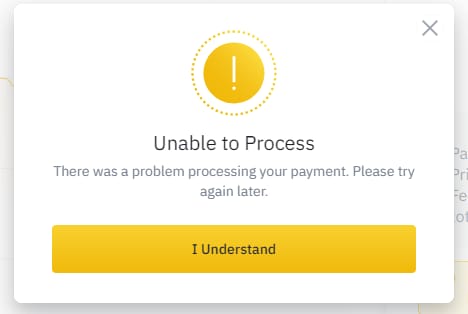
Because payment success and diamond delivery are not the same checkpoint. Binance can confirm the transfer, while the merchant still needs to verify the order and match it to the correct IMO account.
In my experience reviewing recharge issues, these are the real failure points:
Wrong IMO ID: This is the biggest one. The required IMO ID is usually 7–10 digits, and reported data says about 40% of failures come from incorrect ID entry.
Expired QR code: Binance Pay QR sessions can time out. If you scan an old code, the payment may fail or not map cleanly to the order.
Insufficient USDT balance: Sounds obvious, but users often forget fees or rate movement.
Unsupported region: Binance Pay availability depends on country and account region. Users commonly report blocks when the Binance account region doesn’t match the checkout environment.
KYC or risk review: Binance Pay eligibility can require completed KYC. A successful wallet balance check doesn’t guarantee the payment clears risk control instantly.
Network delay: A weak connection can interrupt the handoff between merchant checkout and Binance confirmation.
A detail many guides miss: a successful charge does not always mean the order has cleared verification. Honestly, that’s the frustrating part. You see payment leave your wallet, but the merchant still shows pending.
If your account is in a restricted Binance region, that’s an extra risk. Community reports mention US-region mismatch issues in particular. Sources commonly suggest using a compatible region setup; some users use a VPN in restricted areas, but availability still depends on Binance’s own rules.
Can I buy IMO Diamonds with Binance Pay in every country?
No. IMO top-up sites may support worldwide delivery, but Binance Pay itself is region-limited. That’s the distinction that trips people up.
Here’s the practical version:
IMO recharge availability: often worldwide on supported sites
Binance Pay availability: depends on your Binance country support and account status
Delivery success: also depends on entering the right IMO ID and using a compatible region/account setup
Personally, I would check region compatibility before choosing the package. If Binance Pay is blocked in your account region, don’t force the payment flow and hope it clears later. That’s how you end up with a stuck order and a support ticket.
How do you top up IMO Diamonds with Binance Pay step by step?
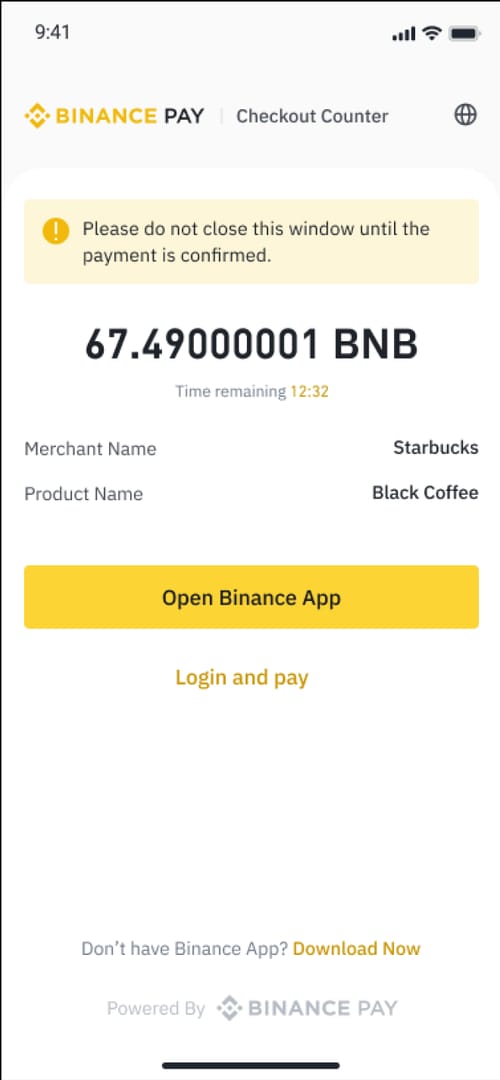
Follow this sequence exactly. It avoids most preventable errors.
Open a recharge checkout that supports Binance Pay.
IMO doesn’t provide an official direct Binance Pay top-up path, so you’ll use a third-party recharge page.Enter your IMO ID carefully.
You usually only need the IMO account number/ID, not a phone number or linked account login. Check every digit before moving on. I would verify this twice because wrong-ID top-ups are the most common failure.Choose the diamond package.
Compare package value before paying. Bulk packages can offer better rates, but only buy large amounts if you’re sure the recipient account is correct.Select Binance Pay / USDT.
Most supported checkouts use Binance Pay with USDT, commonly on TRC20 or BEP20-supported flows.Review the final payable amount.
Don’t rely only on the displayed package price. Confirm the actual USDT amount shown at checkout, since exchange rate and fees can change the total.Scan the QR code in the Binance app.
On mobile: open Binance app, go to Pay, then scan the merchant QR.
On desktop: open the checkout QR on your computer and scan it with the Binance app.Confirm payment and save proof.
Screenshot the payment result. Save:merchant order ID
Binance transaction ID
payment timestamp
the exact IMO ID you entered
Wait before retrying.
Most deliveries are instant to 5 minutes. If it’s pending, don’t place a duplicate order immediately.
If you want a cleaner purchase path, you can buy IMO diamonds with binance pay through a checkout flow that emphasizes order tracking and fewer payment surprises.
How do you check whether your IMO Diamonds order was completed successfully?
Check both the payment record and the in-app credit. You need both.
Use this order check sequence:
Confirm Binance Pay shows the transaction as completed.
Check the merchant order status using the order ID.
Open IMO and refresh the app.
Go to Me > Wallet > Recharge History to see whether the diamonds were credited.
If nothing appears, force close and reopen IMO. A stable connection helps; users report sync issues often clear after refresh.
Reported data says 90% of sync issues auto-resolve within 30 minutes. So if payment is complete but diamonds aren’t visible, my first move would be:
restart IMO
clear cache if needed
wait up to 30 minutes
check wallet history again
After 30 minutes, contact the recharge site’s support with:
order ID
Binance transaction ID
payment screenshot
payment time
IMO ID used
That evidence matters. When troubleshooting delayed delivery, support usually can’t do much without those details.
FAQ
Can I buy IMO Diamonds with Binance Pay?
Yes, if the checkout you use supports Binance Pay and your Binance account region allows it. There is no official direct IMO in-app Binance Pay integration; the route is through third-party recharge sites.
What details do I need to top up IMO Diamonds?
Usually just your IMO account ID. In most reported flows, you do not need a phone number or linked account login, but the ID must be correct because wrong entry causes a large share of failed orders.
How long does IMO Diamonds delivery take after Binance Pay?
Most orders arrive instantly or within 5 minutes after payment verification. Delays up to 30 minutes are commonly reported and often resolve after refreshing the IMO app.
Why did my Binance Pay payment for IMO fail?
The usual causes are expired QR code, insufficient USDT balance, unsupported region, incomplete Binance KYC, or a timed-out checkout session. Wrong IMO ID can also stop successful delivery even if the payment itself went through.
What should I do if IMO Diamonds are not received?
First, refresh IMO, restart the app, and check Me > Wallet > Recharge History. If nothing shows after 30 minutes, contact the seller’s support with your order ID, Binance transaction record, screenshot, timestamp, and the IMO ID entered.
Can I get a refund if I sent Binance Pay for the wrong IMO account?
Usually not after delivery, because completed crypto payments are generally irreversible. Some sites may allow refunds before delivery, but once the order is processed to the wrong account, recovery is difficult.
To top up IMO Diamonds with Binance Pay, the safe path is simple: use a supported checkout, enter the correct IMO ID, confirm the real USDT total, save your order proof, and wait for verification before retrying. My clear recommendation: check ID and region first, because those two mistakes cause more trouble than the payment step itself.