
Yes—GCash is a valid no-credit-card way to top up Dragon Nest M Classic Cash in the Philippines on supported web checkout paths. Officially, Codashop PH supports Dragon Nest M: Classic Cash and lists GCash among its payment methods, with instant delivery after you enter the correct User ID and Zone ID.
If you want the smoothest no-card checkout, verify four things before paying: your User ID, server/zone, GCash balance, and OTP access. From reviewing wallet-payment support cases, most failed or missing top-ups come from wrong account details, wallet limits, or expired payment sessions—not from the game item itself. If you’re comparing routes, Dragon Nest M Classic GCash top up options are worth checking alongside official checkout.
Why do users choose GCash to top up Dragon Nest M Classic Cash without a credit card?
Because it works on supported PH checkout paths and removes the usual card friction. Officially, Codashop PH supports GCash, Maya, GrabPay, Coins.ph, and bank payment for Dragon Nest M: Classic Cash, so you don’t need a credit card to complete a purchase.
For Philippines buyers, GCash is usually the most practical option when:
you don’t have a credit card
your debit card fails 3DS or issuer checks
you want PHP checkout instead of app-store billing
you need faster wallet confirmation than repeated card retries
In my experience reviewing recharge issues, wallet users also make fewer issuer-related support tickets than card users. But there’s a catch: a successful wallet charge still doesn’t guarantee the order cleared verification if the User ID or server was wrong.
What payment methods actually make sense for Dragon Nest M Classic Cash buyers in the Philippines?
For most PH users, GCash is the best no-card default. Apple Pay, Google Pay, crypto, USDT, and Binance Pay are not the practical first choice here because support is either unconfirmed or not confirmed for PH Dragon Nest M Classic top-ups.
That last row matters. Users commonly report ShopeePay, QR Ph, and over-the-counter options on some seller routes, but those aren’t the same as official publisher checkout. Personally, I would use official or clearly tracked checkout first, then compare value only after confirming the payment rail is actually live.
What should you verify before paying for Dragon Nest M Classic Cash with GCash?
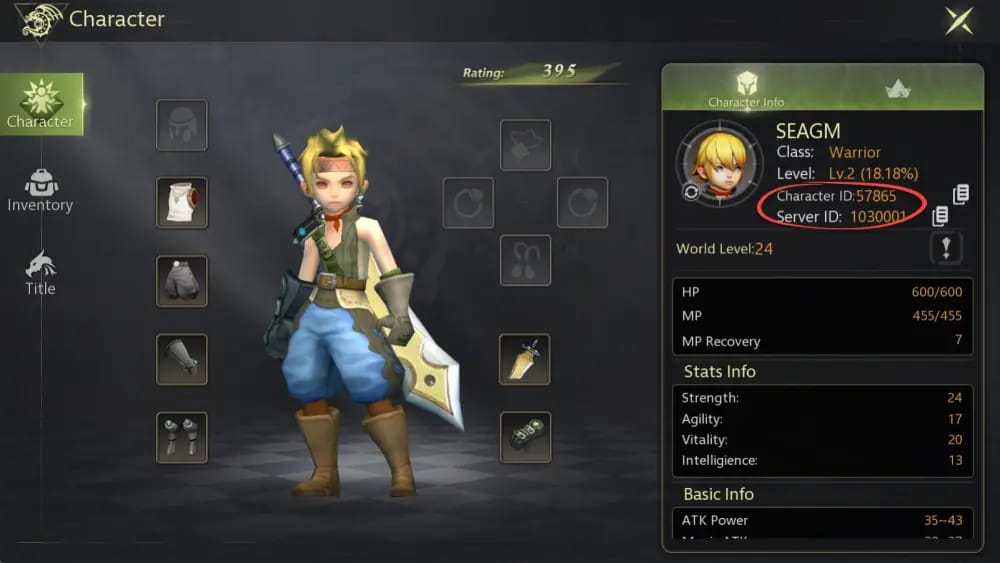
You should verify your account identifiers, region, product, and wallet readiness before you submit payment. This is where most preventable mistakes happen.
Check these first:
User ID and server/zone
Officially, you can log into the game and tap your avatar at the top-left to find your User ID and Server ID.
Community guidance consistently says top-up verification requires User ID plus Zone/Server ID.
No character name is typically required.
Correct region
GCash support is for Philippines checkout paths.
Community reports also stress selecting the correct SEA server. Region mismatch is a common reason buyers think payment failed when the issue is unsupported account targeting.
Exact product and denomination
Confirm you’re buying Dragon Nest M Classic Cash, not another Dragon Nest product.
Community-listed pack examples include 600+26, 3000+130, 6000+366, 12000+800 bonus structures on some sellers. Bonus amounts can differ by seller or promo, so check the order summary, not memory.
GCash readiness
Make sure your balance covers the full amount.
Have OTP access ready.
Use stable internet.
Unverified wallets may hit lower limits; users commonly report this as a hidden cause of failure on larger orders.
Honestly, if you don’t have a credit card, this verification step is where checkout usually breaks. Not because GCash is bad—because wallet redirects and OTP windows punish hesitation.
A practical alternative if you want to compare tracked checkout paths is Dragon Nest M Classic no credit card recharge, especially if you’re deciding between GCash and another local wallet.
How do you top up Dragon Nest M Classic Cash with GCash step by step?
You top up by entering the correct account details on a supported web checkout, selecting a Cash pack, then completing GCash payment. Officially, the Codashop flow is: enter User ID and Zone ID, select Cash value, complete GCash payment, and receive instant delivery.
Open a supported Dragon Nest M Classic Cash checkout
For PH buyers, official Codashop support is confirmed.
If you’re using VGTopup, check whether the current checkout route offers GCash or another supported local-wallet path before you start.
Get your account details from the game
Log in.
Tap your avatar at the top-left.
Copy your User ID and Server/Zone ID exactly.
Enter the account details carefully
Paste, then re-read.
I would check this twice. Wrong-account top-ups are one of the most common irreversible mistakes, and community reports say official paths are safer partly because there’s usually no refund for user-entry errors.
Choose the correct Cash denomination
Review the pack name, bonus amount if shown, and PHP total.
If you’re comparing value, don’t chase a discount until you’ve confirmed the seller uses the right account fields and region.
Select GCash
Complete the wallet authorization.
Keep the app open and finish OTP promptly. Session expiry during redirect is a common no-card failure point.
Save proof before closing the page
Screenshot or save:
order ID
payment amount
timestamp
submitted User ID/server
GCash receipt
Wait for delivery
Official guidance says delivery is instant on supported paths.
If there’s maintenance or a known issue, delays can still happen. An official Cash Shop top-up issue was fixed on March 20, 2025, which is a good reminder that payment systems do occasionally break upstream.
How do you fix common Dragon Nest M Classic Cash GCash payment problems?
You fix them by separating three cases: failed payment, paid-but-pending order, and wrong-account submission. Those are not the same problem, and support handles them differently.
1) Payment failed before confirmation
Check:
insufficient GCash balance
OTP timeout
unstable internet
redirect/session expiry
wallet limit on an unverified account
If you were using card fallback, users also report repeated same-day card attempts can trigger bank limits. For no-card buyers, switching to Maya or GrabPay is often cleaner than retrying a blocked card.
2) Payment was charged but order is pending
This is the frustrating one. Community guidance says to check order history and contact support with:
order ID
GCash receipt
payment timestamp
amount paid
submitted User ID and server
From comparing checkout paths, this proof bundle speeds up support more than a vague I already paid message ever will.
3) Cash did not arrive because account details were wrong
This is the hardest case. Users commonly report no refunds for wrong-account top-ups, especially when the payment itself succeeded and the submitted ID was valid. That’s why I’m strict about double-checking User ID and server before payment.
4) Delivery is delayed during maintenance
Users commonly report delays during maintenance windows. If payment is confirmed but Cash is missing, wait a short period, then escalate with receipt and order ID instead of paying again.
Can I top up Dragon Nest M Classic Cash with GCash without a credit card?
Yes. Officially, Codashop PH supports GCash for Dragon Nest M: Classic Cash, so a credit card is not required on that checkout path.
What details do I need before paying for Dragon Nest M Classic Cash with GCash?
You need your User ID and Server/Zone ID first. Also confirm the correct SEA region, selected Cash pack, GCash balance, and OTP access before you pay.
Why did my GCash payment for Dragon Nest M Classic Cash fail?
The usual reasons are insufficient balance, OTP/session timeout, unstable internet, redirect issues, or wallet limits on unverified accounts. A failed payment is often a wallet-flow problem, not a stock problem.
How long does Dragon Nest M Classic Cash delivery take after payment?
On supported official checkout, delivery is officially described as instant. Still, users commonly report short delays during maintenance or payment verification events.
What should I do if I paid but did not receive Dragon Nest M Classic Cash?
First, check the order status. Then contact support with your order ID, GCash receipt, payment time, amount, and the exact account details you submitted.
Can I get a receipt or proof of payment for a Dragon Nest M Classic Cash top up?
Yes. Keep your GCash transaction record and the seller’s order ID. In support disputes, that pair is the minimum proof you should have.
Is GCash better than card payment for Dragon Nest M Classic Cash in the Philippines?
For most PH no-card buyers, yes. GCash is simpler than card checkout when you want PHP payment and don’t want to deal with issuer declines or 3DS failures, though verified wallet limits still matter.
If you already have your Dragon Nest M Classic account details ready, check VGTopup for the current GCash-supported checkout options and choose the route with the clearest order tracking.
GCash is one of the most practical ways to top up Dragon Nest M Classic Cash in the Philippines without a credit card—provided you use a supported checkout path and verify your User ID, server, and wallet status before paying. My recommendation is simple: use a tracked web checkout, save your receipt and order ID, and never submit payment until the account details are checked twice.