
To safely top up Yalla Ludo Gold for the first time, verify your account details, choose the correct package, use a trusted checkout, and keep your order ID until the Gold is delivered. Most first-time problems come from wrong account info, region mismatches, or retrying payment before a pending order is resolved.
For beginners, the safest path is simple: use your Player ID only, never share your login, start with a small package, and save payment proof. A successful bank charge doesn't always mean the order fully cleared verification, so wait for confirmation before paying again.
Why do first-time buyers need to check account ID, region, and package before topping up Yalla Ludo Gold?
Yes — these three checks prevent most avoidable mistakes before money leaves your account. From reviewing recharge support cases, the most common first-time error is entering the wrong account identifier or skipping the double-check entirely.
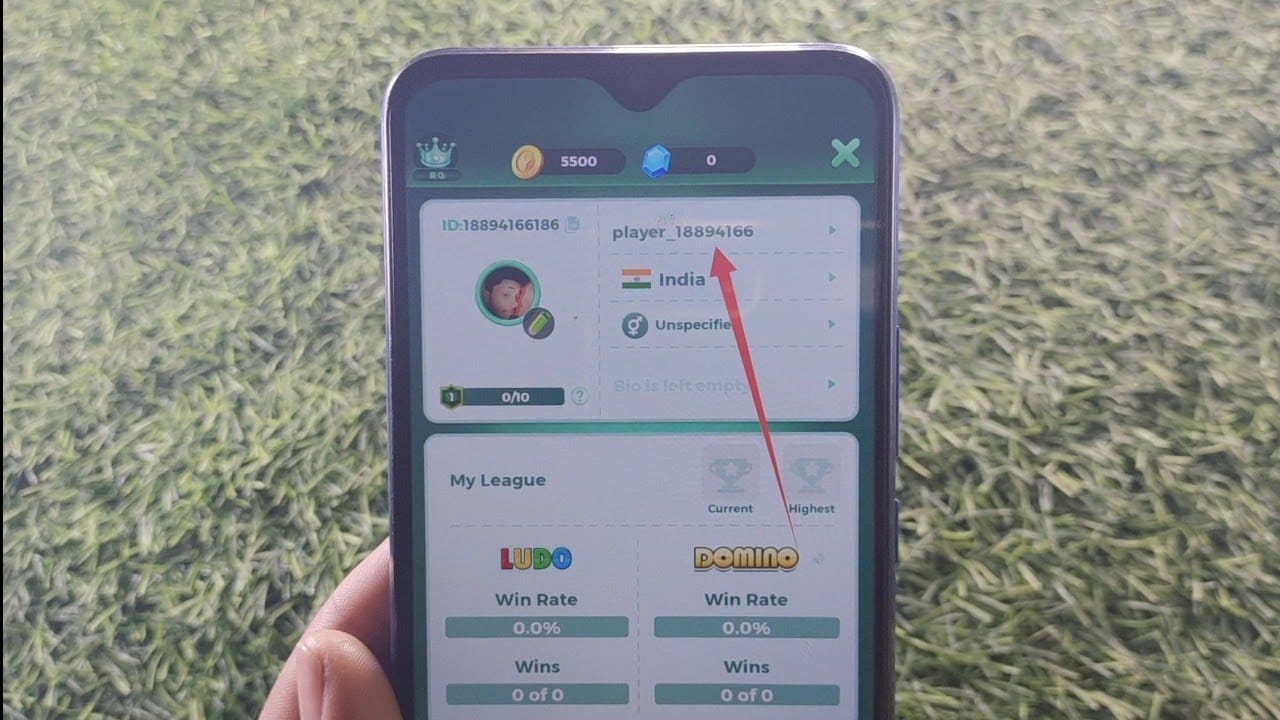
Yalla Ludo Gold is the in-game currency used for purchases in Yalla Ludo and Jackaroo [community]. For top-up purposes, what matters is not your login email or password. It's your Yalla Ludo Player ID. Users commonly report that top-ups are safe when they are UID-only, and you should never share account credentials with any seller.
What should you verify before paying?
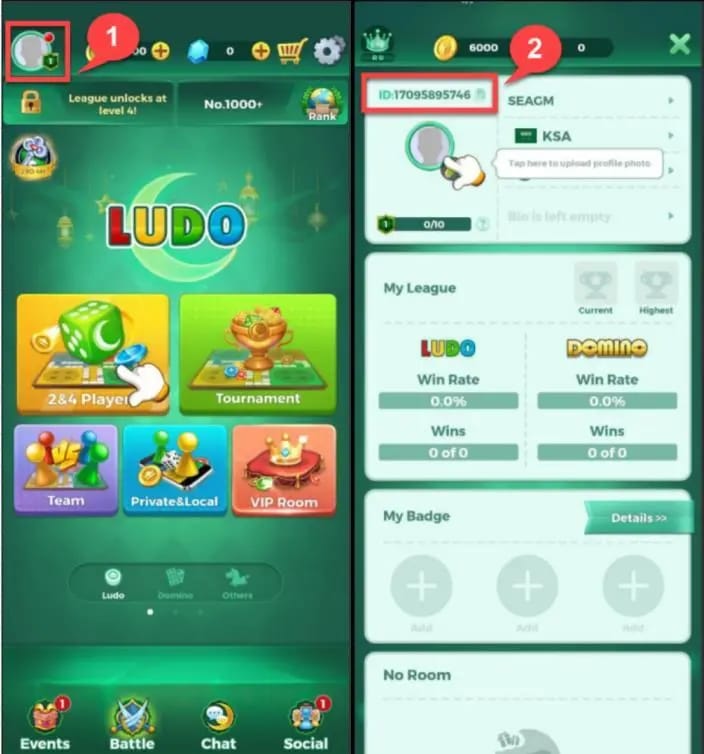
You can usually find your Player ID by tapping the profile icon at the top-left of the game lobby [community]. Copy-paste it. Don't type it manually if you can avoid it.
And if you're comparing beginner-friendly options for a Yalla Ludo Gold first time top up, I would check whether the checkout clearly asks only for Player ID and shows order tracking before I pay.
How can region or platform mismatch cause trouble?
Region mismatch can stop a valid payment from becoming a valid top-up. Users commonly report this with app-store-linked purchases and country-specific payment methods.
Two practical examples:
Google Play payments can fail if the payment country doesn't match the Google Play account region [community].
Some voucher products have country restrictions. Officially, Razer Gold vouchers are invalid in Saudi Arabia, UAE, Bahrain, Oman, Egypt, Morocco, Tunisia, Algeria, Palestine, and Jordan.
Personally, I would check region compatibility before choosing the cheapest-looking option. A lower price is useless if the code or payment route won't work in your country.
Why is a small first package usually the safest choice?
Because it tests your account details, payment flow, and delivery speed with less risk. Community experience consistently points to trying a small first top-up before moving to larger amounts.
Third-party pricing can offer 15–25% more value per dollar than the in-app store [single], and some listings show very low entry packs. But for a first purchase, safety beats maximum value. If anything goes wrong, it's easier to fix one small order than a large one.
What payment risks should beginners avoid when buying Yalla Ludo Gold online?
Beginners should avoid unsupported payment methods, duplicate payment attempts, and any checkout that asks for account login details. In my experience reviewing recharge issues, pending orders get worse when users pay again too quickly instead of checking order status first.
Which payment methods are usually simplest for first-time buyers?
The simplest method is the one that matches your region and gives clear confirmation. Card payments are familiar, but local wallets or bank-linked methods are often smoother in supported countries.
A few useful facts:
Officially, some Pakistan Yalla Ludo Gold checkouts support JazzCash, Easypaisa, and cards.
Bitsika supports Bitcoin and USDT for Yalla Ludo Gold [single].
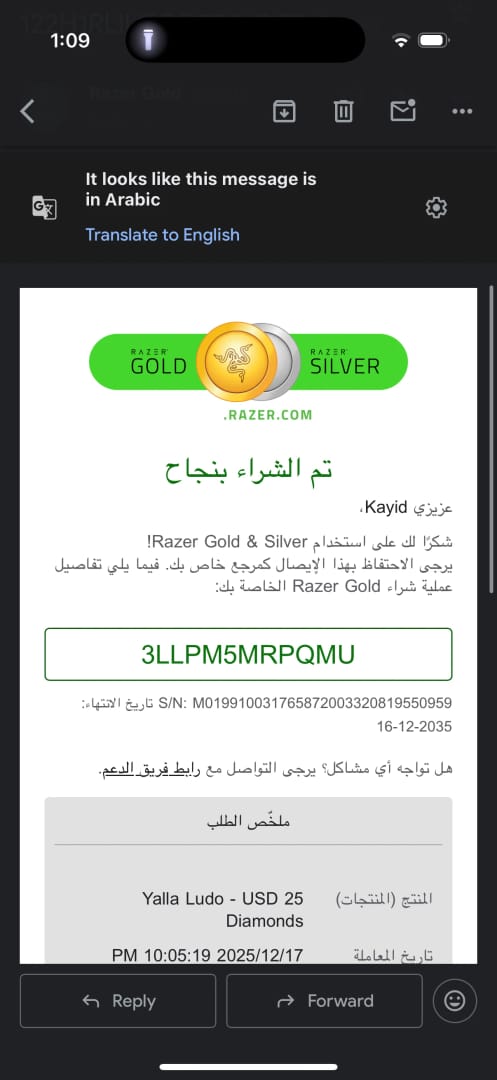
Voucher-style top-up is often the cleanest first-time route because redemption is separate from payment. Official redemption flow: get the 12-digit PIN by email, go to yallapay.live, enter your Yalla Ludo ID, select the matching amount, enter the PIN, and redeem.
Gold vouchers are listed as valid for 12 months from purchase [single]. That's a useful safety buffer if you buy first and redeem later.
Why should you avoid repeated payment attempts on a pending order?
Because duplicate attempts can create duplicate charges, duplicate orders, or a harder support case. Users commonly report that the right move is to wait for the order confirmation email or status update before trying again.
Honestly, delayed delivery is frustrating when the payment already left your account. But paying twice usually makes it worse. First check:
payment confirmation
seller order status
email for PIN or order update
whether the game account already received the Gold
If Google Play fails, users commonly fix it by clearing cache/data or trying a different payment method. That's different from a successful payment with delayed delivery. Don't mix those two problems.
What proof should you save after checkout?
Save these four items every time:
Player ID used
package selected
order ID
payment timestamp or receipt
That support-ready bundle matters. When resolving delayed top-ups, the fastest path is usually having those exact details ready.
How to safely top up Yalla Ludo Gold step by step for the first time?
Use a Player-ID-based checkout, confirm your region and package, complete payment once, then wait for confirmation before retrying anything. If your seller sends a PIN, redeem it only on the official redemption page.
Open Yalla Ludo and copy your Player ID.
Tap your profile icon in the top-left of the lobby [community]. For Global accounts, the ID is commonly 11 digits and starts with 7 [single]. Copy it exactly.
Log out of Yalla Ludo before starting a third-party top-up if that seller recommends it.
This is a practical step users report helps avoid session-related issues on some checkout flows [single].Choose a small package for your first order.
I would do this even if larger packs look better value. Your first purchase is a system test.Check region and payment support before paying.
Match your payment country to your account region where relevant. If you're using vouchers, confirm they are valid in your country.Use a checkout that only needs your Player ID.
No login should be required [community]. If a site asks for your password, stop.Complete payment once and save the order details.
Screenshot the order ID, amount, and payment confirmation. This is where many beginners get careless.If you receive a PIN, redeem it officially.
Official flow:get the 12-digit PIN from email
visit
yallapay.liveenter your Yalla Ludo ID
select the matching amount
input the PIN
redeem
Wait for delivery or status update before doing anything else.
Some services are instant; some can take a few minutes. Community reports mention delivery windows like 2–10 minutes on certain local-payment routes, but don't treat that as a universal promise.
If you want a safe Yalla Ludo Gold recharge for beginners, choose the path with the clearest order tracking and the fewest moving parts. I personally prefer that over chasing the absolute lowest price.
How do you fix common Yalla Ludo Gold top up problems after payment?
First separate the problem: payment failure, pending order, delayed delivery, or wrong account details. Most support delays happen because users report "not received" without proving which of those four actually happened.
What should you do if payment is successful but Gold has not arrived?
Start with the seller, not the game. Users commonly report that non-delivery is handled fastest when you contact the seller first with your order ID and payment proof.
Use this order:
Check seller order status or email.
Confirm you used the correct Player ID.
Wait through the stated delivery window.
Contact seller support with order ID, receipt, Player ID, and package.
If the seller confirms completion but the Gold still isn't there, contact Yalla support.
Users commonly report that Yalla support is most useful after seller confirmation. Officially, for payment issues you can go to Settings > Support > Payment Issue and submit a reissue request.
What should you do if the order is pending or stuck?
Wait for confirmation first, then escalate with evidence. Don't place a second order while the first is still pending unless support explicitly tells you to.
Check this quick table:
What if you entered the wrong Yalla Ludo account ID?
Act fast, but understand the limits. If the order is still pending, contact the seller immediately. If the top-up already completed to another valid account, recovery is often difficult.
This is why I would never type the ID manually on a first purchase. Copy-paste from the profile page only.
What do beginners ask about Yalla Ludo Gold top up most often?
How do I top up Yalla Ludo Gold for the first time?
Copy your Player ID from the game, choose a small package, use a trusted checkout, and save the order ID. If the order gives you a PIN, redeem it on yallapay.live.
Is it safe to buy Yalla Ludo Gold online?
Yes, if the top-up only requires your Player ID and you never share your login credentials. Officially, unofficial recharges can risk a 7-day account suspension on first offense, so avoid shady or unsupported routes.
What do I need before recharging Yalla Ludo Gold?
You need your correct Player ID, the right package, a supported payment method, and region compatibility. Also keep your email accessible in case the seller sends a PIN or confirmation there.
Why did my Yalla Ludo Gold payment fail?
Common causes are issuer blocks, region mismatch, unsupported payment methods, or app-store payment issues. If it's a Google Play payment, users commonly fix it by clearing cache/data or switching payment method.
How long does Yalla Ludo Gold top up take?
Many top-ups are fast, but delivery time varies by seller and payment method. Some community-reported local payment routes deliver in 2–10 minutes, but pending verification can take longer.
Who should I contact if Yalla Ludo Gold is not received?
Contact the seller first with your order ID and payment proof. If the seller confirms the order completed and the Gold still hasn't arrived, contact Yalla support through the in-game support path.
To make your first Yalla Ludo Gold top up safely, verify your Player ID, check region support, start with a small package, and keep every order record until delivery is complete. That's the low-risk workflow that prevents most beginner mistakes.
If you're ready to buy, use a Player-ID-only checkout, pay once, wait for confirmation, and escalate in the right order: seller first, Yalla support second.