
If your 8 Ball Pool Elite subscription is not showing after purchase, the usual cause is one of three things: you’re logged into the wrong 8 Ball Pool account, the App Store or Google Play payment is still pending, or the store purchase hasn’t synced to the app yet. Officially, delivery can take up to 48 hours.
I would check this first: the exact login method used in 8 Ball Pool and the subscription status in your store account. Then restart the app on a fresh connection, update it, and use Restore Purchases if available. Don’t buy it again yet. If you’re comparing payment paths or trying to understand 8 Ball Pool elite subscription not showing, duplicate purchases are a common avoidable mistake.
Why is my 8 Ball Pool Elite subscription not showing after purchase?
Because store billing success and in-app activation are not the same thing. That gap is where most users get stuck.
From reviewing digital subscription support cases, this is the pattern I see most often:
Officially, purchases can take up to 48 hours to reach your 8 Ball Pool account. And that matters: a successful bank charge does not always mean the entitlement has reached the app. Honestly, that’s the most frustrating part of app subscriptions.
Users also commonly report an iOS-specific version of this problem: Elite shows as active in the App Store, but the game still says it’s invalid. That usually points to sync, not a failed payment.
Why does 8 Ball Pool Elite show in Apple App Store or Google Play but not in the app?
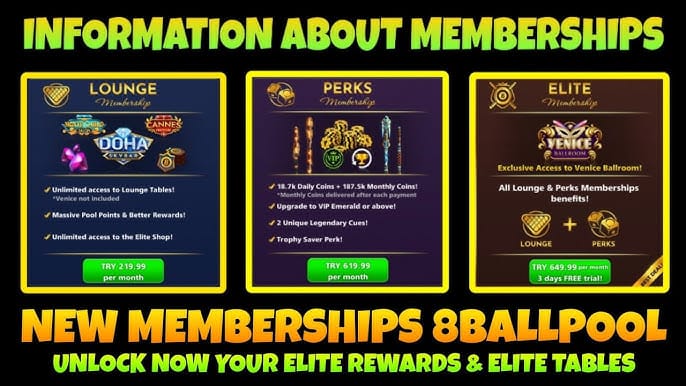
Because the store subscription and the in-app account are checked separately. The store confirms you paid; 8 Ball Pool still has to match that purchase to the correct account and activate the entitlement.
This is where many generic guides miss the real issue. There are two identities involved:
Your store identity: Apple ID or Google account used to pay
Your app identity: Miniclip, Facebook, Google, Apple, or guest login used inside 8 Ball Pool
If those don’t line up, Elite can look paid but still appear missing. Community reports repeatedly point to:
multiple 8 Ball Pool accounts on one device
switching login methods after purchase
changing phones without using the same Apple ID or Google account
reinstalling while still on a guest account
On iPhone, a new device usually restores correctly only if you use the same Apple ID. Users also report that changing Apple ID makes restoration much harder. On Android, Samsung users especially should verify the same Google account is active for restore.
Region mismatch is a rarer edge case, but if your billing region changed, note it in your support ticket. I wouldn’t treat region as the first suspect unless the account and store checks already match.
Why is waiting sometimes the correct fix for a missing Elite membership?
Because pending processing is normal, and official guidance is to allow 48 hours before escalating. If the payment is still under store verification, forcing too many fixes too early can create confusion.
Here’s the practical split:
Personally, I would avoid repeated account switching during this window. Community reports suggest that bouncing between accounts can make subscription assignment errors worse.
How can I fix 8 Ball Pool Elite not showing step by step?
Yes — and the safest order is account check, store check, sync, then support.
Confirm the exact 8 Ball Pool account
Open 8 Ball Pool and check how you’re logged in: Miniclip, Facebook, Google, Apple, or guest.
Make sure it’s the same login method used when you normally access your paid account.
If you use multiple accounts, sign out and sign back in with the correct one.
If you’re on a guest account, be careful: official guidance says guest accounts can lose purchases on reinstall or a new device.
Check the store subscription status
iOS: App Store > profile > Subscriptions
Android: Google Play > Payments & subscriptions > Subscriptions
Confirm Elite is active, not expired or pending.
On Android, also check Google Play order history for the receipt and status.
Verify payment details
Find the order number, receipt screenshot, purchase time, and region.
If this was a renewal, verify billing address and card expiration. Officially, outdated billing details can cause renewal failures.
If you used Apple Pay or Google Pay, the subscription still appears under the store subscriptions page.
Force a clean sync
Update 8 Ball Pool to the latest version.
Fully close the app and reopen it on a stable internet connection.
On Android, force stop the app, then reopen it.
On Android, clearing app cache can help with post-purchase sync.
Use Restore Purchases if available
Open 8 Ball Pool settings and tap Restore Purchases.
This is especially important after changing phones or reinstalling.
Reinstall only after confirming the subscription is active in the store and your account is linked.
Wait up to 48 hours if payment is still processing
Officially, that’s the minimum safe wait before escalation.
Don’t repurchase during this period. Community reports of duplicate charges are common.
If you need a reference point while sorting out 8 Ball Pool restore purchase elite membership, keep your receipt and account details together before you touch anything else. Clear records save time.
What should I send to support if 8 Ball Pool Elite still does not appear?
Send the full proof set, not just I paid. Officially, Miniclip support needs your Unique ID, platform, order number, receipt, purchase time, and region.
Use this checklist:
Submit it through Miniclip Support: https://support.miniclip.com
A clean ticket is faster. I’d write it like this:
Elite purchased on [platform]
Store shows active/pending
8 Ball Pool account Unique ID: [ID]
Logged in with [Apple/Google/Facebook/Miniclip]
Purchase time: [time + region]
Attached: receipt screenshot and order number
One more detail many users miss: Miniclip purchase support requires English tickets. If your first message is vague or missing the Unique ID, expect delays.
Why is my 8 Ball Pool Elite subscription not showing after purchase?
Usually because of account mismatch, pending payment, or sync delay. Officially, delivery can take up to 48 hours, so check store status before assuming the purchase failed.
How do I restore my 8 Ball Pool purchase on a new phone?
Use the same Apple ID or Google account that made the purchase, then log into the same 8 Ball Pool account and tap Restore Purchases if available. If you changed store accounts, restoration often fails until support reviews it.
What if Google Play says the subscription is active but 8 Ball Pool does not?
That usually means the payment succeeded but the entitlement didn’t sync to the app. Update the app, force stop and reopen it, confirm the correct Google account and 8 Ball Pool login, then try Restore Purchases.
How long should I wait if my 8 Ball Pool subscription is still pending?
Wait up to 48 hours. That’s the official minimum before escalating a payment-processing issue.
Can I have 8 Ball Pool Elite on the wrong account after paying?
Yes. Users commonly report paying on one store account or login path, then opening a different 8 Ball Pool account and seeing no Elite benefits.
Where do I find the receipt or order ID for an 8 Ball Pool subscription?
On iOS, check your App Store subscription and purchase records. On Android, check Google Play subscriptions and order history.
Should I buy 8 Ball Pool Elite again if it did not appear?
No, not until the first order is confirmed failed or support tells you to. Repurchasing too early is one of the fastest ways to create duplicate charges.
If 8 Ball Pool Elite isn’t showing after purchase, treat it as an account-and-billing sync problem first, not an instant payment failure. Check the exact app login, confirm the subscription in App Store or Google Play, force a clean sync, and wait up to 48 hours if the payment is still processing. If it still doesn’t appear, contact Miniclip support with your Unique ID, receipt, order number, time, platform, and region.