
Dragonheir: Silent Gods Dragon Crystals top ups are usually fast. Officially and across common recharge flows, most successful orders arrive instantly or within 1–5 minutes, while slower cases can take up to 30 minutes and some sellers state up to 1 hour as their guaranteed window. A pending status usually means payment verification, account-detail checks, or routing delay — not automatic failure.
If you need the fastest safe result, check three things first: your order ID, your payment confirmation, and your exact UID/server. I would check those before doing anything else. For a practical reference on Dragonheir: Silent Gods Dragon Crystals top up delivery time, keep your proof ready and avoid placing a second order while the first one is still processing.
Why can Dragonheir: Silent Gods Dragon Crystals top up be instant for some orders but pending for others?
It’s because digital top-up delivery has two separate stages: payment clearance and account crediting. Many users treat a bank charge as final confirmation, but in payment troubleshooting that’s the mistake I see most often. A successful charge does not always mean the merchant has finished verification.
Typical delivery windows from available platform data look like this:
Officially, Midasbuy offers Dragonheir recharge and states instant top-up, with up to 20% extra Dragon Crystals on eligible purchases. Community and seller data also consistently point to instant or near-instant delivery in most cases. That consistency matters: if your order is still pending well past the normal window, it’s not just how top-ups work.
The part many guides miss is this: pending can happen before delivery even when the payment page says paid. That usually means authorization succeeded, but settlement, anti-fraud review, or account matching hasn’t fully cleared yet.
What usually causes a Dragonheir top up to stay in pending status?
Most pending Dragonheir top ups are caused by verification friction, not by the game itself. From reviewing delayed digital top-up cases, the biggest preventable issue is incorrect account identifiers or server selection, especially when users rush checkout.
Common causes:
Wrong UID or Player ID
Community guidance is clear: top-up requires an accurate Player ID or UID.
A single wrong digit can stop delivery or send it to the wrong target.
Wrong server/region
If the checkout asks for server selection, a mismatch can block routing.
Payment verification delay
Card and local wallet payments are often instant, but issuer checks can slow them.
3D Secure approval can finish later than you expect.
First-time buyer or unusual payment pattern
New orders are more likely to be reviewed than repeat, clean transactions.
Peak hours or maintenance
Widely observed on recharge services: some orders stretch to 30 minutes during busy periods.
Duplicate attempts
If you retry too quickly, you can create a second payment issue while the first order is still under review.
Honestly, delayed delivery is frustrating when the money already left your account. But I would not assume fraud or loss just because the bank app shows a completed charge. Merchant-side review and game-side crediting are different steps.
How can you tell whether the delay is on the payment side or the game side?
You can usually tell by comparing order status, payment proof, and in-game receipt timing. This is the fastest way to decide whether to wait, contact the seller, or contact official Dragonheir support.
Use this status logic:
A practical rule:
If payment is not confirmed: it’s a payment-side issue.
If payment is confirmed but order is still processing/pending: it’s usually merchant verification or routing.
If order says completed but crystals aren’t visible: check the game account, receipt history, UID, and server first. Then escalate as a possible game-side crediting issue.
That distinction saves time. Support teams usually ask different questions depending on which stage failed.
How can you track a Dragonheir: Silent Gods Dragon Crystals top up order step by step?
Track it through the merchant’s order center first, then verify the game account. That’s the cleanest workflow and the one support expects you to follow.
Find the order ID immediately
Save the order confirmation page.
Keep the merchant order number and payment transaction ID if shown.
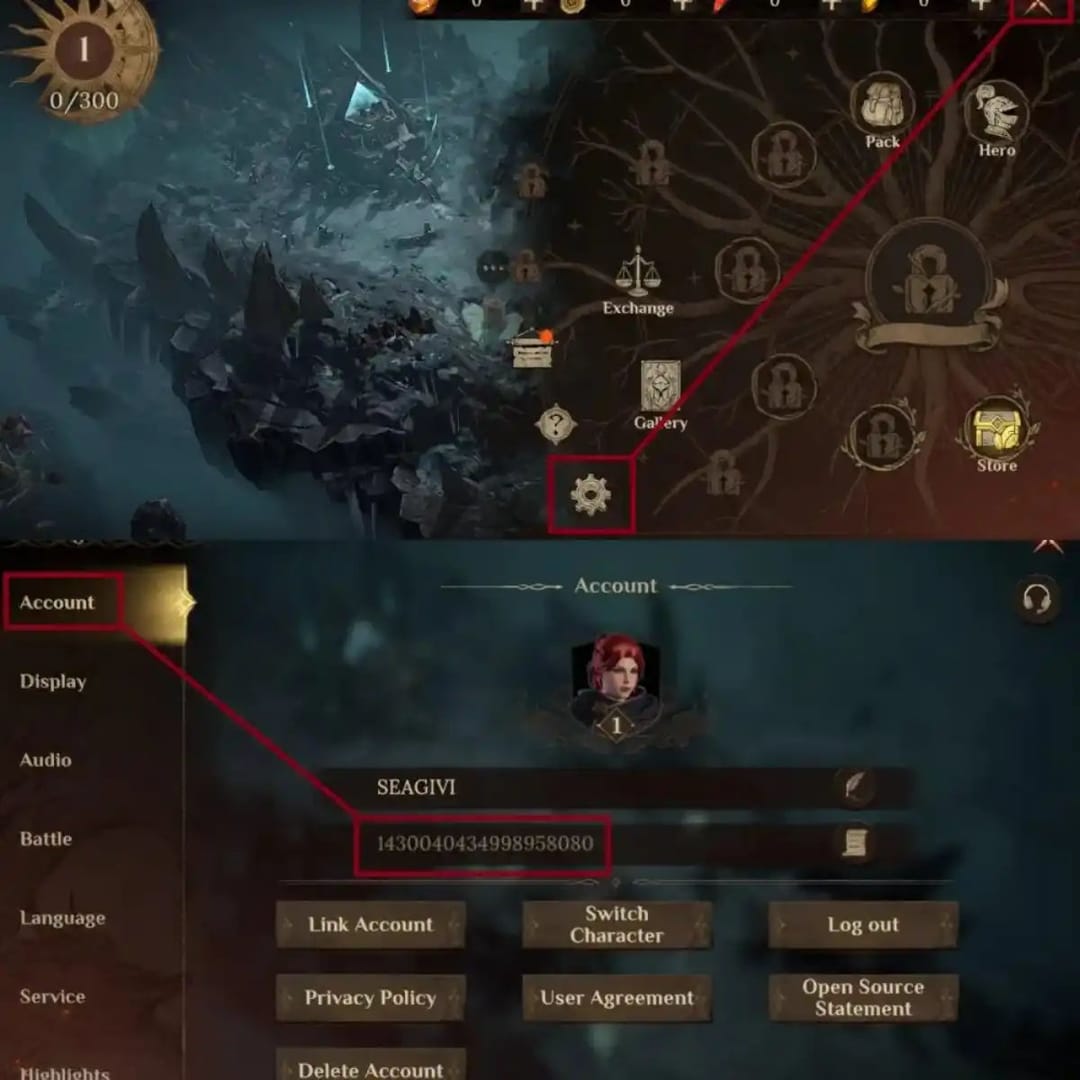
Check the payment result
Confirm whether your bank, card, crypto checkout, or local wallet shows successful payment.
Don’t confuse authorized with fully settled if the merchant still shows pending.
Open the order center
Many top-up sites provide an order history or order center after purchase.
Log in and check whether the order is pending, paid, processing, completed, or failed.
Verify account details
Recheck your Player ID or UID.
Recheck server/region if the checkout required it.
From comparing checkout paths, this is where rushed buyers most often get burned.
Check the game account directly
Open Dragonheir: Silent Gods.
Look for the Dragon Crystals balance and any in-game receipt or purchase history if available.
Wait the right amount of time
Normal: instant to 5 minutes.
Still reasonable: up to 30 minutes during peak or maintenance.
Escalation point: beyond the stated window for your seller, or if status is completed but nothing arrived.
If you want a quick checkpoint while waiting, this page on Dragonheir: Silent Gods Dragon Crystals order tracking pending is useful only if you’ve already verified your UID, server, and payment result first.
What should you do while waiting for a pending Dragonheir order to complete?
Wait carefully, not passively. The goal is to avoid making the case harder to fix.
Do not place a second order for the same amount right away
This is my strongest recommendation.
Duplicate attempts can create double charges or confuse support review.
Do not start a chargeback before support review
Keep the transaction intact while the seller checks the order.
Early disputes can complicate resolution.
Recheck the exact delivery target
UID or Player ID
Server/region
Purchased amount
Payment timestamp
Prepare support evidence before contacting anyone
Order ID
Transaction ID
Amount and currency
Payment timestamp
Screenshot showing successful payment
Target account UID/server
In-game receipt history or balance screenshot if available
Escalate to the right team
Contact the seller first if the order is pending, processing, failed, or charged without delivery.
Contact official Dragonheir support if the seller marks the order completed but the game account still doesn’t show the crystals after you’ve verified UID/server and checked in-game history.
This is where good evidence matters. When support resolves missing top-ups fastest, the first things they usually need are the order ID, payment proof, exact amount, timestamp, and target UID/server. If you send a vague I paid, where is it? message, you’ll lose time.
How long does Dragonheir: Silent Gods Dragon Crystals top up usually take?
Usually, it takes instant to 5 minutes after payment confirmation. Short delays up to 30 minutes are widely reported during peak periods or maintenance, and some listings state up to 1 hour as the guaranteed maximum.
Why is my Dragonheir Dragon Crystals order still pending after payment?
Pending usually means the payment or account details still need verification. Common triggers are UID/server mismatch, issuer checks, first-order review, local payment routing delay, or duplicate purchase attempts.
How can I track my Dragonheir top up order status?
Use the merchant’s order center or order history page with your purchase login or order details. Then compare that status with your payment confirmation and your in-game Dragon Crystals balance to see whether the delay is payment-side or delivery-side.
What should I do if I paid but did not receive Dragon Crystals?
First, don’t pay again. Check the order status, verify UID/server, confirm the payment timestamp and transaction ID, then contact the seller with full proof; if the order is marked completed but the game still shows nothing, contact official Dragonheir support next.
Can the wrong UID or server cause a Dragonheir top up delay?
Yes. Community guidance consistently warns that incorrect Player ID, UID, or server selection can cause delivery failure or misrouting, and it’s one of the most preventable causes of delayed top-ups.
Which payment methods are fastest for Dragonheir top up?
Credit card and local wallet options are commonly supported for instant top-ups, and some services also accept crypto such as USDT. In practice, the fastest method is the one that clears cleanly with your issuer and matches your account details, not the one with the flashiest instant label.
What proof do I need before contacting support about a delayed Dragonheir order?
Prepare the full set: order ID, transaction ID, amount, currency, payment timestamp, screenshot of successful payment, target UID/server, and any in-game receipt or balance screenshot. Personally, I would gather all of that before opening the first ticket.
Dragonheir top ups are usually quick, but quick doesn’t mean every paid order is instantly settled. Most orders land within minutes; slower ones often clear within 30 minutes, and anything beyond the stated window deserves action. Double-check UID, server, and payment proof first, don’t place a duplicate order, and escalate with complete evidence to the seller before going to official Dragonheir support.