
For Dragon Nest M Classic Cash Top Up, enter the exact account ID/player ID/UID and the correct server ID shown inside your in-game profile—not your nickname, character name, or login email. Before paying, confirm the active server and region, then save screenshots of your profile, server page, order summary, and payment receipt.
From reviewing failed recharge cases, this is where most mistakes happen: users copy a visible name instead of the numeric UID, or they use an old server from a previous character. For a safer checkout flow, I’d verify everything first, then place the order through a page that clearly asks for both IDs, such as Dragon Nest M Classic Cash top up correct account ID.
Why do users enter the wrong account ID or server ID for Dragon Nest M Classic Cash Top Up?
They usually confuse visible profile info with the actual recharge identifiers. Community guides consistently note that Dragon Nest M: Classic top-ups require User ID and Server ID, sometimes labeled Zone ID or Character ID, depending on the page.
Here’s the distinction that matters:
A common failure pattern is simple: the buyer sees a nickname first, copies it, pays, then the order can’t be matched. [exp] Users also commonly report wrong delivery when they select the wrong server or use old character details from a previous server.
Why do old servers, alternate characters, and guest accounts cause so many mistakes?
Because direct-credit top ups don’t ask which character did you mean? after payment. They credit the account details you submitted.
Three edge cases matter more than most guides admit:
Old character/server memory: you switched servers, but typed the old one from habit.
Guest account confusion: guest accounts are reported as unsupported for top-up eligibility; link the account first.
Multiple characters: your display setup may show one name while the recharge form needs the underlying UID and server.
In my experience reviewing recharge issues, guest-account confusion creates more support friction than card failure. And if you’re returning after a break, I would check the current active profile first, not rely on memory.
Why is checking your account details before payment so important?
Because Dragon Nest M Classic Cash is typically fulfilled by direct account credit, not by a redeem code. Once the order is processed against the UID and server you entered, reversal is difficult.
That’s the part many buyers underestimate. A successful bank or wallet charge does not always mean the order has fully cleared verification. Community reports and payment-flow experience show delays can come from:
3D Secure confirmation
Wallet confirmation still pending
Payment marked pending even after money left your account
Region mismatch between payment flow and SEA server setup
Typical delivery is commonly reported at 1–5 minutes after correct details and payment confirmation. But if the payment is still pending, don’t place a second order yet. Honestly, that’s how duplicate-payment headaches start.
Does region mismatch really affect Dragon Nest M Classic top up?
Yes, region mismatch can block or delay the order. Single-source reports indicate SEA-region top-ups may fail when the payment method region doesn’t align with the SEA server setup.
This matters most if you:
play on SEA servers
use a card or wallet issued in another region
switch devices or network locations often
There’s also no published universal server ID list. The safest source is your in-game login screen or profile, not a guess based on server name alone. That small detail is easy to miss, and it’s one of the better prevention checks generic guides skip.
How do I enter the correct account ID and server ID for Dragon Nest M Classic Cash Top Up?
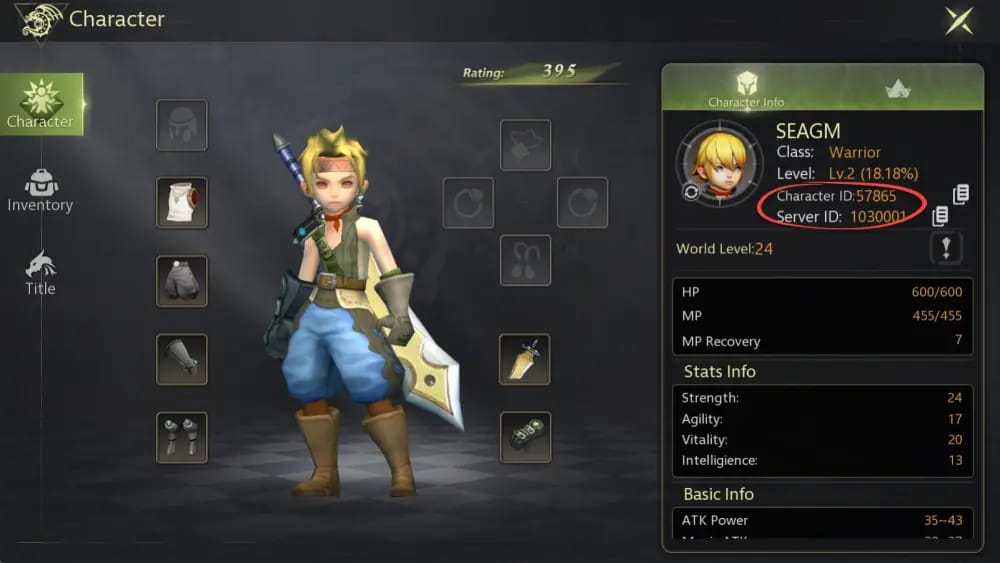
Open the game, copy the IDs from your profile, and match them exactly on the checkout form.
Follow this order:
Log into Dragon Nest M: Classic
Tap your avatar at the top-left.
Open the profile or character information panel.
Look near the avatar or on the right side of the character info page for User ID / Character ID / Server ID.
If there’s a copy icon, use it. Don’t type manually if you can avoid it.
Confirm which ID is the real recharge ID
Use the numeric UID/player ID from the profile.
Do not use your nickname, display name, or email login.
Confirm the active server
Check the current server ID from the profile or login screen.
If you recently changed servers or returned to an old account, verify again before paying.
Check region
Dragon Nest M: Classic top-up support is commonly tied to SEA region flows.
If your payment method is from another region, expect possible verification friction.
Enter the details exactly on the payment page
Paste User ID
Select or enter Server ID
Choose the package
Review the summary before paying
Pay and wait for confirmation
Common methods reported include GCash QR, PayMaya, credit/debit card, and local wallets.
If payment stays pending, wait for verification before trying again.
If you’ve already checked your UID and server and just need a clean form to match them, Dragon Nest M Classic Cash recharge right server ID is the kind of checkout wording you want to see: clear fields, no password request, and an order ID you can keep for support.
How can I avoid a wrong-account or wrong-server Dragon Nest M Classic Cash order?
Use a 60-second checklist before every payment. It’s faster than dealing with support later.
Pre-payment checklist
What should you screenshot before and after payment?
Save these four items:
Profile page showing User ID and Server ID
Server selection or login screen if the server label is easy to confuse
Order summary before payment
Payment receipt with transaction reference
And keep these text details in one note:
Order ID
Transaction ID
Selected package
Time of payment
In payment troubleshooting, delayed orders are usually resolved faster when the user sends all of that together. I would label the files plainly: UID-server-profile, order-summary, payment-receipt. Support teams work faster when they don’t have to decode your screenshots.
FAQ
How do I find my Dragon Nest M Classic account ID and server ID?
Open the game, tap your avatar, and check the profile or character information panel. Community instructions say the User ID/Character ID and Server ID appear near the avatar or on the right side, often with a copy icon.
Can I use my character name instead of account ID for Dragon Nest M Classic top up?
No. Top-up systems commonly use the numeric UID/player ID and server ID, not your character name or nickname. This is one of the most common recharge mistakes.
What happens if I top up the wrong Dragon Nest M Classic server?
The order can fail, be delayed, or be credited to the wrong account context. Users commonly report that wrong-server cases are hard to reverse, so contact the seller first, then escalate to official support with screenshots and your order ID.
Why was my Dragon Nest M Classic Cash order delayed after payment?
The usual causes are pending payment verification, 3D Secure confirmation, wallet confirmation delay, or region mismatch. Check your in-game mail or Eye Cash balance first, then contact support if the order still hasn’t arrived after the normal 1–5 minute window.
Can a wrong-account Dragon Nest M Classic top up be reversed?
Usually not reliably. Community reports say there’s no dependable reversal path for wrong UID or wrong server submissions, and official escalation may be required, but no outcome is guaranteed.
What proof should I send to support for a Dragon Nest M Classic recharge issue?
Send your profile screenshot with UID/server, order ID, payment receipt, and transaction ID. If the issue is delayed delivery, include the package selected and whether you already checked in-game mail or Eye Cash balance.
Does region mismatch affect Dragon Nest M Classic Cash top up?
Yes, it can. Single-source reports indicate SEA top-ups may fail or stall when the payment method region doesn’t match the server flow, so verify region before paying.
Dragon Nest M Classic Cash top up goes smoothly when you use the numeric UID/player ID, the correct current server ID, and proof screenshots saved before payment. Don’t use your nickname, old server, or login email. My practical recommendation: verify in-game details, confirm region, keep the order ID and receipt, and contact seller support first if anything is delayed—before placing another order.